Community listing page, reviews here may not be monitored by the author.
XP Simplifier


No reviews yet
A mod focused on providing full control over XP, customizing XP values for every source independently with seamless support for both vanilla and modded content.

Community voices
Reviews
No reviews yet. Be the first to review this project!
Get it on
Available Platforms
Compatibility
Supported Environments
Runs entirely on the server. Also works in singleplayer.
Required on the server. Installing it on the client adds functionality.
Varies by version.
About
Project Details
For authors
Embed Badge
If you're the author of this project, you can embed a live badge anywhere that supports HTML or Markdown. It updates automatically whenever ratings change.
Use HTML for any page that supports it, or Markdown for README files and Markdown-based descriptions.
Identifiers
Platform IDs
About
Description
🧪 XP Simplifier
A mod focused on providing full control over XP, customizing XP values for every source independently with seamless support for both vanilla and modded content.
💡 Why Use XP Simplifier?
Perfect for:
- 🎮 Modpacks that need XP rebalancing
- ⚔️ Hardcore servers with punishment systems
- 🌾 Economy/progression servers
- 🧩 Heavy modpacks with inconsistent XP rewards
- 🛠 Players who want full control over progression
🎯 Prime Goals
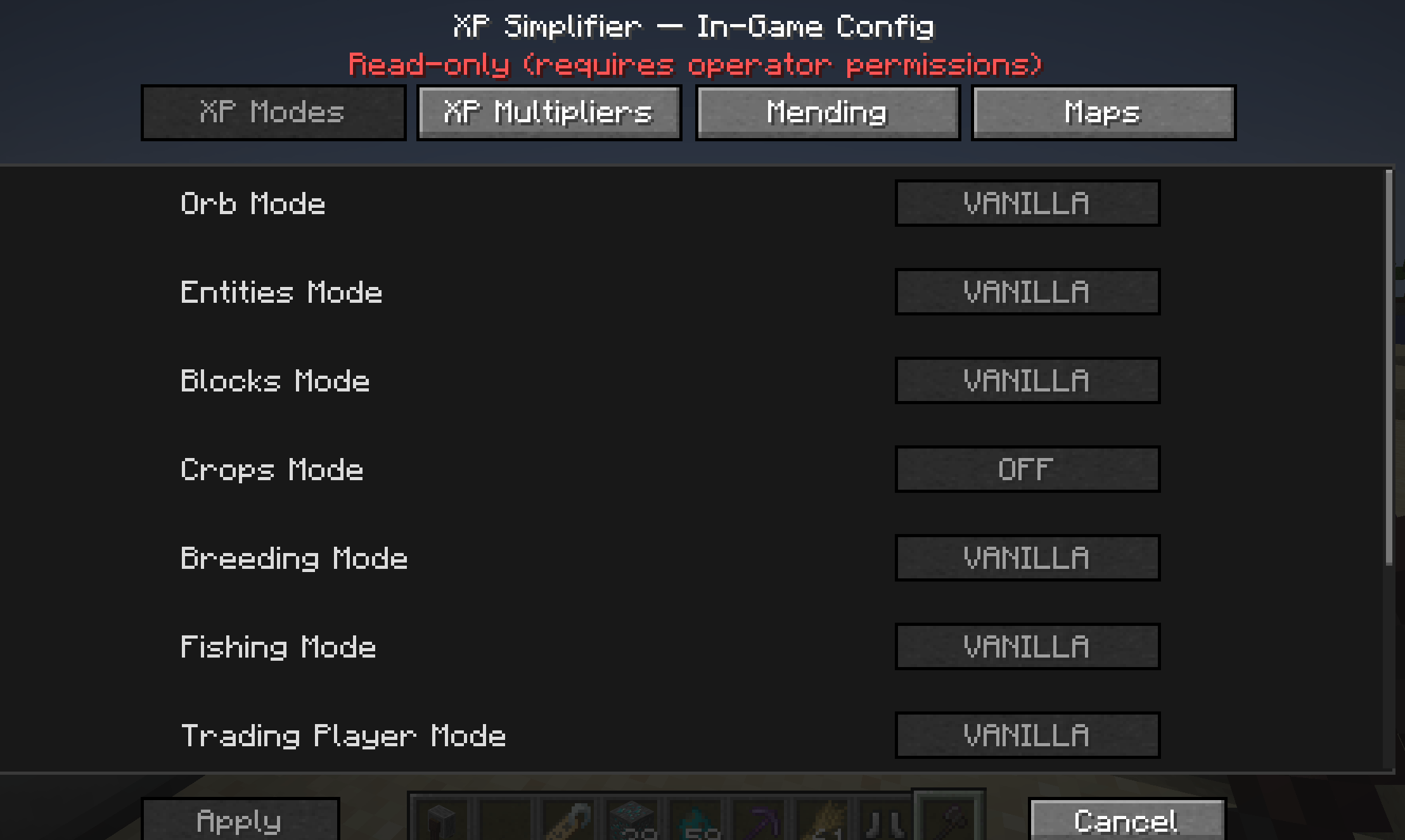
- Control over XP behaviour (2 modes):
- Direct xp gaining (no orbs)
- Vanilla xp gaining (with orbs)
- Full control over:
- XP sources
- XP values
- Multipliers since v.2.0.5
- User-friendly config (all split into sources)
🧪 Features
Version 2.0.5+:
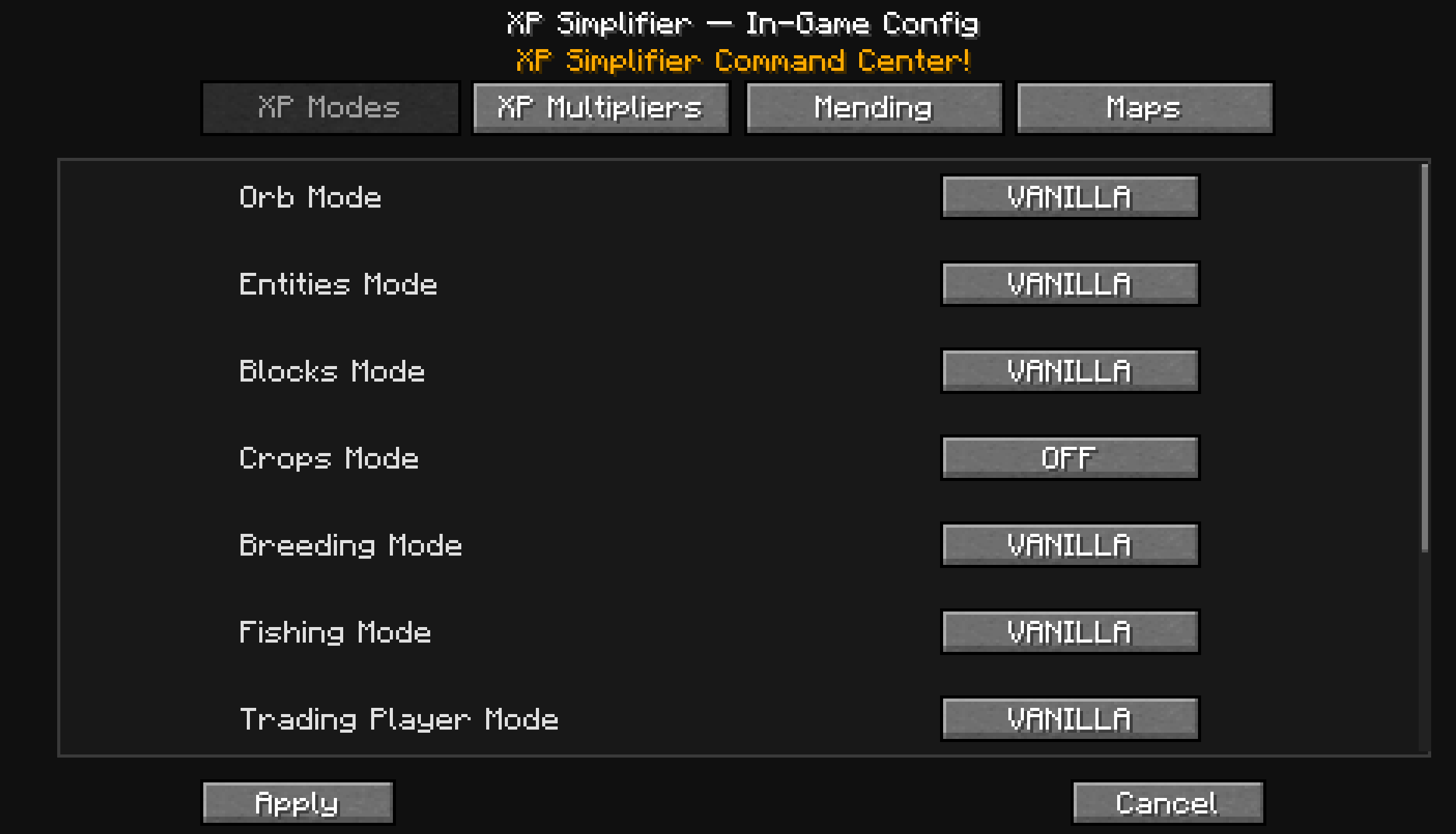
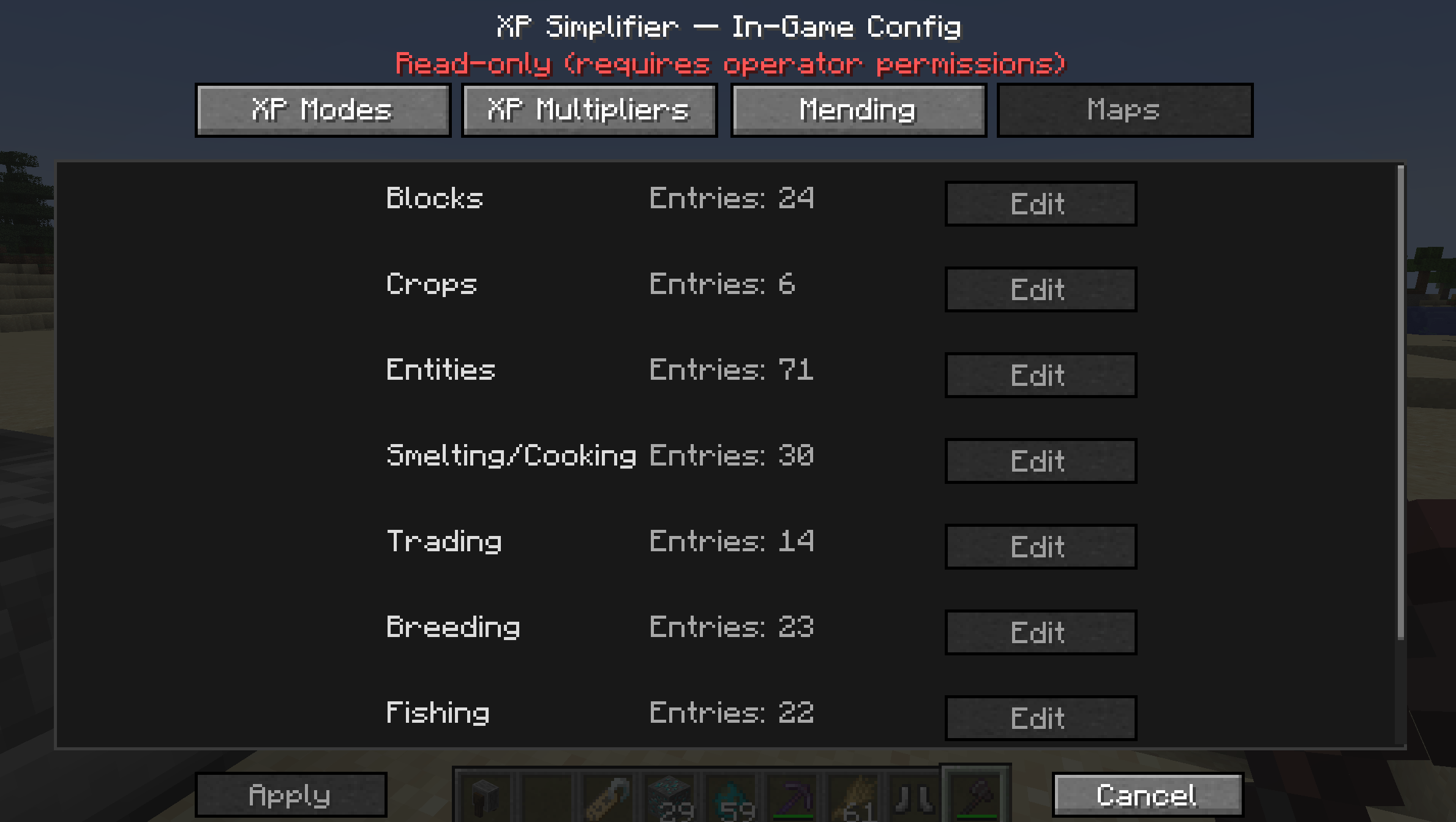
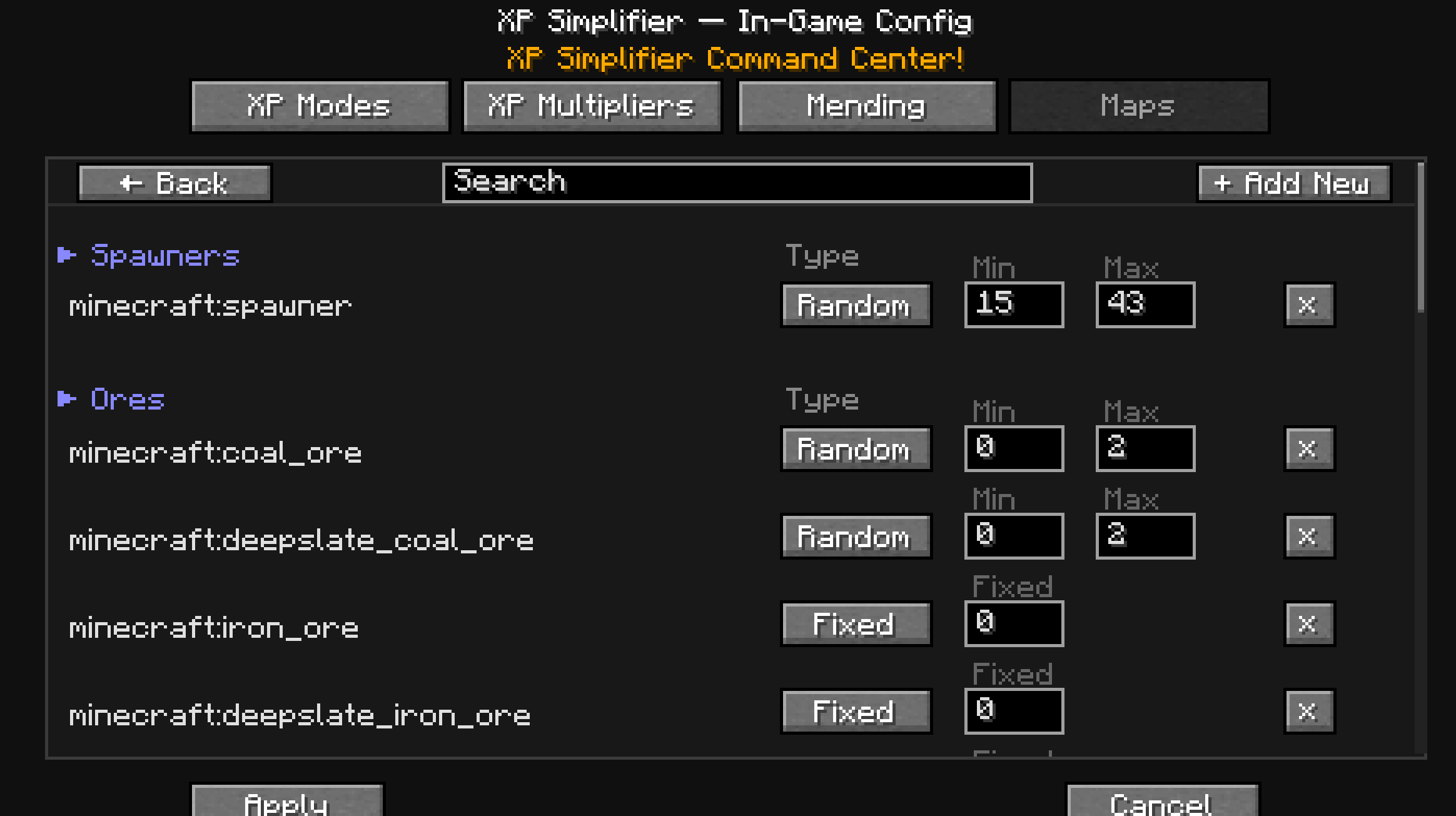
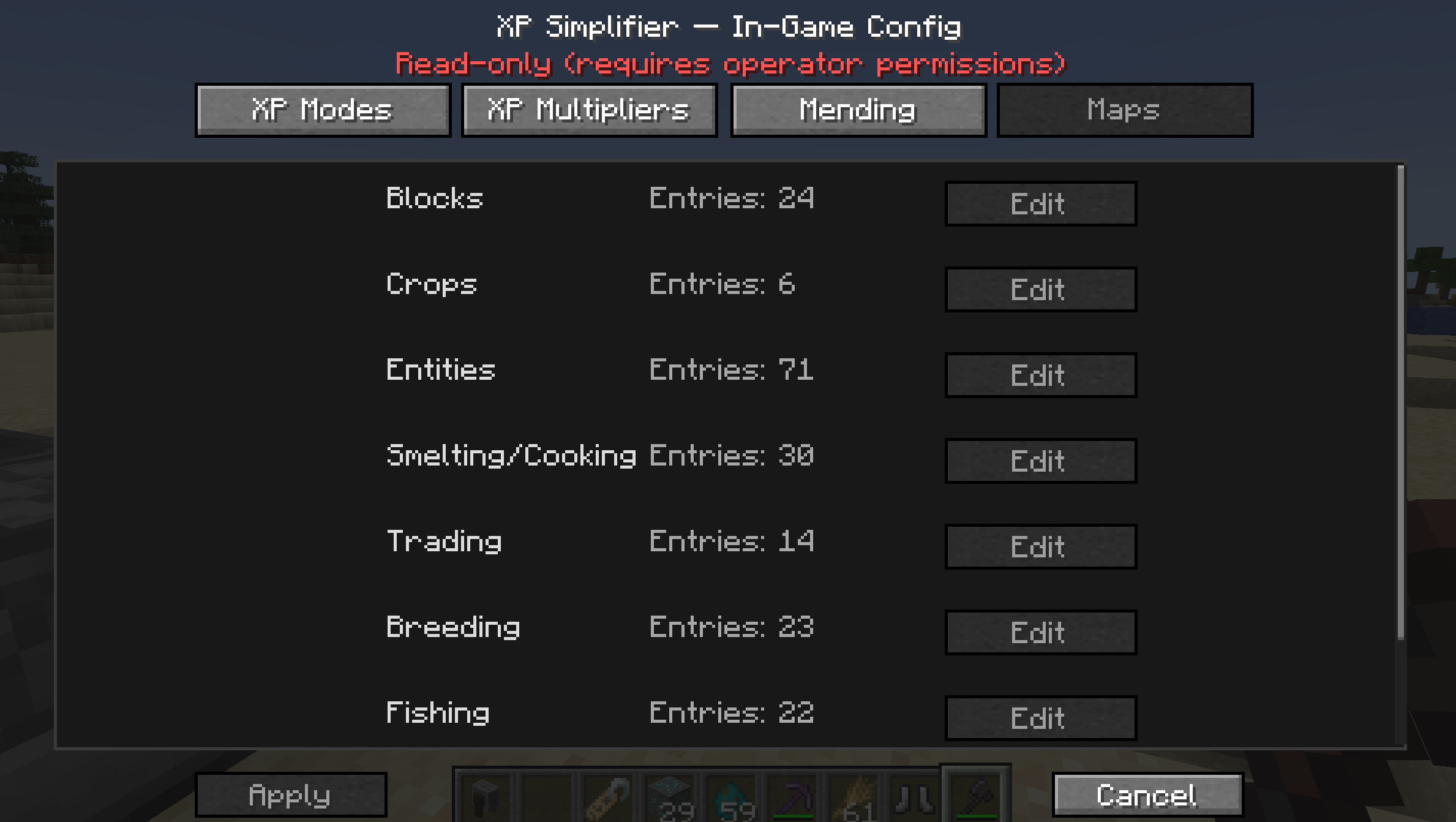
- In-game config via menu/mods (Fabric requires Mod Menu / NeoForge uses built-in config screen).
- Config changes apply instantly — no restart required.
- Client is optional, but required for in-game config menu, recommended for OPS.
- Config Sync (config changes via in-game menu are synced across all server players so modded player = config view).
- 2FA verification for config changes -> OP permissions (level 2+) + User flag.
- If
null+OP (level 2+)-> access denied. - If
true+OP (level 2+)-> access granted. - If
true+non-OP-> access denied. - If
false+OP (level 2+)-> access denied. - If
false+non-OP-> access denied.
- If
- Commands access for OP players (level 2+) can be revoked via LuckyPerms.
- Per world instance config (config changes via in-game menu affect only current world instance).
- Translation support.
🛠 Commands
| Command | Description |
|---|---|
/xps add <player> <true/false> |
Adds player to config change list (true = allow, false = deny) |
/xps edit <player> <true/false> |
Edits player in config change list (true = allow, false = deny) |
/xps delete <player> |
Deletes player from config change list |
/xps list |
Lists all players in config change list |
/xps mapview <true/false> |
Toggles map view for config categories (true = show, false = hide); affects all players globally unless per-player editing is enabled. |
🧩 Configuration Categories
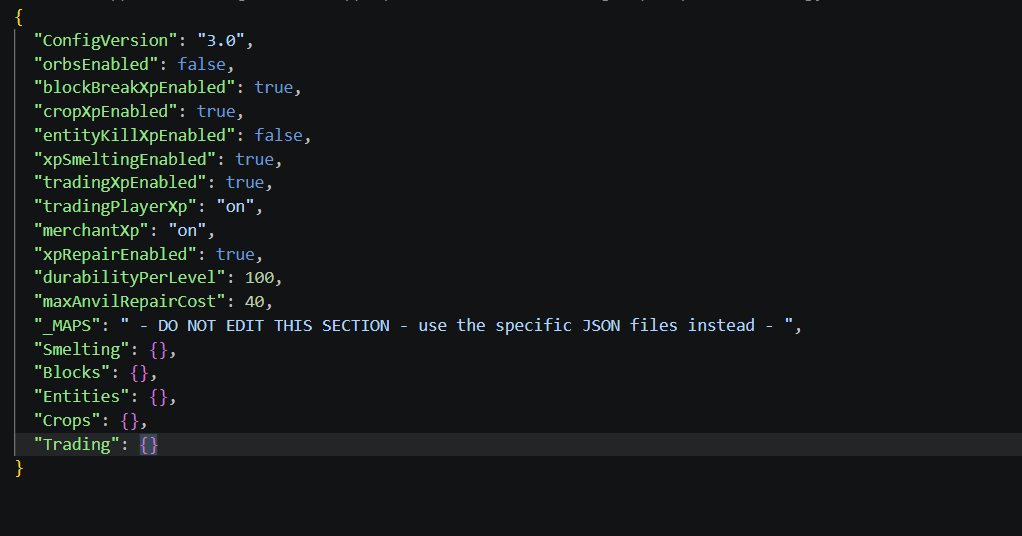
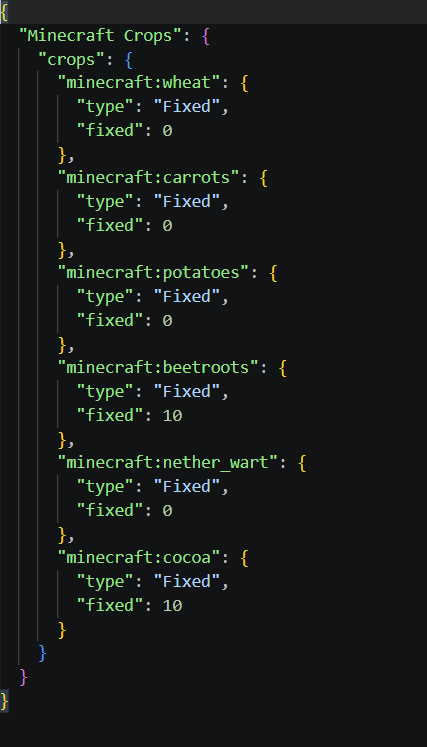
All sources are split into categories, each with its own config file:
- Blocks.json
- Entities.json
- Crops.json
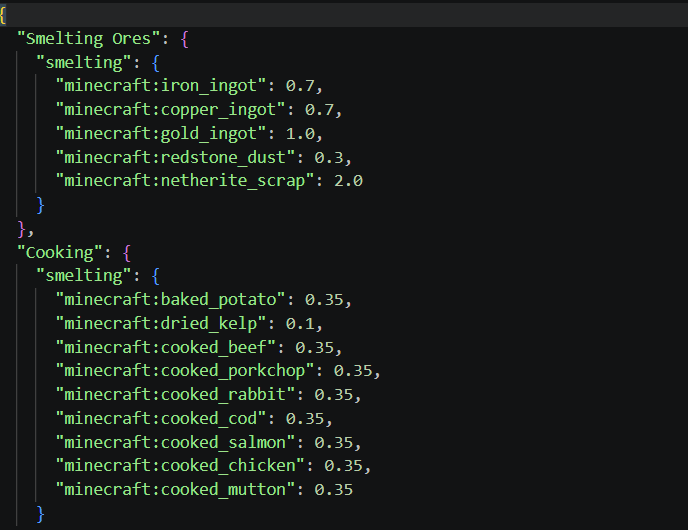
- Smelting.json
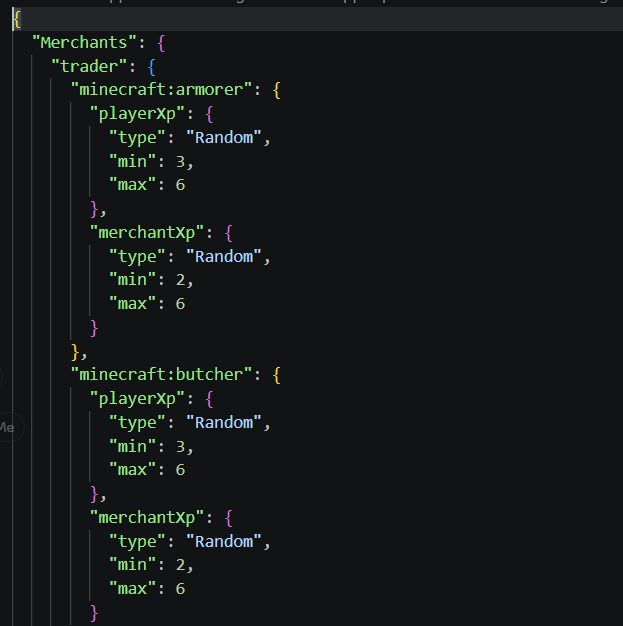
- Trading.json
- Breeding.json
- Fishing.json
- Grindstone.json
(no achievements)
Each category contains subcategories. Subcategories exist purely to keep the config clean and tidy.
Multipliers since v.2.0.5
- Each source has a
multiplierfield that multiplies the final XP value by the specified amount. - Multipliers are applied after all other calculations, so they can be used to adjust the final XP values without changing the base values for each source.
- Multipliers affects both per-source modes ->
ONandVANILLA. - Multipliers are set as a float value, so you can use values like
0.5for half XP or2.0for double XP.
🎲 XP Calculation Types
Two XP calculation methods are supported: supports negative values in "simple" OrbMode
- Random
- Grants a random amount of XP between
minandmax
- Grants a random amount of XP between
- Fixed
- Grants a fixed amount of XP
0means no XP is granted
🔧 Mending Rework (Anvil-Based)
Mending has been reworked to function without them while remaining balanced mainly due to OrbMode -> "simple".
🔨 How Mending Works
- Items with Mending can be repaired in an Anvil
- No additional items are required
- Repair cost is XP only
Default formula:
Since ver.2.0.5, the XP cost formula takes XP Points instead of XP Levels, so the cost is more granular and allows for more precise balancing.
_can be changed via Config file or via In-Game Menu since v.2.0.5.
- DEFAULT:
1 durability point = 2 XP_Points (min. 1lvl always)- Example:
- Diamond Sword durability: 1561
1561 * 2 = 3122 XP_Points
Level amount required depends on player level
📉 Max Cap Behavior
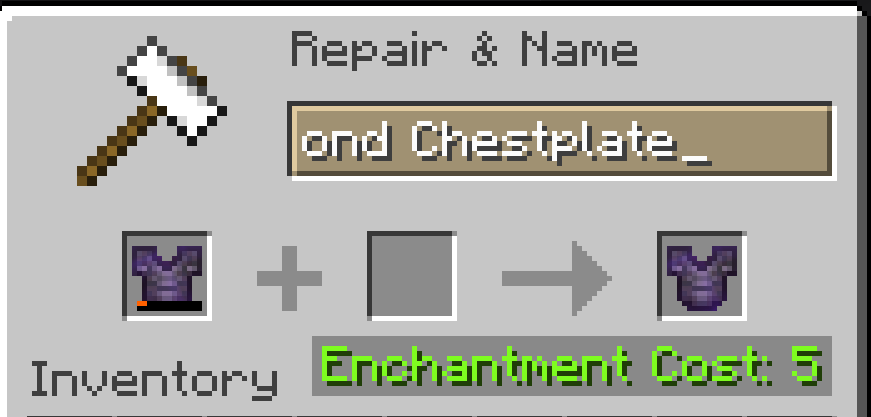
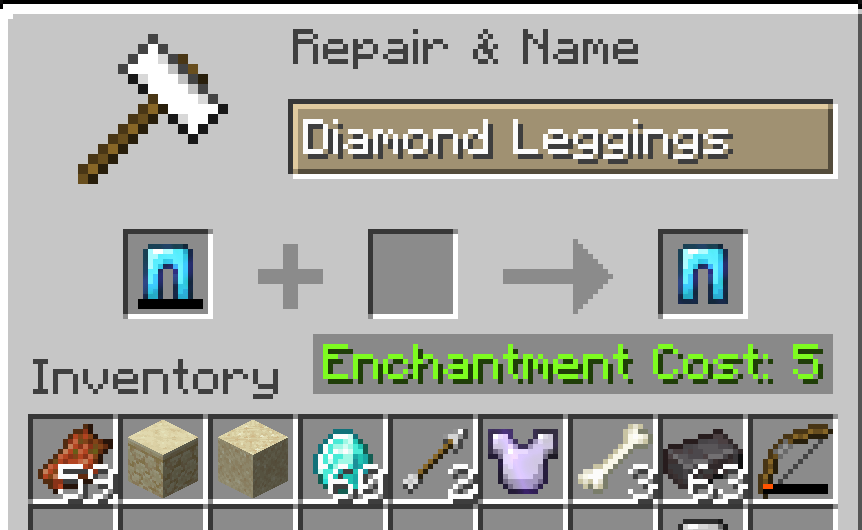
maxAnvilRepairCost limits the maximum XP levels required for a full repair.
For higher caps like >30, to avoid To expensive! message, ANTE mod is recommended.
Lower values cap the total XP cost for full repairs.
⚠️ Important
- Setting
"xpRepairEnabled": false- Disables Mending completely if orbs are canceled
🧩 Compatibility
- Minecraft 1.20-1.21.1
- Fabric / NeoForge (v. 2.0.5)
- Server-side friendly
- Client is optional (only for in-game config menu -> v.2.0.5)
- Compatible with modded blocks/entities/etc
WIKI:
Do you want to know more? Visit wiki -> HERE
TL;DR
VERSIONS 1.0.+ :
- Once updated to newer version -> create a backup of your existing configs and delete whole folder. Let the mod initialize the defaults and then replace all new maps with yours but be careful, few changes were made to versions 1.+ :)
VERSIONS 2.0.+ :
- No map JSON file structure changes, but new fields were added to the main config. Once initialized -> all defaults load to memory, if any change made, config appears.
KNOWN ISSUE:
Create's experience nuggets don't work
XP Storage books - NO COMPATIBILITY -> Use Tomes of Experience instead
RightClickHarvest - NO COMPATIBILITY
If you found a bug/no compatibility issue, let me know HERE
📜 License
This project is licensed under the GNU General Public License since ver. 2.0.5.
Feel free to use and include it in modpacks.
⭐ If you find this mod useful, consider following the mod!
FAQ
Q: Do I need to restart for config changes?
- A: Since ver.2.0.5, no restart is needed for config changes to take effect.
- For older versions -> configuration files are editable only manually and require a restart to take effect.
Q: Can I use decimal XP for mining?
- A: No, only smelting supports decimal values. Blocks/Entities/Fishing/Breeding/Trading must be integers.
Q: How do I prevent XP duplication?
- A: Since the mod supports only 2 modes ->
"simple"and"vanilla", there's no XP duplication.
Q: What about negative values while breaking blocks/killing entities?
- A: If
"OrbMode"->"simple", all actions (except smelting and merchants) accept negative values so players can be punished for killing entities like villagers or so. Keep in mind that while setting up negative values ->"min"must be lower than"max".
Q: Do experience bottles work without entity XP enabled?
- A: No, experience bottles are treated as entities, so they require
entityXpMode: "vanilla" || "on".
Q: What about modded content?
- A: All default/vanilla fallbacks exist, so once all options set to ->
on||vanilla, all sources should work fine.
🧪 XP Simplifier
A mod focused on providing full control over XP, customizing XP values for every source independently with seamless support for both vanilla and modded content.
💡 Why Use XP Simplifier?
Perfect for:
- 🎮 Modpacks that need XP rebalancing
- ⚔️ Hardcore servers with punishment systems
- 🌾 Economy/progression servers
- 🧩 Heavy modpacks with inconsistent XP rewards
- 🛠 Players who want full control over progression
🎯 Prime Goals
- Control over XP behaviour (2 modes):
- Direct xp gaining (no orbs)
- Vanilla xp gaining (with orbs)
- Full control over:
- XP sources
- XP values
- Multipliers since v.2.0.5
- User-friendly config (all split into sources)
🧪 Features
Version 2.0.5+:
- In-game config via menu/mods (Fabric requires Mod Menu / NeoForge uses built-in config screen).
- Config changes apply instantly — no restart required.
- Client is optional, but required for in-game config menu, recommended for OPS.
- Config Sync (config changes via in-game menu are synced across all server players so modded player = config view).
- 2FA verification for config changes -> OP permissions (level 2+) + User flag.
- If
null+OP (level 2+)-> access denied. - If
true+OP (level 2+)-> access granted. - If
true+non-OP-> access denied. - If
false+OP (level 2+)-> access denied. - If
false+non-OP-> access denied. - Commands access for OP players (level 2+) can be revoked via LuckyPerms.
- Per world instance config (config changes via in-game menu affect only current world instance).
- Translation support.
🛠 Commands
| Command | Description |
|---|---|
/xps add <player> <true/false> |
Adds player to config change list (true = allow, false = deny) |
/xps edit <player> <true/false> |
Edits player in config change list (true = allow, false = deny) |
/xps delete <player> |
Deletes player from config change list |
/xps list |
Lists all players in config change list |
/xps mapview <true/false> |
Toggles map view for config categories (true = show, false = hide); affects all players globally unless per-player editing is enabled. |
🧩 Configuration Categories
All sources are split into categories, each with its own config file:
- Blocks.json
- Entities.json
- Crops.json
- Smelting.json
- Trading.json
- Breeding.json
- Fishing.json
- Grindstone.json
(no achievements)
Each category contains subcategories. Subcategories exist purely to keep the config clean and tidy.
Multipliers since v.2.0.5
- Each source has a
multiplierfield that multiplies the final XP value by the specified amount. - Multipliers are applied after all other calculations, so they can be used to adjust the final XP values without changing the base values for each source.
- Multipliers affects both per-source modes ->
ONandVANILLA. - Multipliers are set as a float value, so you can use values like
0.5for half XP or2.0for double XP.
🎲 XP Calculation Types
Two XP calculation methods are supported: supports negative values in "simple" OrbMode
- Random
- Grants a random amount of XP between
minandmax
- Fixed
- Grants a fixed amount of XP
0means no XP is granted
- Grants a random amount of XP between
🔧 Mending Rework (Anvil-Based)
Mending has been reworked to function without them while remaining balanced mainly due to OrbMode -> "simple".
🔨 How Mending Works
- Items with Mending can be repaired in an Anvil
- No additional items are required
- Repair cost is XP only
Default formula:
Since ver.2.0.5, the XP cost formula takes XP Points instead of XP Levels, so the cost is more granular and allows for more precise balancing.
_can be changed via Config file or via In-Game Menu since v.2.0.5.
- DEFAULT:
1 durability point = 2 XP_Points (min. 1lvl always)
- Example:
- Diamond Sword durability: 1561
1561 * 2 = 3122 XP_Points
Level amount required depends on player level
📉 Max Cap Behavior
maxAnvilRepairCost limits the maximum XP levels required for a full repair.
For higher caps like >30, to avoid To expensive! message, ANTE mod is recommended.
Lower values cap the total XP cost for full repairs.
⚠️ Important
- Setting
"xpRepairEnabled": false- Disables Mending completely if orbs are canceled
🧩 Compatibility
- Minecraft 1.20-1.21.1
- Fabric / NeoForge (v. 2.0.5)
- Server-side friendly
- Client is optional (only for in-game config menu -> v.2.0.5)
- Compatible with modded blocks/entities/etc
WIKI:
Do you want to know more? Visit wiki -> HERE
TL;DR
VERSIONS 1.0.+ :
- Once updated to newer version -> create a backup of your existing configs and delete whole folder. Let the mod initialize the defaults and then replace all new maps with yours but be careful, few changes were made to versions 1.+ :)
VERSIONS 2.0.+ :
- No map JSON file structure changes, but new fields were added to the main config. Once initialized -> all defaults load to memory, if any change made, config appears.
KNOWN ISSUE:
-
Create's experience nuggets don't work
-
XP Storage books - NO COMPATIBILITY -> Use Tomes of Experience instead
-
RightClickHarvest - NO COMPATIBILITY
If you found a bug/no compatibility issue, let me know HERE
📜 License
This project is licensed under the GNU General Public License since ver. 2.0.5.
Feel free to use and include it in modpacks.
⭐ If you find this mod useful, consider following the mod!
FAQ
Q: Do I need to restart for config changes?
- A: Since ver.2.0.5, no restart is needed for config changes to take effect.
- For older versions -> configuration files are editable only manually and require a restart to take effect.
Q: Can I use decimal XP for mining?
- A: No, only smelting supports decimal values. Blocks/Entities/Fishing/Breeding/Trading must be integers.
Q: How do I prevent XP duplication?
- A: Since the mod supports only 2 modes ->
"simple"and"vanilla", there's no XP duplication.
Q: What about negative values while breaking blocks/killing entities?
- A: If
"OrbMode"->"simple", all actions (except smelting and merchants) accept negative values so players can be punished for killing entities like villagers or so. Keep in mind that while setting up negative values ->"min"must be lower than"max".
Q: Do experience bottles work without entity XP enabled?
- A: No, experience bottles are treated as entities, so they require
entityXpMode: "vanilla" "on"`. Q: What about modded content?vanilla`, all sources should work fine.
- A: All default/vanilla fallbacks exist, so once all options set to ->on
Screenshots
Gallery
-
 Screenshot 2026-05-24 044816.png Screenshot 2026-05-24 044816.png
 -
 Screenshot 2026-05-24 044914.png Screenshot 2026-05-24 044914.png
 -
 Screenshot 2026-05-24 044841.png Screenshot 2026-05-24 044841.png
 -
 Screenshot 2026-05-24 044914.png Screenshot 2026-05-24 044914.png
 -
 Screenshot 2026-05-24 044906.png Screenshot 2026-05-24 044906.png
 -
 trading.png trading.png
 -
 smelting.png smelting.png
 -
 main config.png main config.png
 -
 crops.png crops.png
 -
 repairCost_neth.png repairCost_neth.png
 -
 RepairCost_500dura.png RepairCost_500dura.png
 -
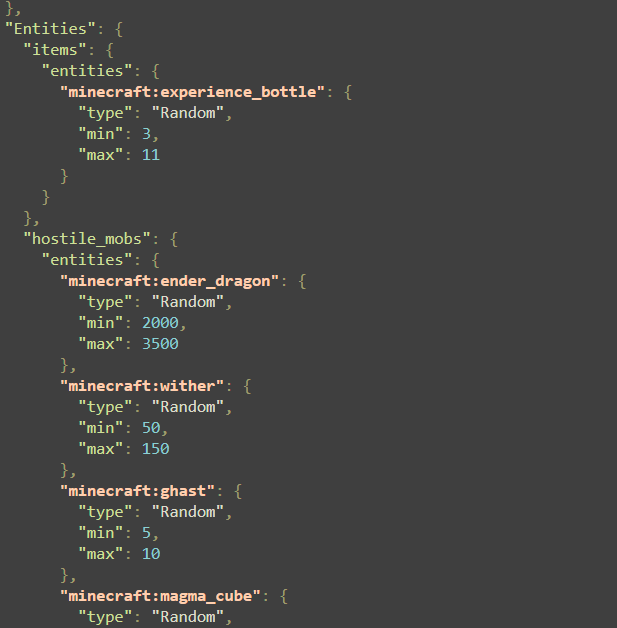 entities.png entities.png
-
 Full repair for 5lvls
 -
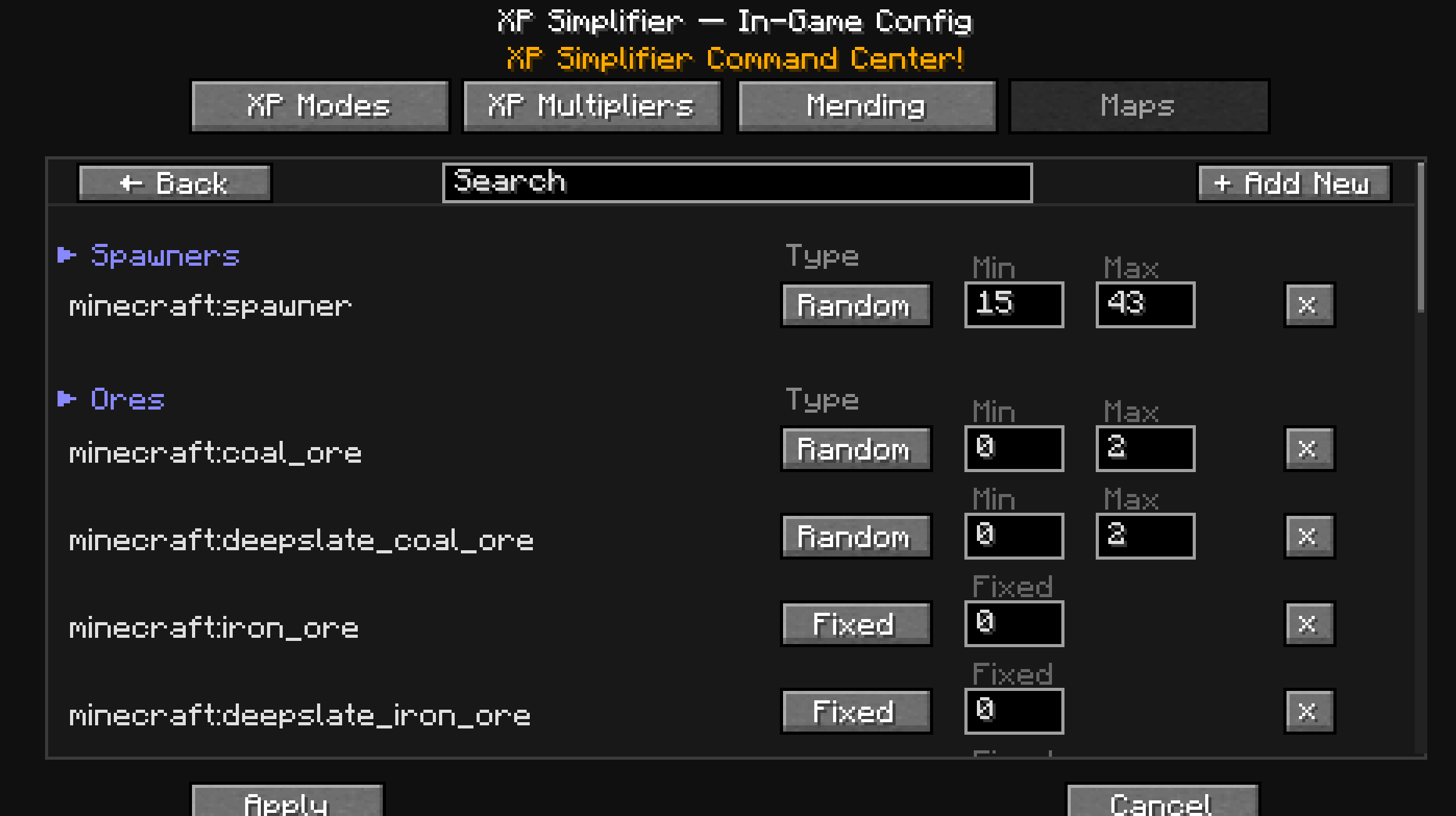 in-game maps manu
 -
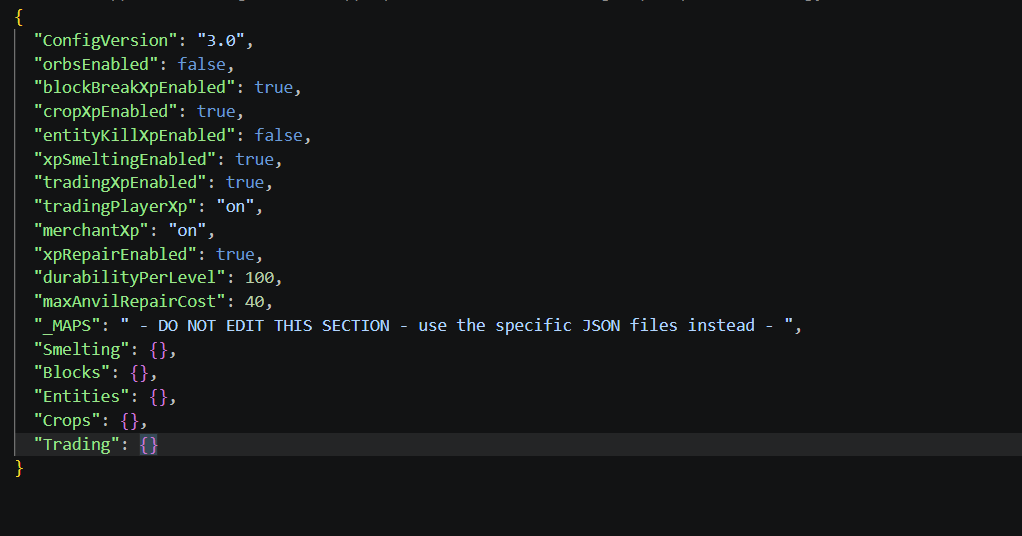 main config
 -

-
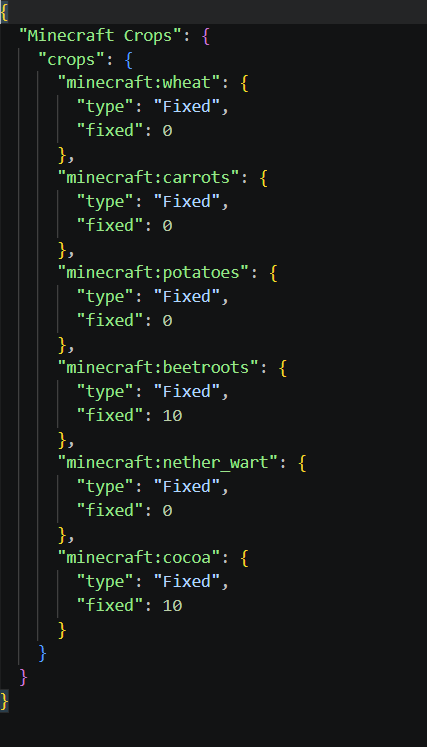 crops ver. 1.1.3+
 -
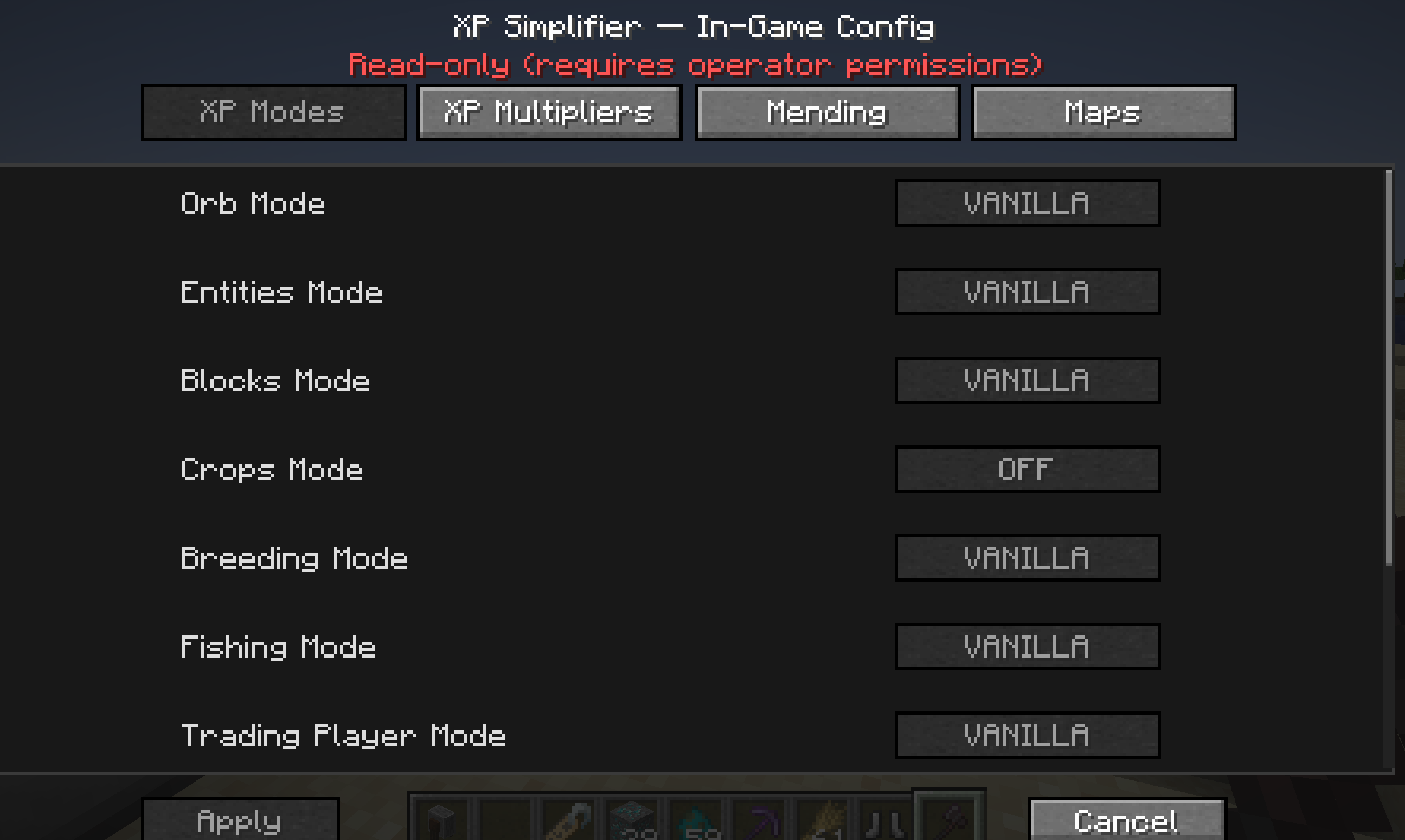 in-game read only menu
 -
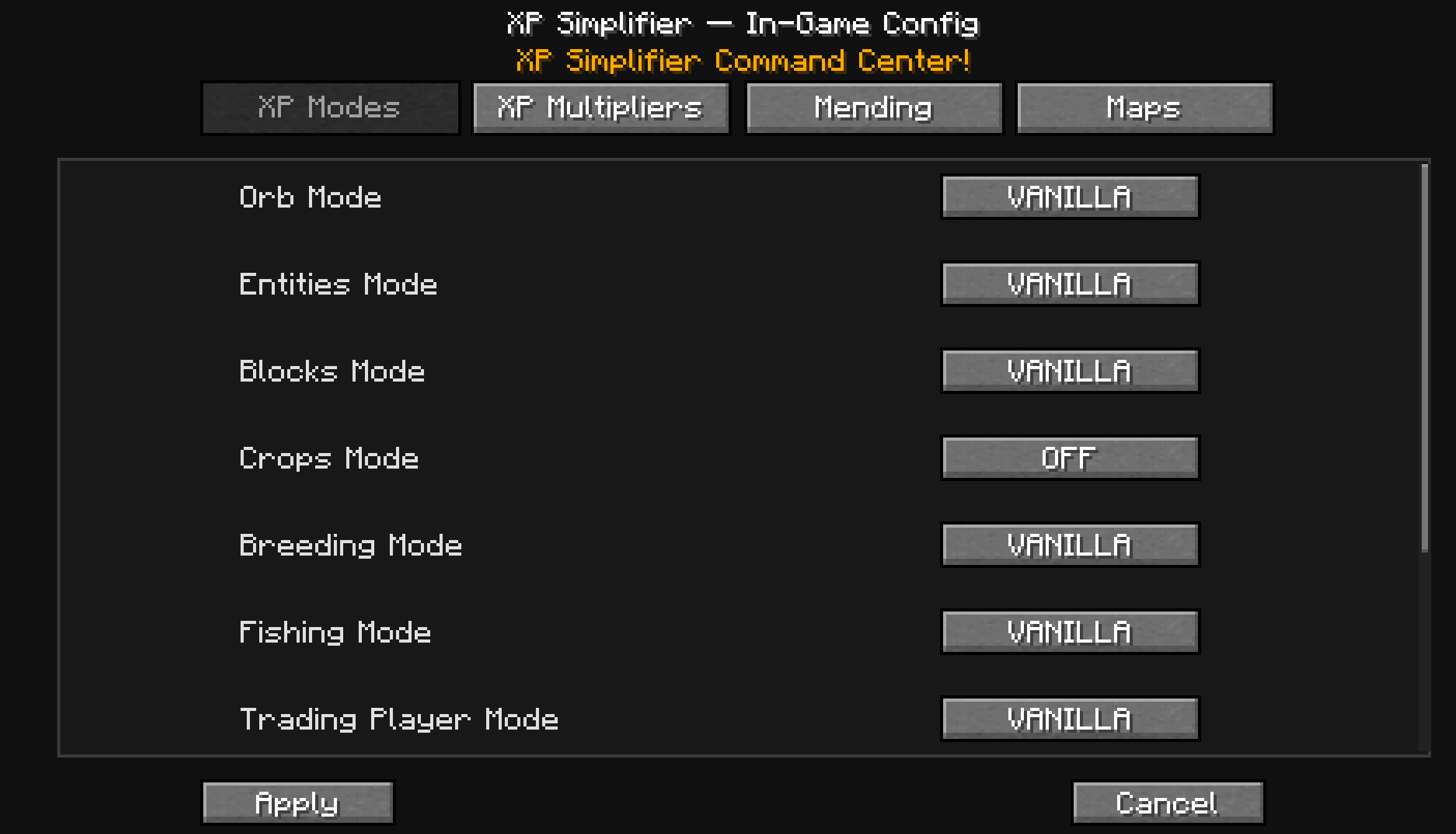 in-game menu
Versions
Files
Relations
Project Relations
More like this
Similar Mods
Suggestions use data such as tags, dependencies, dependents, descriptions, titles, and more to rank how much they overlap with this mod.
On ModDex
Community snapshot
By the numbers
Statistics
 (opens in a new tab)
Get it on
Available Platforms
On ModDex
Community snapshot
By the numbers