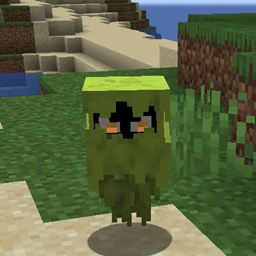
YDM's Glare
This mod adds the glare mob from the 2021 mobvote
No ratings yet
Be the first to rate it.
Community listing page
Community listing page, reviews may not be monitored by the author.

Community voices
Reviews
No reviews yet. Be the first to review this project!
Get it on
Available Platforms
Compatibility
Supported Environments
Must be installed on both the client and the server.
About
Project Details
For authors
Embed Badge
If you're the author of this project, you can embed a live badge anywhere that supports HTML or Markdown. It updates automatically whenever ratings change.
Use HTML for any page that supports it, or Markdown for README files and Markdown-based descriptions.
Identifiers
Platform IDs
About
Description
YDM's Glare for FORGE/FABRIC
Get the Glare to your game!
It will show you areas that are dark enough for monsters to spawn.
It does so by flying to dangerously dark areas and then throwing a hissy fit.
With the glare by your side, you’ll know that each tantrum might lead to monsters too!
-can be tamed and breed with glow berries.
-it glares at you
-if you want a mob to spawn in another mods biome:
You have to change the biome_name line to:
biome_name = "modid:name_of_the_biome"
For example with Biomes O' Plenty:
biome_name = "biomesoplenty:cherry_blossom_grove"
To let it spawn in more biomes you have to put a comma (,) between the biome names like this:
biome_name = "modid:name_of_the_biome,minecraft:desert,minecraft:forest"
In the fabric version you dont have to write the modid.
(You have to restart the game to let the config changes happen)
In 1.19 the config for spawn settings was replaced with biome tag and biome modifier json files.
These can be found under the data folder in the jar.
If you find any errors please let me know.
Thanks for downloading my mod!


YDM's Glare for FORGE/FABRIC
Get the Glare to your game!
It will show you areas that are dark enough for monsters to spawn.
It does so by flying to dangerously dark areas and then throwing a hissy fit.
With the glare by your side, you’ll know that each tantrum might lead to monsters too!
- can be tamed and breed with glow berries.
- it glares at you
- if you want a mob to spawn in another mods biome: You have to change the biome_name line to:
biome_name = "modid:name_of_the_biome"
For example with Biomes O' Plenty:
biome_name = "biomesoplenty:cherry_blossom_grove"
To let it spawn in more biomes you have to put a comma (,) between the biome names like this: biome_name = "modid:name_of_the_biome,minecraft:desert,minecraft:forest"
In the fabric version you dont have to write the modid.
(You have to restart the game to let the config changes happen)
In 1.19 the config for spawn settings was replaced with biome tag and biome modifier json files.
These can be found under the data folder in the jar.
If you find any errors please let me know.
Thanks for downloading my mod!
Screenshots
Gallery
Versions
Files
Relations
Project Relations
More like this
Similar Mods
Suggestions use data such as tags, dependencies, dependents, descriptions, titles, and more to rank how much they overlap with this mod.
Stats
- Downloads
-
46k
 44k
 2k
- Used in
- 20 modpacks
- Followers
- 0
- In stacks
- 0
- Created
-
- Last synced
-
Nov 2, 2026 11:14 PM UTC
New file updates sync automatically.
When ModDex last fully re-synced this project from CurseForge or Modrinth. A new file release triggers a resync usually within minutes, and every project is also re-synced on a schedule. Edits that don't ship a file, such as a new description or screenshots, are checked every few hours and can appear before this date changes.
How syncing works
External Links

Stats
- Downloads
-
46k
44k
2k
- Used in
- 20 modpacks
- Followers
- 0
- In stacks
- 0
- Created
-
- Last synced
-
Nov 2, 2026 11:14 PM UTC
New file updates sync automatically.
When ModDex last fully re-synced this project from CurseForge or Modrinth. A new file release triggers a resync usually within minutes, and every project is also re-synced on a schedule. Edits that don't ship a file, such as a new description or screenshots, are checked every few hours and can appear before this date changes.
How syncing works