
Community listing page, reviews here may not be monitored by the author.
ZapHosting Server Integration Menu


No reviews yet
A ZAP-Hosting Server Integration Menu is a custom in-game or web-based UI that promotes your ZAP-Hosting partner link and discount code. It allows players to easily access hosting services while supporting your partnership.
Community voices
Reviews
No reviews yet. Be the first to review this project!
Get it on
Available Platforms
Compatibility
Supported Environments
Runs entirely on the client. Works on vanilla servers.
About
Project Details
For authors
Embed Badge
If you're the author of this project, you can embed a live badge anywhere that supports HTML or Markdown. It updates automatically whenever ratings change.
Use HTML for any page that supports it, or Markdown for README files and Markdown-based descriptions.
Identifiers
Platform IDs
Resources
External Links
About
Description

ZAP-Hosting Server Integration Menu
This mod provides an in-game configurable menu for integrating ZAP-Hosting directly into your Minecraft Modpack. With this, you can easily add your partner link and discount code to promote your ZAP-Hosting affiliation.
This mod is intended for Zap-Hosting Official Partners.
Apply for the Partnership Program.
Mod Installation & Features Guide
Installation Instructions
Step 1: Install the Mod
-
Download the mod
.jarfile. -
Place it inside the
modsfolder of your Modpack.-
Location:
Your_Modpack_Folder/mods/
-
Step 2: Generate the Configuration File
-
Launch the modpack or directly execute the
.jarfile. -
This will automatically generate the necessary config files in the following directory:
-
Config Path:
config/zap_hosting_server_integration_menu/common.json5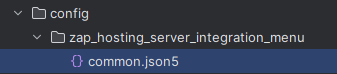
-
Step 3: Configure the Mod
-
Modify settings using either:
-
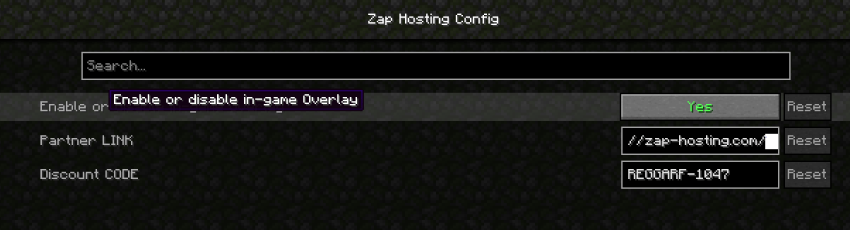
The in-game Config Menu
-
Manually editing the
common.json5file.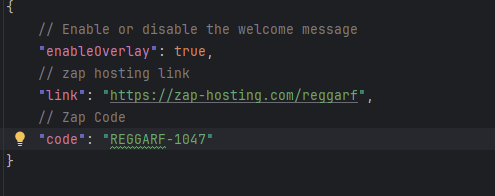
-
Mod Features
1. ZAP-Hosting Integration
-
Players can order a Minecraft server directly by clicking on the ZAP-Hosting image in the game.
-
This provides a seamless way to set up multiplayer worlds with optimized hosting.
2. First-Time In-Game Notification
-
When launching a world for the first time, a special one-time popup message will appear.
-
This message informs players about the ZAP-Hosting integration and how to order a server.
-
The message will only appear once per world to avoid spam.
3. Customizable Settings
-
Players can adjust settings in
common.json5to:-
Enable/disable the popup message.
-
Customize the ZAP-Hosting image click behavior.
-

ZAP-Hosting Server Integration Menu
This mod provides an in-game configurable menu for integrating ZAP-Hosting directly into your Minecraft Modpack. With this, you can easily add your partner link and discount code to promote your ZAP-Hosting affiliation.
This mod is intended for Zap-Hosting Official Partners.
Apply for the Partnership Program.
Mod Installation & Features Guide
Installation Instructions
Step 1: Install the Mod
-
Download the mod
.jarfile. -
Place it inside the
modsfolder of your Modpack.-
Location:
Your_Modpack_Folder/mods/
-
Step 2: Generate the Configuration File
-
Launch the modpack or directly execute the
.jarfile. -
This will automatically generate the necessary config files in the following directory:
-
Config Path:
config/zap_hosting_server_integration_menu/common.json5
-
Step 3: Configure the Mod
-
Modify settings using either:
-
The in-game Config Menu
-
Manually editing the
common.json5file.
-
Mod Features
1. ZAP-Hosting Integration
-
Players can order a Minecraft server directly by clicking on the ZAP-Hosting image in the game.
-
This provides a seamless way to set up multiplayer worlds with optimized hosting.
2. First-Time In-Game Notification
-
When launching a world for the first time, a special one-time popup message will appear.
-
This message informs players about the ZAP-Hosting integration and how to order a server.
-
The message will only appear once per world to avoid spam.
3. Customizable Settings
-
Players can adjust settings in
common.json5to:-
Enable/disable the popup message.
-
Customize the ZAP-Hosting image click behavior.
-
Screenshots
Gallery
-
 logo
logo
Versions
Files
Relations
Project Relations
More like this
Similar Mods
Suggestions use data such as tags, dependencies, dependents, descriptions, titles, and more to rank how much they overlap with this mod.
On ModDex
Community snapshot
By the numbers
Statistics
Want to reach Minecraft players?
We're looking for a server hosting partner to feature here and other parts of the site. Interested? Send us a message!
Get in touchGet it on
Available Platforms
On ModDex
Community snapshot
By the numbers
Statistics
Resources