Community listing page, reviews here may not be monitored by the author.
Zevac's Survival Flight

No reviews yet
Do you want to fly in Survival mode too?
Community voices
Reviews
No reviews yet. Be the first to review this project!
Get it on
Available Platforms
About
Project Details
For authors
Embed Badge
If you're the author of this project, you can embed a live badge anywhere that supports HTML or Markdown. It updates automatically whenever ratings change.
Use HTML for any page that supports it, or Markdown for README files and Markdown-based descriptions.
Identifiers
Platform IDs
Resources
External Links
About
Description
This mods will not be maintained anymore, after 1.13 I switched to Fabric and found existing alternative mods, if you want a copy of the code to tinker yourself, just let me know in the comments
After waiting a while for AmbientOcclusion to make his brilliant survival flight mod available for 1.12 I decided to try to make my own mod. This here is the result.
A simple mod to enable flight while in Survival mode.
Works in Minecraft 1.12, 1.12.1 en 1.12.2.
Needs Forge.
Three keys are defined under Options\Controls in Minecraft:
Allow Flight (default key: DELETE)
Fly Faster (default key: +)
Fly Slower (default key: -)
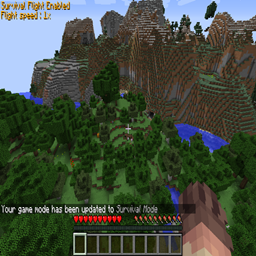
When the mod is loaded, you will see 'Survival Flight disabled' in the top left corner when you are in a world. Press the Allow Flight key (default DELETE) to enable flight, when flight is enabled you can start flying by double-tapping the space-bar, as you would in Creative Mode. While flying you can use the Fly Faster and Fly Slower keys.
In the Config folder there's a zevac.survivalflight.cfg after first run, in there you can set:
- Whether or not you want to see the status text
- In what color you want that text
- On what position on the screen you want it
- And whether you want it to auto-hide when the debug screen is showing
- Whether or not you want to save your Flight status and Speed, TIP: save the optimal setting for you and then disable save, it will load your settings every time.
With version 0.1.7 you don't need to edit the cfg file and restart the game anymore, just change the settings via Mod Options/<select SurvivalFlight mod>/Config.
- The key-mappings for the controls are also here, but it's easier to change them in the Options menu.
The code works mostly on the client-side, if you run on a server, the server needs to run the mod too otherwise you'll end up with fall-damage.
Enjoy flying
Z
PS Check out my other mods: Zevac's Coordinates and Zevac's ToolSaver
Screenshots
Gallery
Versions
Files
Relations
Project Relations
More like this
Similar Mods
Suggestions use data such as tags, dependencies, dependents, descriptions, titles, and more to rank how much they overlap with this mod.
On ModDex
Community snapshot
By the numbers
Statistics
Want to reach Minecraft players?
We're looking for a server hosting partner to feature here and other parts of the site. Interested? Send us a message!
Get in touchGet it on
Available Platforms
On ModDex
Community snapshot
By the numbers
Statistics
Resources