
Community listing page, reviews may not be monitored by the author.
SkyBlock Enhanced


No reviews yet
The only Hypixel SkyBlock modpack you need. Built for modern Minecraft — 60+ optimized mods, a guided setup wizard, and a config system no other pack comes close to match.

Community voices
Reviews
No reviews yet. Be the first to review this project!
Get it on
Available Platforms
Compatibility
Supported Environments
Runs entirely on the client. Works on vanilla servers.
About
Project Details
For authors
Embed Badge
If you're the author of this project, you can embed a live badge anywhere that supports HTML or Markdown. It updates automatically whenever ratings change.
Use HTML for any page that supports it, or Markdown for README files and Markdown-based descriptions.
Identifiers
Platform IDs
About
Description

Skyblock Enhanced the only Hypixel SkyBlock pack you'll ever need! Over 60 mods for Minecraft 26.1+ (Fabric), covering everything you need — performance, dungeons, Bazaar, quality of life and much more — bundled and ready to go. One install, one quick wizard, and you're playing. Spend time on the game not your mods!





With over 1 million downloads, SkyBlock Enhanced has helped thousands of players make their experience better — and you can get same enhanced experience:
- Default configs. Close to a hundred hours have been spent reading every mod's config, learning what each option does, and tuning them so every part of the game is as smooth as possible — hundreds of QoL features, big and small, already set up for you. On top of that, there are 6 resolution versions of the configs: same base settings, but with every HUD overlay individually positioned so nothing overlaps or sits awkwardly, no matter your monitor.
- In-game Config Manager. Ever lost your configs? Never again. The pack backs them up on every update and every three days, so if they're ever wiped you can restore them in one click.
- Performance mods + optimized settings. Dozens of hours spent researching optimization mods and tweaking settings to give you the smoothest gameplay possible.
- Custom SkyBlock-themed menu. Makes it feel like you're booting up a dedicated game, not just vanilla Minecraft.
- One-click updates through the Modrinth App.
- Plus so much more!

Setup Wizard
On first launch, a guided wizard configures everything for you. Some steps only appear if the relevant mod is installed.
| Step | What it does |
|---|---|
| Welcome | Quick intro and support info |
| Config Packs | Apply, import, reapply, or restore config packs |
| Main Menu Design | Pick your title-screen style |
| Performance Profile | Choose your FPS/visuals balance (see below) |
| Tab Design | Compact or fancy player list |
| Item Background | How item rarity is shown |
| Storage Design | Overlay or vanilla storage UI |
| Dungeon Routes | Skyblocker waypoints or Stella |
| Sword Block | Toggle 1.8.9-style sword block |
| ScamScreener | Set scam alert level and pings |
| Caxton Font | Pick a custom font pack |
| Resource Packs | Choose from the included packs |
| Confirm & Apply | Review every choice before anything changes |
Performance Profiles
- Performance — lowest visuals, maximum FPS for low-end hardware
- Balanced — close to default, recommended for most players
- Quality — high render distance and maxed visuals for strong PCs
- Shaders (Balanced / Quality) — the above with shaders enabled (note: shaders may break some in-world overlays)
Resolution Presets
UI overlays shift with resolution and GUI scale — what looks clean at 1080p can overlap at 1440p. Six presets ship with every HUD overlay positioned for that exact setup, and the right one is applied automatically:
1080p 2× · 1080p 3× · 1440p · 1440p Ultrawide · 4K · 4K Ultrawide
In-Game Config Manager
Lost your configs easily? Restore backups and so much more with the custom-made Config Manager:
- Apply official presets or your own
- Export selected configs as a shareable
.zip(with name, author, and target resolution) - Import a config pack, preview it, and apply
- Back up & restore at any time — a backup is also made automatically before any preset is applied
Spent hours perfecting a 1440p layout? Export it, share the
.zip, and a friend imports it in seconds.
<details> <summary>Screenshots</summary>


</details>
Quality-of-Life Mods
The big SkyBlock mods, pre-configured for a clean screen. Expand each for details.
<details> <summary>SkyHanni — all-round QoL</summary>
Farming crop trackers with money-per-hour, Diana/Mythological Ritual helpers, Slayer and damage helpers, mineshaft detection with party chat, plus customizable HUDs, a cleaner scoreboard, and chat improvements.
</details> <details> <summary>Skyblocker — all-round QoL</summary>
Dungeon puzzle solvers, secret waypoints, and a full dungeon HUD; mining/foraging/commission waypoints; customizable health, mana, defense, and XP bars; Bazaar/AH prices in tooltips; built-in wiki lookup, profile viewer, and event timers.
</details> <details> <summary>Odin — dungeons & Kuudra</summary>
Endgame PvE utility: puzzle solvers for most Floor 7 terminals and dungeon puzzles, Wither Dragon tracking, Melody helpers, full run stats, and Kuudra pearl waypoints and supply tracking. Everything is optional and configurable.
</details> <details> <summary>ScamScreener — safety</summary>
Scans chat in real time for scam patterns (phishing links, fake verification, suspicious invites) with optional local AI scoring — nothing leaves your machine. Warns during trades and invites, with manual blacklisting.
</details> <details> <summary>Other SkyBlock mods</summary>
- SkyBlock Profile Viewer — a modern
/pvwith tabs for skills, slayers, catacombs, pets, and more - Modern Warp Menu — a clean warp interface with rendered island views
- SkyBlock Enhancements — small tweaks: missing-enchant detection, command-confirm disabler,
/reminder - Scale Me — scale your model, other players, NPCs, and held items; includes 1.8 sword block
- Bazaar Utils — faster, safer Bazaar trading: custom buttons, mistake prevention, one-click undercut, bookmarks
- SkyOcean — slayers, fishing, mining, and garden helpers, item value screen, and searchable storage
- Skyblock Enhanced Storage — all your Ender Chests and Backpacks in one searchable overlay
- Enhanced Chat — chat quality-of-life improvements
</details> <details> <summary>⌨️ Essential Keybinds</summary>
General
F7– Move GUI / EditorM– Warp MenuK– Toggle Shaders
Wiki & Info (Skyblocker)
F1– Fandom Wiki (hover item) ·F4– Hypixel Wiki (hover item) ·F6– Item Price Lookup
Item Management (Skyblocker)
P– Protect Item ·H– Lock Hotbar Slot ·Z– Bazaar Refresh
SkyHanni
X– Chat Peek ·Z– Garden Home / Mining Spot ·H– Set Garden Home / Rep HelperB– Barn Teleport ·V– Warp to Pest / Trapper ·R– Reset Fishing TimerY– Share Waypoint ·K– Accept Visitor ·Left Shift– Fortune Breakdown ·Left Ctrl– Bypass Refuse Prevention
SkyOcean
O– Item Search ·J– Item Value ·C– Set Craft Helper Item
</details>
Custom Main Menu
A SkyBlock-themed menu, chosen in the wizard:
- Modern — fully custom menu with a custom background
- Modern Minimal — custom buttons over the default panorama
- Minimal — vanilla menu with a change log button (recommend if you use other mods that add main menu buttons)
<details> <summary>Screenshots</summary>


</details>

Installation
You'll need a valid Minecraft Java account and the free Modrinth App.
- Install the Modrinth App — download it, run the installer, and let it open.
- Log in — click Playing as (top-right) → Log in, and sign in with your Microsoft account.
- Install the pack — go to Discover content → Modpacks, search SkyBlock Enhanced, and click Install.
- Allocate RAM — open the instance's gear icon → Java and Memory, enable Custom Memory Allocation, and set it using the table below.
| System RAM | Recommended |
|---|---|
| 8 GB | 3–4 GB |
| 16 GB | 4–6 GB |
| 32 GB+ | 6–8 GB |
Check your RAM:
Ctrl + Shift + Esc→ Performance → Memory.

All mods are Hypixel-safe, client-side, and do not automate gameplay.
<details> <summary>🎮 SkyBlock Mods</summary>
- Bazaar Utils by mkram17
- Enhanced Chat by Kd_Gaming1
- Firmament by nea89o
- MarketGuard by Pankraz01
- Modern Warp Menu by Yukkuritaku
- Odin by odtheking
- ScamScreener by Pankraz01
- SkyBlock Enhancements by Kd_Gaming1
- Skyblock Enhanced Storage by Kd_Gaming1
- SkyBlock Profile Viewer by Meowdding
- SkyHanni by hannibal2
- SkyOcean by Meowdding
- SkyRecipes by Kd_Gaming1 (coming soon to Modrinth)
- Skyblock Overhaul (SBO) by Charismara
- Skyblocker by Wohlhabend
</details> <details> <summary>⚡ Performance & Optimization</summary>
- BadOptimizations by thosea
- Better Block Entities by cseden
- Debugify by isxander
- Entity Culling by tr7zw
- Fast IP Ping by fallen-breath
- FerriteCore by malte0811
- ImmediatelyFast by RaphiMC
- Krypton by astei
- Lithium by jellysquid3
- ModernFix-mVUS by Coredex
- More Culling by FX
- Packet Fixer by TonimatasDEV
- Particle Core by fzzyhmstrs
- Sodium by jellysquid3
- Sodium Extra by FlashyReese
- Sodium Shadowy Path Blocks by Rynix
- Stfu by ItsFelix5
</details> <details> <summary>🧩 UI & Quality of Life</summary>
- 3D Skin Layers by tr7zw
- Auth Me by axieum
- BetterF3 by TreyRuffy
- Bobby by Johni0702
- Catharsis by KaiAF
- Caxton by flirora
- Continuity by PepperCode1
- Controlling by jaredlll08
- Crash Assistant by KostromDan
- Cubes Without Borders by Kira-NT
- Feesh by imBloop
- Gnetum by Cynosphere
- Ixeris by imBloop
- Language Reload by Jerozgen
- Longview by EnnuiLangeweile
- Mod Menu by Terraformers
- Modern UI by Tealeste
- Network Protocol Disconnect by mobilelize
- No Chat Reports by Aizistral
- PackCore by Kd_Gaming1
- Reliable Recipe Viewer (RRV) by cassiancc
- Respackopts by JFronny
- Scale Me by Kd_Gaming1
- Searchables by jaredlll08
- Sound Controller by BVengo
- kennytv's Force Close Loading Screen by kennytv
- Wavey Capes by tr7zw
- Zoomify by isxander
</details> <details> <summary>🎨 Shaders & Visual</summary>
</details> <details> <summary>🛠️ Configuration & Libraries</summary>
- Cloth Config API by shedaniel
- Fabric API by modmuss50
- Fabric Language Kotlin by modmuss50
- Fzzy Config by fzzyhmstrs
- LibJF by JFronny
- Text Placeholder API by Patbox
- UI Lib by DAQEM Studios
- YetAnotherConfigLib (YACL) by isxander
</details> <details> <summary>🎨 Resource Packs</summary>
- Defrosted by looshy
- Furfsky Reborn by Tylerrrr
- Hypixel Plus by ic22487
- Looshy by looshy
- PacksHQ by PacksHQ
- SkyBlock Dark UI by jani270
- SkyBlock Dark Mode by ic22487
- Sophie's Hypixel SkyBlock Enchantment Books by Bentcheesee
</details>

<details> <summary>🧩 General</summary>
Q: What is SkyBlock Enhanced?
A: A pre-configured Hypixel SkyBlock modpack for Minecraft 26.1+ on Fabric, with 60+ optimized mods, a first-launch wizard, six resolution presets, and an in-game config manager — ready to go with no manual setup.
Q: Can I use it on Hypixel?
A: Yes. All included mods are allowed on Hypixel, are client-side, and don't automate gameplay. Always check Hypixel's rules before adding your own mods.
Q: Do I have to configure anything manually?
A: No — install through the Modrinth App, launch, follow the wizard, and play.
</details> <details> <summary>⚙️ Installation & Setup</summary>
Q: How do I install it?
A: Use the Modrinth App — see the installation steps above.
Q: The game won't start or crashes.
A: Allocate more RAM, add -Xss4M if you see "Resource Reload Failed", and make sure you're on a compatible, up-to-date Java runtime (the Modrinth App handles this automatically). Still stuck? Join the Discord.
Q: How do I update?
A: Click Update pack in the Modrinth App and pick the latest version.
</details> <details> <summary>🚀 Performance</summary>
Q: Will it run on a low-end PC?
A: Yes — pick the Performance profile in the wizard.
Q: Do shaders work?
A: Yes — Iris with Complementary Unbound and MakeUp Ultra Fast are included. Some overlays may not display correctly with shaders on.
</details> <details> <summary>🧰 Customization</summary>
Q: What resolution presets are there?
A: Six: 1080p 2×, 1080p 3×, 1440p, 1440p Ultrawide, 4K, and 4K Ultrawide — applied automatically on first launch.
Q: Can I reset or share my config?
A: Yes — the in-game Config Manager handles backups, restores, exports, and imports.
</details> <details> <summary>💬 Support & Community</summary>
Q: Where do I get help or report bugs?
A: Join the Discord. A Fluxer server is also available if you prefer.
Q: How can I support the project?
A: Via Ko-fi, or use Bisect Hosting code SBE for 25% off.
</details>
Community & Support
Need help, want to share configs, or looking for updates? Join the Discord for support channels, config sharing, and release announcements. A privacy-focused Fluxer server is also available.
Support the Project
Donations fund continued updates and support — every bit is appreciated. Need a server? Use code SBE for 25% off at Bisect Hosting.

Thanks for choosing SkyBlock Enhanced — a modern, optimized, fully configured Hypixel SkyBlock modpack. If you enjoy it, heart it on Modrinth, join the community, and share it with friends.
Happy grinding!
— Kd_Gaming1
Special thanks to all the mod developers behind these mods, and to @ic22487 for the logo.
Skyblock Enhanced the only Hypixel SkyBlock pack you'll ever need! Over 60 mods for Minecraft 26.1+ (Fabric), covering everything you need — performance, dungeons, Bazaar, quality of life and much more — bundled and ready to go. One install, one quick wizard, and you're playing. Spend time on the game not your mods!


With over 1 million downloads, SkyBlock Enhanced has helped thousands of players make their experience better — and you can get same enhanced experience:
- Default configs. Close to a hundred hours have been spent reading every mod's config, learning what each option does, and tuning them so every part of the game is as smooth as possible — hundreds of QoL features, big and small, already set up for you. On top of that, there are 6 resolution versions of the configs: same base settings, but with every HUD overlay individually positioned so nothing overlaps or sits awkwardly, no matter your monitor.
- In-game Config Manager. Ever lost your configs? Never again. The pack backs them up on every update and every three days, so if they're ever wiped you can restore them in one click.
- Performance mods + optimized settings. Dozens of hours spent researching optimization mods and tweaking settings to give you the smoothest gameplay possible.
- Custom SkyBlock-themed menu. Makes it feel like you're booting up a dedicated game, not just vanilla Minecraft.
- One-click updates through the Modrinth App.
- Plus so much more!
Setup Wizard
On first launch, a guided wizard configures everything for you. Some steps only appear if the relevant mod is installed.
| Step | What it does |
|---|---|
| Welcome | Quick intro and support info |
| Config Packs | Apply, import, reapply, or restore config packs |
| Main Menu Design | Pick your title-screen style |
| Performance Profile | Choose your FPS/visuals balance (see below) |
| Tab Design | Compact or fancy player list |
| Item Background | How item rarity is shown |
| Storage Design | Overlay or vanilla storage UI |
| Dungeon Routes | Skyblocker waypoints or Stella |
| Sword Block | Toggle 1.8.9-style sword block |
| ScamScreener | Set scam alert level and pings |
| Caxton Font | Pick a custom font pack |
| Resource Packs | Choose from the included packs |
| Confirm & Apply | Review every choice before anything changes |
Performance Profiles
- Performance — lowest visuals, maximum FPS for low-end hardware
- Balanced — close to default, recommended for most players
- Quality — high render distance and maxed visuals for strong PCs
- Shaders (Balanced / Quality) — the above with shaders enabled (note: shaders may break some in-world overlays)
Resolution Presets
UI overlays shift with resolution and GUI scale — what looks clean at 1080p can overlap at 1440p. Six presets ship with every HUD overlay positioned for that exact setup, and the right one is applied automatically:
1080p 2× · 1080p 3× · 1440p · 1440p Ultrawide · 4K · 4K Ultrawide
In-Game Config Manager
Lost your configs easily? Restore backups and so much more with the custom-made Config Manager:
- Apply official presets or your own
- Export selected configs as a shareable
.zip(with name, author, and target resolution) - Import a config pack, preview it, and apply
- Back up & restore at any time — a backup is also made automatically before any preset is applied
Spent hours perfecting a 1440p layout? Export it, share the
.zip, and a friend imports it in seconds.
Screenshots
Quality-of-Life Mods
The big SkyBlock mods, pre-configured for a clean screen. Expand each for details.
SkyHanni — all-round QoL
Farming crop trackers with money-per-hour, Diana/Mythological Ritual helpers, Slayer and damage helpers, mineshaft detection with party chat, plus customizable HUDs, a cleaner scoreboard, and chat improvements.
Skyblocker — all-round QoL
Dungeon puzzle solvers, secret waypoints, and a full dungeon HUD; mining/foraging/commission waypoints; customizable health, mana, defense, and XP bars; Bazaar/AH prices in tooltips; built-in wiki lookup, profile viewer, and event timers.
Odin — dungeons & Kuudra
Endgame PvE utility: puzzle solvers for most Floor 7 terminals and dungeon puzzles, Wither Dragon tracking, Melody helpers, full run stats, and Kuudra pearl waypoints and supply tracking. Everything is optional and configurable.
ScamScreener — safety
Scans chat in real time for scam patterns (phishing links, fake verification, suspicious invites) with optional local AI scoring — nothing leaves your machine. Warns during trades and invites, with manual blacklisting.
Other SkyBlock mods
- SkyBlock Profile Viewer — a modern
/pvwith tabs for skills, slayers, catacombs, pets, and more - Modern Warp Menu — a clean warp interface with rendered island views
- SkyBlock Enhancements — small tweaks: missing-enchant detection, command-confirm disabler,
/reminder - Scale Me — scale your model, other players, NPCs, and held items; includes 1.8 sword block
- Bazaar Utils — faster, safer Bazaar trading: custom buttons, mistake prevention, one-click undercut, bookmarks
- SkyOcean — slayers, fishing, mining, and garden helpers, item value screen, and searchable storage
- Skyblock Enhanced Storage — all your Ender Chests and Backpacks in one searchable overlay
- Enhanced Chat — chat quality-of-life improvements
⌨️ Essential Keybinds
General
F7– Move GUI / EditorM– Warp MenuK– Toggle Shaders
Wiki & Info (Skyblocker)
F1– Fandom Wiki (hover item) ·F4– Hypixel Wiki (hover item) ·F6– Item Price Lookup
Item Management (Skyblocker)
P– Protect Item ·H– Lock Hotbar Slot ·Z– Bazaar Refresh
SkyHanni
X– Chat Peek ·Z– Garden Home / Mining Spot ·H– Set Garden Home / Rep HelperB– Barn Teleport ·V– Warp to Pest / Trapper ·R– Reset Fishing TimerY– Share Waypoint ·K– Accept Visitor ·Left Shift– Fortune Breakdown ·Left Ctrl– Bypass Refuse Prevention
SkyOcean
O– Item Search ·J– Item Value ·C– Set Craft Helper Item
Custom Main Menu
A SkyBlock-themed menu, chosen in the wizard:
- Modern — fully custom menu with a custom background
- Modern Minimal — custom buttons over the default panorama
- Minimal — vanilla menu with a change log button (recommend if you use other mods that add main menu buttons)
Screenshots
Installation
You'll need a valid Minecraft Java account and the free Modrinth App.
- Install the Modrinth App — download it, run the installer, and let it open.
- Log in — click Playing as (top-right) → Log in, and sign in with your Microsoft account.
- Install the pack — go to Discover content → Modpacks, search SkyBlock Enhanced, and click Install.
- Allocate RAM — open the instance's gear icon → Java and Memory, enable Custom Memory Allocation, and set it using the table below.
| System RAM | Recommended |
|---|---|
| 8 GB | 3–4 GB |
| 16 GB | 4–6 GB |
| 32 GB+ | 6–8 GB |
Check your RAM:
Ctrl + Shift + Esc→ Performance → Memory.
All mods are Hypixel-safe, client-side, and do not automate gameplay.
🎮 SkyBlock Mods
- Bazaar Utils by mkram17
- Enhanced Chat by Kd_Gaming1
- Firmament by nea89o
- MarketGuard by Pankraz01
- Modern Warp Menu by Yukkuritaku
- Odin by odtheking
- ScamScreener by Pankraz01
- SkyBlock Enhancements by Kd_Gaming1
- Skyblock Enhanced Storage by Kd_Gaming1
- SkyBlock Profile Viewer by Meowdding
- SkyHanni by hannibal2
- SkyOcean by Meowdding
- SkyRecipes by Kd_Gaming1 (coming soon to Modrinth)
- Skyblock Overhaul (SBO) by Charismara
- Skyblocker by Wohlhabend
⚡ Performance & Optimization
- BadOptimizations by thosea
- Better Block Entities by cseden
- Debugify by isxander
- Entity Culling by tr7zw
- Fast IP Ping by fallen-breath
- FerriteCore by malte0811
- ImmediatelyFast by RaphiMC
- Krypton by astei
- Lithium by jellysquid3
- ModernFix-mVUS by Coredex
- More Culling by FX
- Packet Fixer by TonimatasDEV
- Particle Core by fzzyhmstrs
- Sodium by jellysquid3
- Sodium Extra by FlashyReese
- Sodium Shadowy Path Blocks by Rynix
- Stfu by ItsFelix5
🧩 UI & Quality of Life
- 3D Skin Layers by tr7zw
- Auth Me by axieum
- BetterF3 by TreyRuffy
- Bobby by Johni0702
- Catharsis by KaiAF
- Caxton by flirora
- Continuity by PepperCode1
- Controlling by jaredlll08
- Crash Assistant by KostromDan
- Cubes Without Borders by Kira-NT
- Feesh by imBloop
- Gnetum by Cynosphere
- Ixeris by imBloop
- Language Reload by Jerozgen
- Longview by EnnuiLangeweile
- Mod Menu by Terraformers
- Modern UI by Tealeste
- Network Protocol Disconnect by mobilelize
- No Chat Reports by Aizistral
- PackCore by Kd_Gaming1
- Reliable Recipe Viewer (RRV) by cassiancc
- Respackopts by JFronny
- Scale Me by Kd_Gaming1
- Searchables by jaredlll08
- Sound Controller by BVengo
- kennytv's Force Close Loading Screen by kennytv
- Wavey Capes by tr7zw
- Zoomify by isxander
🎨 Shaders & Visual
🛠️ Configuration & Libraries
🎨 Resource Packs
🧩 General
Q: What is SkyBlock Enhanced?
A: A pre-configured Hypixel SkyBlock modpack for Minecraft 26.1+ on Fabric, with 60+ optimized mods, a first-launch wizard, six resolution presets, and an in-game config manager — ready to go with no manual setup.
Q: Can I use it on Hypixel?
A: Yes. All included mods are allowed on Hypixel, are client-side, and don't automate gameplay. Always check Hypixel's rules before adding your own mods.
Q: Do I have to configure anything manually?
A: No — install through the Modrinth App, launch, follow the wizard, and play.
⚙️ Installation & Setup
Q: How do I install it?
A: Use the Modrinth App — see the installation steps above.
Q: The game won't start or crashes.
A: Allocate more RAM, add -Xss4M if you see "Resource Reload Failed", and make sure you're on a compatible, up-to-date Java runtime (the Modrinth App handles this automatically). Still stuck? Join the Discord.
Q: How do I update?
A: Click Update pack in the Modrinth App and pick the latest version.
🚀 Performance
Q: Will it run on a low-end PC?
A: Yes — pick the Performance profile in the wizard.
Q: Do shaders work?
A: Yes — Iris with Complementary Unbound and MakeUp Ultra Fast are included. Some overlays may not display correctly with shaders on.
🧰 Customization
Q: What resolution presets are there?
A: Six: 1080p 2×, 1080p 3×, 1440p, 1440p Ultrawide, 4K, and 4K Ultrawide — applied automatically on first launch.
Q: Can I reset or share my config?
A: Yes — the in-game Config Manager handles backups, restores, exports, and imports.
💬 Support & Community
Q: Where do I get help or report bugs?
A: Join the Discord. A Fluxer server is also available if you prefer.
Q: How can I support the project?
A: Via Ko-fi, or use Bisect Hosting code SBE for 25% off.
Community & Support
Need help, want to share configs, or looking for updates? Join the Discord for support channels, config sharing, and release announcements. A privacy-focused Fluxer server is also available.
Support the Project
Donations fund continued updates and support — every bit is appreciated. Need a server? Use code SBE for 25% off at Bisect Hosting.
Thanks for choosing SkyBlock Enhanced — a modern, optimized, fully configured Hypixel SkyBlock modpack. If you enjoy it, heart it on Modrinth, join the community, and share it with friends.
Happy grinding!
— Kd_Gaming1
Special thanks to all the mod developers behind these mods, and to @ic22487 for the logo.
Screenshots
Gallery
-
 Skyblock Enhanced Banner Skyblock Enhanced Banner
 -
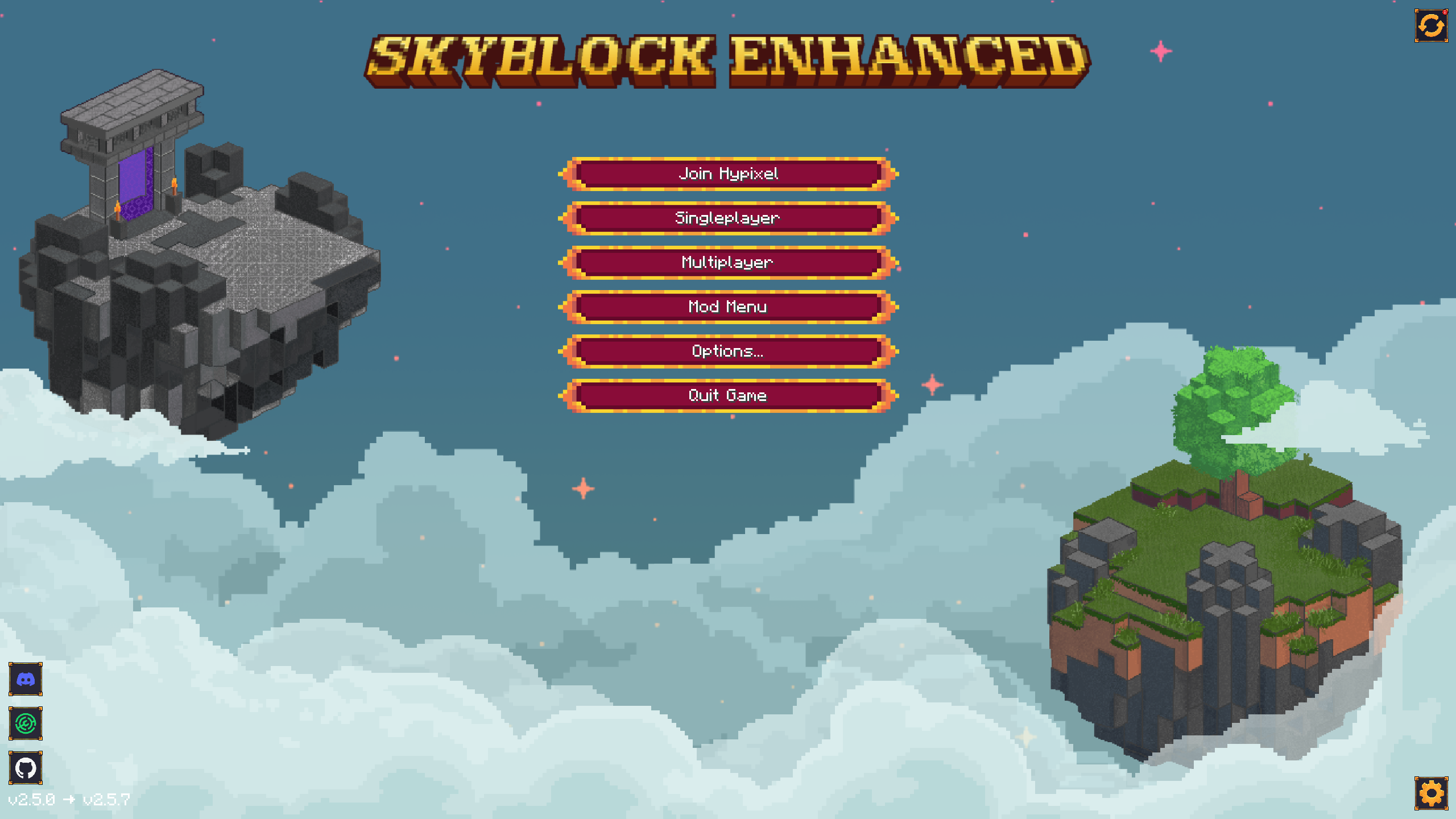 Main Menu Design 1 Custom Main Menu Design 2
 -
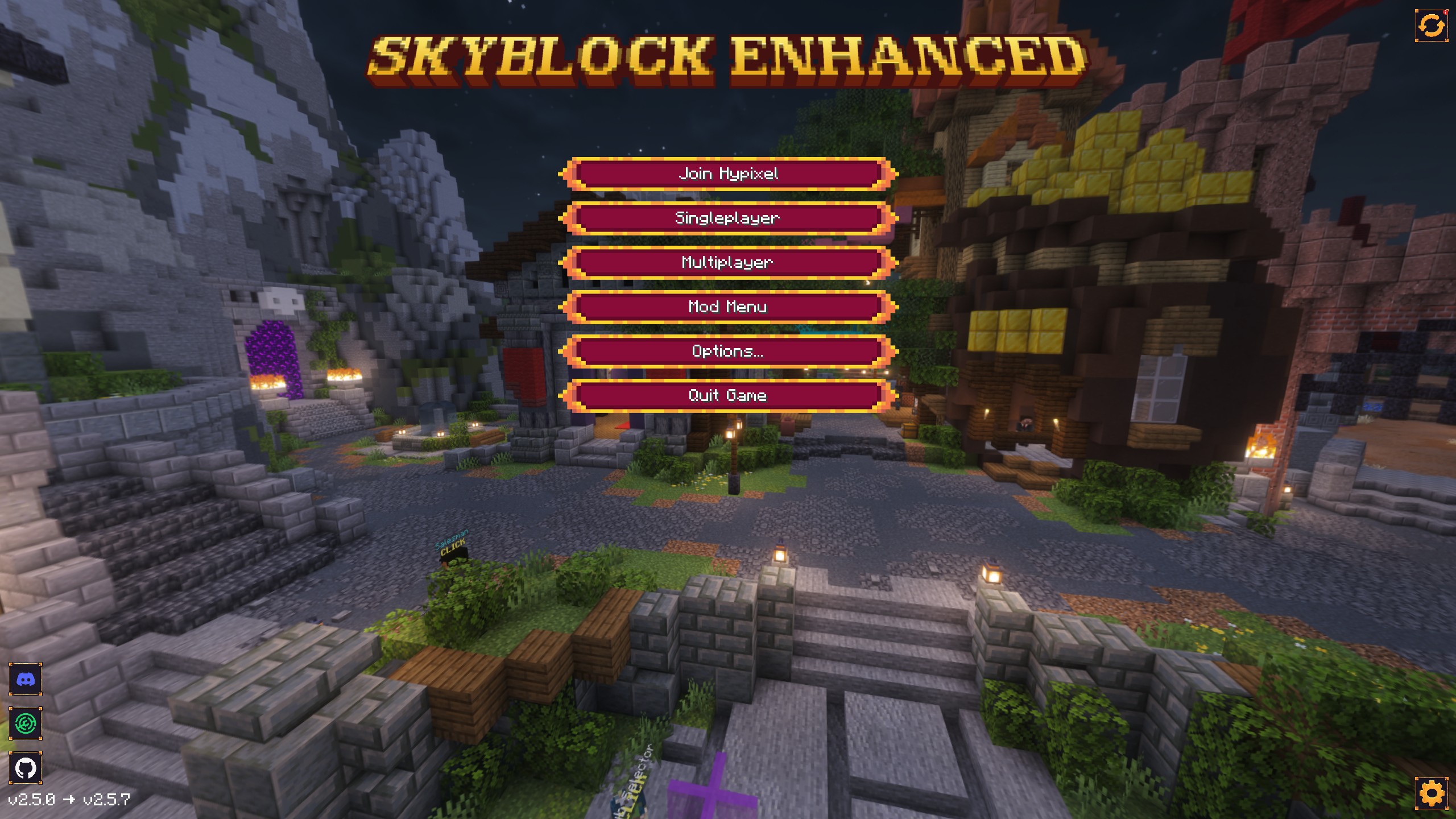 Main Menu Design 2 Custom Main Menu Design 2
 -
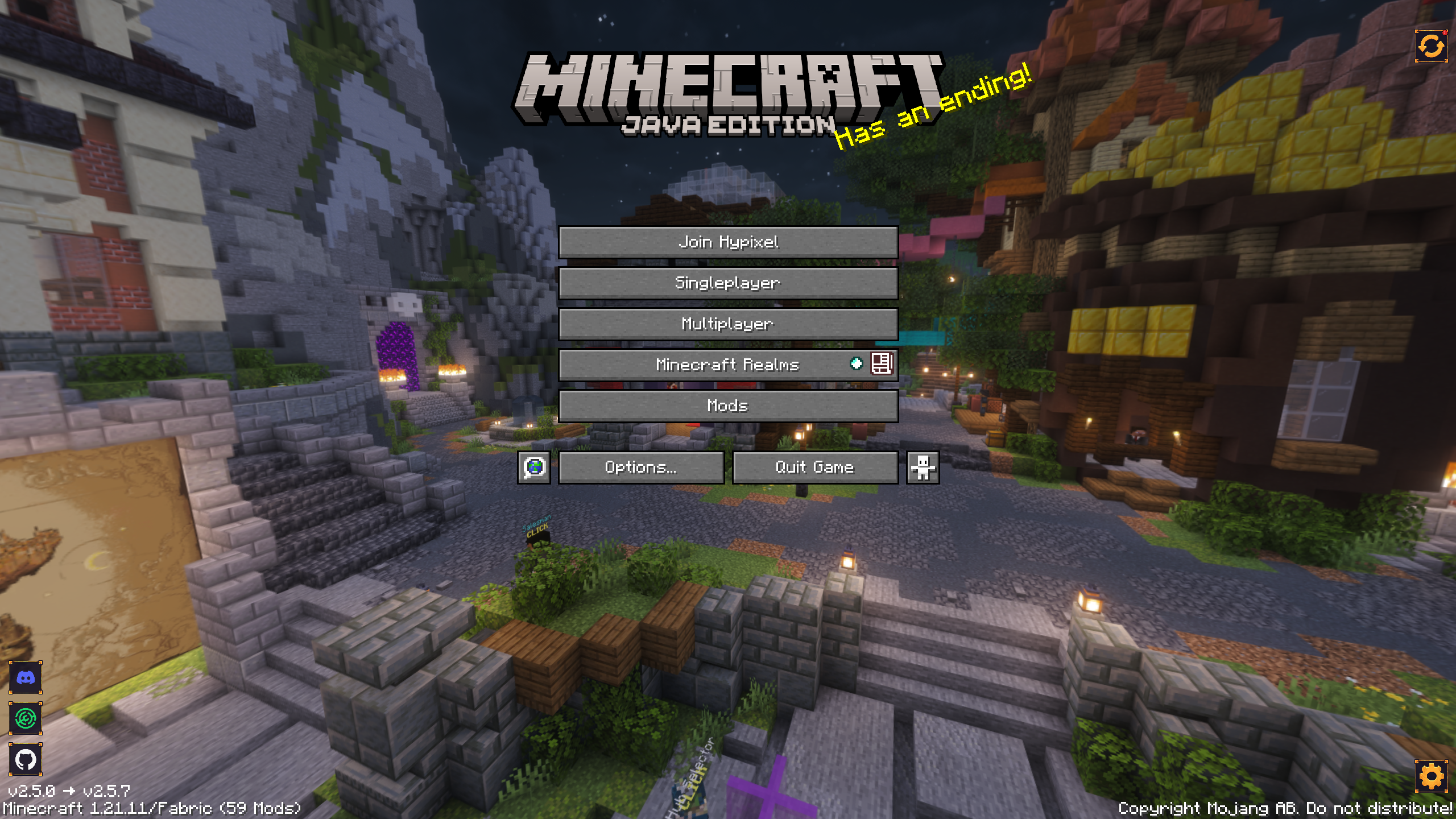 Main Menu Design 3 Custom Main Menu Design 3
 -
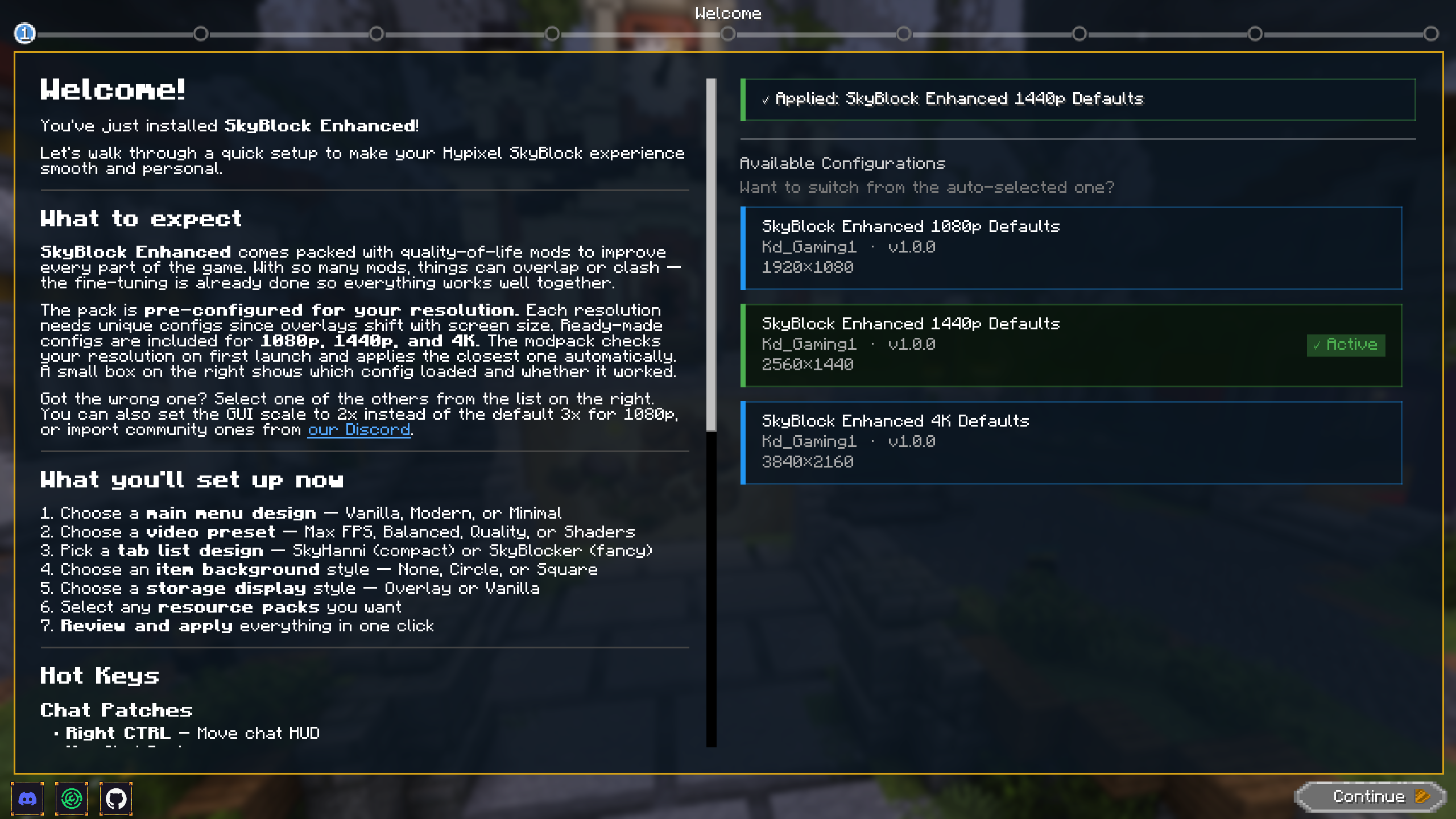 Welcome Wizard Page 1 Welcome Wizard - Page 1. Let's you change what default configs you use.
 -
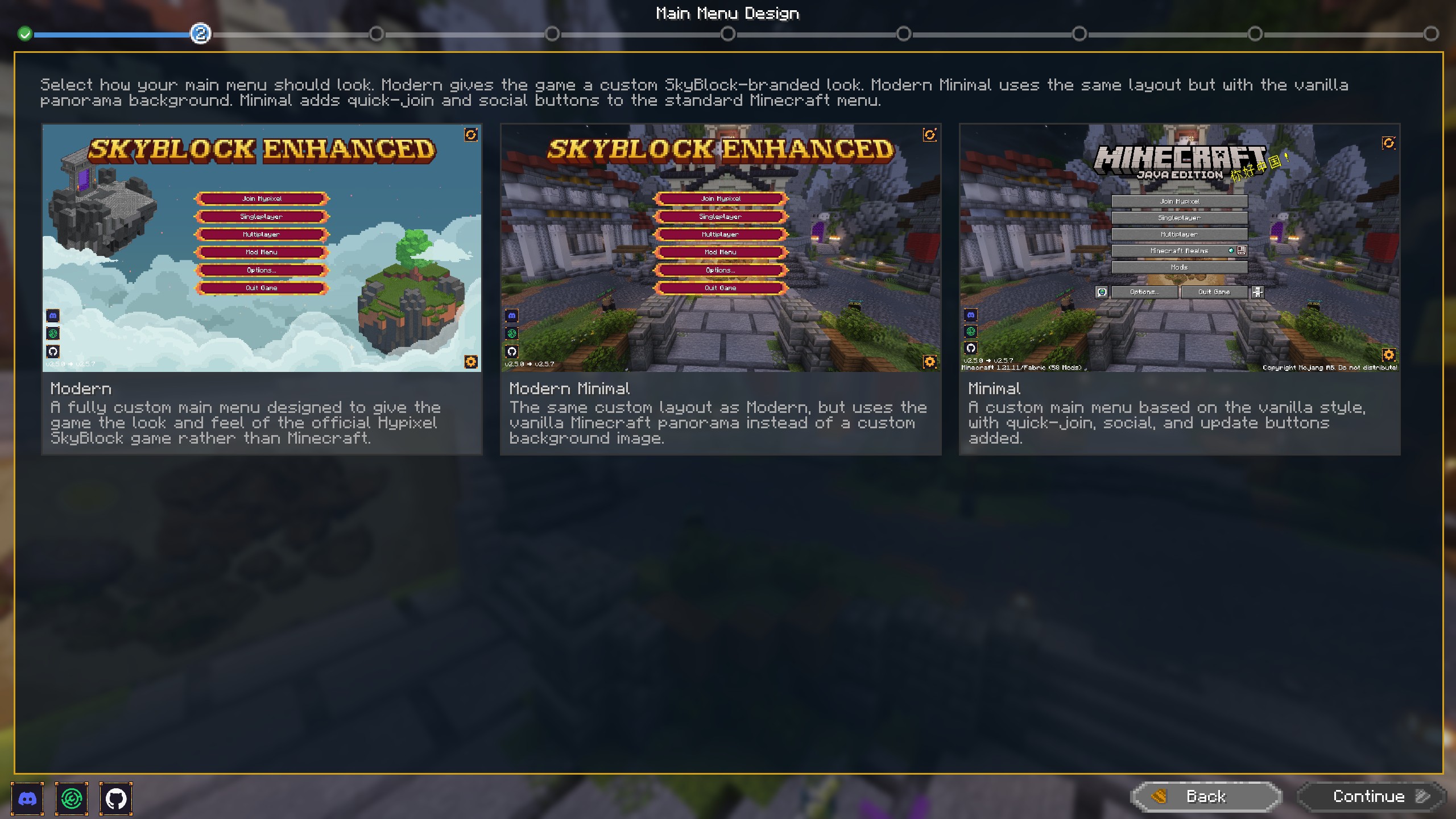 Welcome Wizard Page 2 Welcome Wizard - Page 2. Lets you choose which Main Menu design to use.
 -
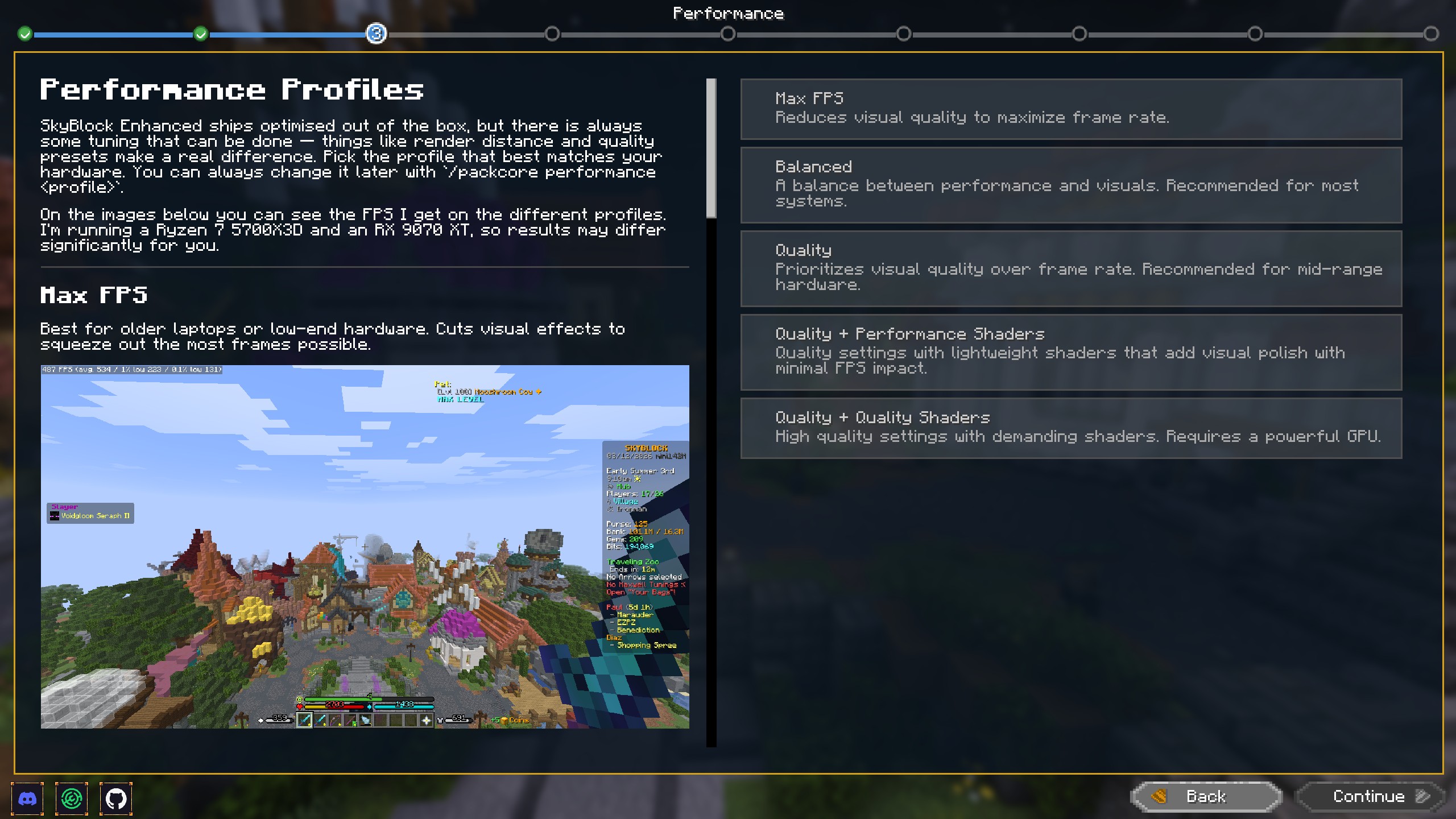 Welcome Wizard Page 3 Welcome Wizard - Page 3. Let's you choose performance profile.
 -
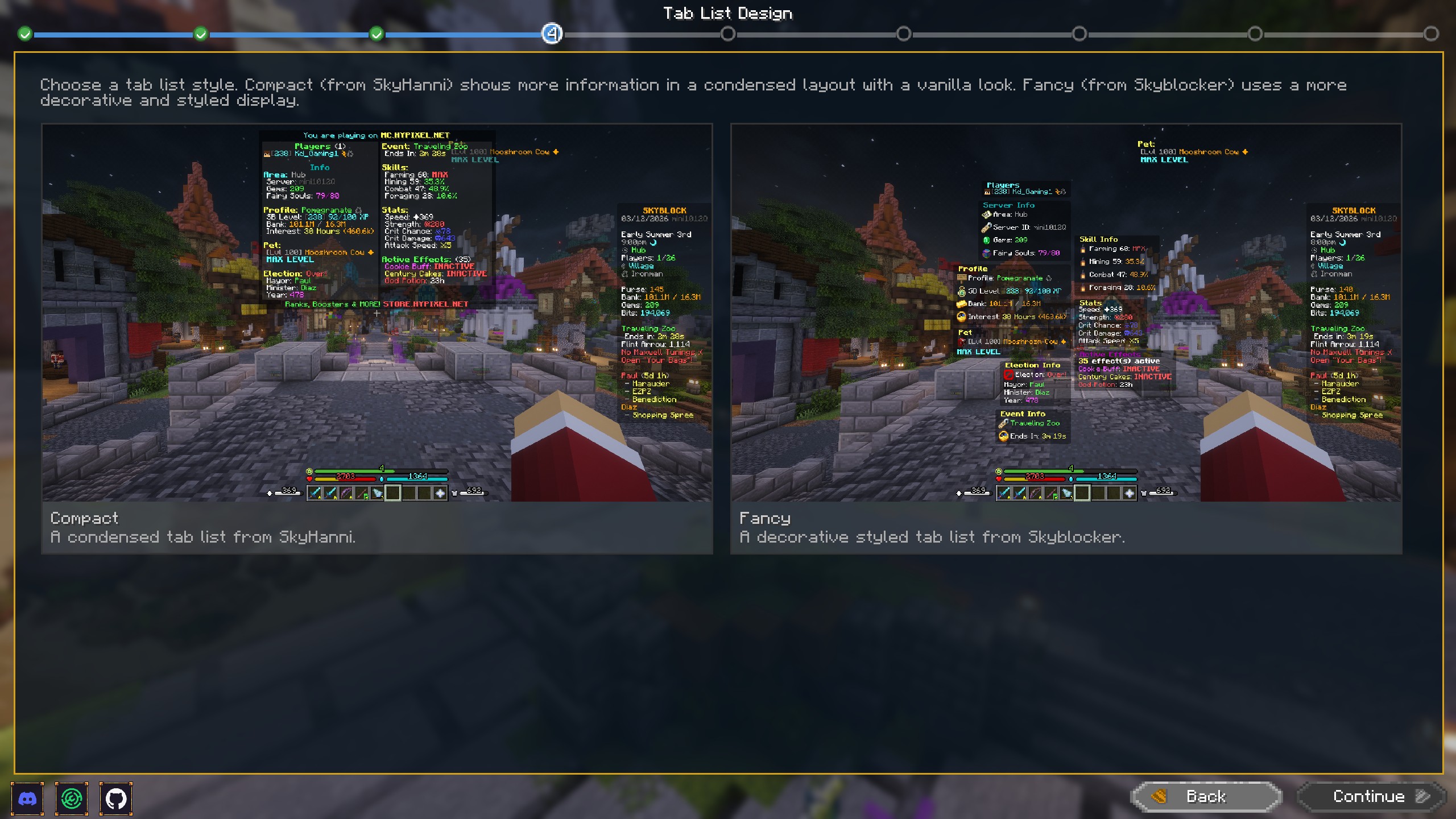 Welcome Wizard Page 4 Welcome Wizard - Page 4. Let's you choose tab design.
 -
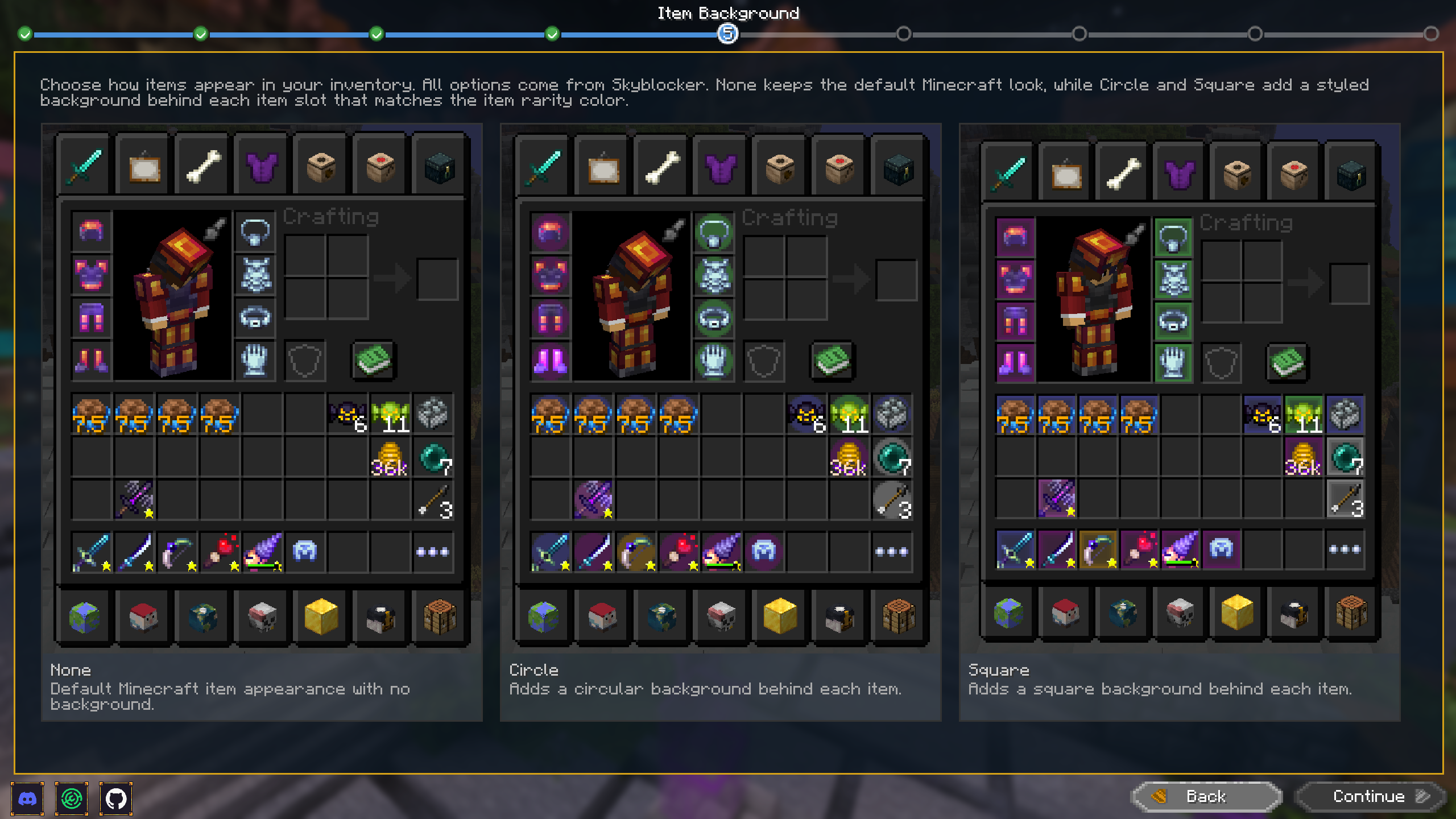 Welcome Wizard Page 5 Welcome Wizard - Page 5. Let's you choose Item Background.
 -
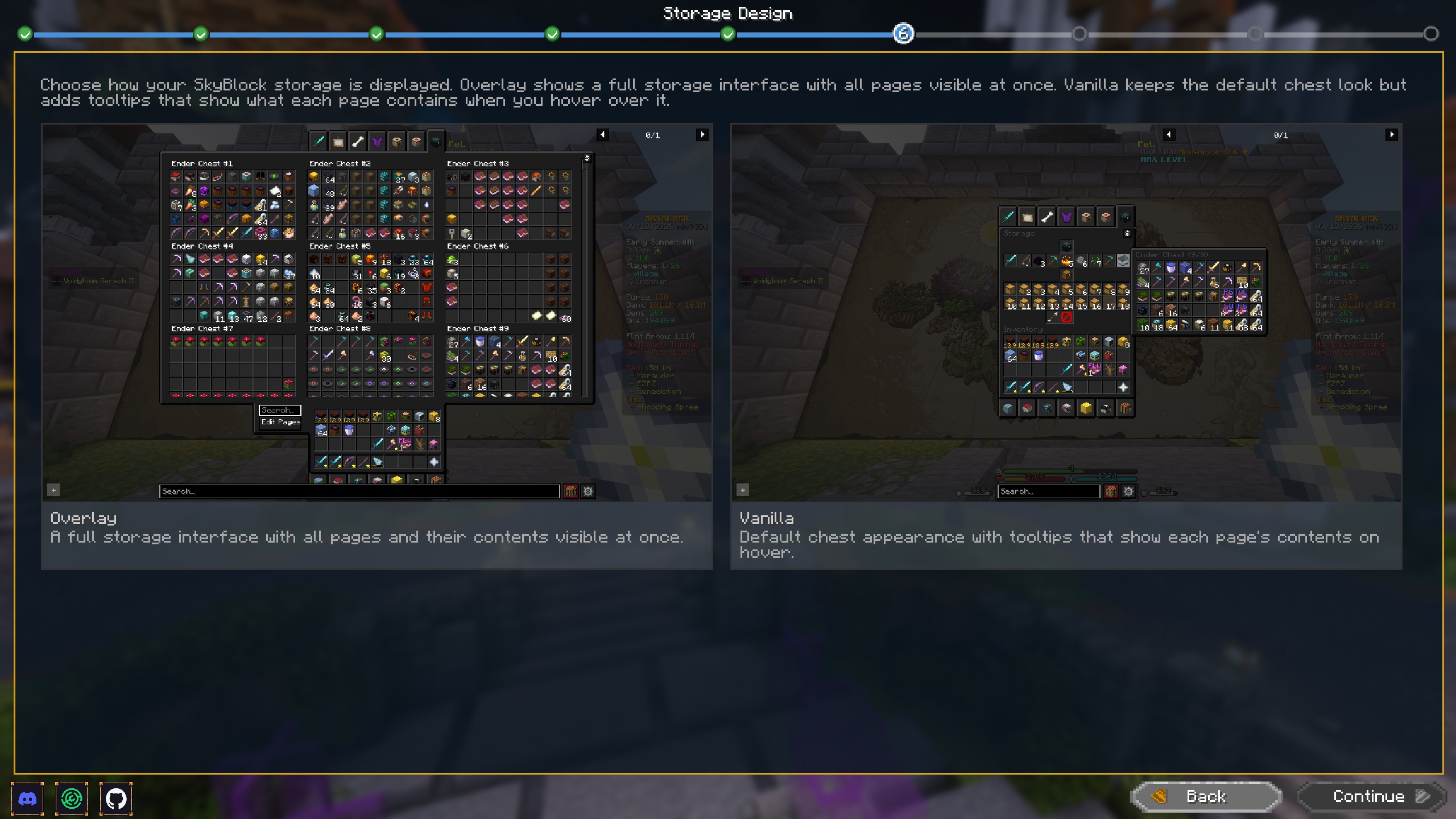 Welcome Wizard Page 6 Welcome Wizard - Page 6. Let's you choose Storage Overlay on or off.
 -
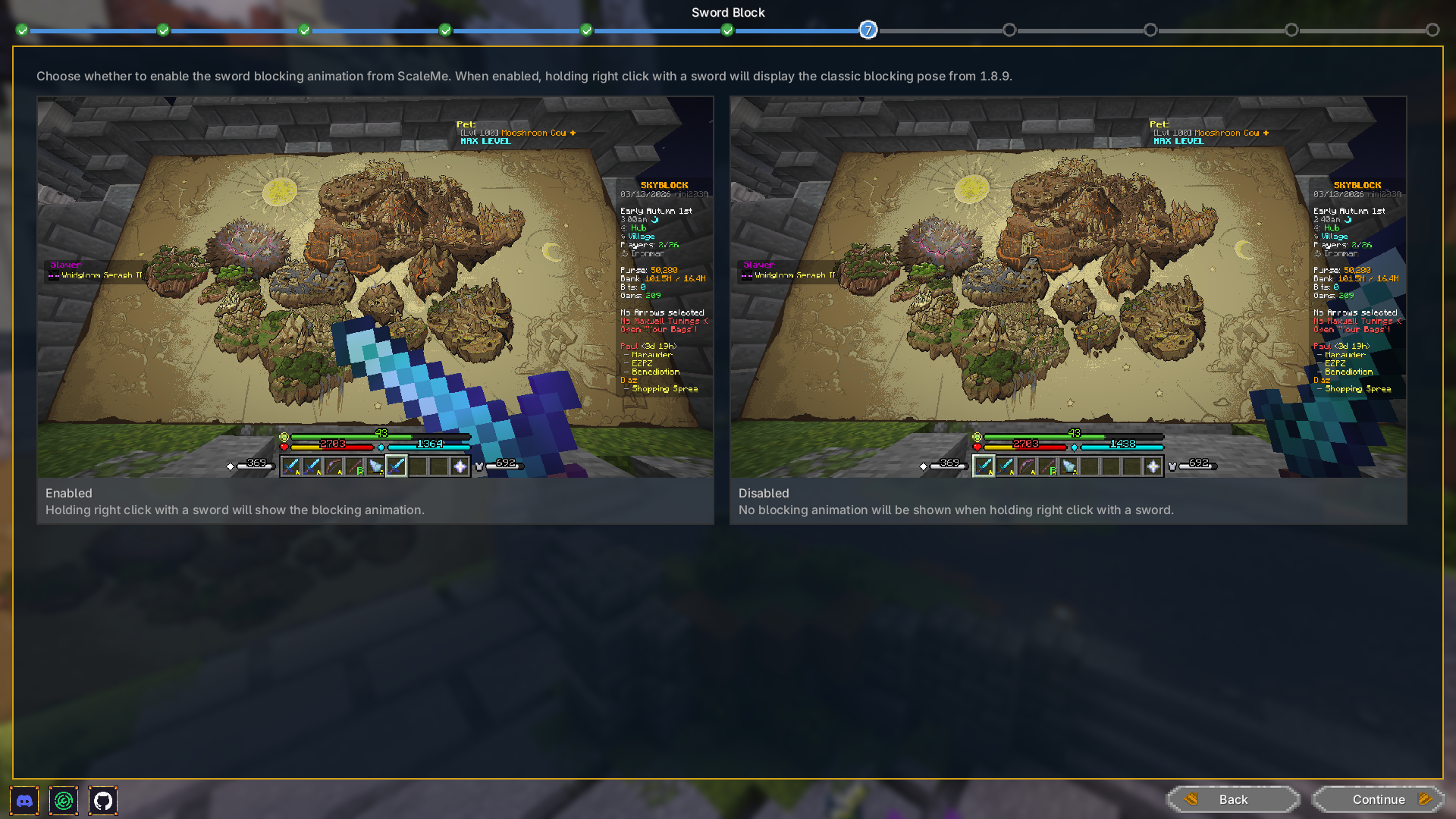 Welcome Wizard Page 7 Welcome Wizard - Page 7. Let's you configure Scale Me.
 -
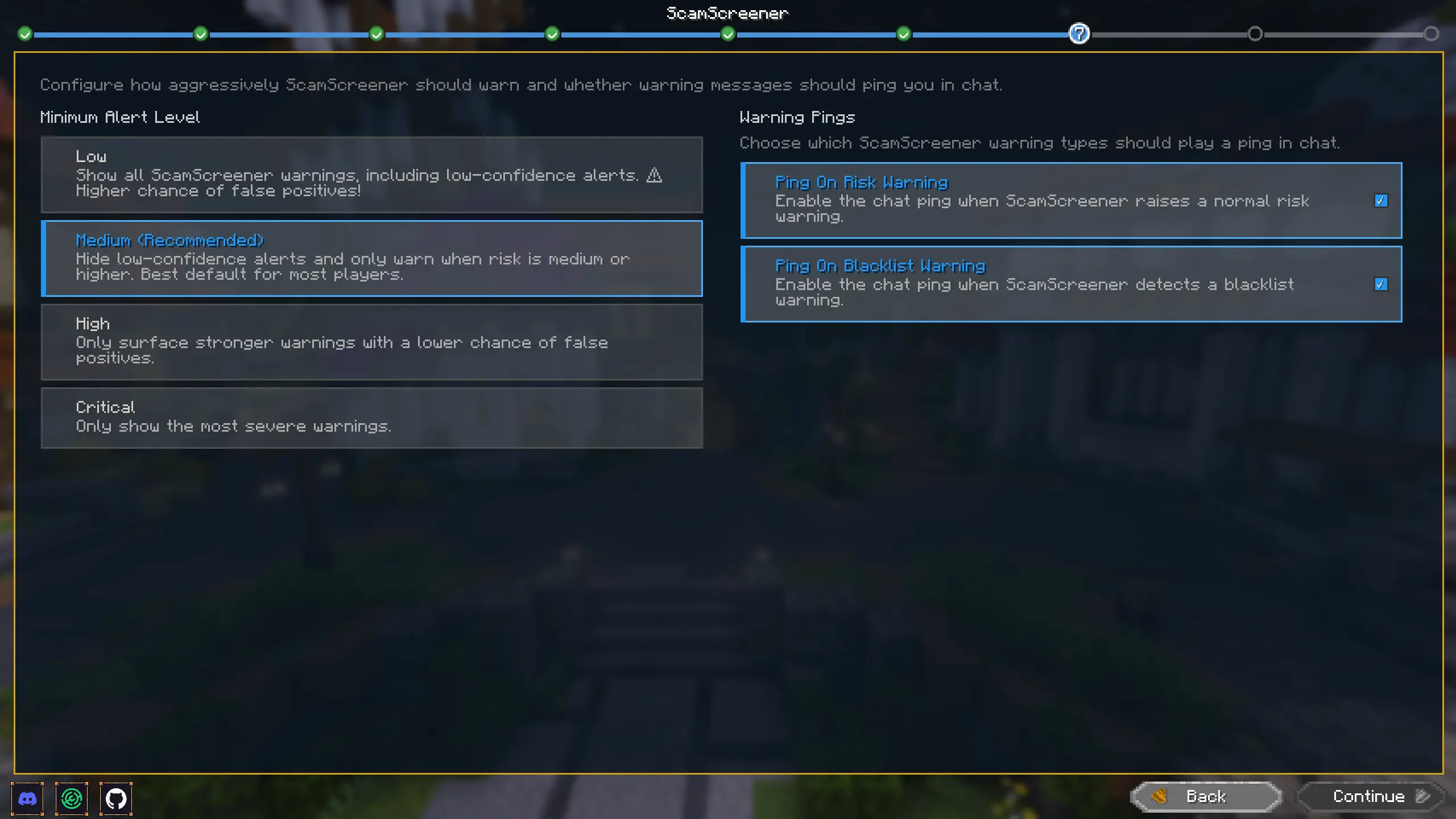 Welcome Wizard Page 8 Welcome Wizard - Page 8. Let's you configure Scam Screener.
 -
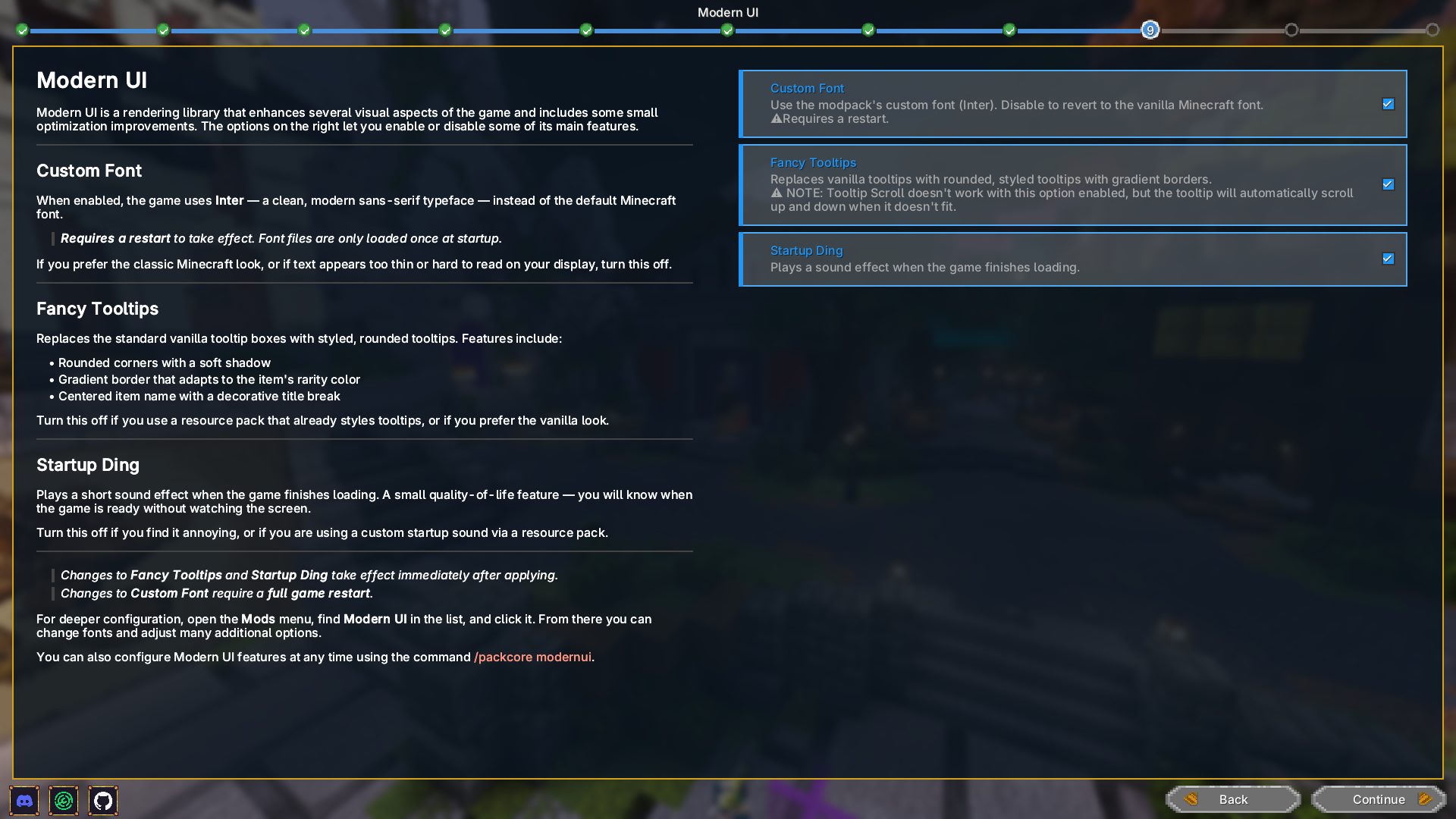 Welcome Wizard Page 9 Welcome Wizard - Page 12. Let's you configure Modern UI.
 -
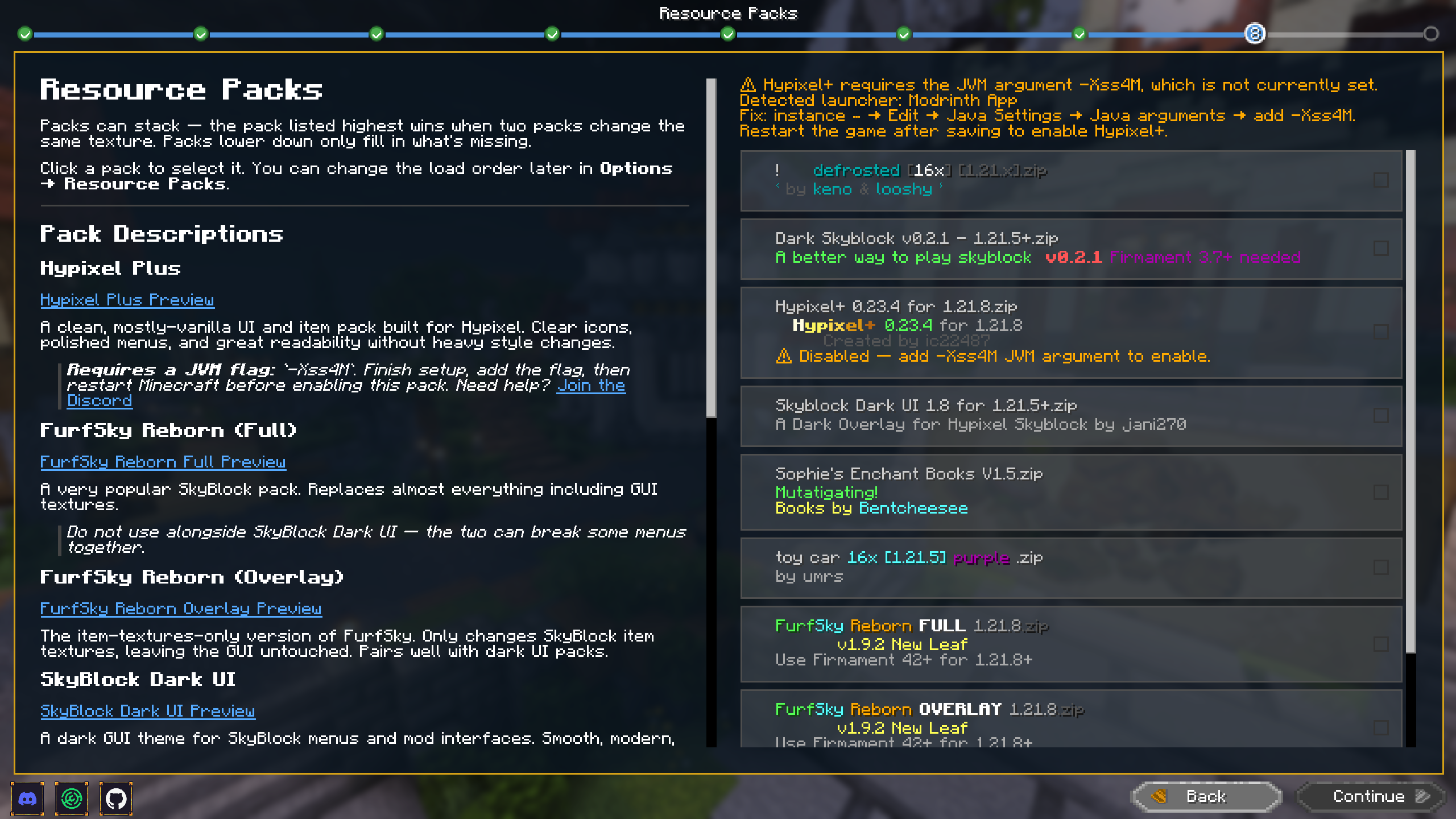 Welcome Wizard Page 10 Welcome Wizard - Page 10. Let's You choose Resource Packs to use.
 -
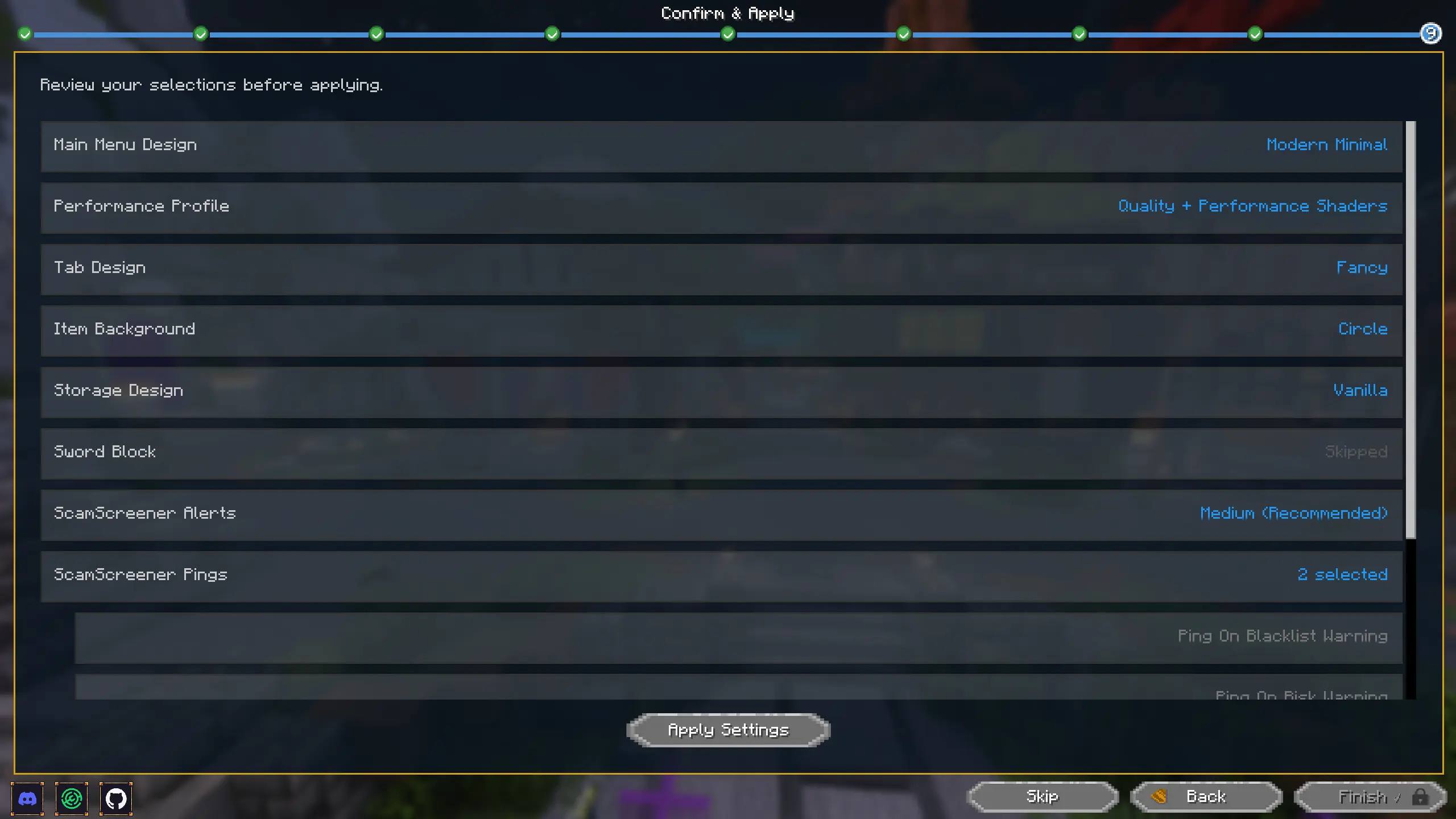 Welcome Wizard Page 11 Welcome Wizard - Page 11. Confirm and apply your choices.
 -
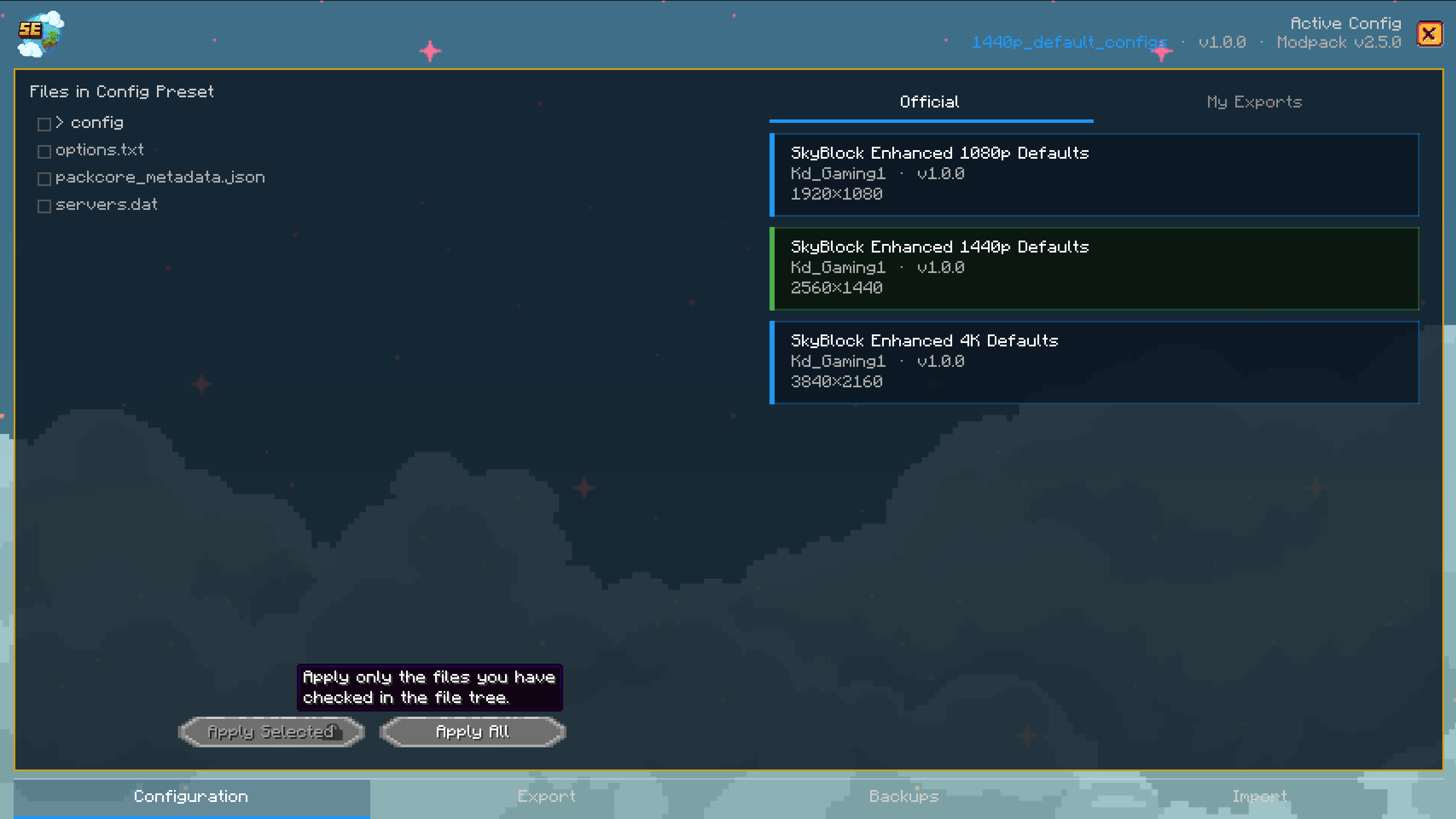 Configuration Menu Change between your default configs or exported configs with just a few clicks
 -
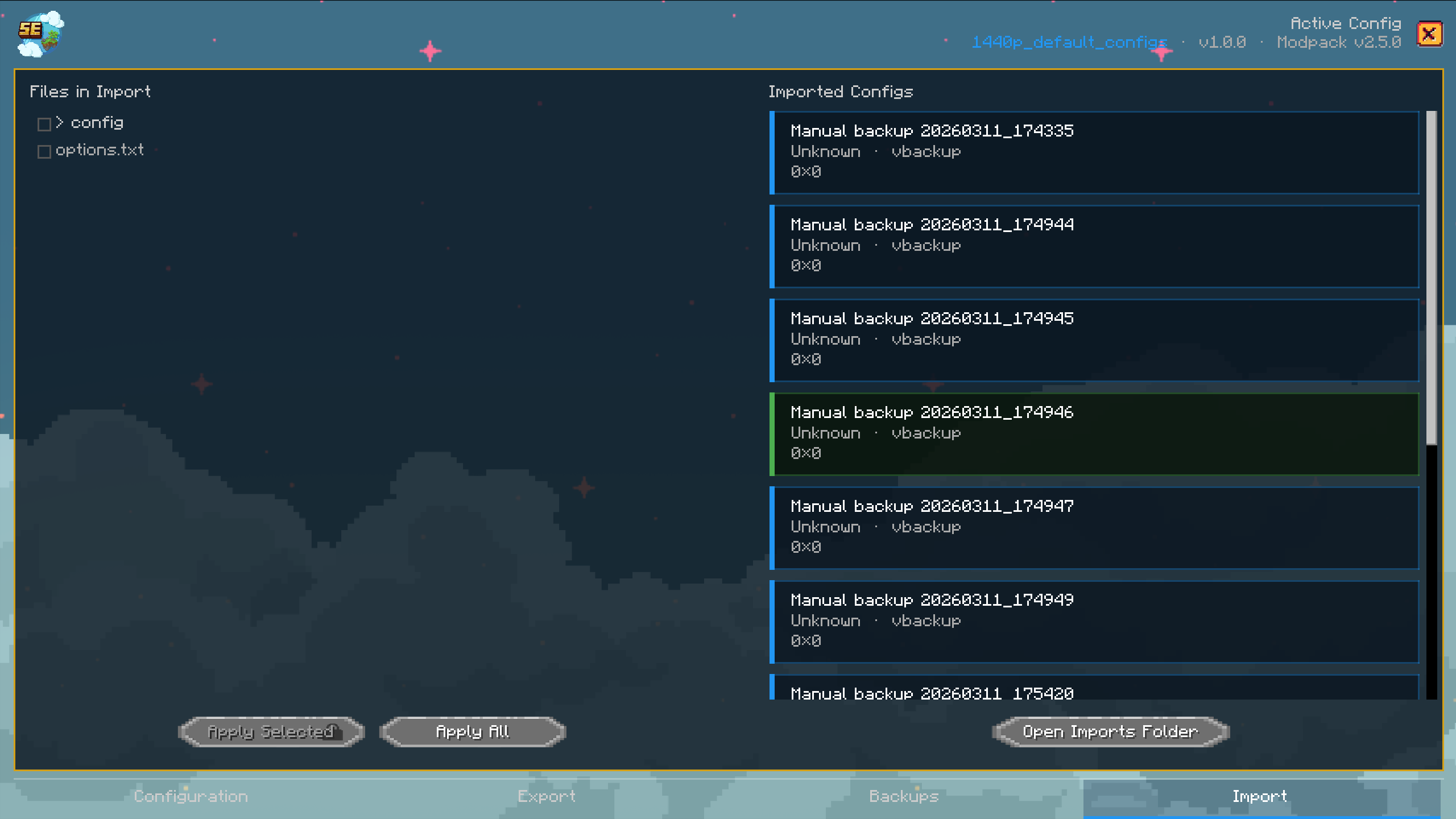 Import Menu Import configs from others easily by just opening the Import folder and placing the .zip file you got from a friend or the Fluxer/Discord server.
 -
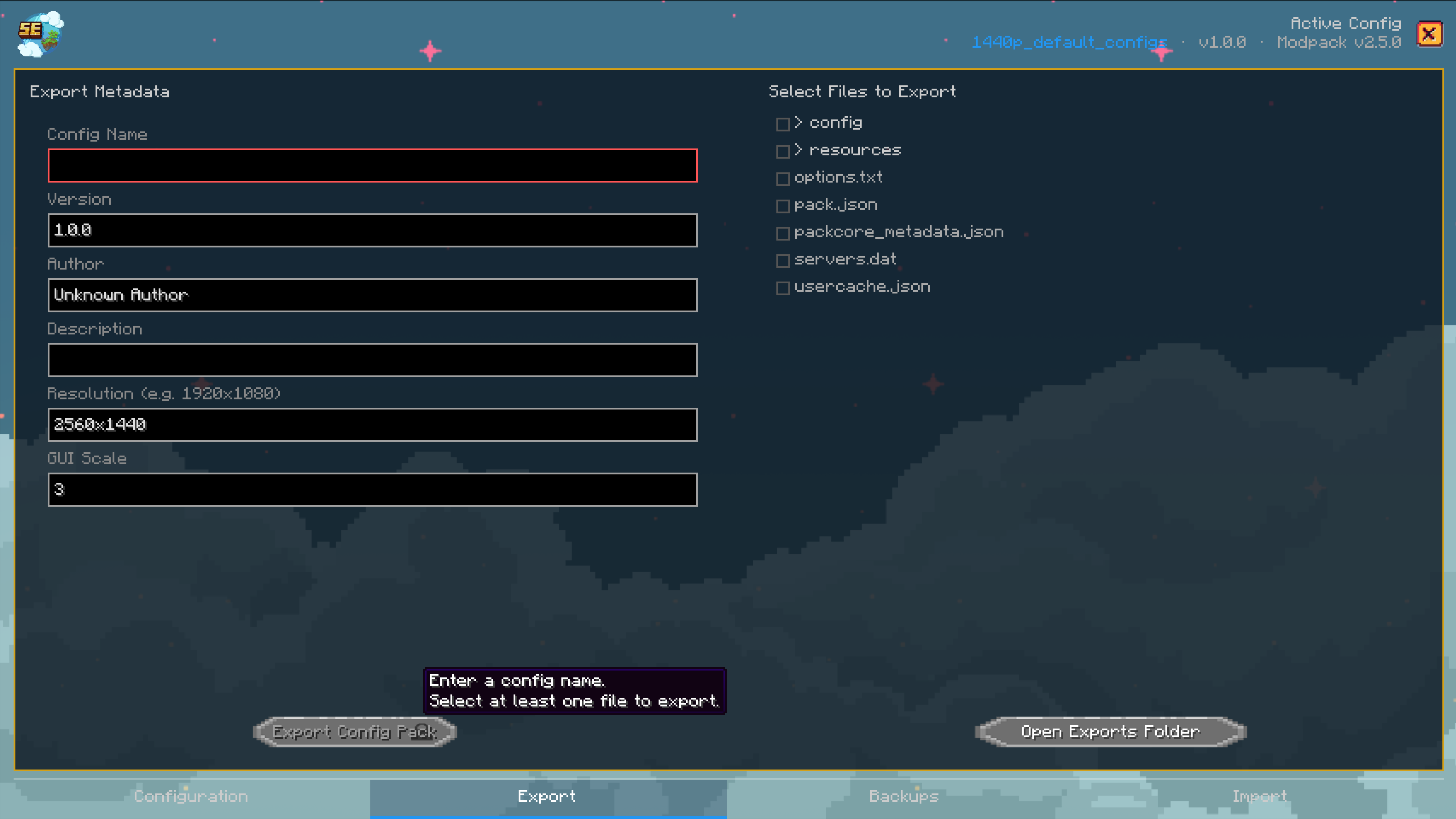 Export Menu Export your current config into a zip with metadata so you can later apply it or share it with others who can apply your settings
 -
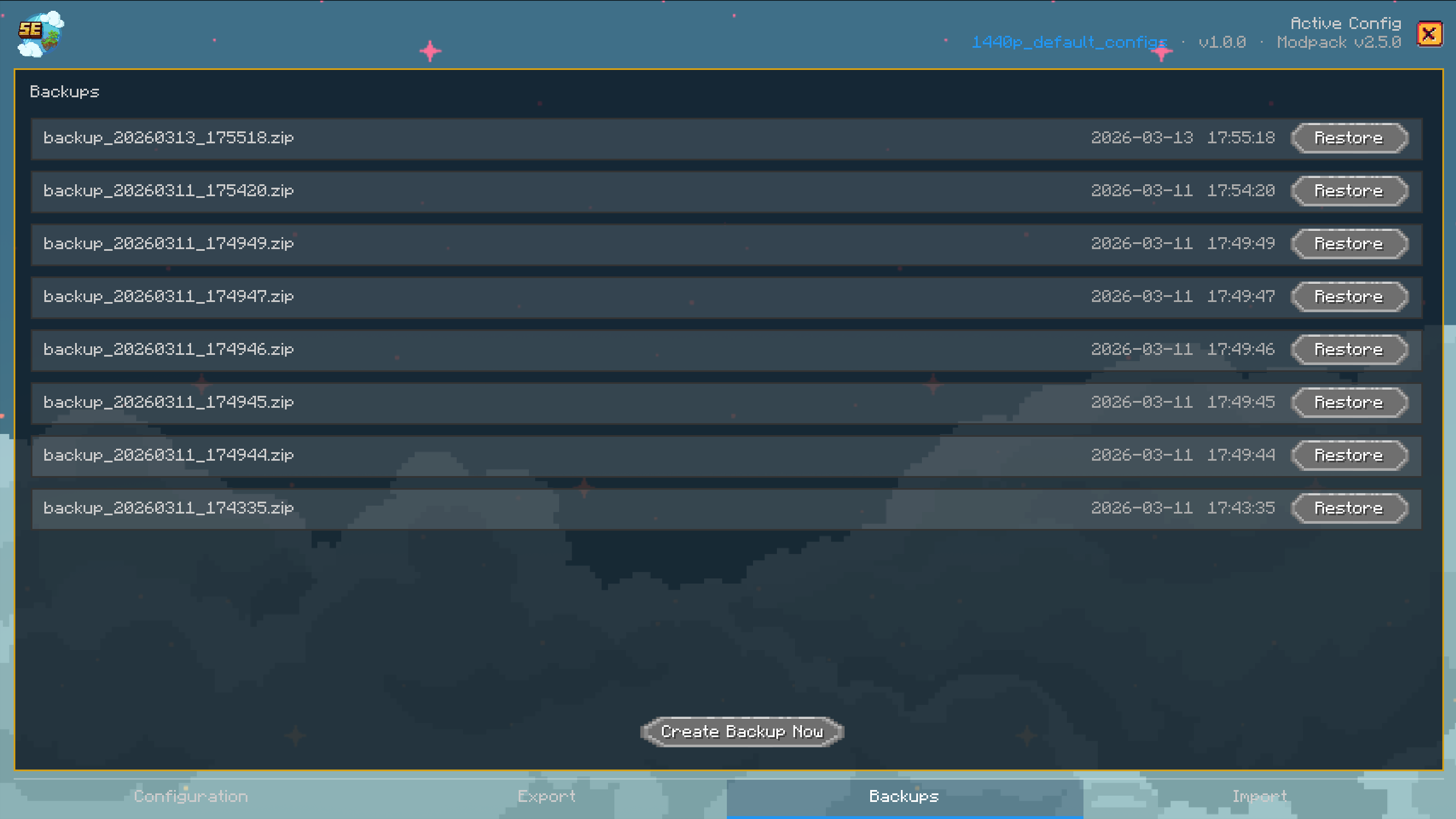 Backup Menu Backup and restore your configs! If you messed something up or your configs reset/broke without warning, have the modpack make automatic backups you can restore.
 -
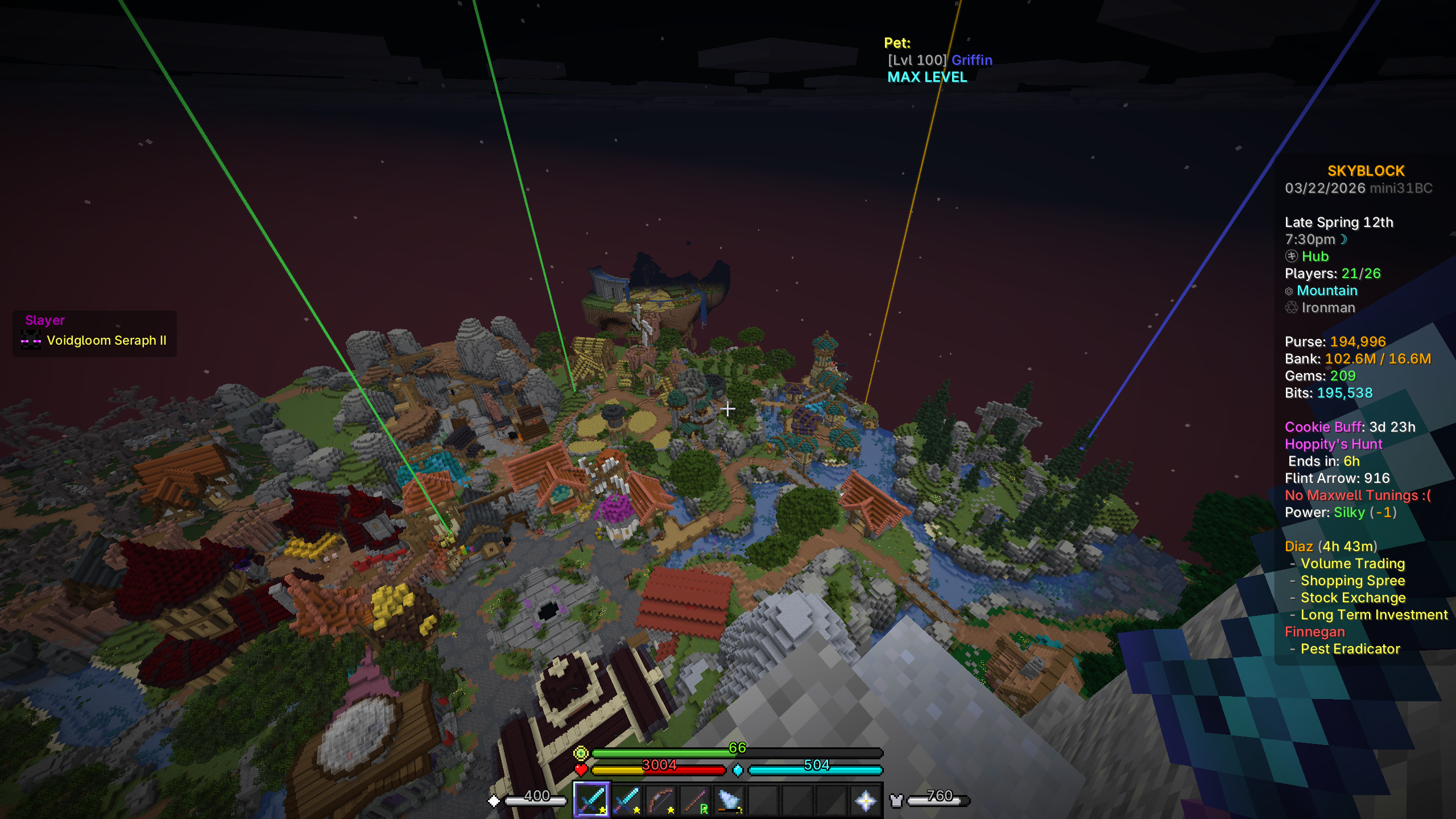 Hoppity's Hunt Egg locator Receive waypoints from other users how find Chocolate Rabbit Eggs
 -
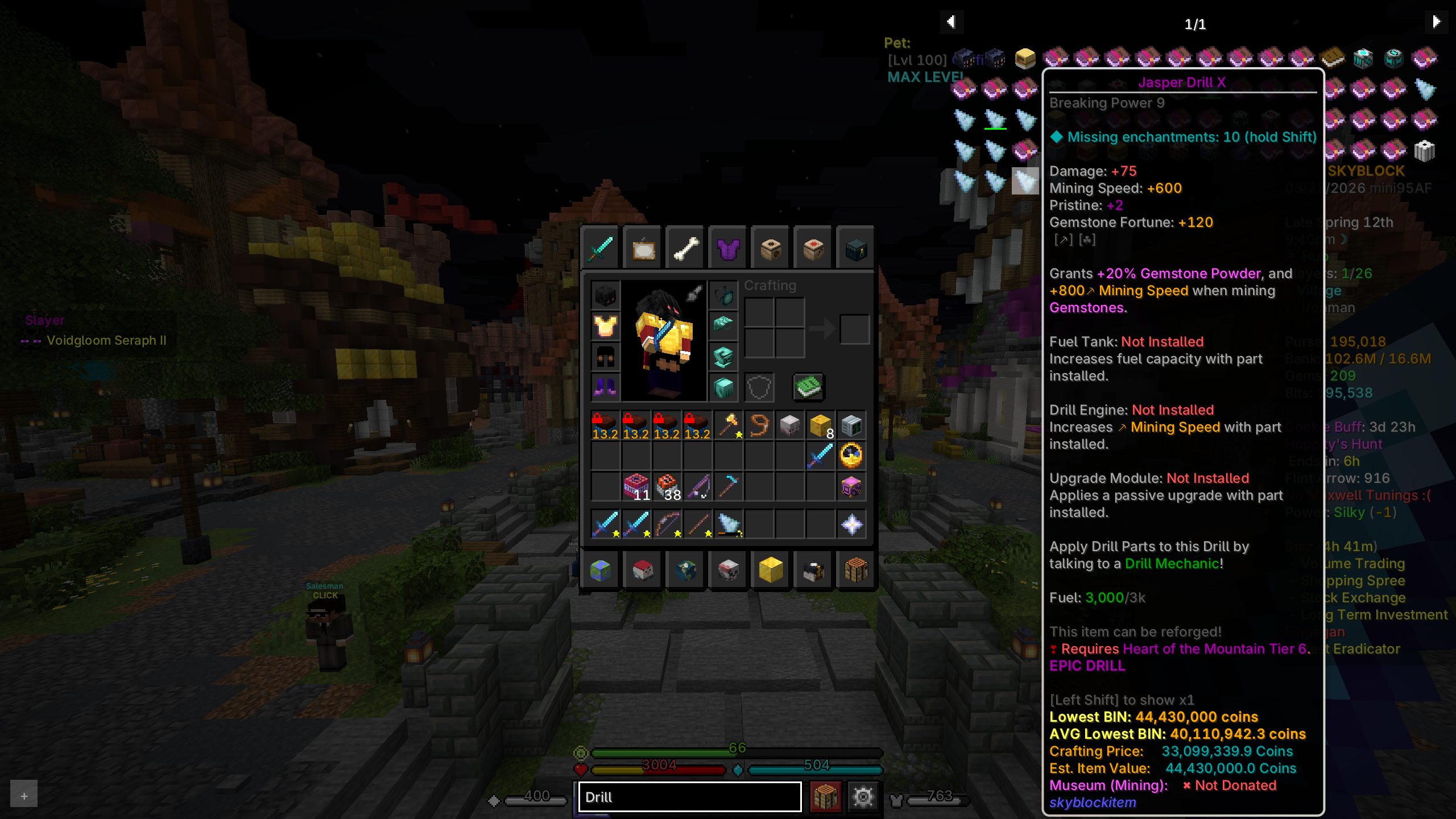 REI integration - Search for any item Search for any item you want, and click it to see its recipe or which mob drops it.
 -
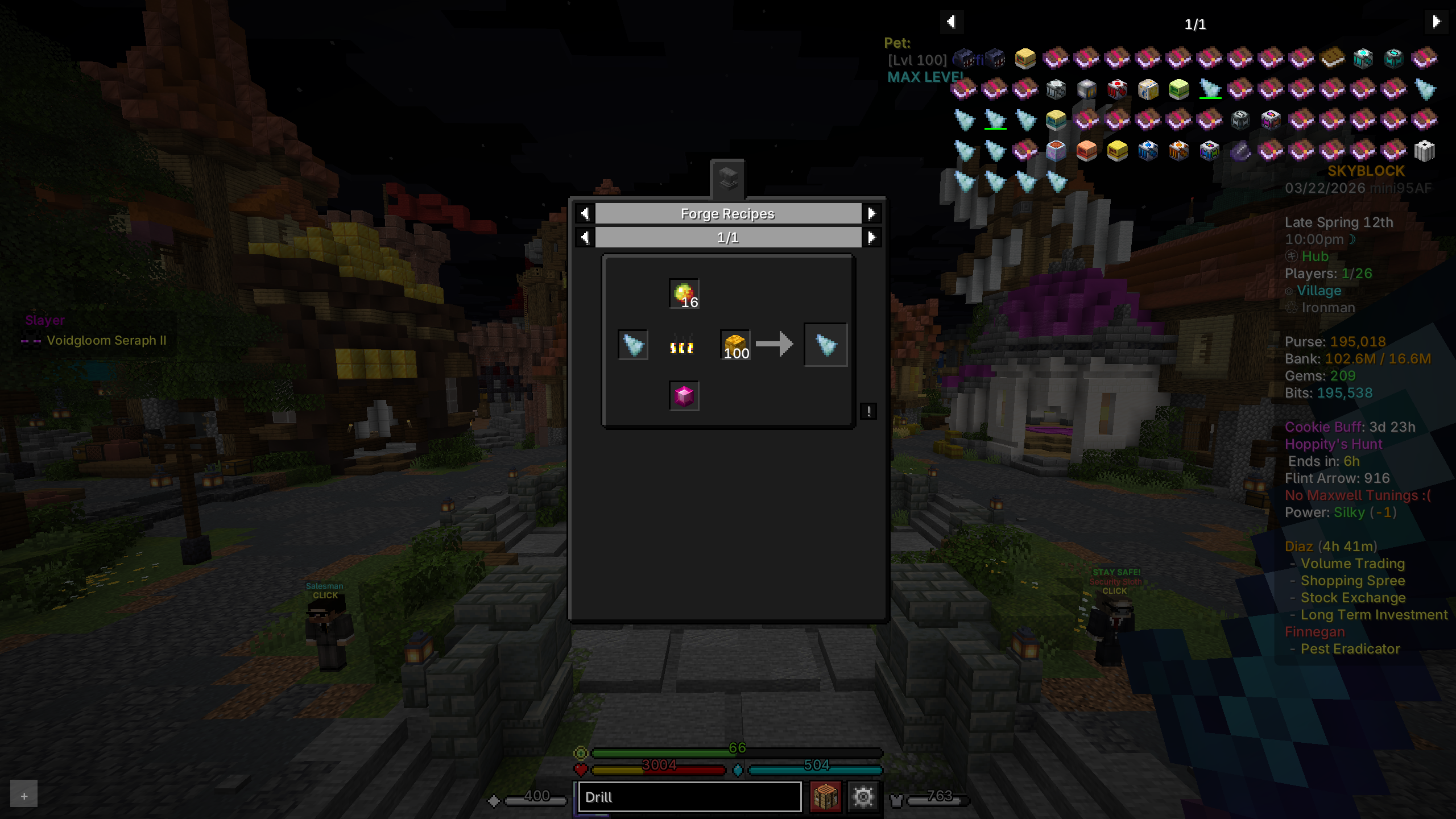 REI integration - See the repice for any item See the recipe for any item you may want to craft. No need to check the wiki.
 -
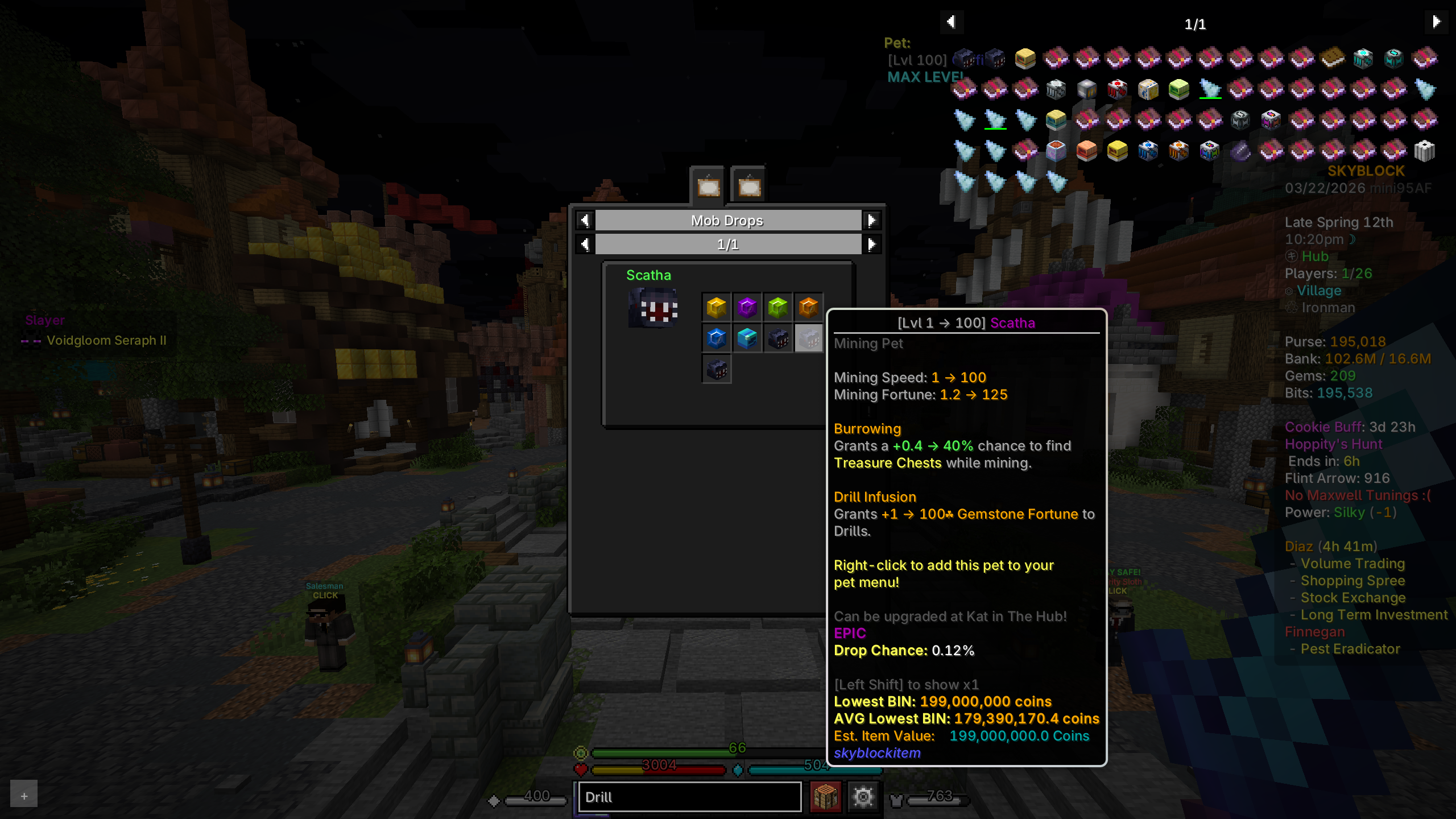 REI integration - See where an item drops from See where an item drops from and it drop chance. No need to check the wiki.
 -
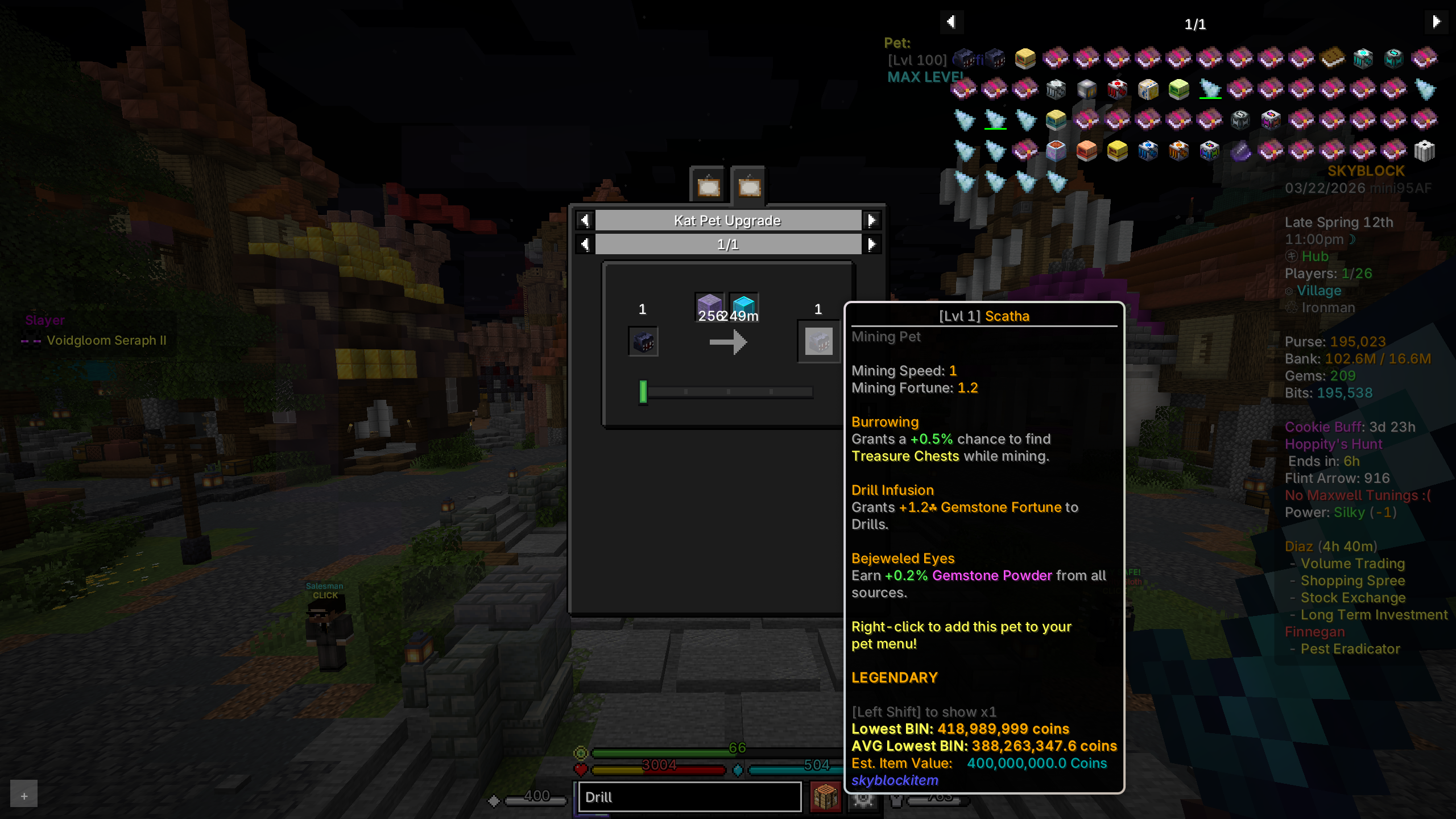 REI integration - See upgrade requirements for pets See upgrade requirements for pets. No need to check the wiki.
 -
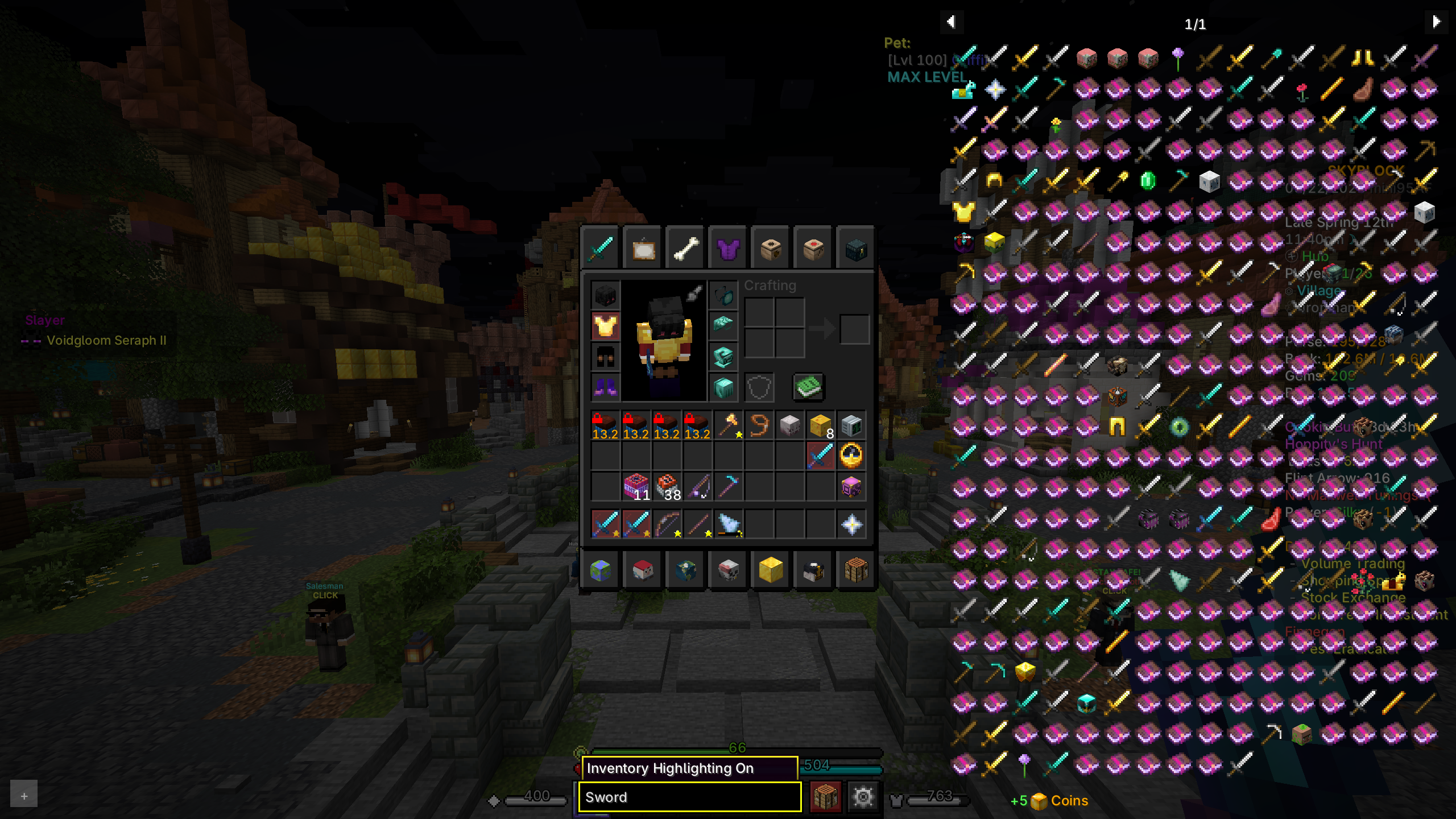 Locate any item in inventory Locate any item in inventory by double-clicking the search bar and typing the name of the item.
 -
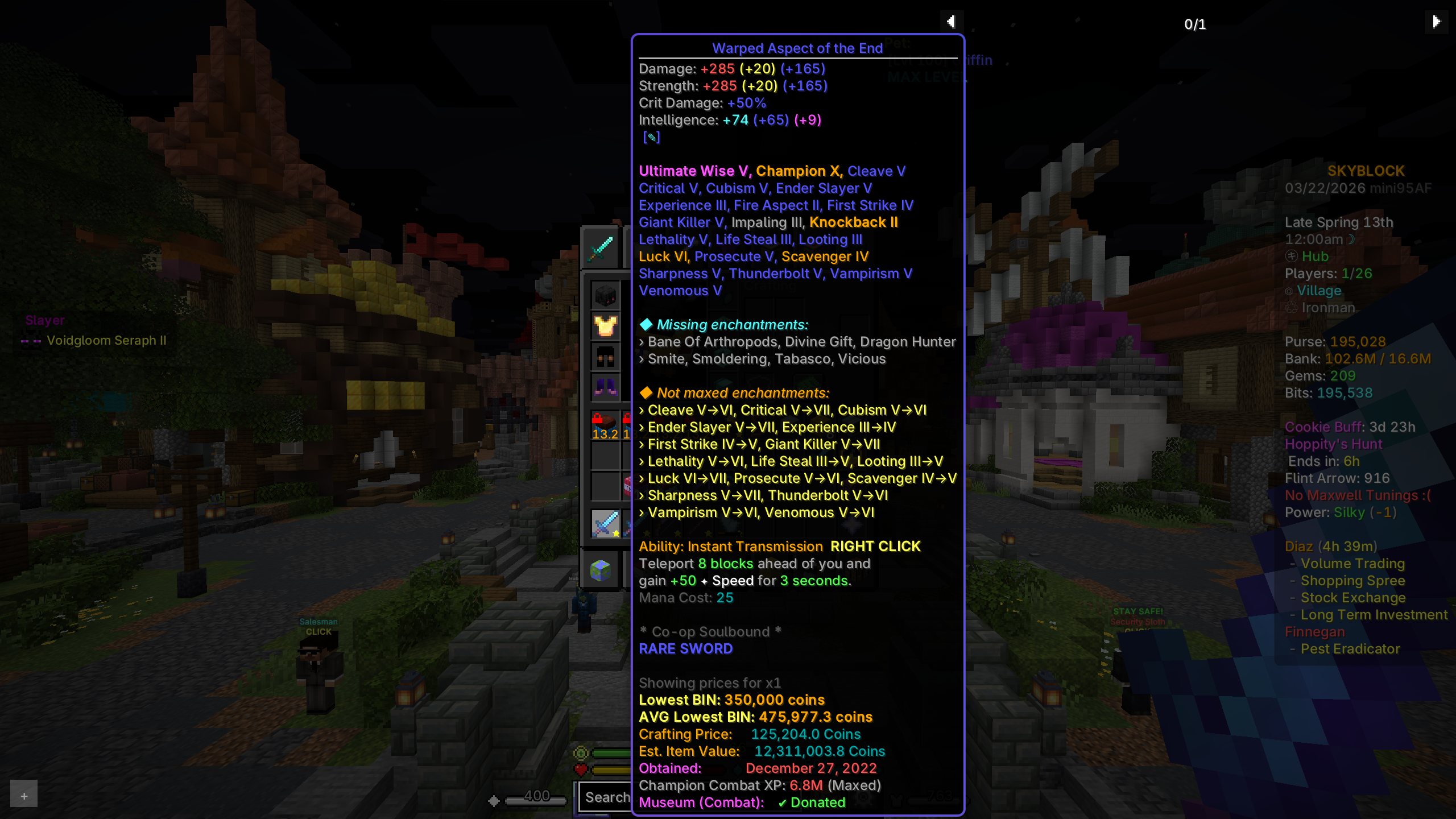 See missing enchants in tooltip See missing enchants in the tooltip and non-maxed enchants.
 -
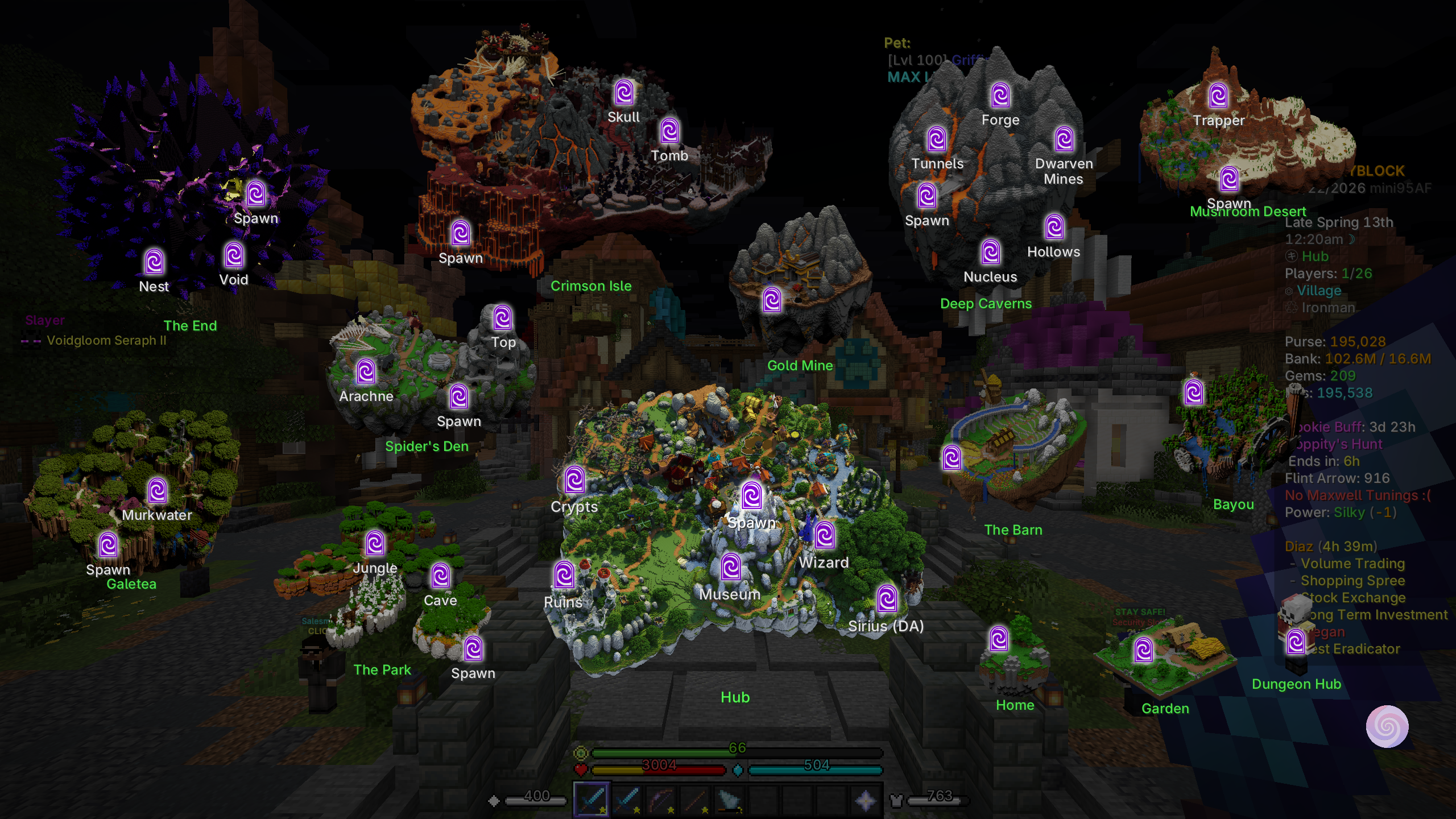 Modern Warp Menu Easily navigate around the SkyBlock world with modern warp menu, just click the location you want to travel to!
 -
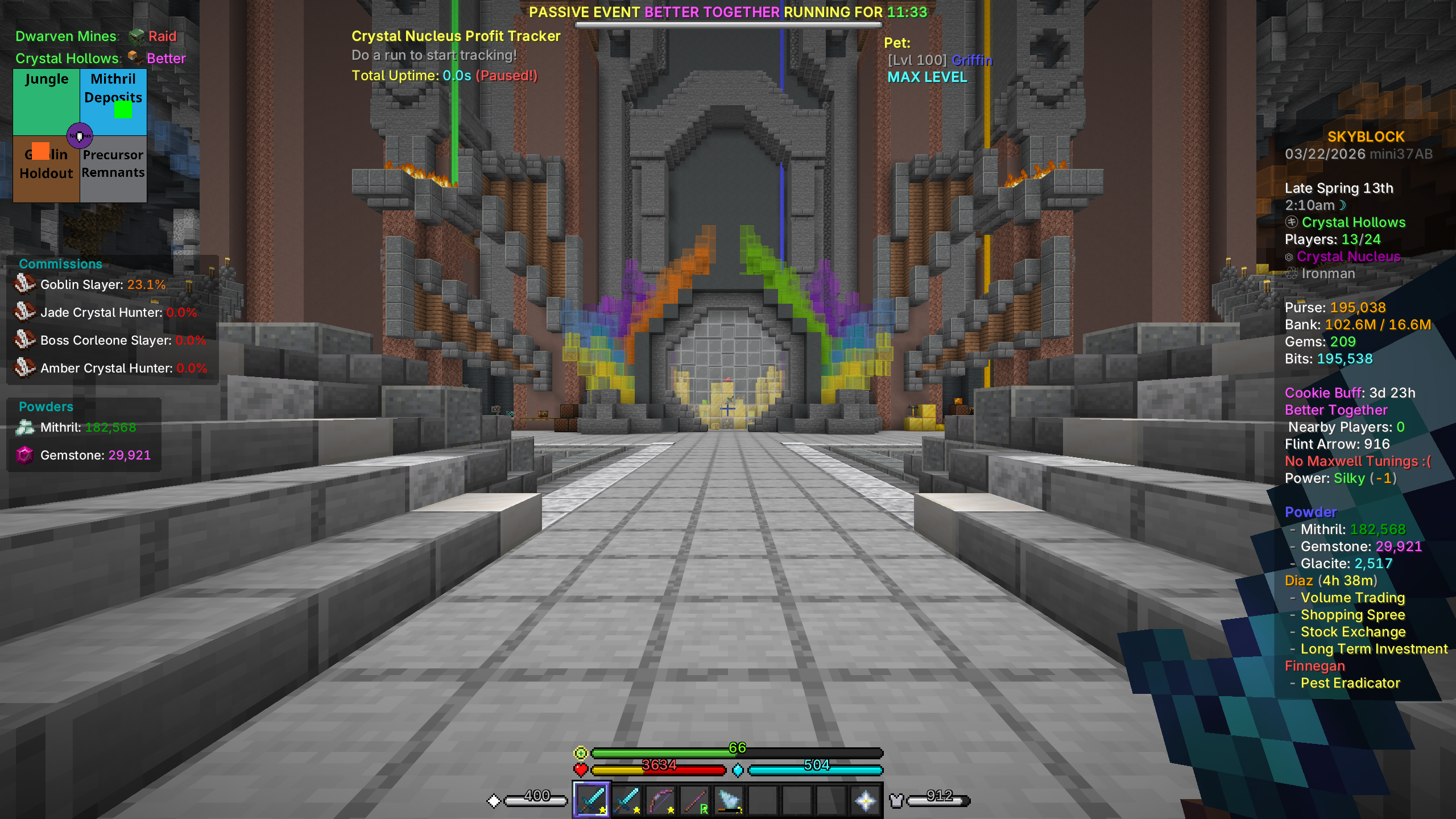 Tons of useful overlays on screen when you need them See useful overlays on screen when you need them. Example shows map for Crystal Hollows, commission and powder overlay, and Crystal Nucleus profit tracker.
 -
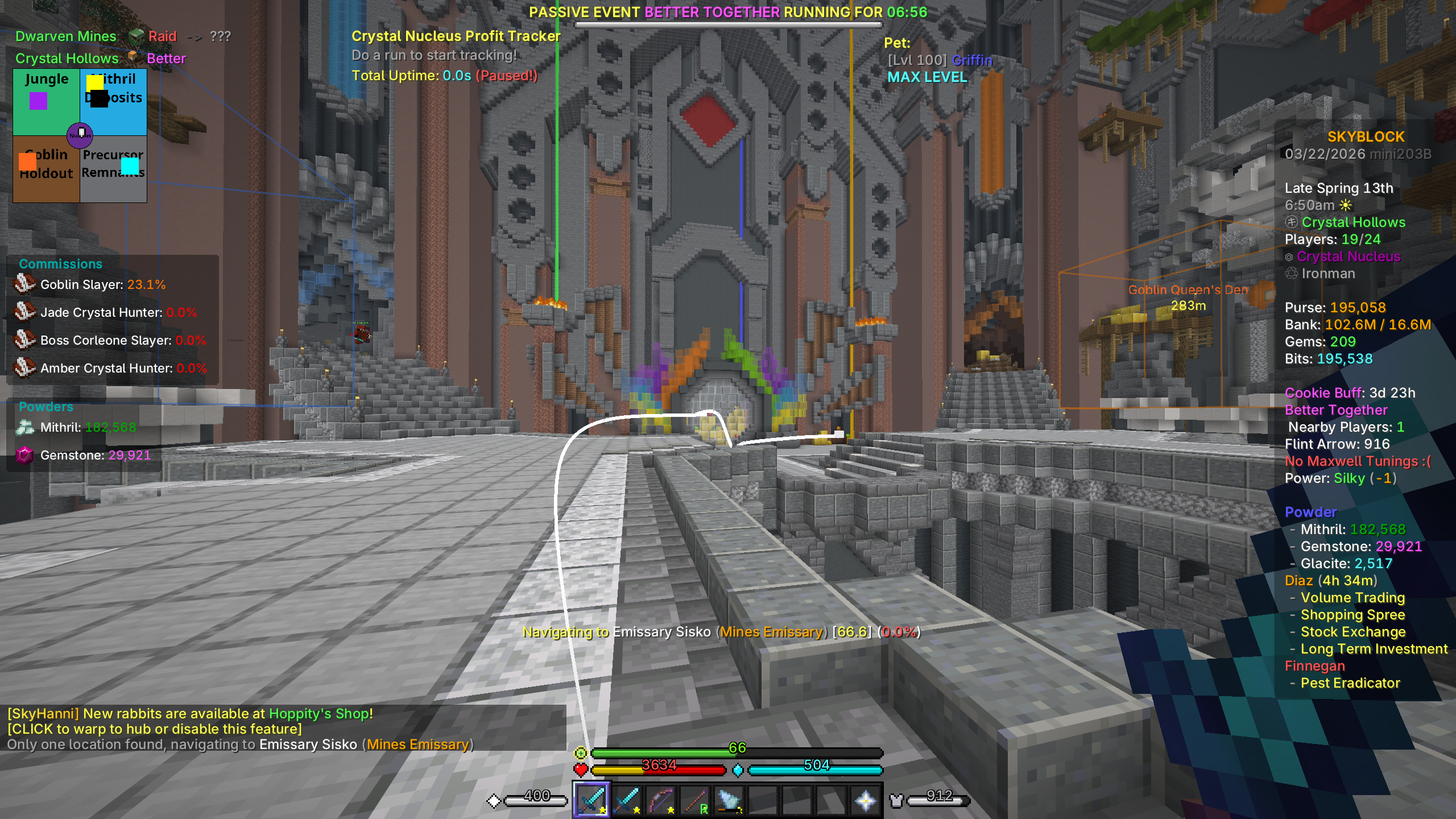 Navigate the world of Skyblock Navigate the world of Skyblock! Just type /shnav [npc name|coords] and hit Enter, then follow the line to your location. Navigation has never been easier.
 -
 Experimentation Table Solver Solver for the Experimentation Table. Easily do the Experimentation Table and get notified in chat when you have done enough rounds.
Versions
Files
Relations
Project Relations
More like this
Similar Modpacks
Suggestions use data such as tags, dependencies, dependents, descriptions, titles, and more to rank how much they overlap with this modpack.
On ModDex
Community snapshot
By the numbers
Statistics
 (opens in a new tab)
Get it on
Available Platforms
On ModDex
Community snapshot
By the numbers