Community listing page, reviews may not be monitored by the author.
Techno Hell

No reviews yet
You have 5 in game days to prepare before all hell breaks loose and you become hunted.

Community voices
Reviews
No reviews yet. Be the first to review this project!
Get it on
Available Platforms
About
Project Details
For authors
Embed Badge
If you're the author of this project, you can embed a live badge anywhere that supports HTML or Markdown. It updates automatically whenever ratings change.
Use HTML for any page that supports it, or Markdown for README files and Markdown-based descriptions.
Identifiers
Platform IDs
About
Description
Welcome to Techno Hell
You have 5 in game days to prepare. After this the mobs will be able to break almost any block in the game the only exceptions being obsidian and netherite.
Performance
There are lots of mods here. So the modpcak is pretty demanding to run.
As you can see from some of the screenshots below then render distance looks pretty high (thanks to Distant Horizons). This doesnt affect performance for the most part, but it does increase ram ussage. I'd reccoment a minimum of 4 Gigs if you disable Distant Horizons and 6 Gigs if you leave it on (the default).
Compatibility
I plan to keep worlds compatible atleast when moving up in versions so you should be relatively safe to play the same world when upgrading modpack versions.
Downloading and running the modpack
Just download the zip file for the version you want and load it into polymc, multimc or whatever client you want to use that is capable of downloading modpacks and launch it.
Running a server
There are server files provided alongside every version in the form of Dockerfiles. Building and running a server with Docker is probably the easiest way to run a server, but it's understandable if you're unfamiliar with it that you'd want to run the server another way. It is doable the files for aquiring the mods are in the download, but it will take more work on your part. More guidance on this can be found in the ReadMe.txt file included with the server download. The server has an included web map (thanks to Dynmap). You can access that by going to serverip:8123 in a web browser.
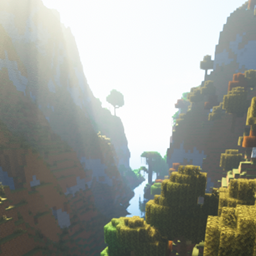
Heres some screenshots


Screenshots
Gallery
Versions
Files
Relations
Project Relations
More like this
Similar Modpacks
Suggestions use data such as tags, dependencies, dependents, descriptions, titles, and more to rank how much they overlap with this modpack.
On ModDex
Community snapshot
By the numbers
Statistics

Get it on
Available Platforms
On ModDex
Community snapshot
By the numbers