
Community listing page, reviews may not be monitored by the author.
Actually Amazing Config Screen


No reviews yet
A settings screen library for Fabric and NeoForge mods: tabs, folding sections, smooth scrolling and a card that explains each setting with a picture.

Community voices
Reviews
No reviews yet. Be the first to review this project!
Get it on
Available Platforms
Compatibility
Supported Environments
Runs entirely on the client. Works on vanilla servers.
About
Project Details
For authors
Embed Badge
If you're the author of this project, you can embed a live badge anywhere that supports HTML or Markdown. It updates automatically whenever ratings change.
Use HTML for any page that supports it, or Markdown for README files and Markdown-based descriptions.
Identifiers
Platform IDs
About
Description

Actually Amazing Config Screen


A settings screen library for Minecraft mods on Fabric and NeoForge.
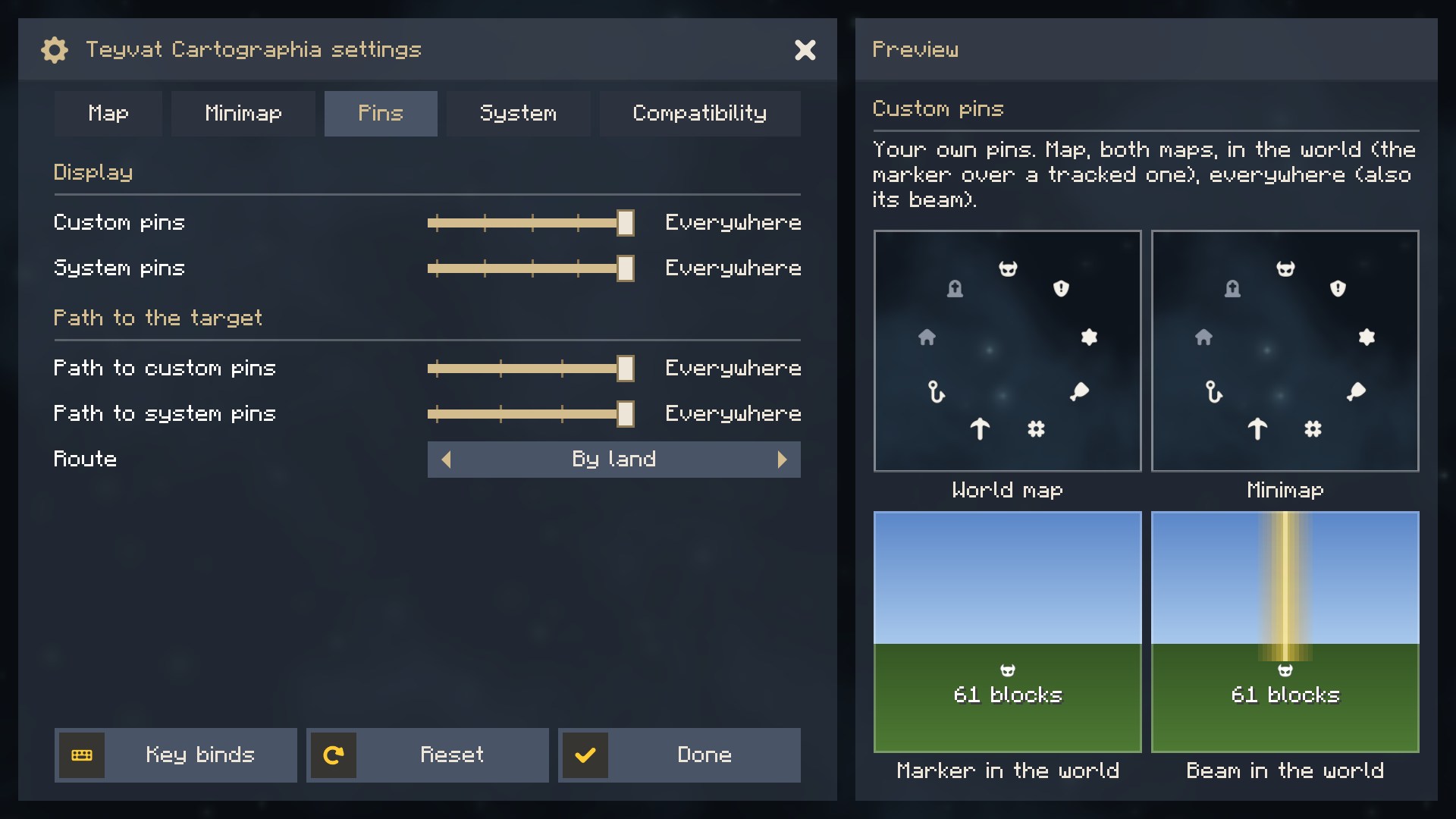
Tabs, sections that fold, smooth scrolling, and a card beside the list that explains the setting under the pointer
with a picture of what it does.


For players
You do not need to install anything. The library comes inside the mods that use it, such as Teyvat Cartographia. It shows in the mod list as a library, and the settings button of each such mod opens its screen.
What the screen does
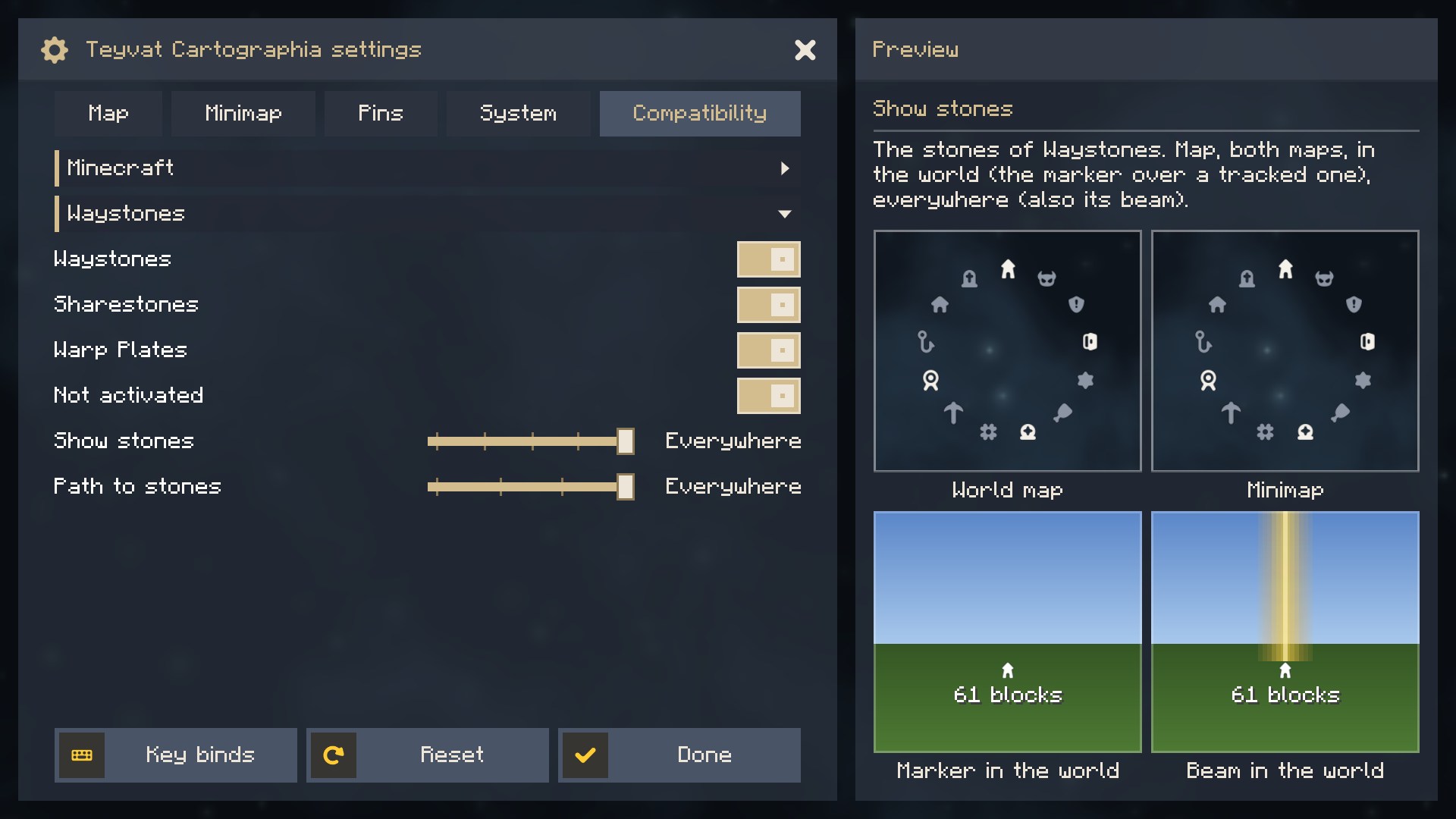
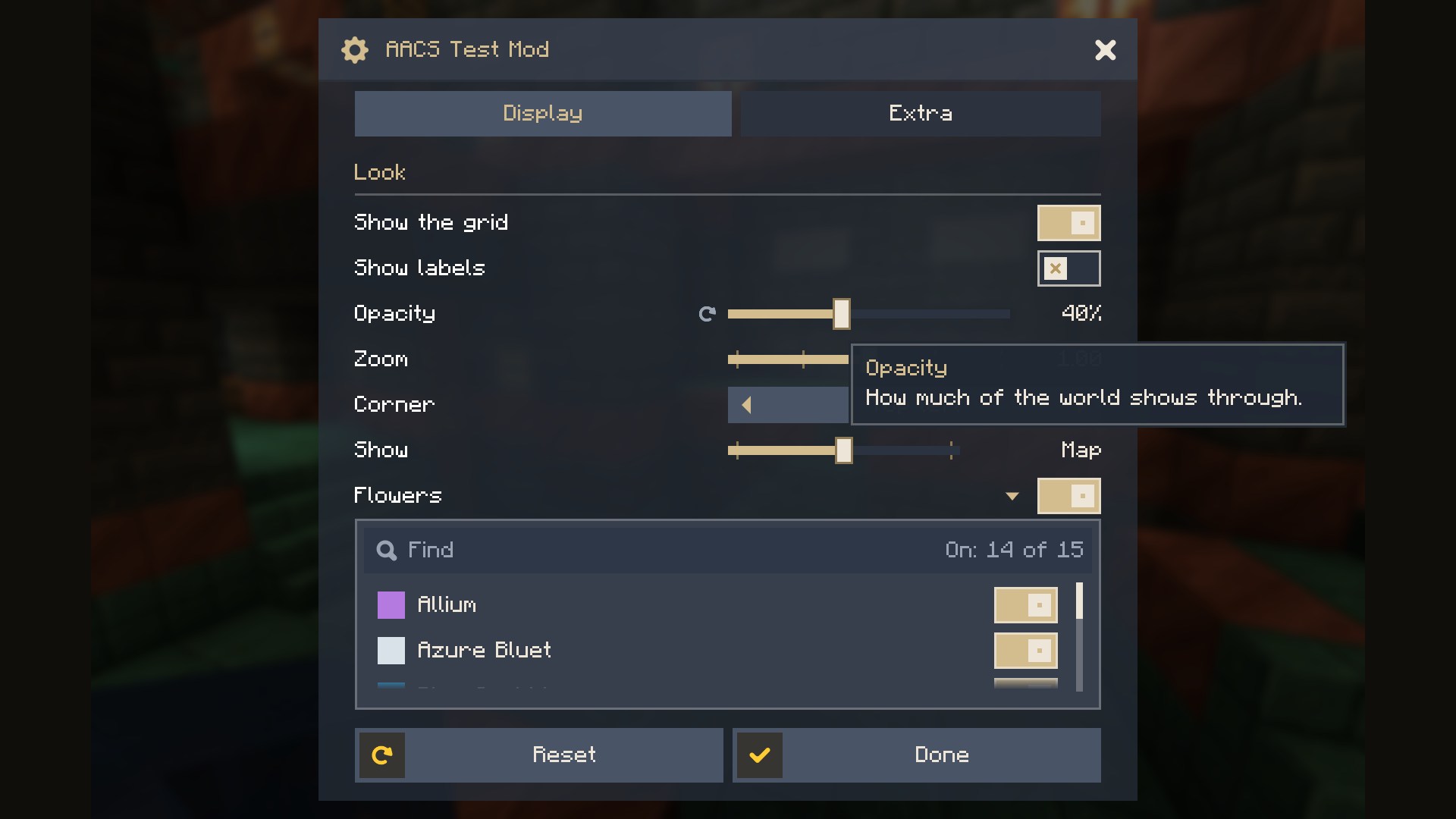
- Tabs as wide as their titles (more than fit scroll between two arrows), sections, and sub-sections that fold.
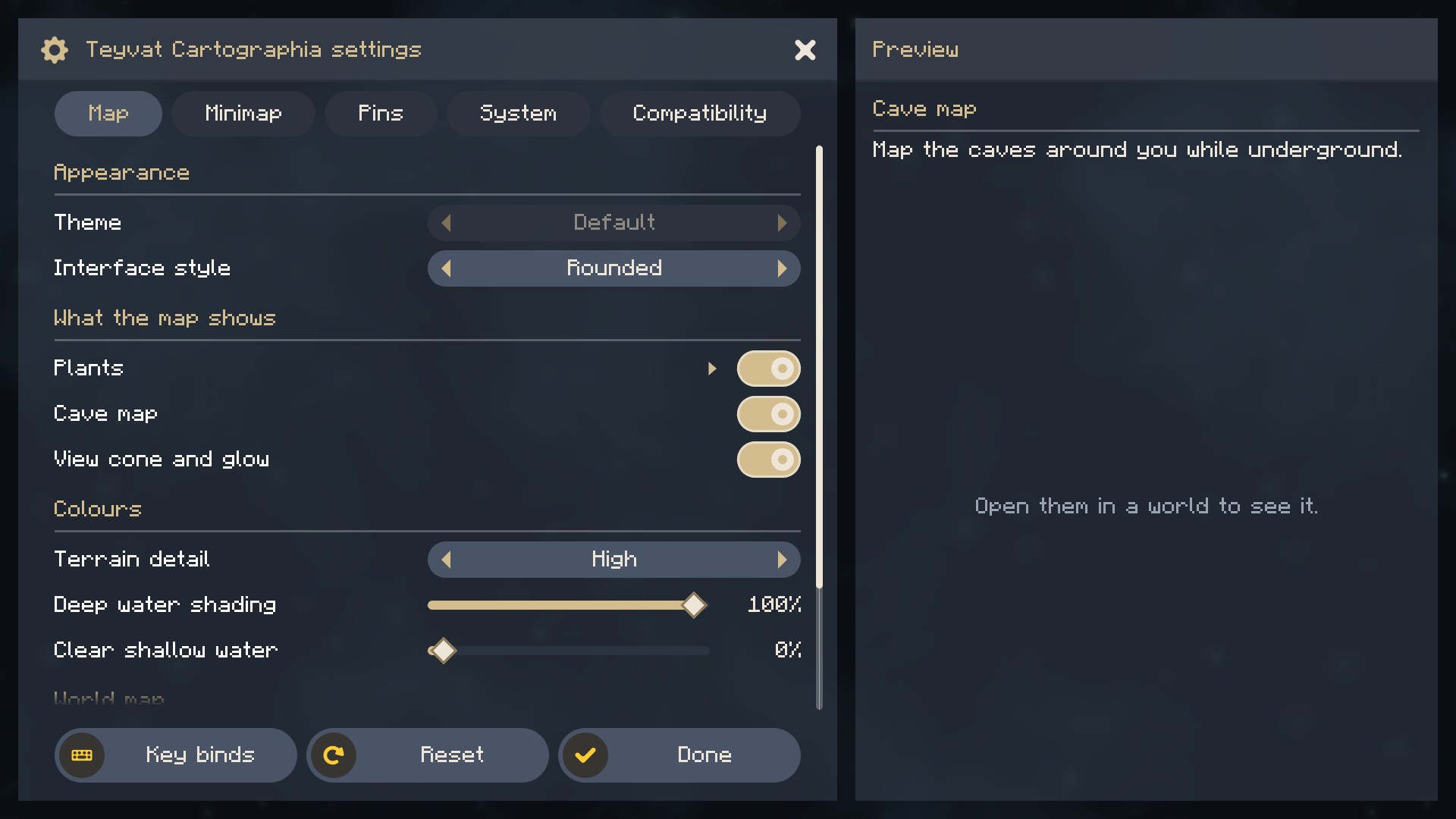
- Smooth scrolling without steps: the wheel moves a row's distance, the scroll bar can be dragged freely, and rows cut by the edges of the list dissolve.
- The card beside the list: the name and description of the setting under the pointer, and a picture of what it does, drawn by the mod. In a window too narrow for the card, the description shows as a tooltip by the row.
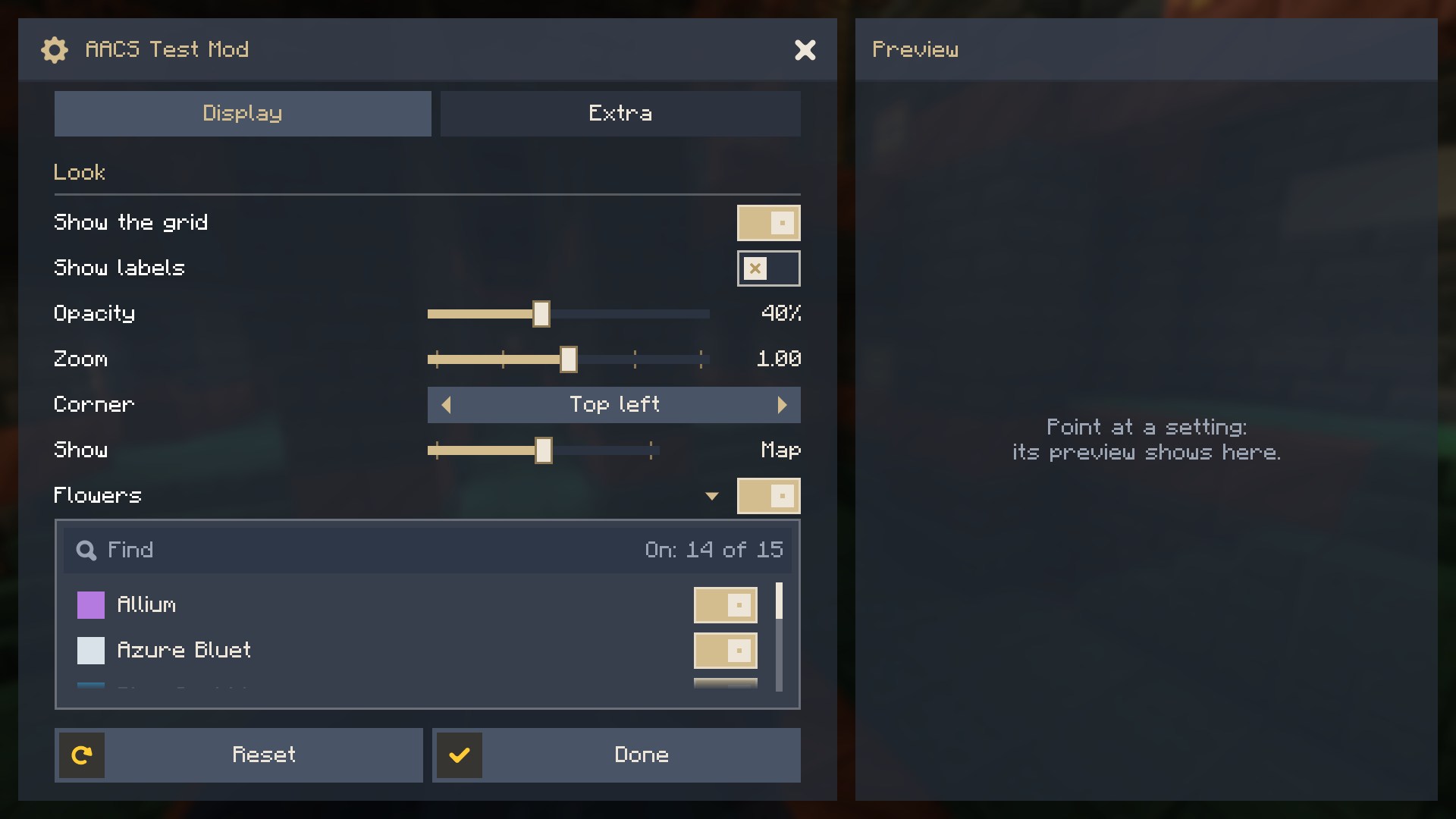
- Rows: switches, sliders of numbers (with a unit, fixed steps or words), choices in steps on a slider, choices with arrows, a switch with a searchable list of switches under it, and a link at the right end that hands the screen to the mod, say to open a window of its own.
- A reset icon beside a setting you changed, and Reset and Done at the bottom.
- Rectangular or rounded shapes, the mod's own colours and background, and the GUI scale held at a size that fits the window while the screen is open.
- The settings button in Mod Menu and in the mod list of NeoForge.
- Sub-sections from other mods: a mod can open a tab to others, and they add their own settings there.
For mod authors
Note Since 1.0.0 the API in
net.tapacywka.aacs.apiis stable: it only grows, and older methods are kept working (marked@Deprecated) rather than removed, because the loader keeps only the newest copy of the library among all the mods that embed it.Aacs.API_VERSIONtells which version is running.
Embed the library in your JAR (Fabric include, NeoForge jarJar), so players have nothing to install. The files are
on Modrinth Maven:
repositories {
    maven { url = 'https://api.modrinth.com/maven' }
}

dependencies {
    // The game after +mc: 1.21.1, 26.1.2, 26.2 or 26.3 (on 26.x Loom takes implementation, not modImplementation)
    // Fabric (Loom)
    modImplementation 'maven.modrinth:actually-amazing-config-screen:1.2.0+mc1.21.1-fabric'
    include 'maven.modrinth:actually-amazing-config-screen:1.2.0+mc1.21.1-fabric'
    // NeoForge (ModDevGradle)
    jarJar(implementation('maven.modrinth:actually-amazing-config-screen:1.2.0+mc1.21.1-neoforge'))
}
The settings are values in a JSON file of your mod, described by a builder; the screen is laid out over them:
ConfigFile.Builder b = ConfigFile.builder();
b.push("map");                                              // a section of the file: { "map": { ... } }
BoolValue grid = b.bool("grid", true);
IntValue opacity = b.integer("opacity", 80, 0, 100);
b.pop();
ConfigFile file = b.build();
file.load(configDir.resolve("mymod-client.json"));

AacsScreen screen = AacsScreen.builder("mymod", file)
        .tab("mymod.config.tab.display", t -> t
                .section("mymod.config.section.look")
                .toggle(grid)
                .slider(opacity, s -> s.unit("%"))
                .preview((g, row, x, y, w, h, partialTick) -> { /* draw a picture of the setting */ }))
        .build();                                           // also the settings button in the mod lists

boolean showGrid = grid.get();                              // read where you need it; changes count at once
Minecraft.getInstance().setScreen(screen.open(parent));
Texts come from your lang files: a row's name mymod.config.<key> and its description mymod.config.<key>.tooltip.
Another mod can add a sub-section to a tab you opened to others:
.tab("mymod.config.tab.compat", t -> t.openTo("compatibility"))  // in your screen

AacsScreen.extend("mymod", "compatibility", "othermod", otherFile, t -> t.toggle(otherValue))  // in the other mod
        .shownIf(() -> isOtherThingLoaded);
Compatibility
- Minecraft 1.21.1, Fabric (Fabric Loader 0.16 or newer, no Fabric API needed) and NeoForge 21.1.
- The Fabric file also runs on NeoForge through Sinytra Connector.
- Minecraft 26.1.2, 26.2 and 26.3 (Java 25), Fabric and NeoForge.
Building
./gradlew build builds both JARs (fabric/build/libs, neoforge/build/libs) and runs the unit tests;
./gradlew publishToMavenLocal puts net.tapacywka.aacs:aacs-common, aacs-fabric and aacs-neoforge in the local
Maven repository. ./gradlew :fabric:runClient and :neoforge:runClient open a game with a small test mod that shows
every kind of row.
License
MIT. The icons are from Nieobie's Game Icon Pack (CC0).
Actually Amazing Config Screen
A settings screen library for Minecraft mods on Fabric and NeoForge.
Tabs, sections that fold, smooth scrolling, and a card beside the list that explains the setting under the pointer
with a picture of what it does.
For players
You do not need to install anything. The library comes inside the mods that use it, such as Teyvat Cartographia. It shows in the mod list as a library, and the settings button of each such mod opens its screen.
What the screen does
- Tabs as wide as their titles (more than fit scroll between two arrows), sections, and sub-sections that fold.
- Smooth scrolling without steps: the wheel moves a row's distance, the scroll bar can be dragged freely, and rows cut by the edges of the list dissolve.
- The card beside the list: the name and description of the setting under the pointer, and a picture of what it does, drawn by the mod. In a window too narrow for the card, the description shows as a tooltip by the row.
- Rows: switches, sliders of numbers (with a unit, fixed steps or words), choices in steps on a slider, choices with arrows (over one setting, or since 1.3.0 named options the mod keeps its own way), a switch with a searchable list of switches under it, and a link at the right end that hands the screen to the mod, say to open a window of its own.
- A reset icon beside a setting you changed, and Reset and Done at the bottom.
- Rectangular or rounded shapes, the mod's own colours and background, and the GUI scale held at a size that fits the window while the screen is open.
- The settings button in Mod Menu and in the mod list of NeoForge.
- Sub-sections from other mods: a mod can open a tab to others, and they add their own settings there.
For mod authors
Note Since 1.0.0 the API in
net.tapacywka.aacs.apiis stable: it only grows, and older methods are kept working (marked@Deprecated) rather than removed, because the loader keeps only the newest copy of the library among all the mods that embed it.Aacs.API_VERSIONtells which version is running.
Embed the library in your JAR (Fabric include, NeoForge jarJar), so players have nothing to install. The files are
on Modrinth Maven:
repositories {
    maven { url = 'https://api.modrinth.com/maven' }
}

dependencies {
    // The game after +mc: 1.21.1, 26.1.2, 26.2 or 26.3 (on 26.x Loom takes implementation, not modImplementation)
    // Fabric (Loom)
    modImplementation 'maven.modrinth:actually-amazing-config-screen:1.3.0+mc1.21.1-fabric'
    include 'maven.modrinth:actually-amazing-config-screen:1.3.0+mc1.21.1-fabric'
    // NeoForge (ModDevGradle)
    jarJar(implementation('maven.modrinth:actually-amazing-config-screen:1.3.0+mc1.21.1-neoforge'))
}
The settings are values in a JSON file of your mod, described by a builder; the screen is laid out over them:
ConfigFile.Builder b = ConfigFile.builder();
b.push("map");                                              // a section of the file: { "map": { ... } }
BoolValue grid = b.bool("grid", true);
IntValue opacity = b.integer("opacity", 80, 0, 100);
b.pop();
ConfigFile file = b.build();
file.load(configDir.resolve("mymod-client.json"));

AacsScreen screen = AacsScreen.builder("mymod", file)
        .tab("mymod.config.tab.display", t -> t
                .section("mymod.config.section.look")
                .toggle(grid)
                .slider(opacity, s -> s.unit("%"))
                .preview((g, row, x, y, w, h, partialTick) -> { /* draw a picture of the setting */ }))
        .build();                                           // also the settings button in the mod lists

boolean showGrid = grid.get();                              // read where you need it; changes count at once
Minecraft.getInstance().setScreen(screen.open(parent));
Texts come from your lang files: a row's name mymod.config.<key> and its description mymod.config.<key>.tooltip.
Another mod can add a sub-section to a tab you opened to others:
.tab("mymod.config.tab.compat", t -> t.openTo("compatibility"))  // in your screen

AacsScreen.extend("mymod", "compatibility", "othermod", otherFile, t -> t.toggle(otherValue))  // in the other mod
        .shownIf(() -> isOtherThingLoaded);
Compatibility
- Minecraft 1.21.1, Fabric (Fabric Loader 0.16 or newer, no Fabric API needed) and NeoForge 21.1.
- The Fabric file also runs on NeoForge through Sinytra Connector.
- Minecraft 26.1.2, 26.2 and 26.3 (Java 25), Fabric and NeoForge.
Building
./gradlew build builds both JARs (fabric/build/libs, neoforge/build/libs) and runs the unit tests;
./gradlew publishToMavenLocal puts net.tapacywka.aacs:aacs-common, aacs-fabric and aacs-neoforge in the local
Maven repository. ./gradlew :fabric:runClient and :neoforge:runClient open a game with a small test mod that shows
every kind of row.
License
MIT. The icons are from Nieobie's Game Icon Pack (CC0).
Screenshots
Gallery
Versions
Files
Relations
Project Relations
More like this
Similar Mods
Suggestions use data such as tags, dependencies, dependents, descriptions, titles, and more to rank how much they overlap with this mod.
On ModDex
Community snapshot
By the numbers
Statistics

Get it on
Available Platforms
On ModDex
Community snapshot
By the numbers