
Community listing page, reviews here may not be monitored by the author.
Advanced Cloud Storage

No reviews yet
A personal cloud warehouse with linked container remote access, entity capture, persistent crafting, and a 5-level upgrade system up to 5,400 slots.
Community voices
Reviews
No reviews yet. Be the first to review this project!
Get it on
Available Platforms
About
Project Details
For authors
Embed Badge
If you're the author of this project, you can embed a live badge anywhere that supports HTML or Markdown. It updates automatically whenever ratings change.
Use HTML for any page that supports it, or Markdown for README files and Markdown-based descriptions.
Identifiers
Platform IDs
Resources
External Links
About
Description
**Press V to open your personal cross-dimensional cloud warehouse** — store up to 5,400 slots, link containers and recall them from anywhere, capture entities, and craft 3×3 recipes that persist across sessions.
---
### What is Advanced Cloud Storage?
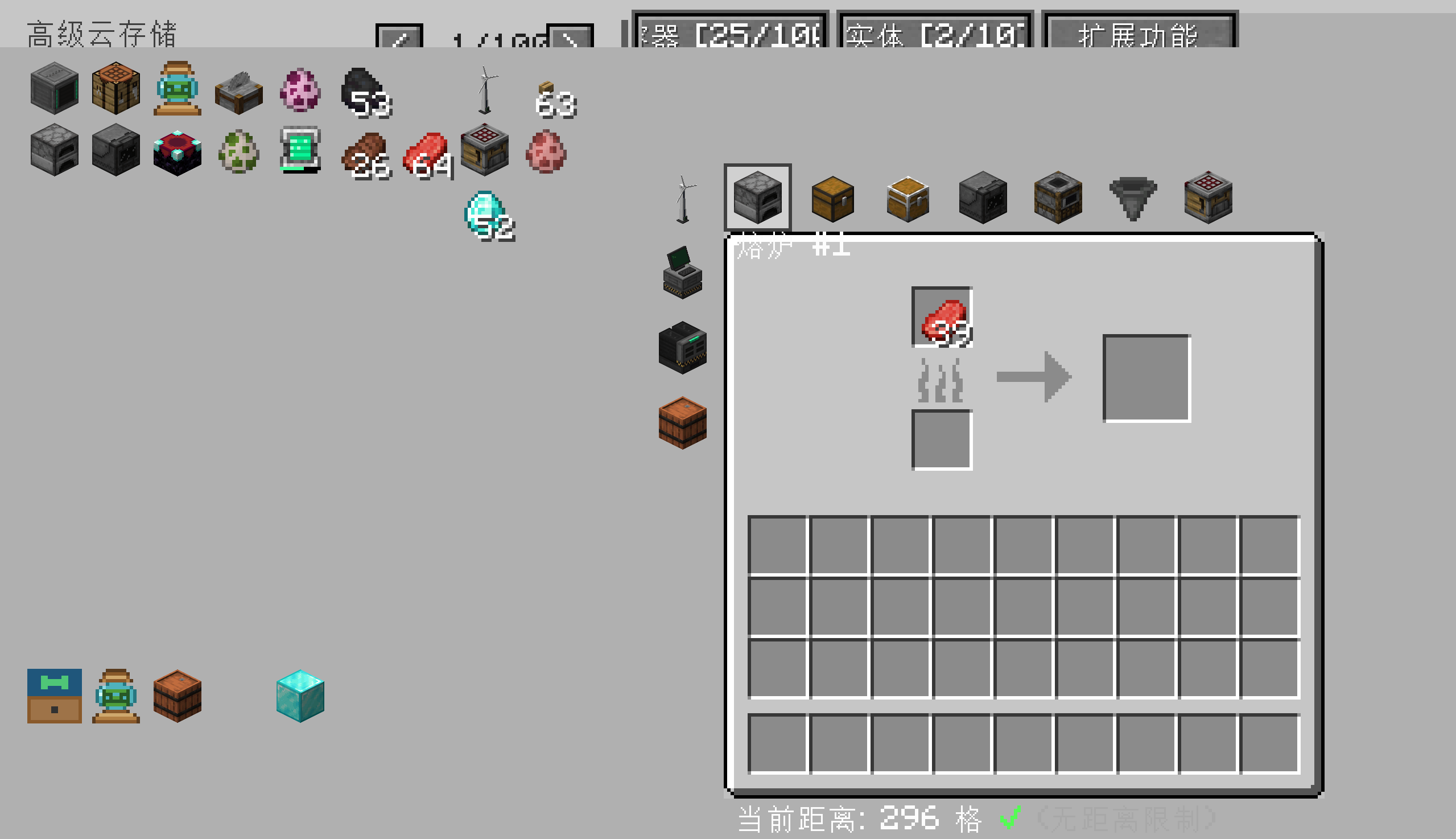
A personal warehouse mod for **NeoForge 1.21.1** that gives every player their own cloud-based inventory. Press V to open it — even across dimensions. Link chests, barrels, shulker boxes, and even entities, then access them from up to **175 blocks away**. Craft persistent 3×3 recipes that survive game restarts, and progress through a 5-level upgrade system to expand storage up to **5,400 slots** and **100 linked containers**.
---
### Core Features
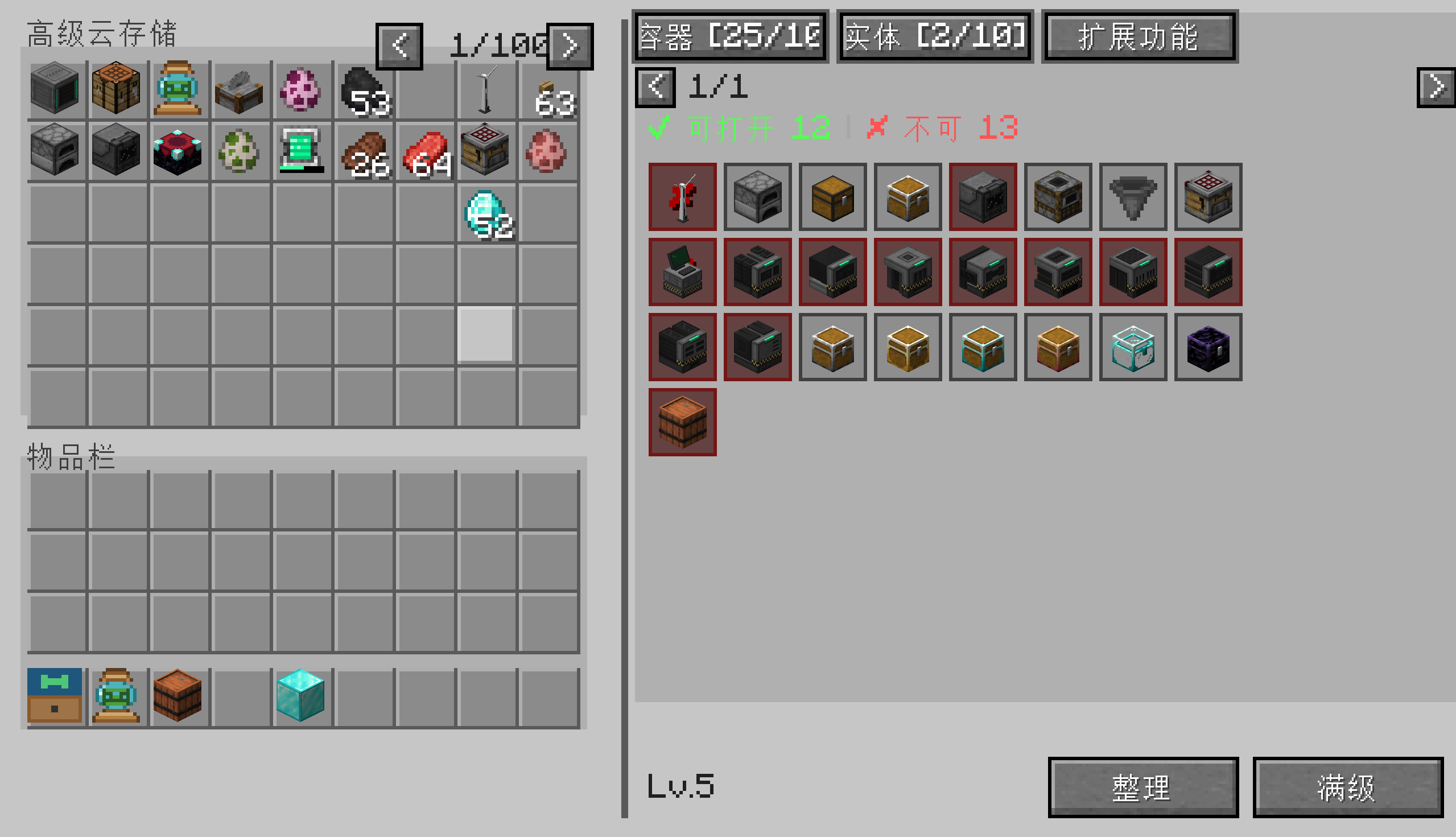
- **5,400-Slot Personal Warehouse** — Up to 100 pages of 54 slots each, all accessible from a single keybind.
- **Remote Container Access** — Link any chest, barrel, or shulker box and open it from up to 175 blocks away. No more running back to base.
- **Entity Capture & Recall** — Capture mobs, store them in your warehouse, and release or summon them anywhere.
- **Persistent 3×3 Crafting** — Your crafting grid is saved across sessions. Never lose a recipe in progress.
- **5-Level Upgrade System** — Start with 1 page and 5 container slots. Upgrade up to 100 pages and 100 linked containers.
- **Multi-Dimensional Storage** — Your warehouse follows you across dimensions. Same inventory, anywhere.
- **Item Categories & Search** — Organize your warehouse with custom categories. Search within the active category.
- **Drop Pickup** — Sweep nearby dropped items into your warehouse with a single command.
---
### How to Use
1. **Press V** to open your cloud warehouse.
2. Use the toolbar to **switch categories**, **search**, **sort**, **upgrade**, or **flip pages**.
3. **Link a container**: Aim at any chest / barrel / shulker box and run `/cloud link`.
4. **Open a linked container**: Click its icon in the Containers tab, or run `/cloud openlinked <index>`.
5. **Capture an entity**: Aim at a mob and run `/cloud capture`.
6. **Upgrade your warehouse**: Run `/cloud upgrade` after placing required materials in your inventory.
---
### Upgrade Levels
| Level | Pages | Linked Containers | Required Materials |
|---|---|---|---|
| Lv1 (default) | 1 | 5 | — |
| Lv2 | 5 | 10 | 64 iron ingots |
| Lv3 | 20 | 20 | 64 diamonds |
| Lv4 | 50 | 50 | 64 emeralds |
| Lv5 (max) | 100 | 100 | 1 nether star |
*(Material requirements are configurable — see Configuration below.)*
---
### Configuration
All settings live in `config/premiumcloudstorage-common.toml`:
- `warehouse.maxSlots` — Default slot capacity per player
- `warehouse.upgradeMaterials` — Required materials per upgrade level
- `warehouse.maxLinkedContainers` — Container limit per level
- `warehouse.maxLinkedEntities` — Entity slot limit per level
- `warehouse.remoteAccessDistance` — Max distance for remote container access (default 175)
---
### All Done via GUI — No Commands Needed
Advanced Cloud Storage is designed to be **fully GUI-driven**. There are no chat commands to memorize.
- **Press V** to open your warehouse
- **Aim at a chest/barrel/shulker box** with a Container Connector to link it
- **Aim at a mob** with an Entity Container to capture it
- Click in-GUI buttons to upgrade, rename, sort, search, switch categories, or flip pages
- Grant / revoke player access through the in-GUI permission manager
The only commands the mod registers (`/cloudstorage-perm-allow/deny`, `/cloudstorage-item-accept/deny`) are auto-triggered by chat buttons — they exist only so the click-to-accept flow works.
---
### Compatibility
- **Minecraft**: 1.21.1
- **Mod Loader**: NeoForge 21.1.x
- **Dependencies**: None (standalone mod)
---
### Feedback
Found a bug or have a suggestion? Open an issue on this page. Please include `latest.log` and reproduction steps.
Screenshots
Gallery
-
 å±å¹æªå¾ 2026-07-26 190450.png å±å¹æªå¾ 2026-07-26 190450.png
 -
 å±å¹æªå¾ 2026-07-26 190431.png å±å¹æªå¾ 2026-07-26 190431.png
Versions
Files
Relations
Project Relations
More like this
Similar Mods
Suggestions use data such as tags, dependencies, dependents, descriptions, titles, and more to rank how much they overlap with this mod.
On ModDex
Community snapshot
By the numbers
Statistics
Want to reach Minecraft players?
We're looking for a server hosting partner to feature here and other parts of the site. Interested? Send us a message!
Get in touchGet it on
Available Platforms
On ModDex
Community snapshot
By the numbers
Statistics
Resources