
Community listing page, reviews here may not be monitored by the author.
Advanced Skills: Remastered


No reviews yet
A large number of skills give you a more enjoyable combat experience
Community voices
Reviews
No reviews yet. Be the first to review this project!
Get it on
Available Platforms
Compatibility
Supported Environments
Must be installed on both the client and the server.
About
Project Details
For authors
Embed Badge
If you're the author of this project, you can embed a live badge anywhere that supports HTML or Markdown. It updates automatically whenever ratings change.
Use HTML for any page that supports it, or Markdown for README files and Markdown-based descriptions.
Identifiers
Platform IDs
About
Description
Required Mods:
Fabric Language Kotlin/Kotlin for ForgeArchitectury API
Gameplay Introduction:
Players can gain Skill Experience alongside Vanilla Experience (viewable in the skill list screen). Every few levels, they can randomly choose to learn a new skill.
Open the skill list with the hotkey (K by default), equip skills to the skill slots, and press the corresponding hotkey to use the skill. Alternatively, hold the Quick Cast hotkey (R by default) and move the mouse to select or use the skill. When a skill is selected, pressing the Quick Cast hotkey again will instantly release the skill.
Players start with 6 skill slots:
- 3 Active slots
- 1 Generic slot
- 2 Passive slots
Except for the Generic slot, other slots can only equip corresponding types of skills. A maximum of 10 skill slots can be active at once.
Players can modify the number of skill slots and the types of skills in each slot via commands.
Using skills does not consume any resources, but most skills have a cooldown after use (Can be modified by command).
Some skills are continuous and require holding down the button to charge up. However, if the skill is cast using Quick Cast, no need to hold the button—it will persist until it ends, unless manually interrupted by using the skill again.
Sample Skills:
- Reflective Skills: Skills that have a certain chance of reflecting the first incoming damage within a specific time.
Different types of reflective effects exist. - Movement Skills: Includes various movement abilities, such as dashing, teleporting, dodging, jumping, grappling, etc.
- Control Skills: Includes various control abilities, such as immobilizing, slowing, silencing, etc.
- Passive Skills: All skills that are not passive are considered active. Passive skills include self-healing, passive effects, wall climbing, invisibility, and more.
- Enhancement Skills: Various enhancement skills, such as X-ray vision, water bypassing, and resistance to negative effects.
- Summoning Skills: Includes summoning duplicates, mounts, minions, etc.
- Healing Skills: Different healing skills restore varying amounts of health.
- Destructive Skills: Includes fireballs, TNT, meteorites, etc.
Enhancement System:
When drawing skills, there is a chance to get enhancements for learned skills. Enhancements can improve skill values or provide additional effects. Different types of enhancements have different effects, which can increase the skill's damage, speed, range, duration, and more.
Skill Fruit:
Each rarity has a corresponding skill fruit. After eating it, you can randomly learn a skill. The highest rarity depends on the rarity of the skill fruit.
How to get it (Probability can be modified through configuration file):
- Oak Leaves - 0.5%
- Dark Oak Leaves - 0.5%
- Fishing - Same as the treasure
- Ancient City Chest - 25%
- Buried Treasure Chest – 25%
- End City Treasure Chest - 25%
- Spawn Bonus Chest - 100%
Rarity Weight (Weight can be modified through configuration file):
| Rarity | Weight |
|---|---|
| Common | 8 |
| Uncommon | 7 |
| Rare | 6 |
| Superb | 5 |
| Epic | 4 |
| Legendary | 3 |
| Mythic | 2 |
| Unique | 1 |
Useful Tips:
- In the inventory screen, press the View Skill List hotkey (K by default) to directly open the skill inventory.
- In creative mode, you can quickly learn all skills and reset skill cooldowns in the Skill List screen (requires permission).
- In the Skill List screen, double-click a skill with left mouse button to jump to its detailed description in the gallery, right-click to manage skill enhancement settings.
- In the Skill Inventory screen, you can quickly equip/swap skills using the hotkeys (1-0 on the top row of the keyboard), Shift + Left Click to quickly equip/unequip skills, and hold Shift to view skill details.
- In the Quick Cast screen, press the Open/Close Inventory hotkey (E by default) to directly open the skill inventory.
- In the Quick Cast screen, when a skill is selected, press the middle mouse button in the Cancel area to deselect the skill.
- You can use the hotkey (N by default) to move the skill bar position.
- You can modify most parameters of all skills and their enhancements through the configuration file.
Images: (Old)


Command Overview:
equip [skill] [slot: 1-10]- Equip a skill to a skill slotunequip [slot: 1-10]- Unequip the skill from the specified slotlist- List all learned skillslearn [skill]- Learn a new skilllearn-all- Learn all skillsforget [skill]- Forget a skillforget-all- Forget all skillsreset- Reset all skill datareset-cooldown- Reset all skills' cooldownsslotadd [active/passive/generic]- Add a new skill slotremove [slot: 1-10]- Remove a skill slotreset- Reset to default skill slots
slots- Query default skill slot numbersactive- Query default active skill slot number[slot: 1-10]- Set default active skill slot numbergeneric- Query default generic skill slot number[slot: 1-10]- Set default generic skill slot numberpassive- Query default passive skill slot number[slot: 1-10]- Set default passive skill slot numberreset- Reset to default skill slot numbers
xpadd [amount] [points/levels]- Add skill experience/levelsset [amount] [points/levels]- Set skill experience/levelsquery [points/levels]- Query current skill experience/levelsmultiplierget [local/global]- Get local/global skill experience multiplierset [local/global] [multiplier]- Set local/global skill experience multiplierreset [local/global]- Reset local/global skill experience multiplierreset- Reset skill experience and levels
cooldown- Query global skill cooldown multiplierreset [local/global]- Reset local/global skill cooldown multiplierget [local/global]- Get local/global skill cooldown multiplierset [local/global] [multiplier]- Set local/global skill cooldown multiplier
blacklistadd [local/global] [skill]- Add skill to local/global blacklistremove [local/global] [id]- Remove skill from local/global blacklistlist [local/global]- List local/global blacklisted skillsclear [local/global]- Clear local/global skill blacklist
enhance [skill][id] [level]- Enhance skill to specified levelall- Enhance all skills to maximum level
de-enhance [skill] [id/all]- Remove skill enhancement
Required Mods:
Fabric Language Kotlin/Kotlin for ForgeArchitectury API
Gameplay Introduction:
-
Players can gain Skill Experience alongside Vanilla Experience (viewable in the skill list screen). Every few levels, they can randomly choose to learn a new skill.
-
Open the skill list with the hotkey (K by default), equip skills to the skill slots, and press the corresponding hotkey to use the skill. Alternatively, hold the Quick Cast hotkey (R by default) and move the mouse to select or use the skill. When a skill is selected, pressing the Quick Cast hotkey again will instantly release the skill.
-
Players start with 6 skill slots:
- 3 Active slots
- 1 Generic slot
- 2 Passive slots
Except for the Generic slot, other slots can only equip corresponding types of skills. A maximum of 10 skill slots can be active at once.
-
Players can modify the number of skill slots and the types of skills in each slot via commands.
-
Using skills does not consume any resources, but most skills have a cooldown after use (Can be modified by command).
-
Some skills are continuous and require holding down the button to charge up. However, if the skill is cast using Quick Cast, no need to hold the button—it will persist until it ends, unless manually interrupted by using the skill again.
Sample Skills:
- Reflective Skills: Skills that have a certain chance of reflecting the first incoming damage within a specific time.
Different types of reflective effects exist. - Movement Skills: Includes various movement abilities, such as dashing, teleporting, dodging, jumping, grappling, etc.
- Control Skills: Includes various control abilities, such as immobilizing, slowing, silencing, etc.
- Passive Skills: All skills that are not passive are considered active. Passive skills include self-healing, passive effects, wall climbing, invisibility, and more.
- Enhancement Skills: Various enhancement skills, such as X-ray vision, water bypassing, and resistance to negative effects.
- Summoning Skills: Includes summoning duplicates, mounts, minions, etc.
- Healing Skills: Different healing skills restore varying amounts of health.
- Destructive Skills: Includes fireballs, TNT, meteorites, etc.
Enhancement System:
When drawing skills, there is a chance to get enhancements for learned skills. Enhancements can improve skill values or provide additional effects. Different types of enhancements have different effects, which can increase the skill's damage, speed, range, duration, and more.
Command Overview:
/skills (Click to expand)
equip [skill] [slot: 1-10]- Equip a skill to a skill slotunequip [slot: 1-10]- Unequip the skill from the specified slotlist- List all learned skillslearn [skill]- Learn a new skilllearn-all- Learn all skillsforget [skill]- Forget a skillforget-all- Forget all skillsreset- Reset all skill datareset-cooldown- Reset all skills' cooldownsslotadd [active/passive/generic]- Add a new skill slotremove [slot: 1-10]- Remove a skill slotreset- Reset to default skill slots
slots- Query default skill slot numbersactive- Query default active skill slot number[slot: 1-10]- Set default active skill slot number
generic- Query default generic skill slot number[slot: 1-10]- Set default generic skill slot number
passive- Query default passive skill slot number[slot: 1-10]- Set default passive skill slot number
reset- Reset to default skill slot numbers
xpadd [amount] [points/levels]- Add skill experience/levelsset [amount] [points/levels]- Set skill experience/levelsquery [points/levels]- Query current skill experience/levelsmultiplierget [local/global]- Get local/global skill experience multiplierset [local/global] [multiplier]- Set local/global skill experience multiplierreset [local/global]- Reset local/global skill experience multiplier
reset- Reset skill experience and levels
cooldown- Query global skill cooldown multiplierreset [local/global]- Reset local/global skill cooldown multiplierget [local/global]- Get local/global skill cooldown multiplierset [local/global] [multiplier]- Set local/global skill cooldown multiplier
blacklistadd [local/global] [skill]- Add skill to local/global blacklistremove [local/global] [id]- Remove skill from local/global blacklistlist [local/global]- List local/global blacklisted skillsclear [local/global]- Clear local/global skill blacklist
enhance [skill][id] [level]- Enhance skill to specified levelall- Enhance all skills to maximum level
de-enhance [skill] [id/all]- Remove skill enhancement
Skill Fruit:
Each rarity has a corresponding skill fruit. After eating it, you can randomly learn a skill. The highest rarity depends on the rarity of the skill fruit.
How to get it (Probability can be modified through configuration file):
- Oak Leaves - 0.5%
- Dark Oak Leaves - 0.5%
- Fishing - Same as the treasure
- Ancient City Chest - 25%
- Buried Treasure Chest – 25%
- End City Treasure Chest - 25%
- Spawn Bonus Chest - 100%
Rarity Weight (Weight can be modified through configuration file):
| Rarity | Weight |
|---|---|
| Common | 8 |
| Uncommon | 7 |
| Rare | 6 |
| Superb | 5 |
| Epic | 4 |
| Legendary | 3 |
| Mythic | 2 |
| Unique | 1 |
Useful Tips:
- In the inventory screen, press the View Skill List hotkey (K by default) to directly open the skill inventory.
- In creative mode, you can quickly learn all skills and reset skill cooldowns in the Skill List screen (requires permission).
- In the Skill List screen, double-click a skill with left mouse button to jump to its detailed description in the gallery, right-click to manage skill enhancement settings.
- In the Skill Inventory screen, you can quickly equip/swap skills using the hotkeys (1-0 on the top row of the keyboard), Shift + Left Click to quickly equip/unequip skills, and hold Shift to view skill details.
- In the Quick Cast screen, press the Open/Close Inventory hotkey (E by default) to directly open the skill inventory.
- In the Quick Cast screen, when a skill is selected, press the middle mouse button in the Cancel area to deselect the skill.
- You can use the hotkey (N by default) to move the skill bar position.
- You can modify most parameters of all skills and their enhancements through the configuration file.
Images: (Old)
Screenshots
Gallery
-
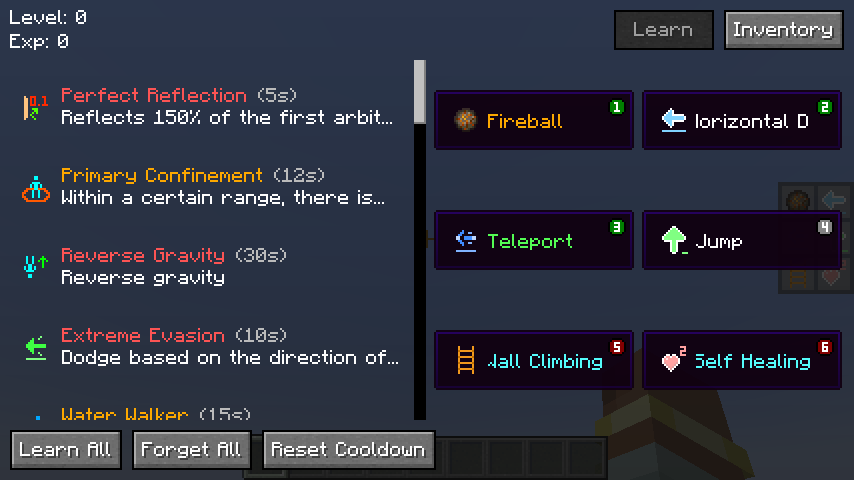 Skill List
 -
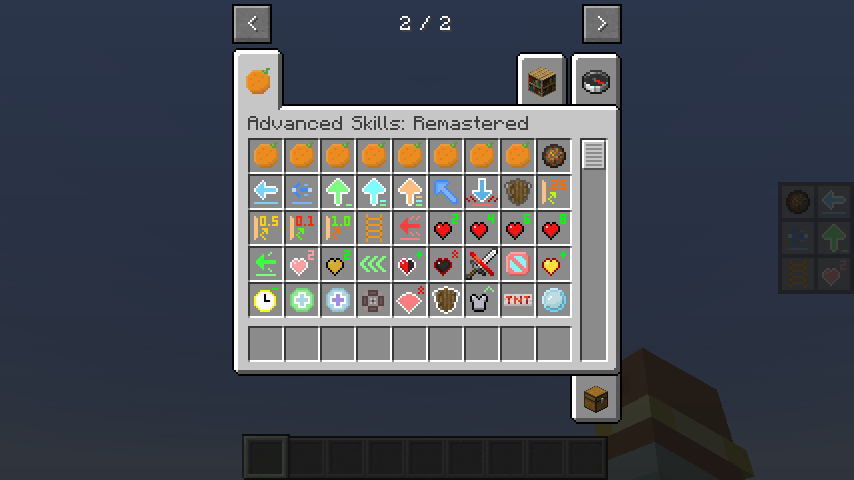 Skill Items
 -
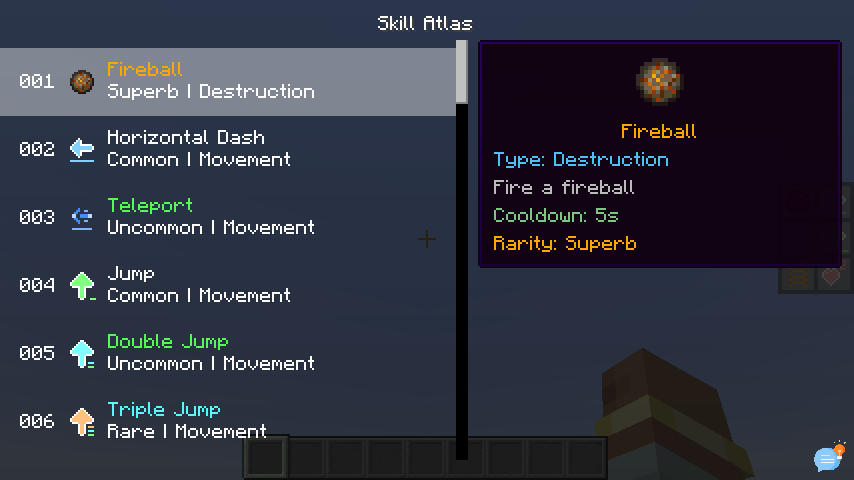 Skill Atlas
 -
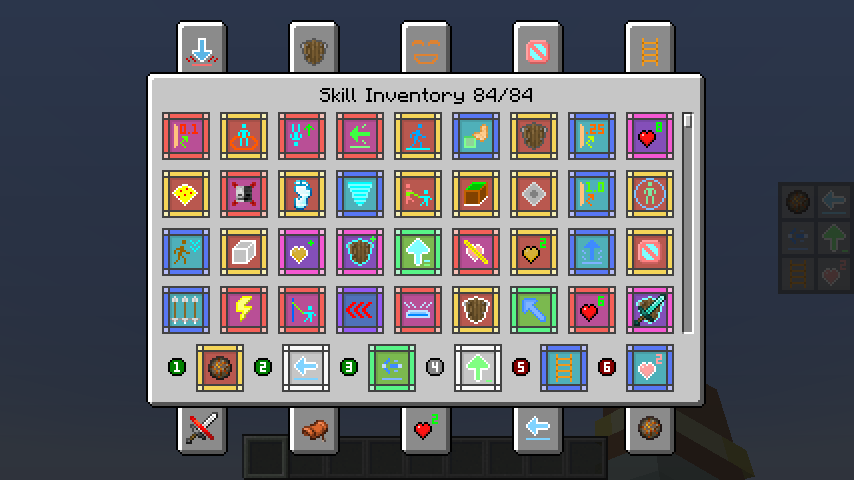 Skill Inventory
 -
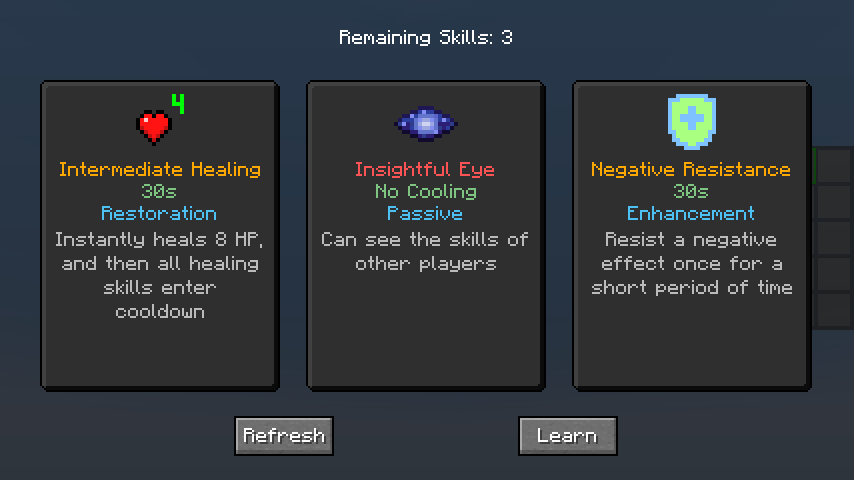 Skill Learning
 -
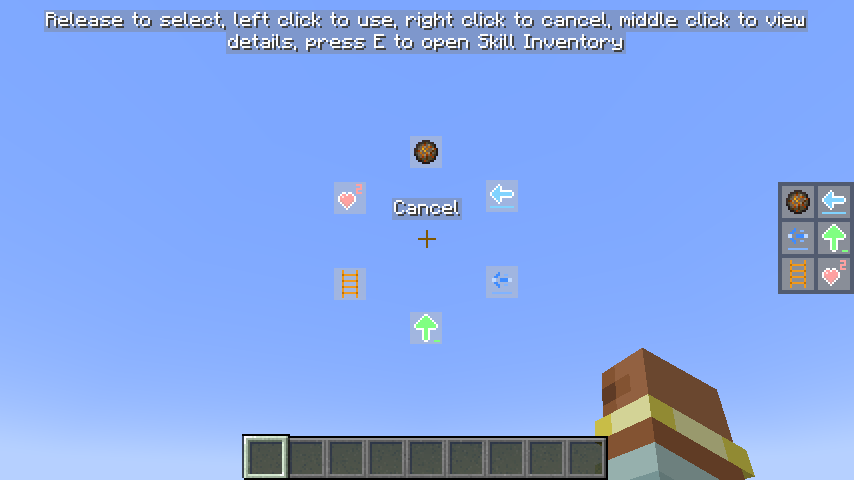 Quick Cast
Versions
Files
Relations
Project Relations
More like this
Similar Mods
Suggestions use data such as tags, dependencies, dependents, descriptions, titles, and more to rank how much they overlap with this mod.
On ModDex
Community snapshot
By the numbers
Statistics
Want to reach Minecraft players?
We're looking for a server hosting partner to feature here and other parts of the site. Interested? Send us a message!
Get in touchGet it on
Available Platforms
On ModDex
Community snapshot
By the numbers