
Community listing page, reviews here may not be monitored by the author.

Community voices
Reviews
No reviews yet. Be the first to review this project!
Get it on
Available Platforms
About
Project Details
For authors
Embed Badge
If you're the author of this project, you can embed a live badge anywhere that supports HTML or Markdown. It updates automatically whenever ratings change.
Use HTML for any page that supports it, or Markdown for README files and Markdown-based descriptions.
Identifiers
Platform IDs
Resources
External Links
About
Description
Airship Charts
See your airships on JourneyMap.
Airship Charts displays loaded Sable craft, including Create: Aeronautics airships, planes, cars and boats, on JourneyMap’s minimap and fullscreen map. This is a client-side map integration; it does not add vehicles.
Features
- Rotated top-down footprint based on each craft’s bounding boxes.
- A direction arrow while travelling, following actual movement.
- Name and distance labels; unnamed craft are labelled “Airship”.
- A last-seen marker for named craft that leave view, retained until logout.
- Connected sub-level parts grouped into a single craft.
- In-game settings for minimap/fullscreen visibility, color, opacity, arrow size, minimum craft size and update interval.
- A configurable toggle key, plus English and Korean translations.
Requirements
- Minecraft 1.21.1 and NeoForge.
- Sable 2.0.5 recommended (declared minimum 2.0.0).
- JourneyMap 6.x for NeoForge 1.21.1 with API v2.
Create: Aeronautics is optional. Install this mod on the client; no server installation is needed. Tested with NeoForge 21.1.248, Sable 2.0.5 and JourneyMap 6.0.7, with Create 6.0.10 and Aeronautics 1.3.2 present.
Getting started
- Install the required mods and put the Airship Charts JAR in your client’s mods folder.
- Join a world with Sable craft. Their overlays appear on JourneyMap.
- Open Mods → Airship Charts → Config to adjust the display.
- Bind “Show / hide airships on map” in Controls for a quick toggle.
Use an Aeronautics Nameplate to name a craft in survival, or use /sable name set @n Sky_Whale with command permission.
Notes
Footprints are convex outlines, not exact per-block silhouettes. A fallback grouping rule may combine smaller unnamed craft parked inside another craft’s bounds. Last-seen markers are session-only. Xaero’s map is not supported. MIT licensed; modpack inclusion is welcome.
한국어
Sable 기체를 JourneyMap에서 실시간으로 확인하세요.
Create: Aeronautics의 비행선·비행기·자동차·보트 등 Sable 기체를 미니맵과 전체 지도에 표시합니다. 회전한 선체 윤곽, 실제 이동 방향 화살표, 이름·거리, 마지막 목격 위치를 지원합니다. 기체 자체를 추가하는 모드는 아닙니다.
필수: Minecraft 1.21.1 · NeoForge · Sable · JourneyMap 6.x. 클라이언트에만 설치하면 됩니다. 모드 목록 → Airship Charts → 설정에서 표시 옵션을 바꾸고, 조작 설정에서 켜기/끄기 키를 지정하세요. 이름판 또는 /sable name set @n Sky_Whale로 이름을 붙일 수 있습니다.
Screenshots
Gallery
-
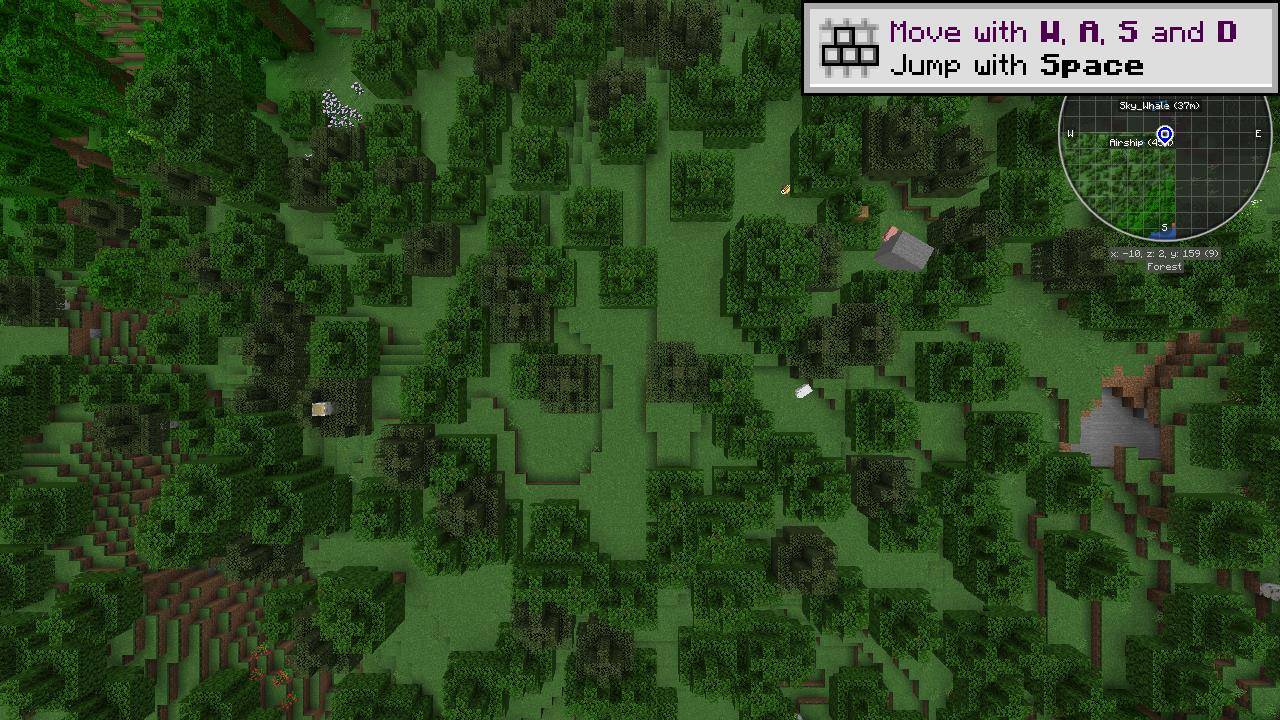 Sable craft on JourneyMap Actual development-world screenshot: Sky_Whale and an unnamed Airship appear with distance labels on the JourneyMap minimap.
Versions
Files
Relations
Project Relations
More like this
Similar Mods
Suggestions use data such as tags, dependencies, dependents, descriptions, titles, and more to rank how much they overlap with this mod.
On ModDex
Community snapshot
By the numbers
Statistics
Want to reach Minecraft players?
We're looking for a server hosting partner to feature here and other parts of the site. Interested? Send us a message!
Get in touchGet it on
Available Platforms
On ModDex
Community snapshot
By the numbers
Statistics
Resources