
Community listing page, reviews here may not be monitored by the author.
Ala Horde


No reviews yet
Hostile mobs grow stronger as you kill them — per-species kill counter scales HP, damage, speed and XP for every new spawn.

Community voices
Reviews
No reviews yet. Be the first to review this project!
Get it on
Available Platforms
Compatibility
Supported Environments
Required on the server. Installing it on the client adds functionality.
About
Project Details
For authors
Embed Badge
If you're the author of this project, you can embed a live badge anywhere that supports HTML or Markdown. It updates automatically whenever ratings change.
Use HTML for any page that supports it, or Markdown for README files and Markdown-based descriptions.
Identifiers
Platform IDs
About
Description
AlaHorde — Hostile mobs that level up
Hostile Minecraft mobs grow stronger as you kill them. AlaHorde tracks every kill of every hostile species (zombies, skeletons, creepers, witches, endermen, blazes, ghasts, even the Wither and Ender Dragon) across the entire world. Hit a threshold for a species and every new spawn of that species comes back stronger — more health, more damage, faster, with bigger XP rewards.
The world remembers. The horde adapts.
What it does
| Stat | Per-level scaling | Default |
|---|---|---|
| Max health | +10% over base per level | configurable |
| Attack damage | +8% over base per level | configurable |
| Movement speed | +5% over base per level | configurable |
| XP drop | +10% over base per level | configurable |
- 25 kills per level by default — fully configurable
- Level cap at 20 — kills are still counted past it
- RPG-style
[Lv.N]label above each spawned mob with color tier (gray Lv.1 → white → yellow → gold → red) - No X-Ray — labels are occluded by solid blocks; you only see the level when the mob is in line of sight
- Bosses included — Wither, Ender Dragon, Warden scale by the same formula. Boss AI phases stay intact (we only touch attribute base values)
- Level-up announcements — chat broadcast (configurable radius) plus flame/smoke particles at the kill site
- Per-world progress — survives restarts, persisted in world
SavedData
Commands
| Command | Permission | What it does |
|---|---|---|
/alahorde info |
everyone | Shows the tracked species with current level and kill progress |
/alahorde reset all |
op (lvl 2) | Resets every species' counter to zero |
/alahorde reset <mob_id> |
op (lvl 2) | Resets a single species (e.g. /alahorde reset minecraft:zombie) |
Configuration
Every option is editable from the in-game Mods → AlaHorde → Settings screen, or by hand in <world>/serverconfig/alahorde-server.toml.
Highlights:
general.enabled— master switch. When off, the mod is fully inert (no scaling, no labels, no kill counting). Lets you A/B test against vanilla without removing the jar.general.killsPerLevel— kills required per level-up (default 25)general.maxLevel— level cap (default 20)general.excludedMobs— entity ids opted out of the system (e.g.["minecraft:bat"])scaling.*— HP / damage / speed / XP per-level multipliersvisuals.*— toggle the level label, level-up chat message, and notify radius
Compatibility
- Multiplayer: progress is stored per-world and shared across all players on the server. Vanilla clients can join — no client-side mod required for core gameplay (the level label uses vanilla custom-name rendering).
- Other mods: mob categories from other mods are respected. Use
excludedMobsto opt out specific species. - Modpacks: zero hard dependencies. Drop in and go.
Languages
English, Русский, Українська, Deutsch, Español, Français, Português (BR), 日本語, 简体中文, Polski.
Translations welcome — open a PR on GitHub.
Installation
- Install NeoForge 26.1.2.28-beta for Minecraft 1.21.10
- Download the latest
alahorde-26.1.2-<version>.jarfrom this page - Drop the jar into
.minecraft/mods/(client) or<server>/mods/(server) - Launch — first start writes the default config to
<world>/serverconfig/alahorde-server.toml
Source / Issues
GitHub repository — bug reports, feature requests and pull requests welcome.
License: MIT © Artem Pavelko (Ma3auka)
AlaHorde
Hostile mobs grow stronger as you kill them — a global per-species kill counter raises HP, damage, speed and XP for every new spawn.
- Minecraft: 1.21.10 (26.1.2)
- Loader: NeoForge 26.1.2.28-beta
- Side: both client and server (vanilla clients can join a server with this mod)
- License: MIT
- Languages: English, Русский, Українська, Deutsch, Español, Français, Português (BR), 日本語, 简体中文, Polski
How it works
Every hostile mob (MobCategory.MONSTER — zombie, skeleton, creeper, witch, enderman, blaze, ghast, wither, ender dragon, warden, …) has its own world-wide kill counter. Every 25 player kills of a species bumps that species to the next level — every NEW spawn of that species after that point comes in stronger.
| Stat | Per-level scaling | Attribute |
|---|---|---|
| Max health | +10% over base | MAX_HEALTH |
| Attack damage | +8% over base | ATTACK_DAMAGE |
| Movement speed | +5% over base | MOVEMENT_SPEED |
| XP drop | +10% over base | via LivingExperienceDropEvent |
Cap at level 20 by default. All thresholds and multipliers are configurable in serverconfig/alahorde-server.toml or via the in-game Mods → AlaHorde → Settings UI.
Each spawned mob gets a styled [Lv.N] label above its head, color-tiered by level (gray Lv.1 → white 2-5 → yellow 6-10 → gold 11-15 → red 16-20). The label is occluded by solid blocks — no X-Ray cheating; the level only shows when the mob is in line of sight.
When a species levels up, all players within the configured radius get a chat broadcast and flame/smoke particles burst at the kill site.
Bosses (Wither, Ender Dragon, Warden) are included by default — only attribute base values are touched, so boss AI phases stay intact.
Commands
| Command | Permission | What it does |
|---|---|---|
/alahorde info |
everyone | Shows the tracked species with current level, kill count and threshold to the next level |
/alahorde reset all |
op (level 2) | Resets every species' kill counter to zero |
/alahorde reset <mob_id> |
op (level 2) | Resets a single species (e.g. /alahorde reset minecraft:zombie) |
Configuration
The config file lives at <world>/serverconfig/alahorde-server.toml. The same options are editable from the in-game Mods → AlaHorde → Settings screen.
| Option | Default | Description |
|---|---|---|
general.enabled |
true |
Master switch — when off, the mod is fully inert (no scaling, no labels, no kill counting) |
general.killsPerLevel |
25 |
Kills required per level-up |
general.maxLevel |
20 |
Level cap; kills are still counted past it |
general.excludedMobs |
[] |
Entity ids opted out of the system (e.g. ["minecraft:bat"]) |
scaling.hpMultiplierPerLevel |
0.10 |
HP gain per level (0.10 = +10%) |
scaling.dmgMultiplierPerLevel |
0.08 |
Attack damage gain per level |
scaling.speedMultiplierPerLevel |
0.05 |
Movement speed gain per level |
scaling.xpMultiplierPerLevel |
0.10 |
XP drop gain per level |
visuals.showLevelLabel |
true |
Show [Lv.N] above mobs |
visuals.showLevelUpMessage |
true |
Broadcast a chat message on level-up |
visuals.levelUpMessageRadius |
-1 |
Notify radius (blocks); -1 = entire server |
Installation
- Install NeoForge 26.1.2.28-beta for Minecraft 1.21.10.
- Download the latest
alahorde-26.1.2-<version>.jarfrom the Files tab on this page. - Drop the jar into
.minecraft/mods/(client) or<server>/mods/(server). - Launch.
Compatibility
- Multiplayer: progress is stored in the world's
SavedData, shared across all players on the server. - Other mods: mob tags / categories from other mods are respected. Use
excludedMobsto opt out specific species. - Modpacks: zero hard dependencies. Drop in and go.
License
MIT © Artem Pavelko (Ma3auka).
Screenshots
Gallery
-
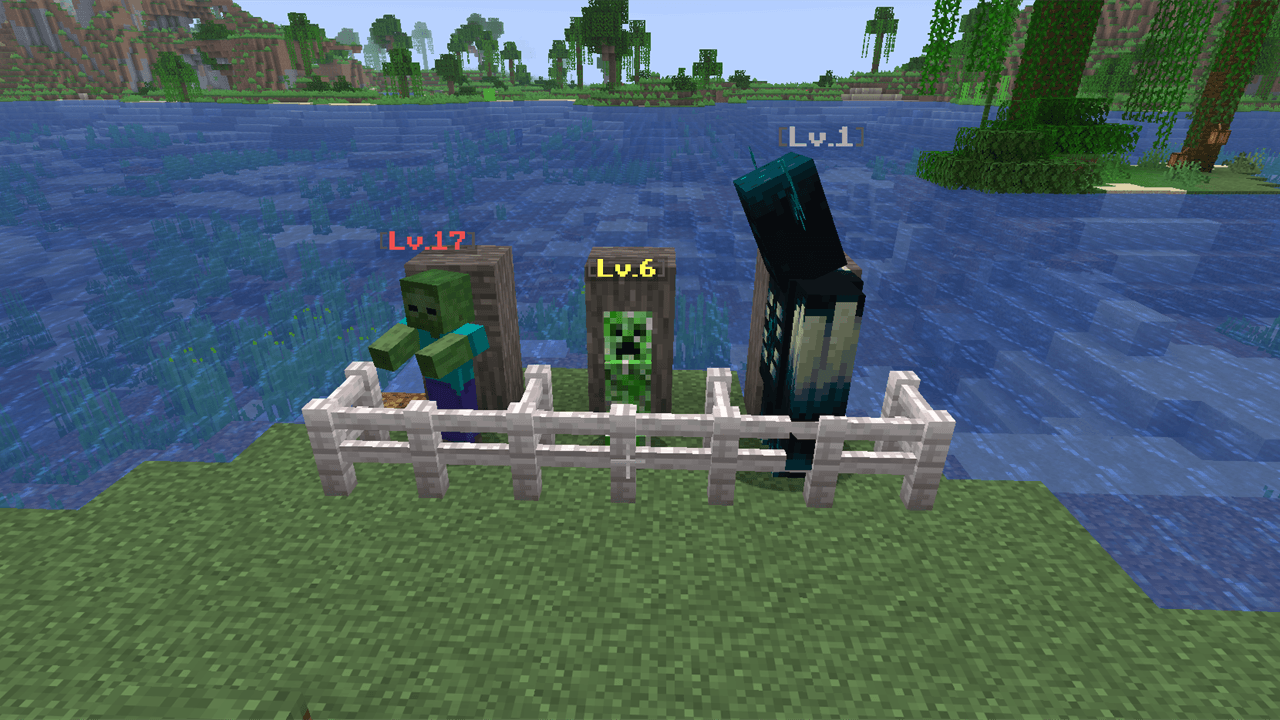 Mobs Get Stronger As You Kill Them Every mob shows its current level above its head. Kill enough of a species and all future spawns of that type become deadlier.
-
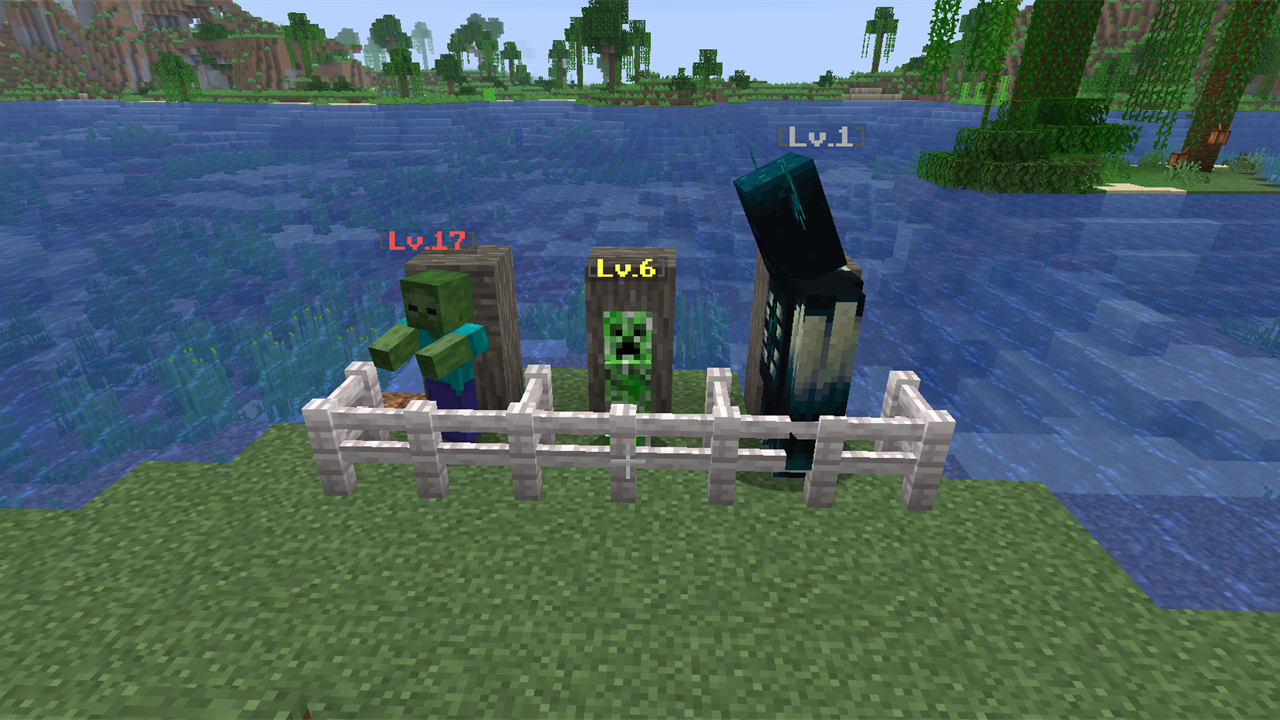 Mobs level up as you kill them Zombie at Lv.17 (red tier), creeper at Lv.6 (yellow), enderman at Lv.1 (gray). The more you kill a species, the stronger every new spawn gets — with a color-tiered level label above each mob.
Versions
Files
Relations
Project Relations
More like this
Similar Mods
Suggestions use data such as tags, dependencies, dependents, descriptions, titles, and more to rank how much they overlap with this mod.
On ModDex
Community snapshot
By the numbers
Statistics
 (opens in a new tab)
Get it on
Available Platforms
On ModDex
Community snapshot
By the numbers