Community listing page, reviews here may not be monitored by the author.
Armor Model API


No reviews yet
Renders Bedrock/GeckoLib geo armor models through the vanilla armor pipeline.

Community voices
Reviews
No reviews yet. Be the first to review this project!
Get it on
Available Platforms
Compatibility
Supported Environments
Must be installed on both the client and the server.
About
Project Details
For authors
Embed Badge
If you're the author of this project, you can embed a live badge anywhere that supports HTML or Markdown. It updates automatically whenever ratings change.
Use HTML for any page that supports it, or Markdown for README files and Markdown-based descriptions.
Identifiers
Platform IDs
About
Description
Armor Model API
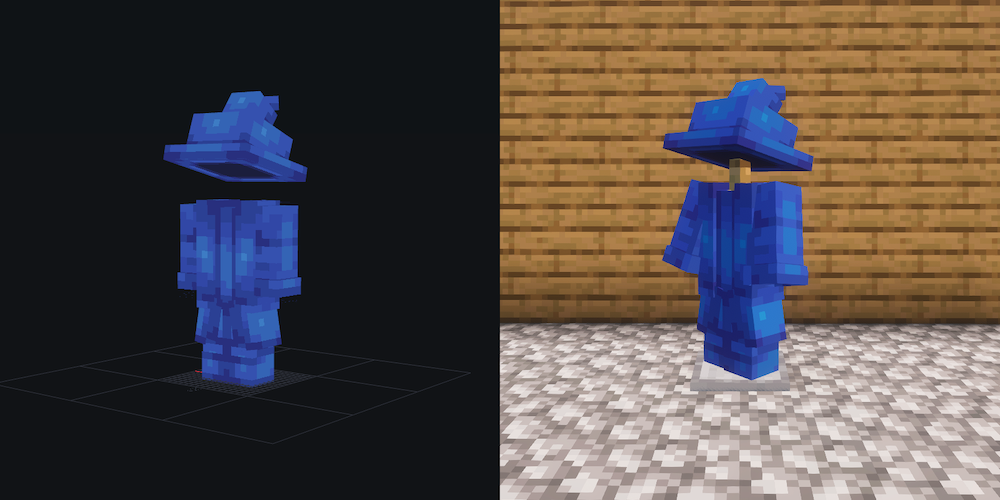
Renders armor with custom geometry authored in the Bedrock/GeckoLib .geo.json format, through the vanilla armor rendering pipeline.
Capabilities
- Custom armor geometry per armor set: robes, pauldrons, hats, skirts — any cuboid-based Blockbench model
- Per-slot rendering with the standard armor bone convention, including separate boot bones and a chest-anchored waist bone for leg pieces
- Armor trims with per-set trim textures (vanilla smithing-table trims, your art)
- Emissive glowmasks — the hand-authored
_glowmask.pngconvention; pixels that stay bright in the dark - Radiant glow — a high-luminance variant that burns toward white and feeds shader-pack bloom
- Custom render layers — a small interface for adding your own passes (extra overlays, effects)
- Everything vanilla armor does comes for free: pose and animation following, sneaking/swimming, armor stands, baby mobs, dyed leather color, enchantment glint, the glowing outline effect
How it works
- Loading — on resource load (and every F3+T reload), each registered
.geo.jsonis parsed and baked once into a vanillaModelParttree (the sameTexturedModelDataevery vanilla entity model is built from), cached until the next reload. Textures are plain resources, resolved by the render layers on demand — nothing is preprocessed. - Hooking in — when an armor piece is about to render, the library steps in per registered item: on Fabric through Fabric API's
ArmorRendererhook, on NeoForge through a small equivalent mixin. Vanilla's overlay rendering is skipped for that piece and the dispatcher renders the baked model instead — vanilla pose copied on, slot visibility applied. Unregistered items are untouched. - Pass order — each piece draws as a stack of passes over the same model: base texture → your render layers (glow, then trim so it lands on top), with enchantment glint riding the base pass. Renderers built through the fluent API keep the layers sorted into that stack automatically; a renderer constructed with an explicit layer list draws them in list order (see Render layers). Every extra pass is just the model rendered again with a different render layer and buffer.
From bake to buffer this is 100% the vanilla code path — the same pose copy, render layers, and buffers vanilla armor uses. That is the whole compatibility and performance story: Sodium, Iris, and anything else that works with vanilla armor sees ordinary vanilla model rendering. There is no custom vertex pipeline.
For developers
For developer documentation, check out the GitHub readme.
Armor Model API
Renders armor with custom geometry authored in the Bedrock/GeckoLib .geo.json format, through the vanilla armor rendering pipeline.
Capabilities
- Custom armor geometry per armor set: robes, pauldrons, hats, skirts — any cuboid-based Blockbench model
- Per-slot rendering with the standard armor bone convention, including separate boot bones and a chest-anchored waist bone for leg pieces
- Armor trims with per-set trim textures (vanilla smithing-table trims, your art)
- Emissive glowmasks — the hand-authored
_glowmask.pngconvention; pixels that stay bright in the dark - Radiant glow — a high-luminance variant that burns toward white and feeds shader-pack bloom
- Custom render layers — a small interface for adding your own passes (extra overlays, effects)
- Everything vanilla armor does comes for free: pose and animation following, sneaking/swimming, armor stands, baby mobs, dyed leather color, enchantment glint, the glowing outline effect
How it works
- Loading — on resource load (and every F3+T reload), each registered
.geo.jsonis parsed and baked once into a vanillaModelParttree (the sameTexturedModelDataevery vanilla entity model is built from), cached until the next reload. Textures are plain resources, resolved by the render layers on demand — nothing is preprocessed. - Hooking in — when an armor piece is about to render, the library steps in per registered item: on Fabric through Fabric API's
ArmorRendererhook, on NeoForge through a small equivalent mixin. Vanilla's overlay rendering is skipped for that piece and the dispatcher renders the baked model instead — vanilla pose copied on, slot visibility applied. Unregistered items are untouched. - Pass order — each piece draws as a stack of passes over the same model: base texture → your render layers (glow, then trim so it lands on top), with enchantment glint riding the base pass. Renderers built through the fluent API keep the layers sorted into that stack automatically; a renderer constructed with an explicit layer list draws them in list order (see Render layers). Every extra pass is just the model rendered again with a different render layer and buffer.
From bake to buffer this is 100% the vanilla code path — the same pose copy, render layers, and buffers vanilla armor uses. That is the whole compatibility and performance story: Sodium, Iris, and anything else that works with vanilla armor sees ordinary vanilla model rendering. There is no custom vertex pipeline.
For developers
For developer documentation, check out the GitHub readme.
Screenshots
Gallery
-
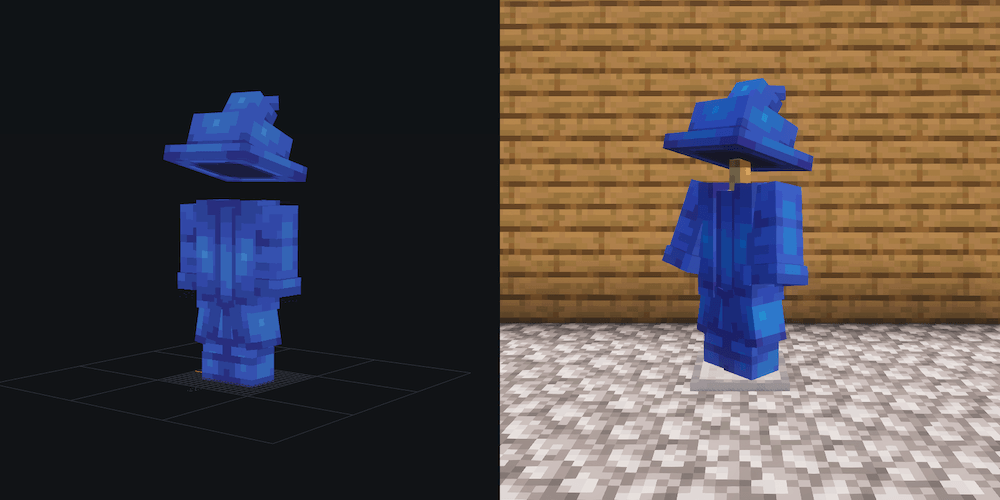 bb_to_game_1000.png bb_to_game_1000.png
Versions
Files
Relations
Project Relations
More like this
Similar Mods
Suggestions use data such as tags, dependencies, dependents, descriptions, titles, and more to rank how much they overlap with this mod.
On ModDex
Community snapshot
By the numbers
Statistics
 (opens in a new tab)
Get it on
Available Platforms
On ModDex
Community snapshot
By the numbers