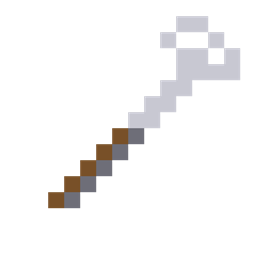
Community listing page, reviews may not be monitored by the author.
Autosorter

No reviews yet
Dump items into one chest and they sort themselves into the linked storages that already hold the same item. Works with modded storage.

Community voices
Reviews
No reviews yet. Be the first to review this project!
Get it on
Available Platforms
About
Project Details
For authors
Embed Badge
If you're the author of this project, you can embed a live badge anywhere that supports HTML or Markdown. It updates automatically whenever ratings change.
Use HTML for any page that supports it, or Markdown for README files and Markdown-based descriptions.
Identifiers
Platform IDs
Resources
External Links
About
Description
Auto Sorter
Stop sorting by hand. Put a Sorter Controller next to a chest, link your storage with the Sorter Wrench, and dump everything into that one chest. The controller moves each stack into the linked storage that already contains the same item. Anything without a home stays in the input chest, which doubles as overflow.
Features
- Sorts by what is already there: no filters to set up. Put one iron ingot in a chest and every iron ingot goes there from now on.
- Smart grouping: all swords count as one kind, same for pickaxes, axes, shovels, hoes, each armor slot and all potions. Enchantments, names and damage are ignored. Add your own groups (any item tag) in the config.
- Lag friendly: moves one stack every half second (configurable) and never loads chunks.
- Never loses items: every move is one transaction. If a storage is full, the rest stays in the input chest.
- Status screen: right-click the controller with an empty hand to see every linked storage with its distance and status (OK, Not loaded, Full, Missing), plus warnings when the same item is in two storages.
- Works with modded storage: anything that exposes the standard NeoForge item capability, tested with Sophisticated Storage and Storage Drawers (drawers, drawer controllers, locked drawers).
- Server friendly: respects adventure mode, spawn protection and claim mods.
How to use
- Craft a Sorter Controller and place it against the chest you want to use as the input, like a hopper. The front face points at that chest.
- Craft a Sorter Wrench and right-click the controller to bind it.
- Right-click each storage you want to sort into. Each linked storage should already hold at least one of the items it should receive.
- Dump items into the input chest and watch them go.
| Wrench action | Result |
|---|---|
| Right-click a controller | Binds the wrench to it |
| Right-click a storage (bound) | Links the storage to the controller |
| Shift + right-click a linked storage | Unlinks it |
| Shift + right-click air | Clears the binding |
Rules: same dimension, up to 200 blocks from the controller, one controller per storage. A double chest counts as one storage. Breaking a linked storage removes its link.
Crafting
- Sorter Wrench: 4 iron ingots in a Y shape.
- Sorter Controller: 6 iron ingots, a chest, a redstone dust and a hopper.
Both recipes show up in the recipe book once you pick up an iron ingot.
Config (config/autosorter-common.toml)
| Option | Default | Meaning |
|---|---|---|
sortIntervalTicks |
10 | Ticks between two moves (20 ticks = 1 second) |
maxLinkDistance |
200 | Max blocks between a controller and a linked storage |
groupTags |
tools, armor, potions | Item tags treated as one kind; the first match wins |
FAQ
Does it need to be installed on the client? Yes, on both the server and the client (it adds blocks, items and a screen).
Does it keep chunks loaded? No. Storages in unloaded chunks are skipped until they load again.
An item is in two linked storages. Where does it go? Into the first one you linked. The status screen warns you about it.
Available in English and Slovenian. Licensed under MIT, source code welcome to fork.
Screenshots
Gallery
-
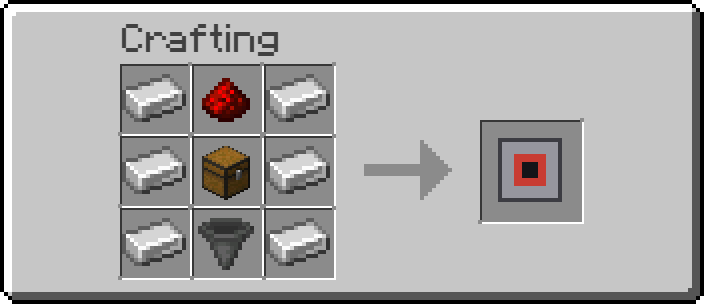 autosorted_controller.png autosorted_controller.png
 -
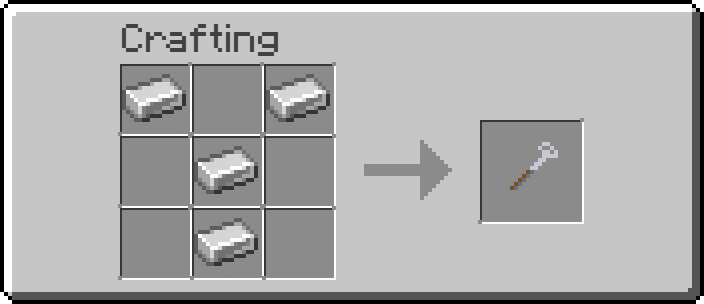 autosorter_wrench.png autosorter_wrench.png
Versions
Files
Relations
Project Relations
More like this
Similar Mods
Suggestions use data such as tags, dependencies, dependents, descriptions, titles, and more to rank how much they overlap with this mod.
On ModDex
Community snapshot
By the numbers
Statistics

Get it on
Available Platforms
On ModDex
Community snapshot
By the numbers
Statistics
Resources