Community listing page, reviews may not be monitored by the author.
Backpack Display


No reviews yet
A mod to show what's in your backpacks, drawers, or any similar containers

Community voices
Reviews
No reviews yet. Be the first to review this project!
Get it on
Available Platforms
Compatibility
Supported Environments
Runs entirely on the client. Works on vanilla servers.
About
Project Details
For authors
Embed Badge
If you're the author of this project, you can embed a live badge anywhere that supports HTML or Markdown. It updates automatically whenever ratings change.
Use HTML for any page that supports it, or Markdown for README files and Markdown-based descriptions.
Identifiers
Platform IDs
About
Description
BackpackDisplay
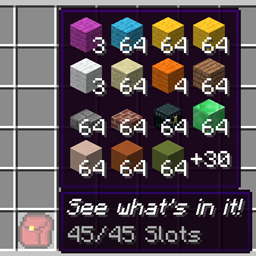
Adds a tooltip to show what's in your backpack, shulker box or other container item.
Configurable of how to get contents for the container item.
The mod has out-of-the-box support for vanilla shulker boxes, storage drawers drawers, and forestry backpacks. You can add support to more items by writing custom rules in the mod's config.

Configurable options(See the mod's config):
- The items that the mod's tooltip should be shown for
- Position and color of the tooltip
- Optional hold or release a keybind to show the tooltip
Config Format
displayRules is the main config of the mod. It lets you to add new container items to display the backpack tooltip, with the following format:
Format: <modID>:<itemID>[:meta]#<rule type>#<rule definition>
meta is a comma-separated list for meta-values to match.
For example,1,2,5-8 allows tooltip to show on the item with metadata 1,2,5,6,7,8.
When meta is absent, tooltip to show on the item ignoring meta.
Rule definition is according to the rule type selected.
Paths
Path is commonly used in the rules, and have a format like path.to.the.item.
For example, in this NBT structure:
{"list":[{"key1":"value"},{"key2":"item"}]}The path list.1.key2 will get the tag "item" from it.
List rule
Rule type: list
In this rule, items are all under a NBTTagList or a NBTTagCompound.
Rule definition:path.to.the.list[;path.to.the.itemstack[;path.to.the.counts]]
The last 2 paths is relative to the tag item in the list. If the counts is absent, the count in the itemstack is used instead.
Example: Show contents when hovering a purple shulker box
minecraft:purple_shulker_box#list#BlockEntityTag.ItemsSingle rule
Rule type: single
In this rule, an item is under a fixed path, with an optional external count value.
Rule definition:path.to.the.itemstack[;path.to.the.counts[;calculations for the counts]]
If the counts is absent, the count in the itemstack is used instead.
Example: Show content for every basic drawers in storage drawers mod
storagedrawers:basicdrawers:0#single#BlockEntityTag.Drawers.0.Item;BlockEntityTag.Drawers.0.Count
storagedrawers:basicdrawers:1,3#single#BlockEntityTag.Drawers.0.Item;BlockEntityTag.Drawers.0.Count
storagedrawers:basicdrawers:1,3#single#BlockEntityTag.Drawers.1.Item;BlockEntityTag.Drawers.1.Count
storagedrawers:basicdrawers:2,4#single#BlockEntityTag.Drawers.0.Item;BlockEntityTag.Drawers.0.Count
storagedrawers:basicdrawers:2,4#single#BlockEntityTag.Drawers.1.Item;BlockEntityTag.Drawers.1.Count
storagedrawers:basicdrawers:2,4#single#BlockEntityTag.Drawers.2.Item;BlockEntityTag.Drawers.2.Count
storagedrawers:basicdrawers:2,4#single#BlockEntityTag.Drawers.3.Item;BlockEntityTag.Drawers.3.Count
This rule supports further calculation to get the real item count if it's not in the tag directly but can be calculated from the values in the tag.
Calculations are a string starting with a operator in +-*/^% and followed by a path. The order of calculation is like that on a basic calculator that cannot input expressions.
All calculations is done in integer.
Example: Show content for compact drawers in storage drawers mod
storagedrawers:compdrawers#single#BlockEntityTag.Drawers.Items.0.Item;BlockEntityTag.Drawers.Count;/BlockEntityTag.Drawers.Items.0.Conv
storagedrawers:compdrawers#single#BlockEntityTag.Drawers.Items.1.Item;BlockEntityTag.Drawers.Count;/BlockEntityTag.Drawers.Items.1.Conv
storagedrawers:compdrawers#single#BlockEntityTag.Drawers.Items.2.Item;BlockEntityTag.Drawers.Count;/BlockEntityTag.Drawers.Items.2.Conv
Crafttweaker Support
Starting from v1.3, crafttweaker is supported to add custom functions to get what items to display.
It's suggested to only write entries in a script with #sideonly client Preprocessor. Otherwise it will cause errors on dedicated server, because this mod is client only.
import mods.backpackdisplay.BackpackDisplay; // IIngredient to match items to add the tooltip, function to return an array of items from a given itemstack BackpackDisplay.addBackDisplay( IIngredient, (IItemStack) -> IItemStack[] );
Example: show a crafting table and the crafting result for every wood log in <ore:logWood>
#sideonly client
import mods.backpackdisplay.BackpackDisplay;
import crafttweaker.item.IItemStack;
BackpackDisplay.addBackDisplay(<ore:logWood>,function(item){
    var items = [<minecraft:crafting_table>,recipes.craft([[item]])] as IItemStack[];
    return items;
});
With both crafttweaker rules and normal rules present on an item, items from crafttweaker support will appear before items from normal rules.
BackpackDisplay
Adds a tooltip to show what's in your backpack, shulker box or other container item.
Configurable of how to get contents for the container item.
The mod has out-of-the-box support for vanilla shulker boxes, storage drawers drawers, and forestry backpacks. You can add support to more items by writing custom rules in the mod's config.
Configurable options(See the mod's config):
- The items that the mod's tooltip should be shown for
- Position and color of the tooltip
- Optional hold or release a keybind to show the tooltip
Config Format
displayRules is the main config of the mod. It lets you to add new container items to display the backpack tooltip, with the following format:
Format: <modID>:<itemID>[:meta]#<rule type>#<rule definition>
meta is a comma-separated list for meta-values to match.
For example,1,2,5-8 allows tooltip to show on the item with metadata 1,2,5,6,7,8.
When meta is absent, tooltip to show on the item ignoring meta.
Rule definition is according to the rule type selected.
Paths
Path is commonly used in the rules, and have a format like path.to.the.item.
For example, in this NBT structure:
{"list":[{"key1":"value"},{"key2":"item"}]}
The path list.1.key2 will get the tag "item" from it.
List rule
Rule type: list
In this rule, items are all under a NBTTagList or a NBTTagCompound.
Rule definition:path.to.the.list[;path.to.the.itemstack[;path.to.the.counts]]
The last 2 paths is relative to the tag item in the list.
If the counts is absent, the count in the itemstack is used instead.
Example: Show contents when hovering a purple shulker box
minecraft:purple_shulker_box#list#BlockEntityTag.Items
Single rule
Rule type: single
In this rule, an item is under a fixed path, with an optional external count value.
Rule definition:path.to.the.itemstack[;path.to.the.counts[;calculations for the counts]]
If the counts is absent, the count in the itemstack is used instead.
Example: Show content for every basic drawers in storage drawers mod
storagedrawers:basicdrawers:0#single#BlockEntityTag.Drawers.0.Item;BlockEntityTag.Drawers.0.Count
storagedrawers:basicdrawers:1,3#single#BlockEntityTag.Drawers.0.Item;BlockEntityTag.Drawers.0.Count
storagedrawers:basicdrawers:1,3#single#BlockEntityTag.Drawers.1.Item;BlockEntityTag.Drawers.1.Count
storagedrawers:basicdrawers:2,4#single#BlockEntityTag.Drawers.0.Item;BlockEntityTag.Drawers.0.Count
storagedrawers:basicdrawers:2,4#single#BlockEntityTag.Drawers.1.Item;BlockEntityTag.Drawers.1.Count
storagedrawers:basicdrawers:2,4#single#BlockEntityTag.Drawers.2.Item;BlockEntityTag.Drawers.2.Count
storagedrawers:basicdrawers:2,4#single#BlockEntityTag.Drawers.3.Item;BlockEntityTag.Drawers.3.Count
This rule supports further calculation to get the real item count if it's not in the tag directly but can be calculated from the values in the tag.
Calculations are a string starting with a operator in +-*/^% and followed by a path. The order of calculation is like that on a basic calculator that cannot input expressions.
All calculations is done in integer.
Example: Show content for compact drawers in storage drawers mod
storagedrawers:compdrawers#single#BlockEntityTag.Drawers.Items.0.Item;BlockEntityTag.Drawers.Count;/BlockEntityTag.Drawers.Items.0.Conv
storagedrawers:compdrawers#single#BlockEntityTag.Drawers.Items.1.Item;BlockEntityTag.Drawers.Count;/BlockEntityTag.Drawers.Items.1.Conv
storagedrawers:compdrawers#single#BlockEntityTag.Drawers.Items.2.Item;BlockEntityTag.Drawers.Count;/BlockEntityTag.Drawers.Items.2.Conv
Screenshots
Gallery
-
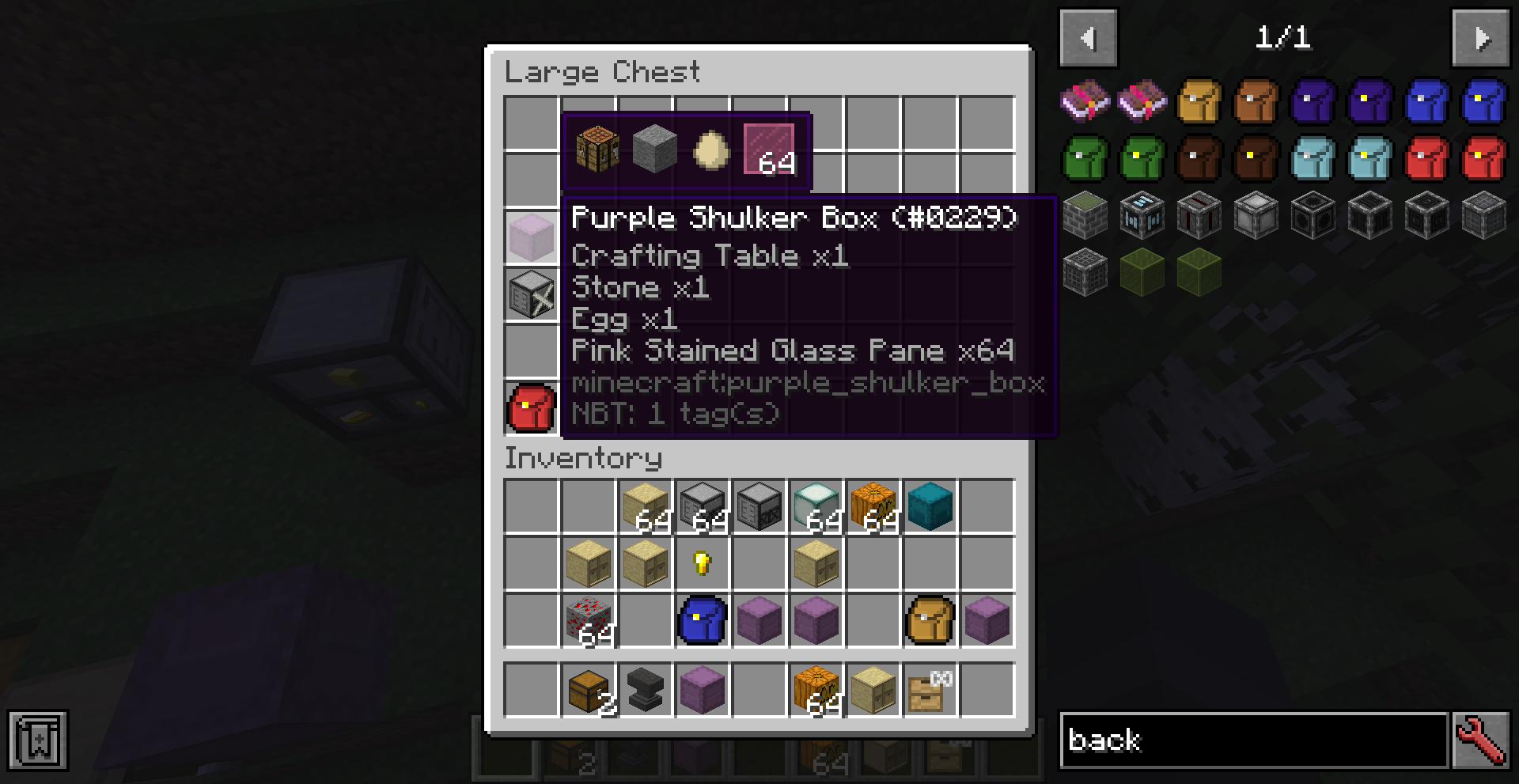 2024-11-01_18.11.47.png 2024-11-01_18.11.47.png
 -
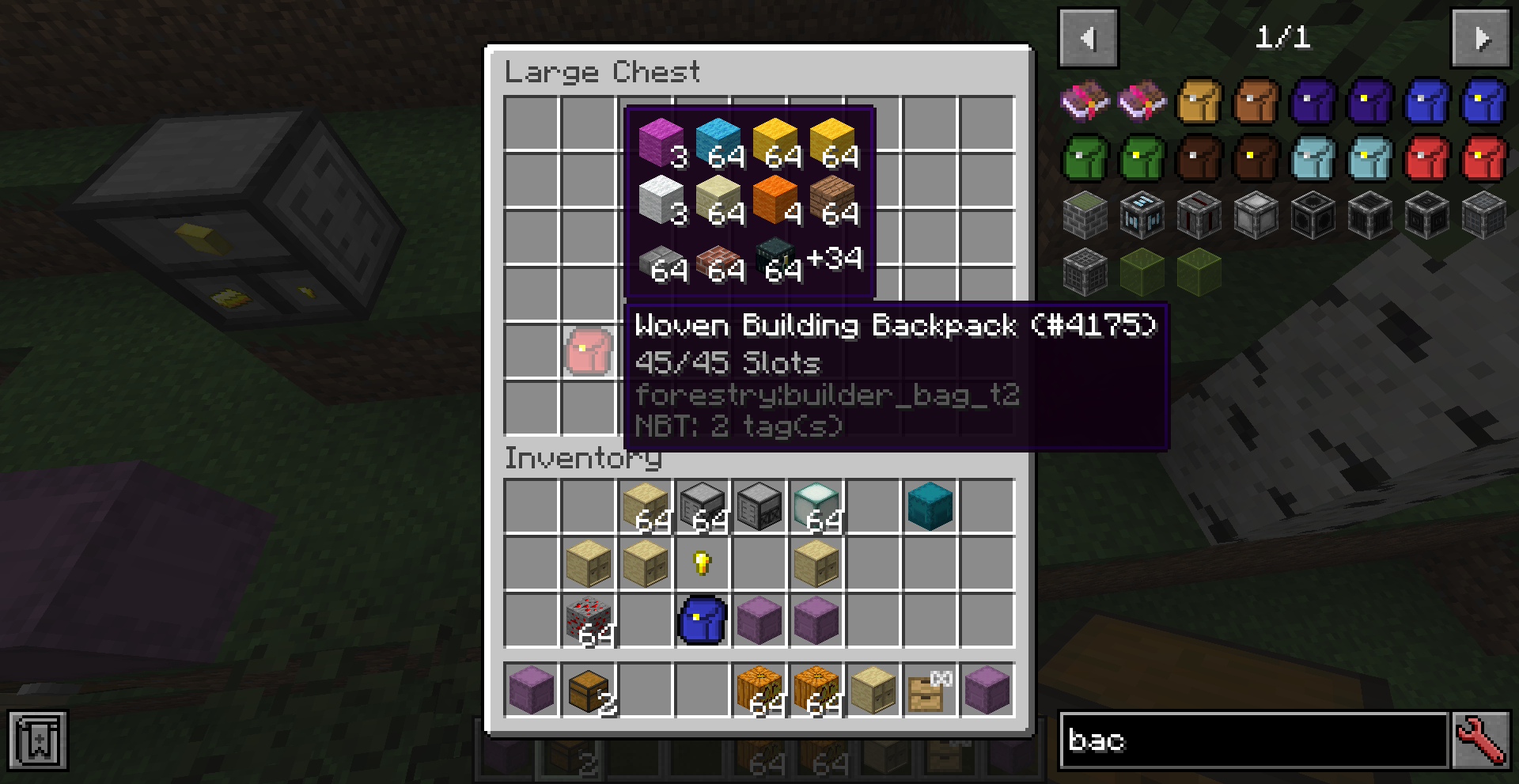 2024-11-01_17.24.12.png 2024-11-01_17.24.12.png
 -
 2024-11-01_18.11.15.png 2024-11-01_18.11.15.png
-
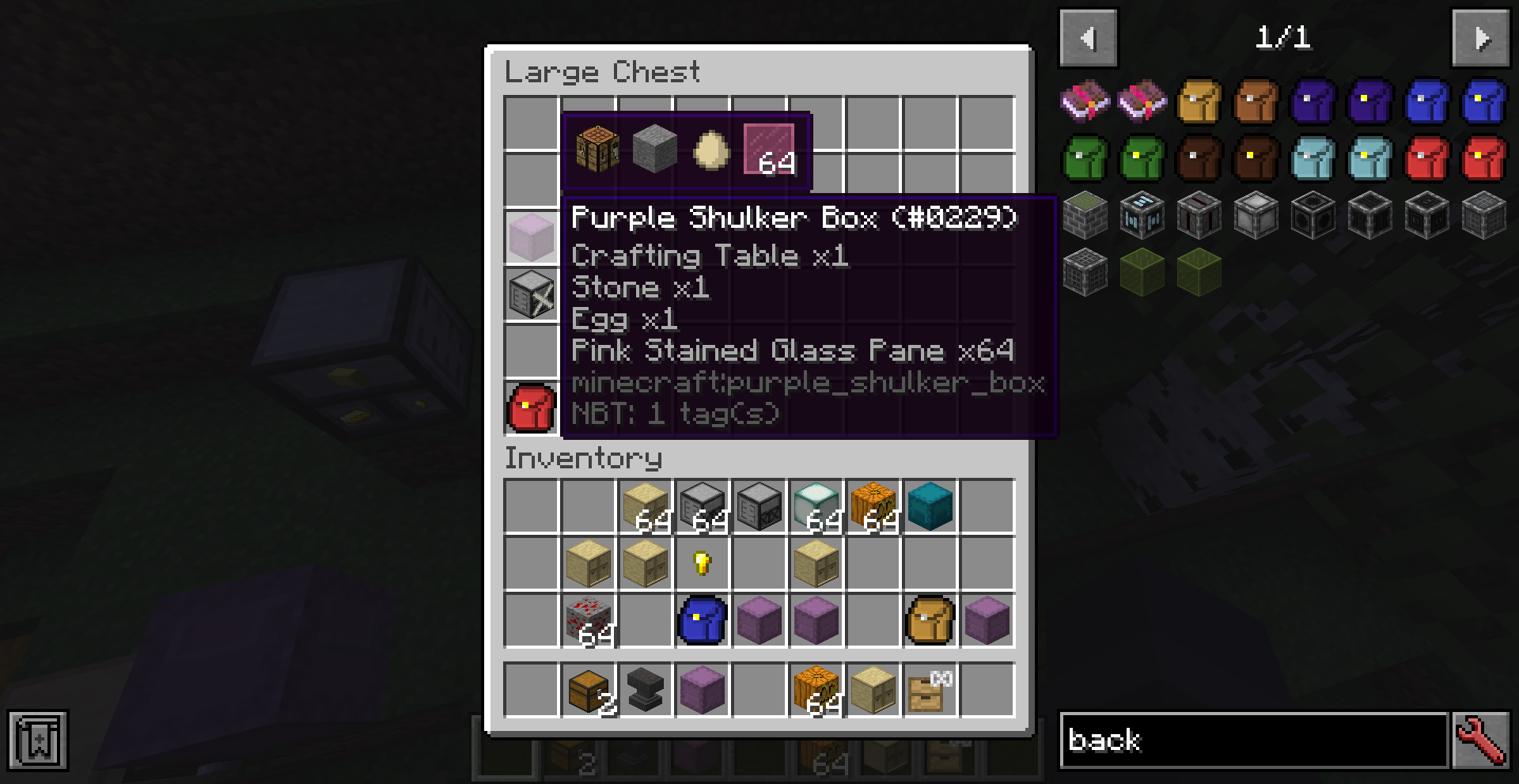 Showing items in a shulker box
 -
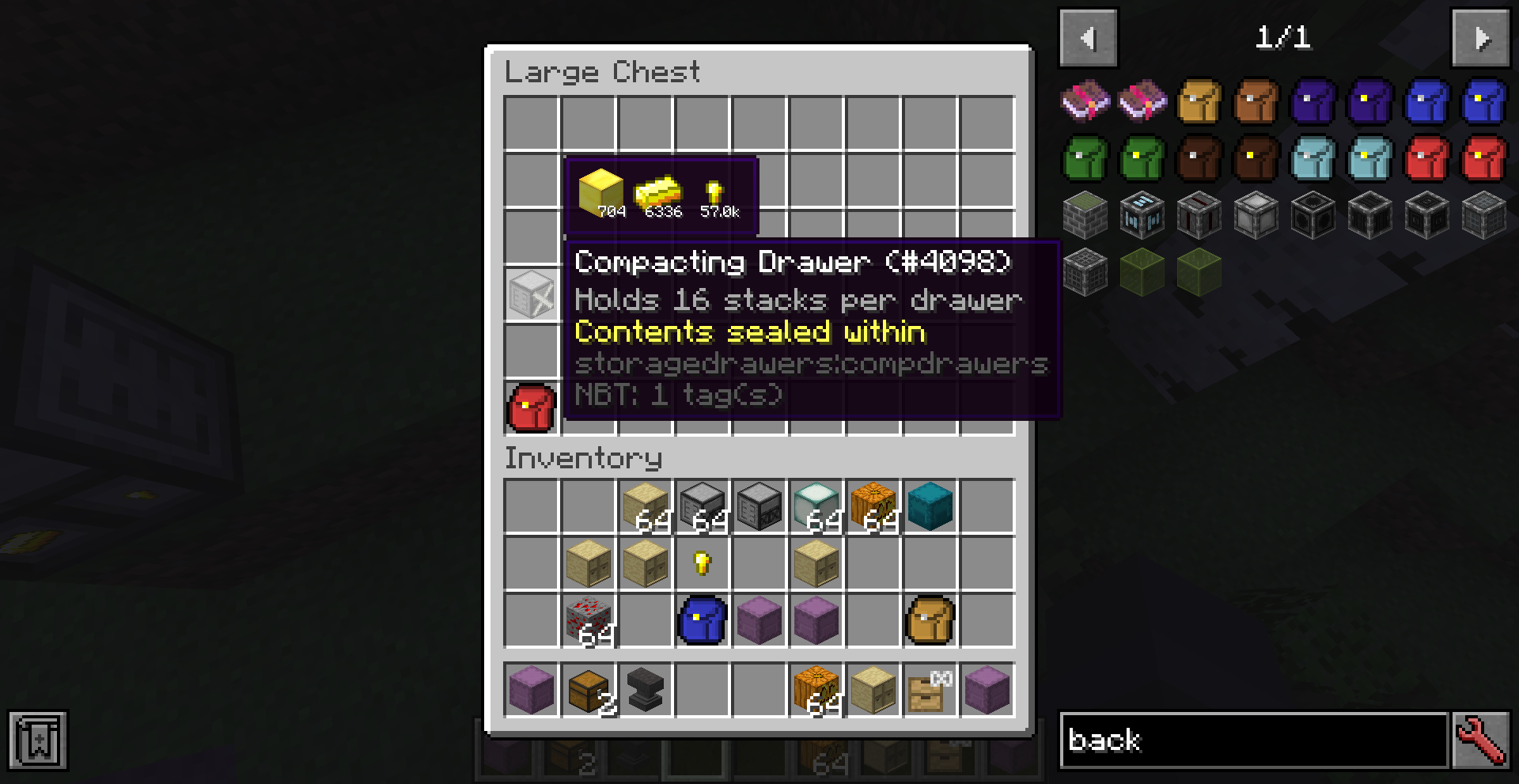 Showing items in a compacting drawer
Versions
Files
Relations
Project Relations
More like this
Similar Mods
Suggestions use data such as tags, dependencies, dependents, descriptions, titles, and more to rank how much they overlap with this mod.
On ModDex
Community snapshot
By the numbers
Statistics
 (opens in a new tab)
Get it on
Available Platforms
On ModDex
Community snapshot
By the numbers