
Community listing page, reviews may not be monitored by the author.
Beautiful Day Counter

No reviews yet
Never lose track of time! A clean, vanilla-style HUD with a day counter, clock and a colorful day/night bar. Milestone celebrations, 6 languages, Fabric, NeoForge & Forge.

Community voices
Reviews
No reviews yet. Be the first to review this project!
Get it on
Available Platforms
Compatibility
Supported Environments
Runs entirely on the client. Works on vanilla servers.
About
Project Details
For authors
Embed Badge
If you're the author of this project, you can embed a live badge anywhere that supports HTML or Markdown. It updates automatically whenever ratings change.
Use HTML for any page that supports it, or Markdown for README files and Markdown-based descriptions.
Identifiers
Platform IDs
About
Description
🌅 Beautiful Day Counter
Never lose track of time. A clean, vanilla-style HUD with a day counter, a clock and a colorful day/night bar, for Fabric, NeoForge and Forge.








How many days have you survived? What time is it? When does night fall? Beautiful Day Counter tells you at a glance, using vanilla sprites and fonts so it fits right into the game. It is client-side only and doesn't change gameplay: it works in singleplayer and on any server, vanilla included.
✨ Features
| 📅 Day counter | The current day with an icon for your game mode: heart, hardcore heart, grass block, sword or ender eye. |
| 🕒 Clock | 24-hour or 12-hour time, with a clock icon that turns into a bed when you can sleep. |
| 🌗 Day/night bar | The vanilla bossbar sprite, filling through the day in four color themes. |
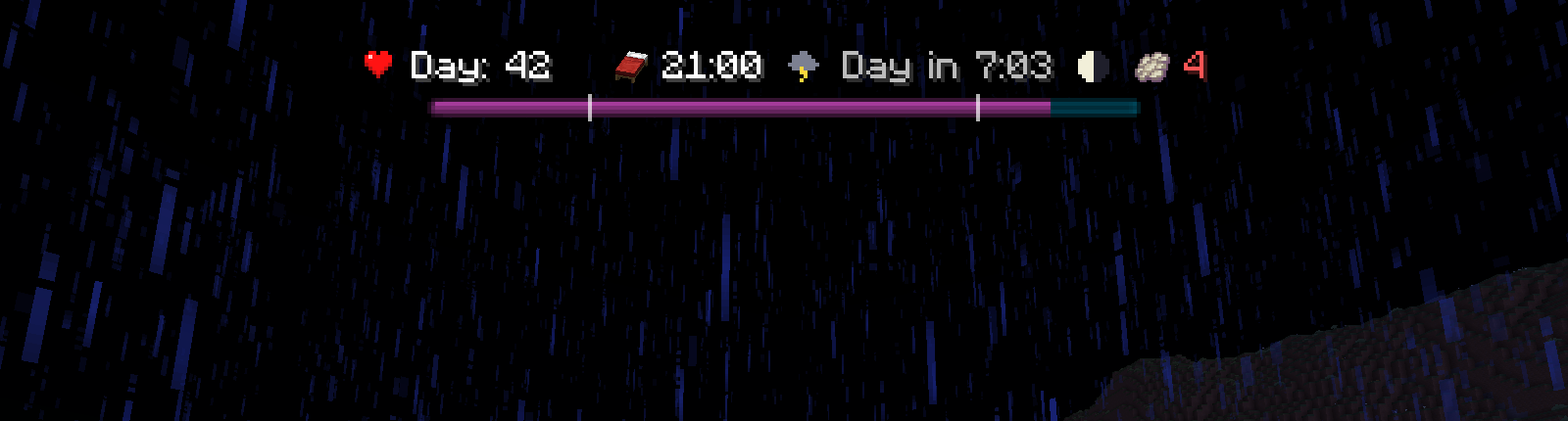
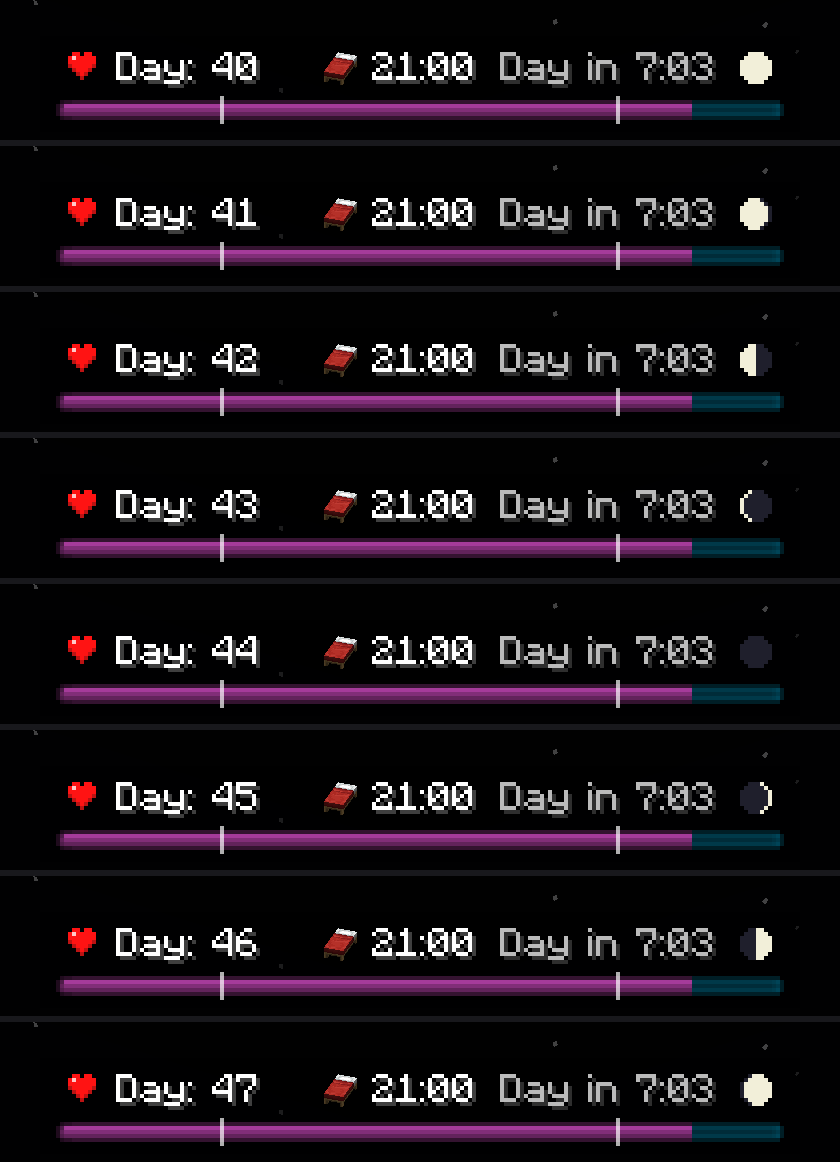
| ⏳ Extras | Countdown to night or day, moon phase, night marks on the bar and an optional background. |
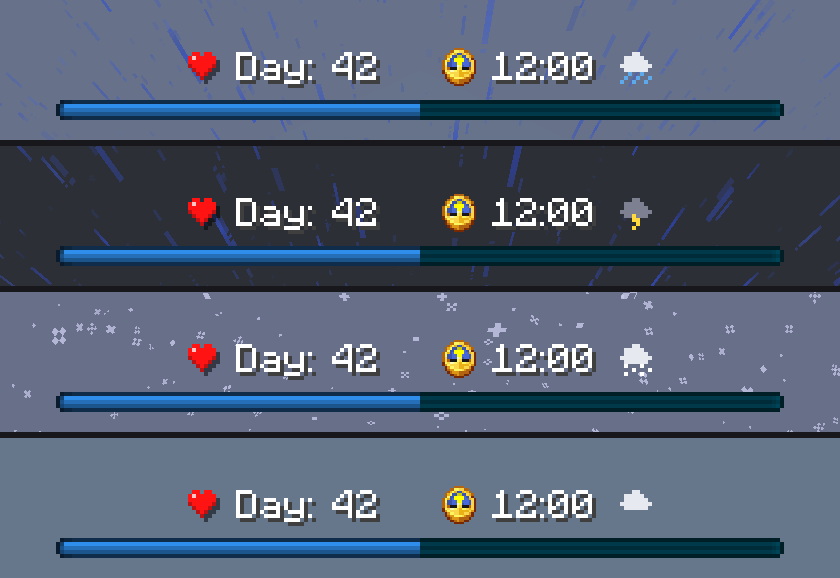
| 🌧️ Weather (new in 1.8.0) | A small pixel cloud after the clock with rain, snow or lightning, based on the weather and the biome you're in. |
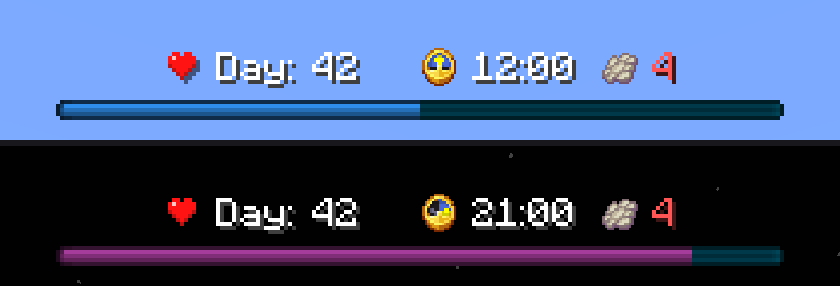
| 🦇 Phantom warning (new in 1.8.0) | After three days without sleep, a phantom membrane and the days since your last rest. |
| 🏆 Milestones | A rainbow counter, a golden apple or a totem and a level-up sound on milestone days. Choose classic milestones (50, 365, every 100) or every 10, 25, 50, 100, 250, 365, 500 or 1000 days. |
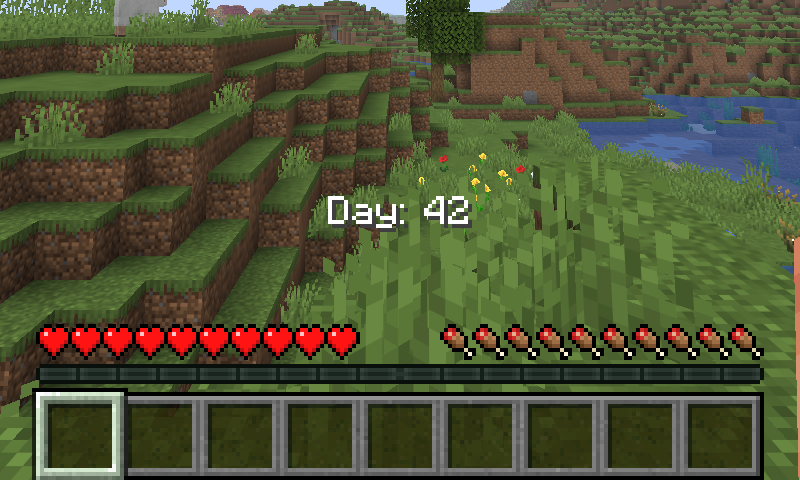
| 🎯 Simple mode | Just "Day: N", anywhere on screen. Set it in percent or drag it with the mouse. |
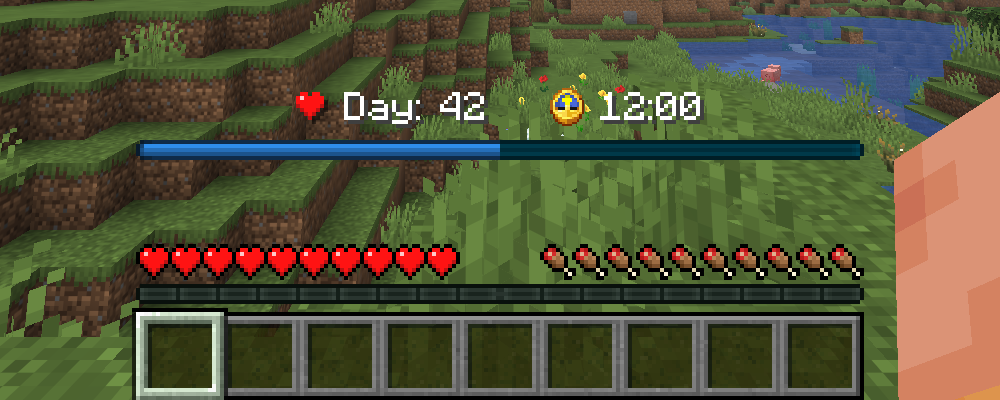
| 📐 Placement | Scale 75 to 150%, opacity, top or bottom, fine offsets. Vanilla bossbars move below the HUD. |
| 🌌 Nether and End | Show the Overworld time, ??:??, or hide the HUD. |
| 🌍 6 languages | English, Italian, German, Spanish, French and Portuguese. |
🖼️ Gallery
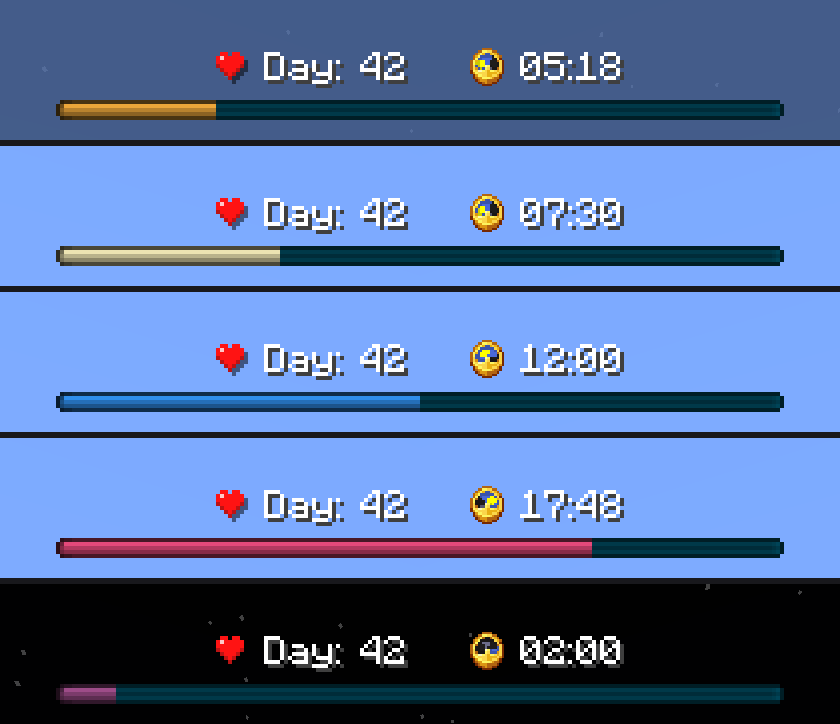
Through the day
The bar changes color as the day goes on: dawn, morning, noon, sunset and night.
New in 1.8.0: weather and phantom warning
| Rain, thunder, snow, and a dry cloud where the biome has no rain | Phantom warning after three sleepless days |
|---|---|
 |
 |
Everything turned on, at night
Themes, game modes and milestones
| Classic, Pastel, Colorblind and Mono | Survival, creative, adventure and spectator |
|---|---|
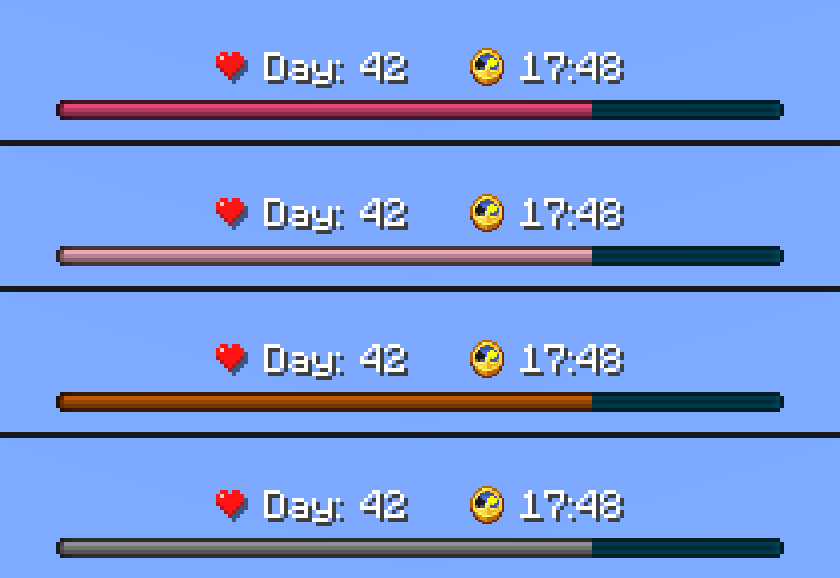 |
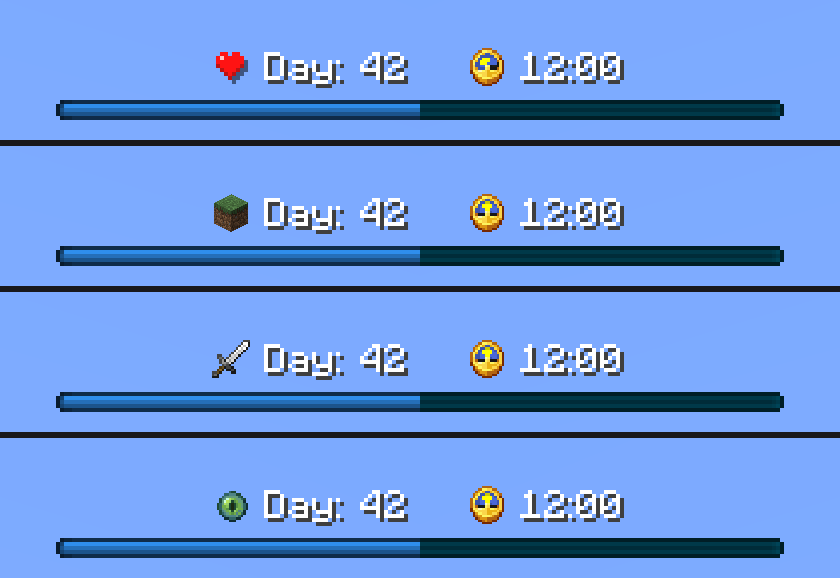 |
| Milestones: golden apple, then a totem from day 500 | Countdown, moon phase, night marks, background and the bed icon |
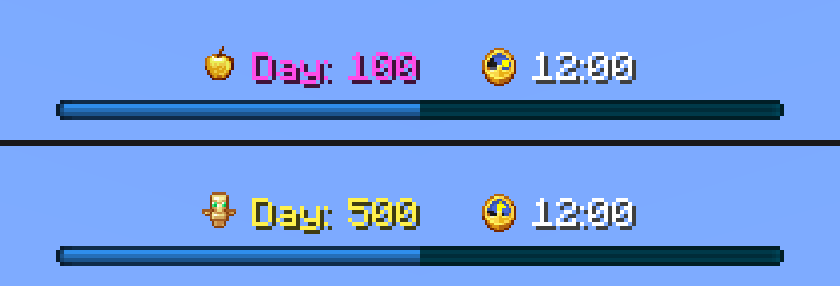 |
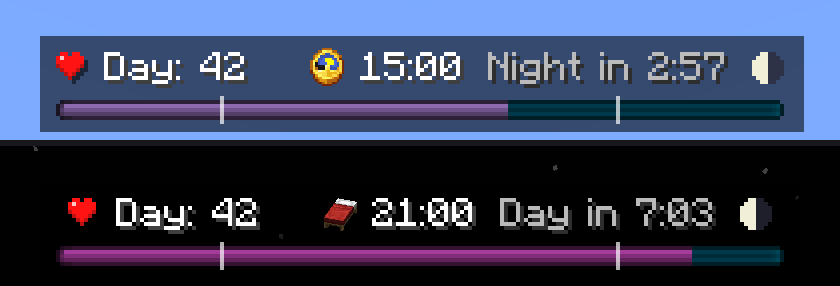 |
| All eight moon phases | Nether and End: ??:??, or just the day |
 |
 |
Make it yours
| Bigger, with background and a 12-hour clock | Smaller and see-through |
|---|---|
 |
 |
| At the bottom, just above health and hunger | Simple mode |
 |
 |
⚙️ Settings
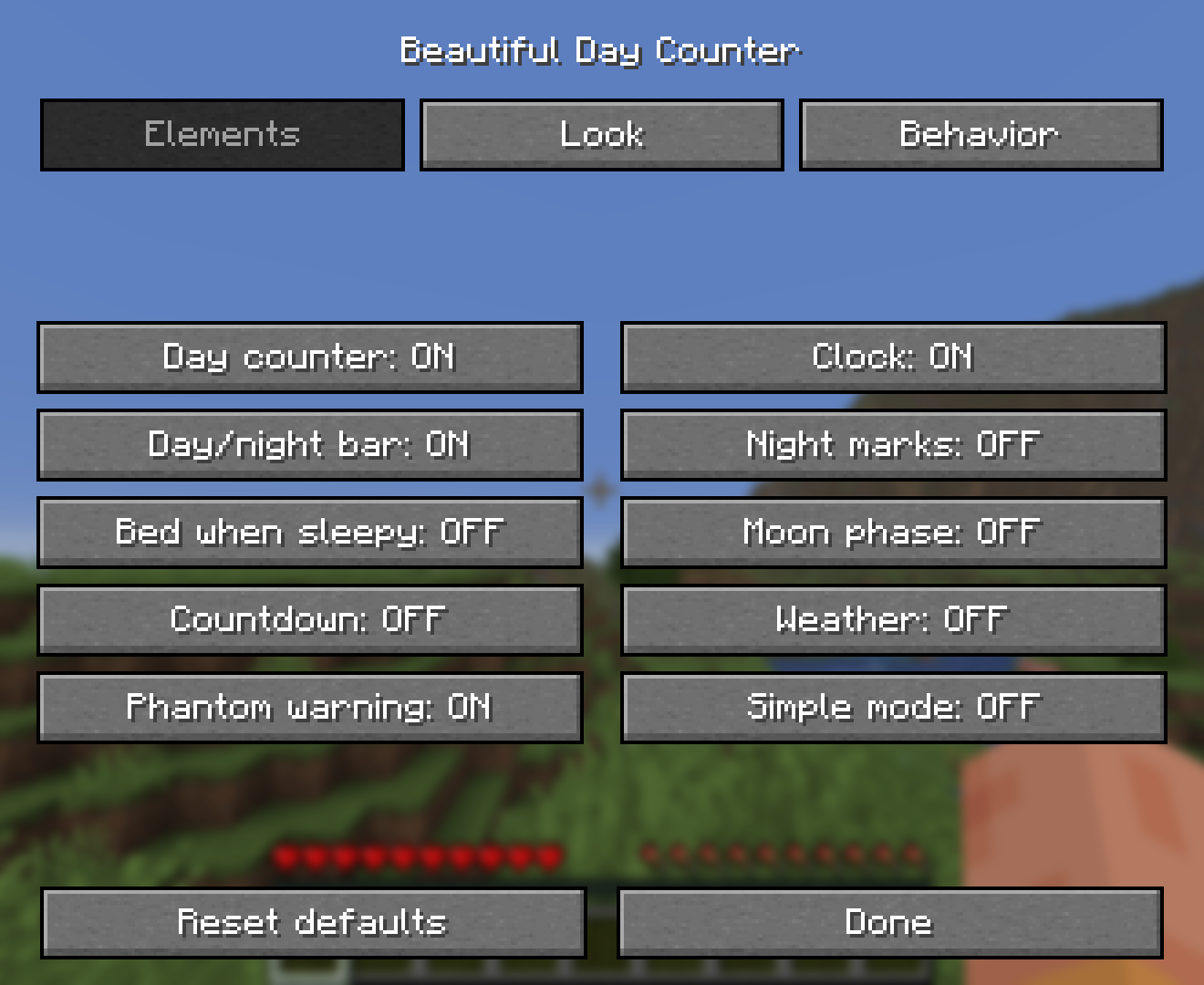
Press H in game (you can change the key in Controls). The settings are also in the mods list: through Mod Menu on Fabric, or the Config button on NeoForge and Forge. Changes apply right away, no restart needed.
| Tab | Options |
|---|---|
| Elements | Day counter, clock, day/night bar, night marks, bed when sleepy, moon phase, countdown, weather, phantom warning, simple mode (with X/Y position and Move with mouse) |
| Look | Scale, opacity, background, bar theme |
| Behavior | 12/24-hour clock, top or bottom, X/Y offset, Nether and End, milestones, milestone sound, milestone every |
| The settings screen | Follows the game language |
|---|---|
 |
 |
📦 Download the right file
| Minecraft | Fabric | NeoForge | Forge | Java |
|---|---|---|---|---|
| 26.3 | ✅ | ✅ | ✅ | 25 |
| 26.2 | ✅ | ✅ | ✅ | 25 |
| 26.1.2 | ✅ | ✅ | ✅ | 25 |
| 1.21.11 | ✅ | 21 | ||
| 1.21 – 1.21.10 | ✅ older versions | 21 |
Requirements
- Fabric: Fabric Loader + Fabric API. Mod Menu is optional.
- NeoForge / Forge: nothing else!
Client-side only: install it just on your game. Servers and your friends don't need it.
Playing on Horizon? Get the native port instead.
💬 Feedback
Found a bug or have an idea? Open an issue on GitHub or leave a comment. The source code is on GitHub under the MIT license.
If you enjoy the mod, a follow ❤️ really helps and lets you know when new updates come out.
Screenshots
Gallery
-
 Always know the day and time Day counter, clock and a day/night bar that fills as the day goes by. Clean, vanilla-style, never in the way.
-
 Celebrate your milestones On day 50, 365 and every 100 days the counter turns rainbow, the heart becomes a Golden Apple (a Totem from day 500) and a level-up sound plays.
-
 A bar that follows the sun The day/night bar smoothly shifts color: purple night, golden dawn, blue day and pink sunset. Know at a glance when it's time to head home.
-
 Top or bottom, your choice Prefer it above the hotbar? Switch position in one click. The HUD moves out of the way of hearts, armor and air bubbles automatically.
-
 Simple settings, in your language Press H (or use Mod Menu / the mods list) to toggle every element. Changes apply instantly, no restart. Available in 6 languages.
Versions
Files
Relations
Project Relations
More like this
Similar Mods
Suggestions use data such as tags, dependencies, dependents, descriptions, titles, and more to rank how much they overlap with this mod.
- Beautiful Day Counter
- DayCounter Epic
- Day/Night Progress Bar
- Axel's Clocks and Chimes
- Beautiful Enchanted Books [MOD EDITION] | 6.0 UPDATE!
- Beautiful Potions [MOD EDITION] | 2.0 UPDATE!
- Beautiful Campfires
- Beautiful Ornaments [Fantastic Cosmetic Series]
- Beautiful Hitboxes
- beautiful dangers
- Beautiful Woods
- Beautiful Tooltips
On ModDex
Community snapshot
By the numbers
Statistics


Get it on
Available Platforms
On ModDex
Community snapshot
By the numbers