

Better Connections
Connects Fences, Walls, and Iron Bars together seamlessly.
No ratings yet
Be the first to rate it.
Community listing page
Community listing page, reviews may not be monitored by the author.

Community voices
Reviews
No reviews yet. Be the first to review this project!
Get it on
Available Platforms
About
Project Details
For authors
Embed Badge
If you're the author of this project, you can embed a live badge anywhere that supports HTML or Markdown. It updates automatically whenever ratings change.
Use HTML for any page that supports it, or Markdown for README files and Markdown-based descriptions.
Identifiers
Platform IDs
About
Description
🔗 Better Connections
Fences, walls and iron bars connect to each other — and to every modded block that uses the vanilla tags.



✨ Overview
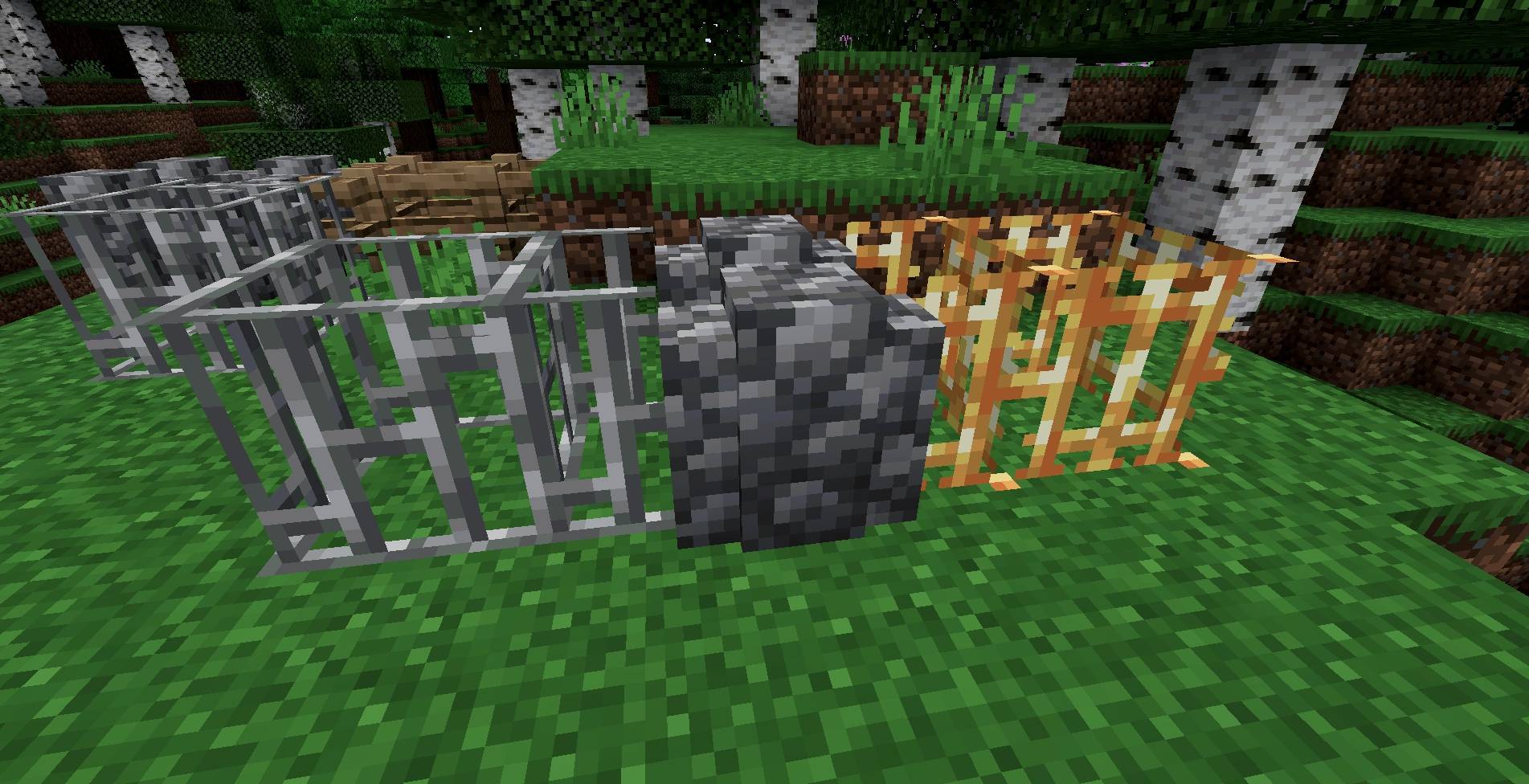
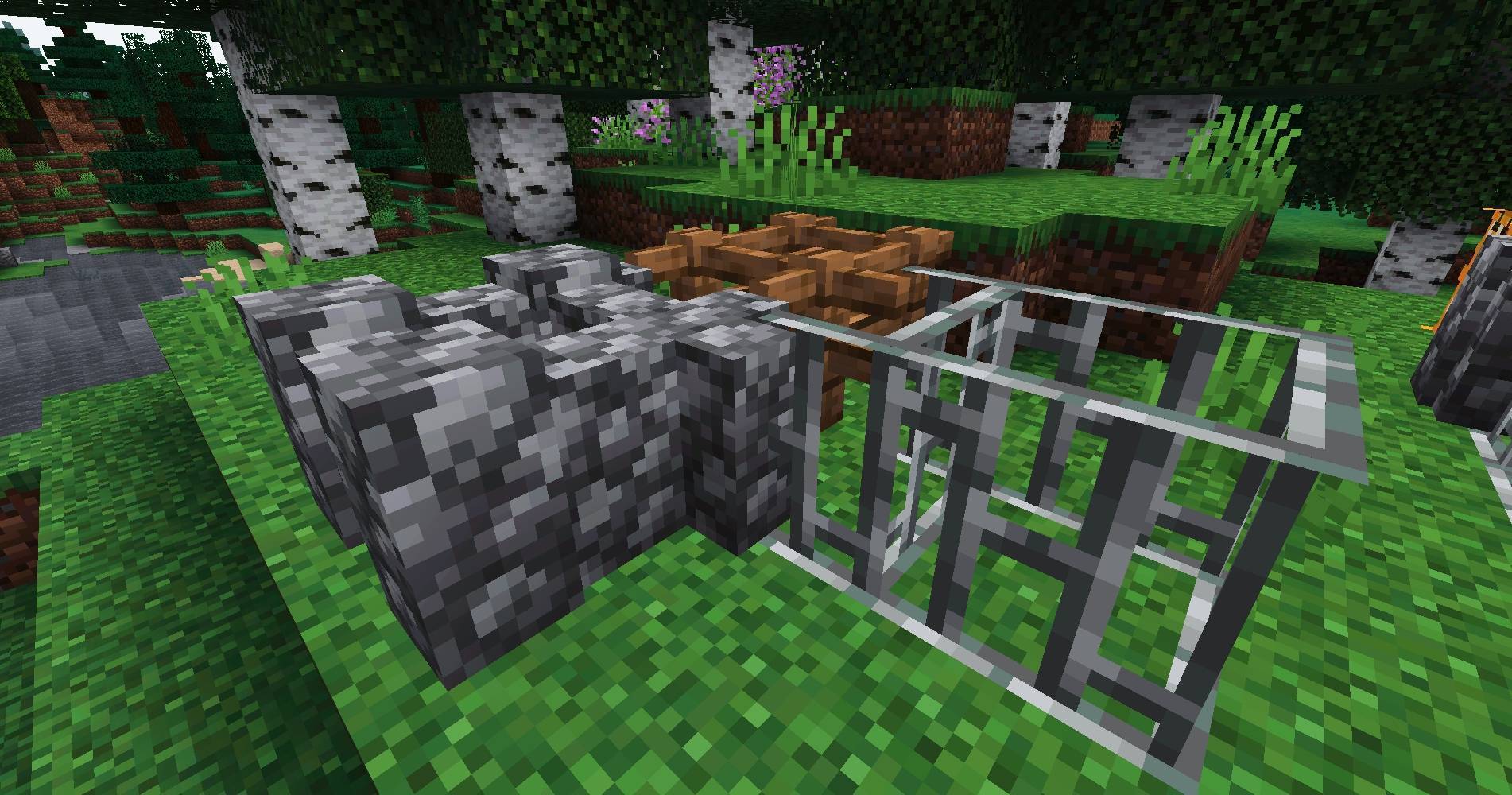
Better Connections closes the ugly gap left where a fence meets a wall, or an iron-bar window meets a fence gate. Fences, walls and iron bars now join each other — and wall signs — into one continuous run. The connection rules are driven by block tags (minecraft:fences, minecraft:walls, minecraft:fence_gates, minecraft:wall_signs) plus the vanilla iron-bars block type, so modded fences, walls, gates and bars are picked up automatically when they are tagged the way vanilla expects — no per-mod patches, nothing to configure.
A NeoForge, Fabric and Forge port of BetterWalls by Lemonnik6484 and JX_Snack (originally a Fabric mod), reworked and extended with the modded-block and wall-sign compatibility by Stalking Dragons. Distributed under the same license (AGPL-3.0). The change is purely visual — hitboxes, collision, redstone and mob pathing are untouched — and it is safe to add to or remove from an existing world at any time. Not affiliated with or endorsed by the original authors.
|

|
🎯 Features
🪵 Fences
Fences connect to walls, other fences, iron bars and wall signs. No more floating fence post sitting a pixel away from the wall it should be joining.⛓️ Iron Bars
Iron bars (and blocks that behave like them) connect to fences, fence gates and wall signs — ideal for windows, railings and mixed-material barriers.🧱 Walls
Walls connect to fences and wall signs, on top of the wall / iron-bar / fence-gate connections they already make in vanilla. Hybrid fence-and-wall runs finally touch.🧩 Modded blocks
Any fence, wall, fence gate or iron-bars-style block from another mod is included automatically when it uses the standard block tags. The compatibility rule is added once, on the vanilla connection logic, instead of listing blocks one by one.⚡ Zero cost, no dependencies
Three small mixins on the vanilla connection checks. No config file, no commands, no runtime overhead, nothing else required.🧱 Mod Structure
| Area | What it provides |
|---|---|
FenceBlockMixin | Extends FenceBlock#connectsTo so fences also connect to walls, iron bars and wall signs. |
PaneBlockMixin | Extends IronBarsBlock#attachsTo so iron bars also connect to fences, fence gates and wall signs. |
WallBlockMixin | Extends WallBlock#connectsTo so walls also connect to fences and wall signs. |
BetterConnections | The mod entrypoint. No registries, no events, no config. |
📋 Requirements
| Minecraft / Loader / Java | see Available Versions below |
| Dependencies | None |
| Side | Client and Server (required on both) |
📦 Available Versions
| Minecraft | NeoForge | Java | Latest build | Status |
|---|---|---|---|---|
| 26.1.2 | 26.1.2.84+ | 25 | 1.0.1 | Stable |
| 26.3 | 26.3.0.26-beta+ | 25 | 0.0.0-beta.1 | Beta |
| 26.2 | 26.2.0.57+ | 25 | 1.1.0 | Stable |
| 1.21.1 | 21.1.259+ | 21 | 0.0.0-beta.3 | Beta |
| Minecraft | Fabric Loader | Java | Latest build | Status |
|---|---|---|---|---|
| 26.1.2 | 0.19.5+ | 25 | 0.0.0-beta.2 | Beta |
| 26.3 | 0.19.5+ | 25 | 0.0.0-beta.1 | Beta |
| 26.2 | 0.19.5+ | 25 | 0.0.0-beta.2 | Beta |
| 1.21.1 | 0.19.5+ | 21 | 0.0.0-beta.2 | Beta |
| Minecraft | Forge | Java | Latest build | Status |
|---|---|---|---|---|
| 26.3 | 66.0.11+ | 25 | 0.0.0-beta.1 | Beta |
| 26.2 | 65.1.4+ | 25 | 0.0.0-beta.1 | Beta |
| 26.1.2 | 64.1.4+ | 25 | 0.0.0-beta.1 | Beta |
| 1.21.1 | 52.1.16+ | 21 | 0.0.0-beta.1 | Beta |
🎮 How to Use
- Install NeoForge, Fabric or Forge for your Minecraft version (see the tables above; Fabric API is not needed).
- Place Better Connections in the
modsfolder — on the server and on every client in multiplayer. - Launch the game. Connections apply immediately; there is nothing to configure.
🙏 Credits & License
Better Connections is a NeoForge, Fabric and Forge port of BetterWalls by Lemonnik6484 and JX_Snack (Fabric), reworked and extended by Stalking Dragons. Not affiliated with or endorsed by the original authors. License: GNU AGPL v3.0 (AGPL-3.0-only), the same license under which BetterWalls is published on Modrinth and CurseForge. Under its copyleft terms this port stays under the AGPL, keeps the original BetterWalls copyright, and its complete corresponding source is published at gitlab.com/stalking-dragons/minecraft/better-connections. The full licence text ships in the jar (META-INF/LICENSE) and in the repository LICENSE file.
https://codex.skdragons.com/
Codex Stalking Dragons — Minecraft Modding
Screenshots
Gallery
-
 Picsart_26-10-16_20-03-18-793.jpg Picsart_26-10-16_20-03-18-793.jpg
-
 Picsart_26-10-16_20-01-54-148.jpg Picsart_26-10-16_20-01-54-148.jpg
Versions
Files
Relations
Project Relations
More like this
Similar Mods
Suggestions use data such as tags, dependencies, dependents, descriptions, titles, and more to rank how much they overlap with this mod.
Stats
- Downloads
- 3k
- Used in
- 8 modpacks
- Followers
- 0
- In stacks
- 0
- Created
- Last synced
-
Nov 17, 2026 6:50 PM UTC
New file updates sync automatically.
When ModDex last fully re-synced this project from CurseForge or Modrinth. A new file release triggers a resync usually within minutes, and every project is also re-synced on a schedule. Edits that don't ship a file, such as a new description or screenshots, are checked every few hours and can appear before this date changes.
How syncing works
External Links

Stats
- Downloads
- 3k
- Used in
- 8 modpacks
- Followers
- 0
- In stacks
- 0
- Created
- Last synced
-
Nov 17, 2026 6:50 PM UTC
New file updates sync automatically.
When ModDex last fully re-synced this project from CurseForge or Modrinth. A new file release triggers a resync usually within minutes, and every project is also re-synced on a schedule. Edits that don't ship a file, such as a new description or screenshots, are checked every few hours and can appear before this date changes.
How syncing works