
Community listing page, reviews may not be monitored by the author.
Biome Snapshot


No reviews yet
This mod provides some commands to export the biome or terrain status of a specified coordinate range as a flat map (requires permission level of 4).

Community voices
Reviews
No reviews yet. Be the first to review this project!
Get it on
Available Platforms
Compatibility
Supported Environments
Runs entirely on the server. Also works in singleplayer.
Must be installed on both the client and the server.
Varies by version.
About
Project Details
For authors
Embed Badge
If you're the author of this project, you can embed a live badge anywhere that supports HTML or Markdown. It updates automatically whenever ratings change.
Use HTML for any page that supports it, or Markdown for README files and Markdown-based descriptions.
Identifiers
Platform IDs
About
Description
This mod provides some commands to export the biome or terrain status of a specified coordinate range as a flat map (requires permission level of 4).
The exported image is saved in config/biome-snapshot/<levelName>/.
Supports en_us, zh_cn, zh_hk and zh_tw languages.
Important:
- When exporting images, the game server will be paused until the generation is complete.
- When exporting images, Biome Snapshot will report the progress (%) every 5 seconds; please be patient.
- The Mainland Ocean Biome color resolver and Mainland River Ocean Biome color resolver only support the Overworld dimension of Minecraft.
- The Real Coastline color resolver will use the latest surface block as the standard when encountering chunks that have been fully generated.
BiomeSnapshot




This mod provides some commands to export the biome or terrain status of a specified coordinate range as a flat map (requires permission level of 4).
The exported image is saved in config/biome-snapshot/<levelName>/.
Supports en_us, zh_cn, zh_hk and zh_tw languages.
Important:
- When exporting images, the game server will be paused until the generation is complete.
- When exporting images, Biome Snapshot will report the progress (%) every 5 seconds; please be patient.
- The Mainland Ocean Biome color resolver and Mainland River Ocean Biome color resolver only support the Overworld dimension of Minecraft.
- The Real Coastline color resolver will use the latest surface block as the standard when encountering chunks that have been fully generated.
/biome-snapshot
Export the biome or terrain status of a specified coordinate range as a flat map (requires permission level of 4).
Grammar
/biome-snapshot <colorResolver> <from> <to>
Parameters
-
<colorResolver>: Color ResolversSpecifies the color resolver to use. It must be
biome,mainland_ocean_biome,mainland_river_ocean_biome, orreal_coastline. If not, this command will not be parsed.Examples
- biome
- mainland_ocean_biome
- mainland_river_ocean_biome
- real_coastline
-
<from>: column_pos and<to>: column_posMust be a column coordinates composed of and , each of which must be an integer or tilde notation.
Examples
- 0 0
- ~ ~
- ~1 ~-2
/biome-snapshot-config
Configure each color resolver (requires permission level of 4). After the game restarts, all configurations will be reset to the default values.
Grammar
There are three subcommands for/biome-snapshot-config (biome, mainland_ocean_biomeandmainland_river_ocean_biome).
-
/biome-snapshot-config ...-
... biome ...Configure the Biome Color Resolver. Allows configuration of custom biome colors for other mods or datapacks.
-
... set <namespace> <path> <color>Set the color (of the biome).
-
... remove <namespace> <path> <color>Remove the color (of the biome).
-
... get <namespace> <path>Get the color (of the biome).
-
... mainland_ocean_biome ...Configure the Mainland Ocean Biome Color Resolver.
-
... set mainland <color>Set the color of the mainland.
-
... set ocean <color>Set the color of the ocean.
-
... get mainlandGet the color of the mainland.
-
... get oceanGet the color of the ocean.
-
-
... mainland_river_ocean_biome ...Configure the Mainland River Ocean Biome Color Resolver.
-
... set mainland <color>Set the color of the mainland.
-
... set river <color>Set the color of the river.
-
... set ocean <color>Set the color of the ocean.
-
... get mainlandGet the color of the mainland.
-
... get riverGet the color of the river.
-
... get oceanGet the color of the ocean.
-
-
-
Parameters
-
<namespace>: string and<path>: stringSpecify the namespace and path of the biome. The two values must be single words (without Spaces).
For biomes that have been configured with colors, the '' parameter and the '' parameter will automatically prompt their namespaces and paths.
Examples
- minecraft plains
- biomesoplenty auroral_garden
- betterend amber_land
-
<color>:integerSpecify the color. It must be an integer between 0 and 16,777,215.
The '' parameter will automatically prompt the default color value provided by Biome Snapshot (if any).
Examples
- 0
- 255
- 16777215
Color Resolvers
Biome Color Resolver
ID: biome.
Based on biomes, each biome has its own unique color.
Example: /biome-snapshot biome -5000 -5000 0 0

Mainland Ocean Biome Color Resolver
ID: mainland_ocean_biome.
Based on biomes, all biomes are divided into two categories: mainland and ocean. Mainland is represented by the color of plains (green) by default, and ocean is represented by the color of ocean (dark blue) by default.
Example: /biome-snapshot mainland_ocean_biome -5000 -5000 0 0

Mainland River Ocean Biome Color Resolver
ID: mainland_river_ocean_biome.
Based on biomes, all biomes are divided into three categories: mainland, river, and ocean. Mainland is represented by the color of plains (green) by default, river is represented by the color of river (blue) by default, and ocean is represented by the color of ocean (dark blue) by default.
Example: /biome-snapshot mainland_river_ocean_biome -5000 -5000 0 0

Real Coastline Color Resolver
ID: real_coastline.
"By default, the coastlines for versions 1.18 and above don’t match up perfectly. This is not a bug, but rather because the map shows the underlying biomes instead of the exact terrain. Near coasts, ocean and river biomes often have land, while land biomes can be underwater."
By CHUNKBASE
The above phenomenon occurs in all biome-based color resolvers. If you only need an accurate biome map, this phenomenon will not affect you. If you need a more realistic reflection of the coastline, please choose: Real Coastline Color Resolver.
The Real Coastline Color Resolver is based on the chunk data of the NOISE generation stage, which has generated and applied the real heightmap. Since the surface blocks at this stage are only stone and water, the colors corresponding to these two blocks can be used to reflect the situation of the coastline in the exported image.
It should be noted that the NOISE stage is only an early stage of chunk generation. If the chunk has been fully generated, or even modified by players, the latest surface block will be used as the standard, and the exported image will also use the color of the latest surface block. In other words, Biome Snapshot will not roll back the chunk to the NOISE stage.
In addition, subsequent stages such as terrain carving (CARVERS) may still slightly change the coastline, but these changes are not significant. Moreover, the time and space required to generate chunks to these later stages are much greater than those required to generate to the NOISE stage (early stage). In the future, this may be split into two independent color resolvers for selection.
Example: /biome-snapshot real_coastline -5000 -5000 0 0

For Mod and Datapack Developers
Biome Snapshot enables developers or enthusiasts of mods and datapacks to configure default colors for their custom biomes.
Please go to the Issue page to submit a request.
Please provide the mod or datapack home page link, your identity (developer, administrator, contributor, etc.), and a list containing the biome information (namespace, path, and default color).
I will respond to your request in the issue.
License
Licensed under the Apache License 2.0.
Screenshots
Gallery
-
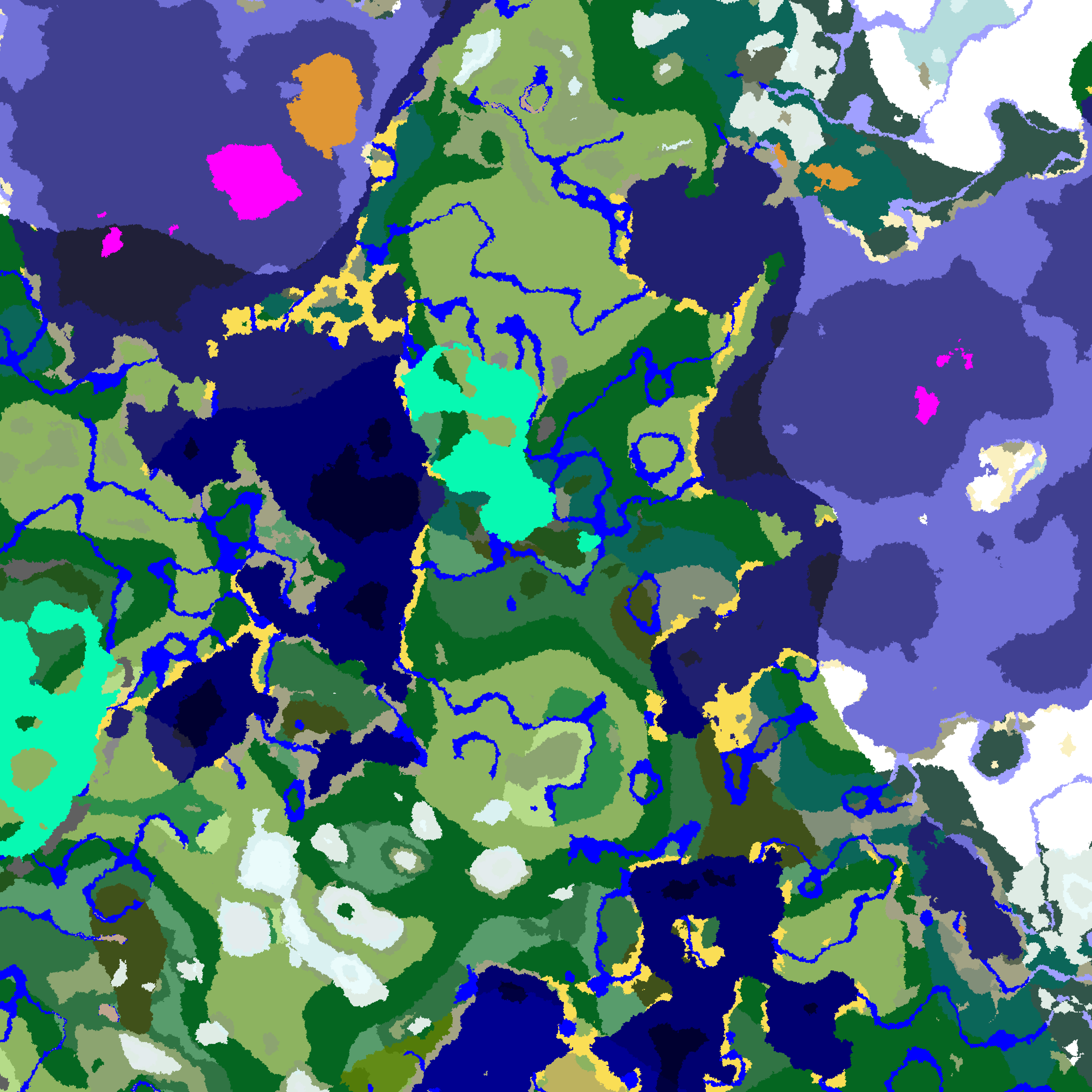 Biome Color Resolver
 -
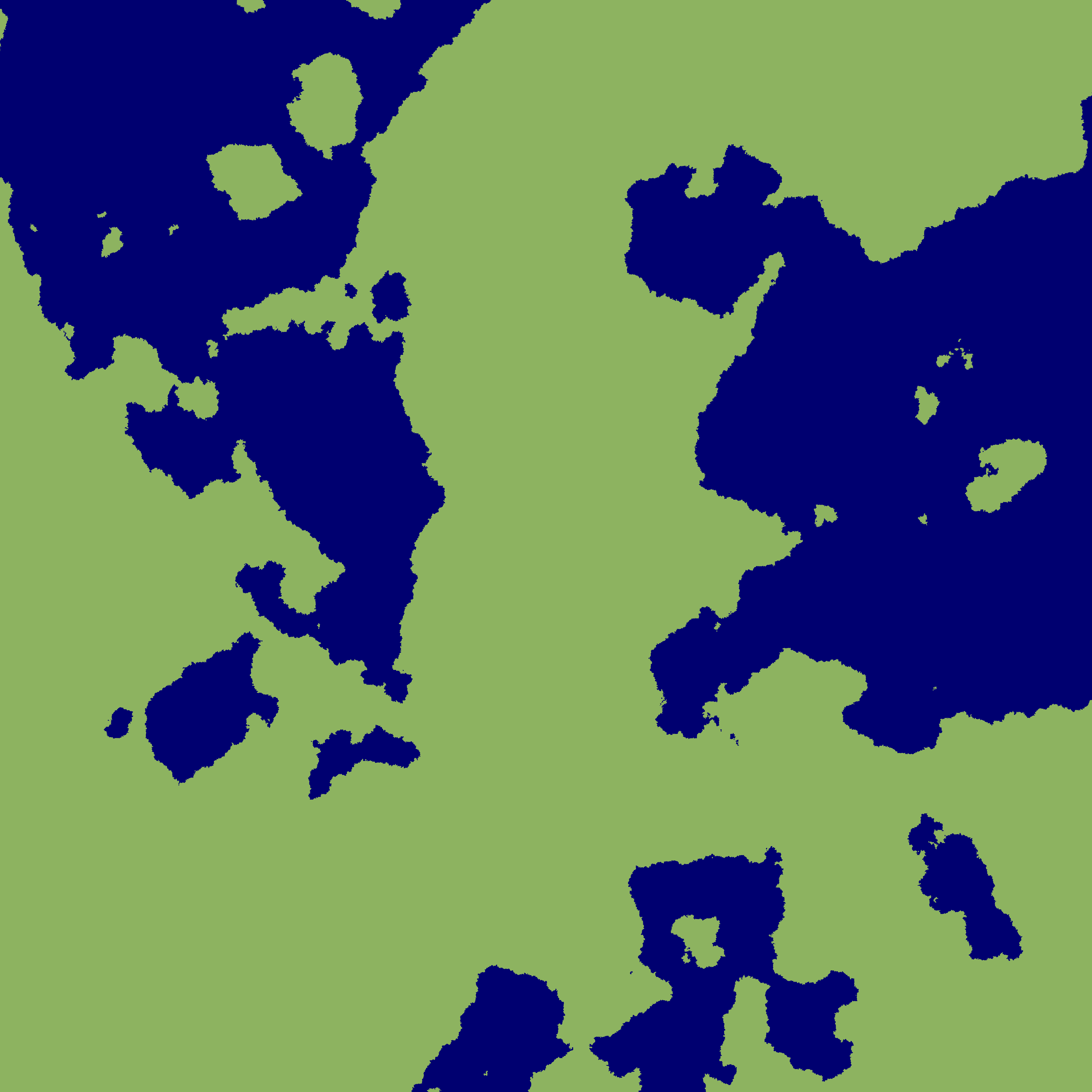 Mainland Ocean Biome Color Resolver
 -
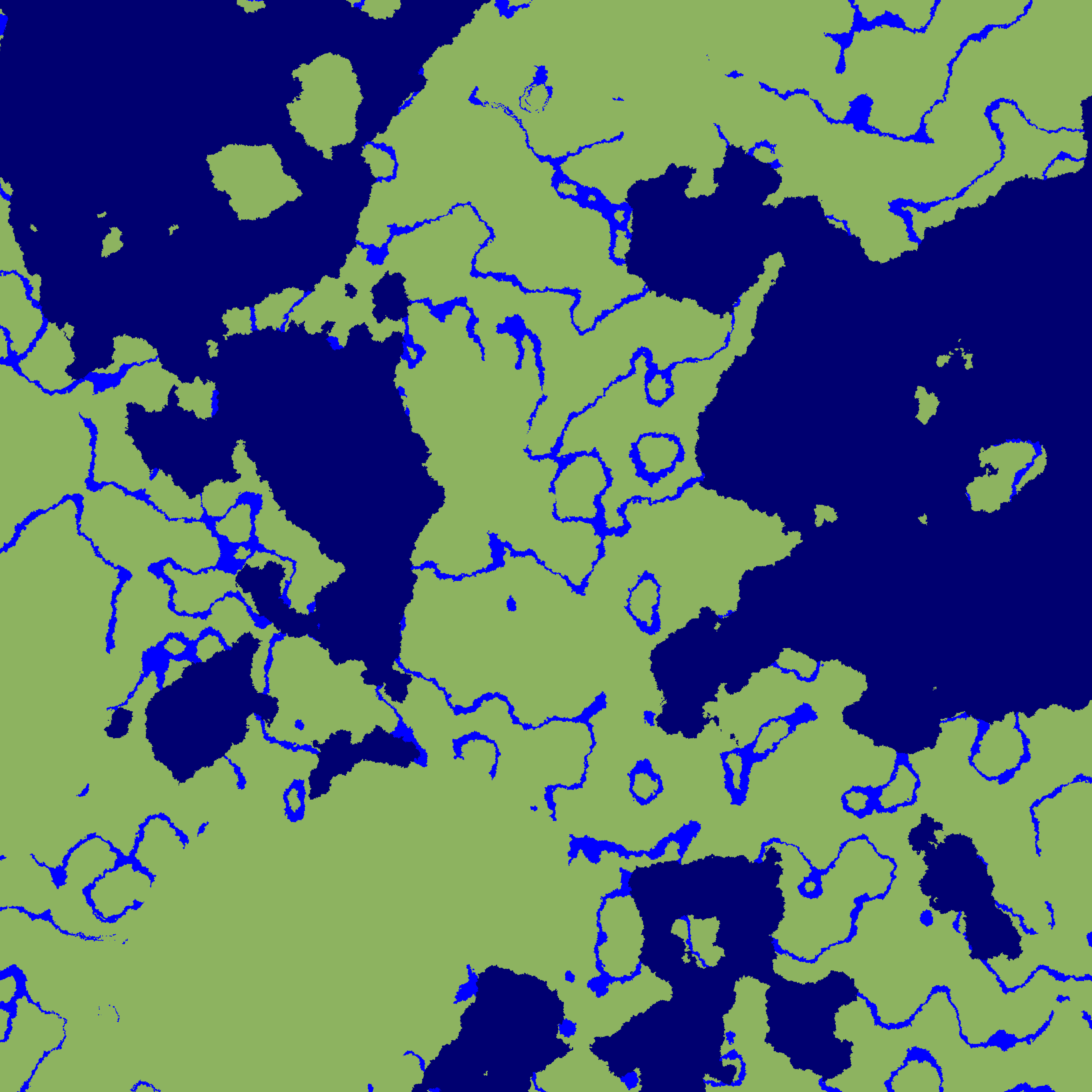 Mainland River Ocean Biome Color Resolver
 -
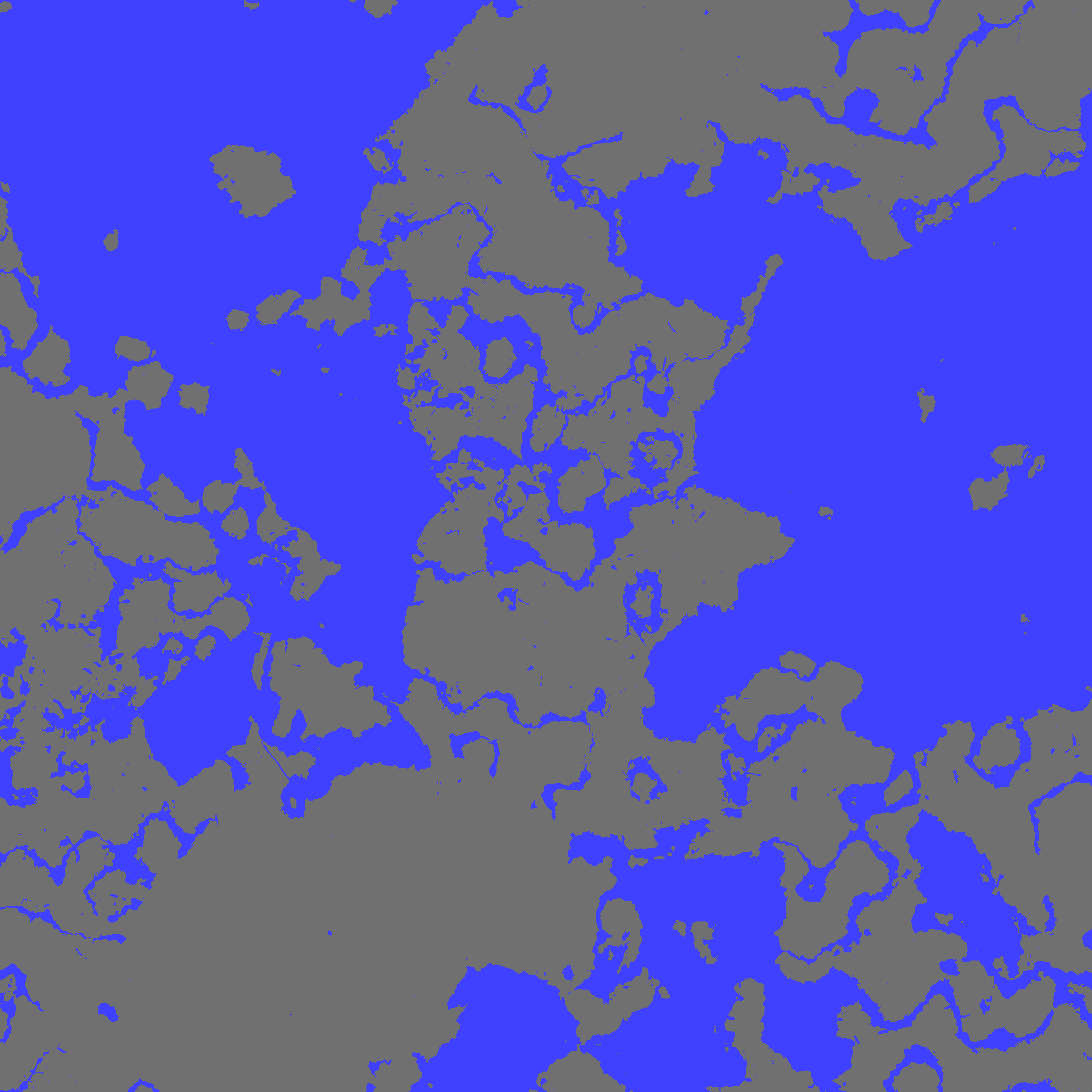 Real Coastline Color Resolver
Versions
Files
Relations
Project Relations
More like this
Similar Mods
Suggestions use data such as tags, dependencies, dependents, descriptions, titles, and more to rank how much they overlap with this mod.
On ModDex
Community snapshot
By the numbers
Statistics

Get it on
Available Platforms
On ModDex
Community snapshot
By the numbers