
Community listing page, reviews here may not be monitored by the author.
BlockTuner-forge


No reviews yet
A note block tuning assistant for forge
Community voices
Reviews
No reviews yet. Be the first to review this project!
Get it on
Available Platforms
Compatibility
Supported Environments
Must be installed on both the client and the server.
About
Project Details
For authors
Embed Badge
If you're the author of this project, you can embed a live badge anywhere that supports HTML or Markdown. It updates automatically whenever ratings change.
Use HTML for any page that supports it, or Markdown for README files and Markdown-based descriptions.
Identifiers
Platform IDs
About
Description
BlockTuner (Forge Mod)
About
This is the forge version of BlockTuner.
If you want a fabric version, please visit this page (Fabric version is the original version of the mod. Forge version was forked from here on 2023/10/12).
If you want the data pack for older versions of Minecraft, please visit this page.
Instructions
Installation
Put this mod in your mods folder. You also need to install Forge API if you haven't installed it yet.
Server need to install the mod for it working.
How to Use BlockTuner
Ctrl + Right clock on a note block to open up tuning UI. Placing a note block while holding Ctrl also opens the UI automatically.
Ctrl to show the note of the note block at crosshair.
Ctrl + middle click on note blocks to pick up readily tuned note blocks.
Right click note blocks with blaze rods to play with right clicks without tuning.
Tuning UI
Top-right corner (from left to right)
 Play mode - toggle whether the GUI will turn off immediately upon clicking a note on the piano keyboard.
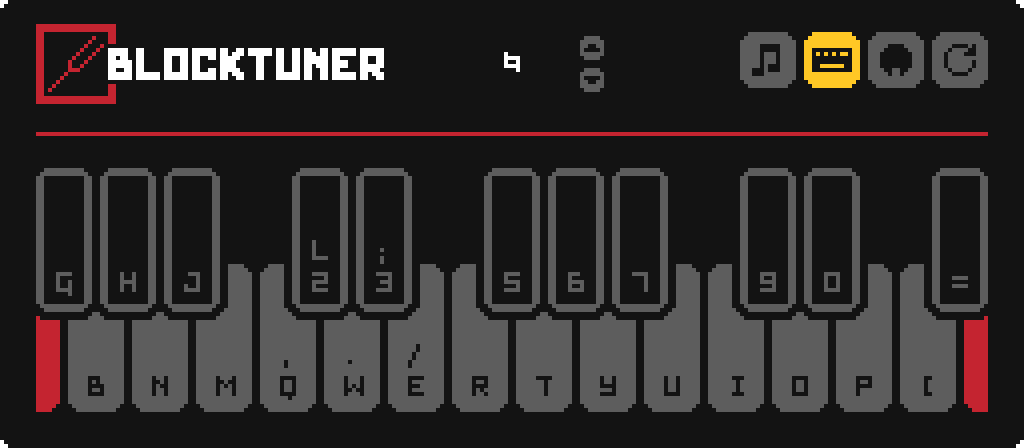
 Typing keyboard to piano keyboard - toggle whether you want to play the piano keyboard using your computer keyboard.
 MIDI Device - Click to cycle through available MIDI input devices. The icon shows red if the device is currently unavailable. This usually means it is being used by another program.
Keyboard Mapping:
Credits
Original author
- Fabric version original author - xwjcool
Localization
- Russian - Felix14-v2 (Currently outdated)
- Japanese - misaka10843 & hakkaku
BlockTuner (Forge Mod)
About
This is the forge version of BlockTuner.
If you want a fabric version, please visit this page.
If you want the data pack for older versions of Minecraft, please visit this page.
Instructions
Installation
Put this mod in your mods folder. You also need to install Forge API if you haven't installed it yet.
Server need to install the mod for it working.
How to Use BlockTuner
Ctrl + Right clock on a note block to open up tuning UI. Placing a note block while holding Ctrl also opens the UI automatically.
Ctrl to show the note of the note block at crosshair.
Ctrl + middle click on note blocks to pick up readily tuned note blocks.
Right click note blocks with blaze rods to play with right clicks without tuning.
Tuning UI
Top-right corner (from left to right)
 Play mode - toggle whether the GUI will turn off immediately upon clicking a note on the piano keyboard.
 Typing keyboard to piano keyboard - toggle whether you want to play the piano keyboard using your computer keyboard.
 MIDI Device - Click to cycle through available MIDI input devices. The icon shows red if the device is currently unavailable. This usually means it is being used by another program.
Keyboard Mapping:

Credits
Original author
- Fabric version original author - xwjcool
Localization
- Russian - Felix14-v2 (Currently outdated)
- Japanese - misaka10843 & hakkaku
Screenshots
Gallery
Versions
Files
Relations
Project Relations
More like this
Similar Mods
Suggestions use data such as tags, dependencies, dependents, descriptions, titles, and more to rank how much they overlap with this mod.
On ModDex
Community snapshot
By the numbers
Statistics
Want to reach Minecraft players?
We're looking for a server hosting partner to feature here and other parts of the site. Interested? Send us a message!
Get in touchGet it on
Available Platforms
On ModDex
Community snapshot
By the numbers