
Community listing page, reviews here may not be monitored by the author.
Book of Blocks- Fabric


No reviews yet
Terraria's "Journey Mode" in Minecraft! Collect and Unlock Unlimited Items!
Community voices
Reviews
No reviews yet. Be the first to review this project!
Get it on
Available Platforms
Compatibility
Supported Environments
Must be installed on both the client and the server.
About
Project Details
For authors
Embed Badge
If you're the author of this project, you can embed a live badge anywhere that supports HTML or Markdown. It updates automatically whenever ratings change.
Use HTML for any page that supports it, or Markdown for README files and Markdown-based descriptions.
Identifiers
Platform IDs
Resources
External Links
About
Description
MC Book of Blocks
REQUIREMENTS: Fabric API 0.80.0+1.19.4 | MC 1.19.4
Would you like to donate as a thank you for this mod?
Introduction
The Book of Blocks (BoB) mod is an interpretation of Terraria's Journey Mode block research, and is intended to be used in conjunction with a near-vanilla playstyle, while providing an adjustable quality of life enhancement to the acquisition of blocks and items in game. This is accomplished by the player " spending" a certain number of the desired block, to unlock an unlimited supply of that block! No more needing to endlessly grind basic materials.
This mod is intended to let people have fun building without going into creative, reduce the grind without eliminating it, and let small servers create a manageable way to provide basic resources without massive expansion or contraptions.
Popular uses
- Basic materials for mass construction (Woods and stones)
- Rare items that may be complicated to get for multiple people (such as elytra)
- Things that get tedious, but valuable after grinding a few times (such as beacon)
This Mod allows you to customize which items are available to unlock, and how much each item will cost to unlock. Default values are provided, but you can add your own preferences via the config. Custom Mod items can be added too!
Setup
Place the mod jar in the mods folder for either server or client. Default configuration will generate.
The default config that generates includes about 150 items and basic building materials, and some examples of various configuration options.
Config
With the BoB screen up, those with permissions (perm lvl 4 required / OP), will see a gear in the top right of the BoB screen. Clicking on this button will open a screen to add new items. NOTE: If you add an item that already exists in the config, the new options will overwrite the previous options.
You can also right-click any item within the BoB item screen to open the options for a single item.
Each item has 4 methods for unlocking.
1 - Pay only (default); This requires the player to pay 'x' number of this item to unlock.
2 - Scoreboard Only; This requires the player to reach a certain score on the scoreboard defined for this item
3 - Pay -or- Scoreboard; Meet either of the criteria to unlock
4 - Pay & Scoreboard; Meet both criteria to unlock
You can also set the pay amount, the name of the scoreboard objective, as well as the goal for the scoreboard objective to meet. Saving the config will instantly adjust those options in-game, and save it to the config file.
An example for adding a scoreboard objective. In game, do the command "/scoreboard objectives add Zombie_Kill_Tracker minecraft.killed:minecraft.zombie ". This will create a scoreboard objective called 'Zombie_Kill_Tracker', which will track each time players kill zombies. You would enter 'Zombie_Kill_Tracker' into the scoreboard name, and set the goal to be whatever you wanted.
--NOTE: A player will unlock an item when the criteria is met, and they open the BoB menu. Changing the goals to unlock the item will not remove the unlock from players who already unlocked it.
Usage
On the first load into a world, default config will generate in the world folder. Changes to the config are advised to be done through in-game tools. If modification of the config file is done directly, the server/client needs to be restarted for changes to take effect.
A player with Permission lvl 4 (OP) can use the command "/bob give <@p>" to give a player the BoB Item.
Players can also craft the BoB Menu Item with 4 paper, 4 ender pearls, and 1 diamond

Right click while holding the BoB Menu Item, and it will open the menu. The menu will load 4 categories for the items: Unlocked, In inventory, In progress, and Other.

"Unlocked" has items that are unlocked and available to summon. If you Left Click, it will give you 1 of the item. If you Shift+Left Click, you will be given the 'give amount' set in the config for that item. These items may have a yellow icon at the top right if you have them in your inventory. Clicking with the middle mouse button (scroll wheel) will clear your inventory of that item if its unlocked.
"In Inventory" has items that are not unlocked, but are currently in your inventory. If you left click, it will open a screen showing the unlock progress for the item.
"In progress" has items that are not unlocked, and not in your inventory, but have the unlocking process started.
"Other" has all other items included in the config.
You can use the search bar to search for specific items. The displayed items will be filtered by the text provided.
Once a player completes the requirements to unlock the item, it will be unlocked when they open the BoB Menu.
Known Incompatibilities
- Essential.gg Mod System -- Will prevent client from connecting to a host using Essential's built in system
CURRENT REMARKS
Most blocks have been added to the default config, however items have not been trial balanced as of yet.
This is a hobby project, originally created for myself and some friends, and as such, programming will be wonky, and updates may be slow.
At this time, there are no plans to integrate other "Journey Mode" features (such as difficulty sliders, weather/time control, etc). There are many other mods that offer that functionality.
This was originally released as "Minecraft Journey Mode", but has since been re-titled to "Book of Blocks" due to publishing site issues.
EB's Book of Blocks
REQUIREMENTS: Fabric API 0.87.0+1.20.1 | MC 1.20.1
Would you like to donate as a thank you for this mod?

Introduction
The Book of Blocks (BoB) mod is an interpretation of Terraria's Journey Mode, and is intended to be used in conjunction with a near-vanilla playstyle, while providing an adjustable quality of life enhancement to the acquisition of blocks and items in game. This is accomplished by the player " spending" a certain number of the desired block, to unlock an unlimited supply of that block! No more needing to endlessly grind basic materials.
This mod is intended to let people have fun building without going into creative, reduce the grind without eliminating it, and let small servers create a manageable way to provide basic resources without massive expansion or contraptions.
Popular uses
- Basic materials for mass construction (Woods and stones)
- Rare items that may be complicated to get for multiple people (such as elytra)
- Things that get tedious, but valuable after grinding a few times (such as beacon)
This Mod allows you to customize which items are available to unlock, and how much each item will cost to unlock. Default values are provided, but you can add your own preferences via the config. Custom Mod items can be added too!
Setup
Place the mod jar in the mods folder for either server or client. Default configuration will generate.
The default config that generates includes about 150 items and basic building materials, and some examples of various configuration options.
Config
With the BoB screen up, those with permissions (perm lvl 4 required / OP), will see a gear in the top right of the BoB screen. Clicking on this button will open a screen to add new items. NOTE: If you add an item that already exists in the config, the new options will overwrite the previous options.
You can also right-click any item within the BoB item screen to open the options for a single item.
Each item has 4 methods for unlocking.
1 - Pay only (default); This requires the player to pay 'x' number of this item to unlock.
2 - Scoreboard Only; This requires the player to reach a certain score on the scoreboard defined for this item
3 - Pay -or- Scoreboard; Meet either of the criteria to unlock
4 - Pay & Scoreboard; Meet both criteria to unlock
You can also set the pay amount, the name of the scoreboard objective, as well as the goal for the scoreboard objective to meet. Saving the config will instantly adjust those options in-game, and save it to the config file.
An example for adding a scoreboard objective. In game, do the command "/scoreboard objectives add Zombie_Kill_Tracker minecraft.killed:minecraft.zombie ". This will create a scoreboard objective called 'Zombie_Kill_Tracker', which will track each time players kill zombies. You would enter 'Zombie_Kill_Tracker' into the scoreboard name, and set the goal to be whatever you wanted.
--NOTE: A player will unlock an item when the criteria is met, and they open the BoB menu. Changing the goals to unlock the item will not remove the unlock from players who already unlocked it.
Usage
On the first load into a world, default config will generate in the world folder. Changes to the config are advised to be done through in-game tools. If modification of the config file is done directly, the server/client needs to be restarted for changes to take effect.
A player with Permission lvl 4 (OP) can use the command "/bob give <@p>" to give a player the BoB Item.
Players can also craft the BoB Menu Item with 4 paper, 4 ender pearls, and 1 diamond
Right click while holding the BoB Menu Item, and it will open the menu. The menu will load 4 categories for the items: Unlocked, In inventory, In progress, and Other.
"Unlocked" has items that are unlocked and available to summon. If you Left Click, it will give you 1 of the item. If you Shift+Left Click, you will be given the 'give amount' set in the config for that item. These items may have a yellow icon at the top right if you have them in your inventory. Clicking with the middle mouse button (scroll wheel) will clear your inventory of that item if its unlocked.
"In Inventory" has items that are not unlocked, but are currently in your inventory. If you left click, it will open a screen showing the unlock progress for the item.
"In progress" has items that are not unlocked, and not in your inventory, but have the unlocking process started.
"Other" has all other items included in the config.
You can use the search bar to search for specific items. The displayed items will be filtered by the text provided.
Once a player completes the requirements to unlock the item, it will be unlocked when they open the BoB Menu.
License
This template is available under the MIT license.
Known Incompatibilities
- Essential.gg Mod System -- Will prevent client from connecting to a host using Essential's built in system
CURRENT REMARKS
Most blocks have been added to the default config, however items have not been trial balanced as of yet.
This is a hobby project, originally created for myself and some friends, and as such, programming will be wonky, and updates may be slow.
This was originally released as "Minecraft Journey Mode", but has since been re-titled to "Book of Blocks" due to publishing site issues.
Screenshots
Gallery
-
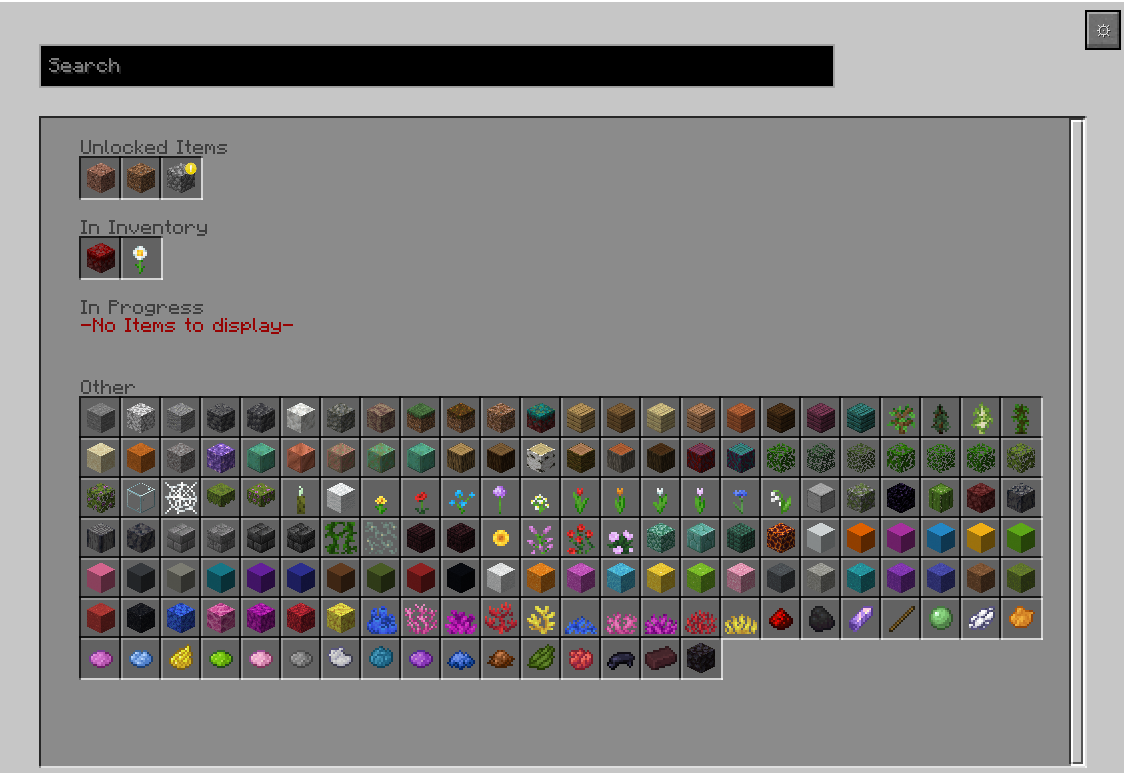 Example GUI Screen An example of a functioning Book of Blocks Menu
 -
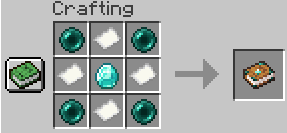 Crafting Recipe BoB Item Crafting Recipe
Versions
Files
Relations
Project Relations
More like this
Similar Mods
Suggestions use data such as tags, dependencies, dependents, descriptions, titles, and more to rank how much they overlap with this mod.
On ModDex
Community snapshot
By the numbers
Statistics
Want to reach Minecraft players?
We're looking for a server hosting partner to feature here and other parts of the site. Interested? Send us a message!
Get in touchGet it on
Available Platforms
On ModDex
Community snapshot
By the numbers
Statistics
Resources