
Community listing page, reviews here may not be monitored by the author.
Book of Familiars


No reviews yet
Adds a Familiar Book item that allows players to store their tamed creatures.
Community voices
Reviews
No reviews yet. Be the first to review this project!
Get it on
Available Platforms
Compatibility
Supported Environments
Must be installed on both the client and the server.
About
Project Details
For authors
Embed Badge
If you're the author of this project, you can embed a live badge anywhere that supports HTML or Markdown. It updates automatically whenever ratings change.
Use HTML for any page that supports it, or Markdown for README files and Markdown-based descriptions.
Identifiers
Platform IDs
About
Description
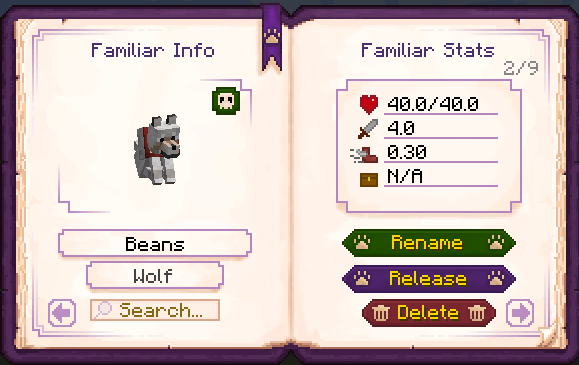
Book of Familiars is a simple mod that adds an item called the Familiar Book. This book allows players to store any tamed creature and release them anywhere in the world! Just left click your tame with the book in hand to store them. The "storage" is attached to the player, so the familiars will remain even if the book is lost. Includes config options for customization.
For update news, the easiest place to find it is the discord (still very new): https://discord.gg/RRFJYEar7Y
All you need is a book, two iron ingots and two bones and you're good to go!

Key Features:
- Familiar storage with name and stats display.
- Renaming.
- Search function to quickly find specific familiars in the book.
- Delete button to remove unwanted familiars from the world.
- Familiar revival (can be disabled per familiar with a button in the book, or entirely in the config)
Config/Customization:
The mod includes several config options.
Max Familiars - The maximum amount of familiars you can store in the book. Default is set to 10.
Blacklist and Whitelist - Unfortunately, it's impossible to catch all modded creatures in the storage checks. You can add any entities that aren't automatically caught into the whitelist. However, this does enable storing without checks like if the entity is tamed or owned by the player. The blacklist is useful for server owners who don't want specific familiars to be stored. For format, see Mod Compatibility.
Cooldown in minutes on the revival timer, and xp amount - The amount of time needed before the entity is revived, and the level cost of reviving them early.
Auto remove invalid familiars - This automatically checks the book of players on login for any unresolvable familiars, like when the mod for that familiar was removed. It will then delete that familiar from the book. There is the potential for wrongful flagging of familiars as non-existent in very niche circumstances. Use with caution.
Enable/disable resurrection - Set to true by default, this enables and disables the revival system for entities.
Mod compatibility:
The book by default checks if an entity is tamed and if the person trying to store the entity is the owner, so it should work for the majority of modded tameable creatures. If the mod has a more unique taming system in place, you may need to add the creature to the whitelist in the config. Keep in mind, this will make the entity storable without checking for an owner ID or if it's actually tamed. So, if you're playing on a server it means anybody can store it, even if they didn't tame it, and people can store other players tames.
Always check you're using the correct format in the config. It should be "minecraft:pig" or "minecraft:cow", the "" are important. If you're unsure what a modded entity is called, you can use the /summon command in game and it should display a list of entity ids you can use. To flag an entire mod, use the format "minecraft:*".
Modpack creators:
If you're adding my mod to a modpack and want specific mod compatability, the best place to find me is over on discord (link is up above). I would be more than happy to help if I can :)
Book of Familiars is a simple mod that adds an item called the Familiar Book. This book allows players to store any tamed creature and release them anywhere in the world! Just left click your tame with the book in hand to store them. The "storage" is attached to the player, so the familiars will remain even if the book is lost. Includes config options to blacklist mobs and for amount of creatures able to be stored.
For update news, the easiest place to find it is the discord (still very new): https://discord.gg/RRFJYEar7Y
All you need is a book, two iron ingots and two bones and you're good to go!

Key Features:
- Familiar storage with name and stats display.
- Renaming.
- Search function to quickly find specific familiars in the book.
- Delete button to remove unwanted familiars from the world.
- Familiar revival (can be disabled per familiar with a button in the book, or entirely in the config)
Config/Customization:
The mod includes several config options.
Max Familiars - The maximum amount of familiars you can store in the book. Default is set to 10.
Blacklist and Whitelist - Unfortunately, it's impossible to catch all modded creatures in the storage checks. You can add any entities that aren't automatically caught into the whitelist. However, this does enable storing without checks like if the entity is tamed or owned by the player. The blacklist is useful for server owners who don't want specific familiars to be stored. For format, see Mod Compatibility.
Cooldown in minutes on the revival timer, and xp amount - The amount of time needed before the entity is revived, and the level cost of reviving them early.
Auto remove invalid familiars - This automatically checks the book of players on login for any unresolvable familiars, like when the mod for that familiar was removed. It will then delete that familiar from the book. There is the potential for wrongful flagging of familiars as non-existent in very niche circumstances. Use with caution.
Enable/disable resurrection - Set to true by default, this enables and disables the revival system for entities.
Mod compatibility:
The book by default checks if an entity is tamed and if the person trying to store the entity is the owner, so it should work for the majority of modded tameable creatures. If the mod has a more unique taming system in place, you may need to add the creature to the whitelist in the config. Keep in mind, this will make the entity storable without checking for an owner ID or if it's actually tamed. So, if you're playing on a server it means anybody can store it, even if they didn't tame it, and people can store other players tames.
Always check you're using the correct format in the config. It should be "minecraft:pig" or "minecraft:cow", the "" are important. If you're unsure what a modded entity is called, you can use the /summon command in game and it should display a list of entity ids you can use. To flag an entire mod, use the format "minecraft:*".
Modpack Creators:
If you're adding my mod to a modpack and want specific mod compatability, the best place to find me is over on discord (link is up above). I would be more than happy to help if I can :)
Screenshots
Gallery
-
 screenshot1.png screenshot1.png
 -
 crafting.png crafting.png
-
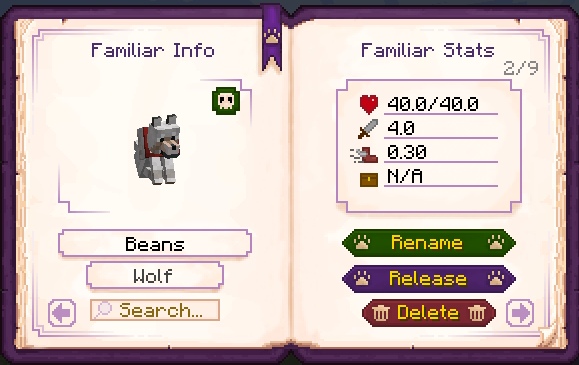
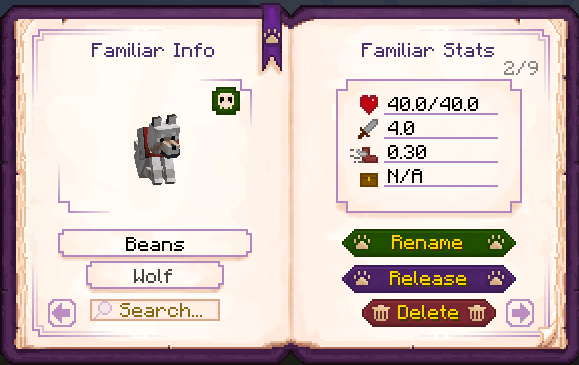
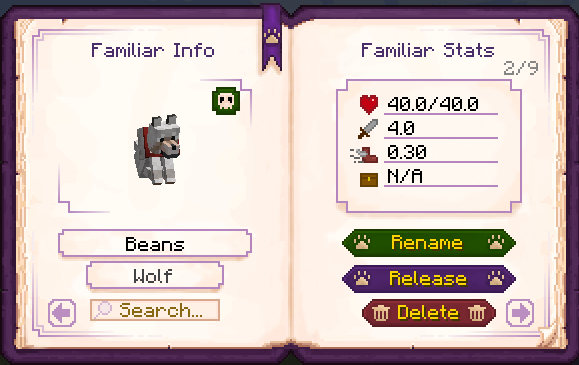 Book UI Screenshot. In-game screenshot of the book UI showing a tamed wolf on the left page with name "Beans", entity type "Wolf", and a search box. The right page has stats for health, damage, movement speed and item count, along with a release, rename, and delete button.
 -
 Book Crafting Recipe. In-game screenshot of the crafting recipe for the book, requiring a book in the middle, two iron ingots on the top and bottom, and two bones on the left and right sides.
Versions
Files
Relations
Project Relations
More like this
Similar Mods
Suggestions use data such as tags, dependencies, dependents, descriptions, titles, and more to rank how much they overlap with this mod.
On ModDex
Community snapshot
By the numbers
Statistics
Want to reach Minecraft players?
We're looking for a server hosting partner to feature here and other parts of the site. Interested? Send us a message!
Get in touchGet it on
Available Platforms
On ModDex
Community snapshot
By the numbers