
Community listing page, reviews here may not be monitored by the author.
Broadcast++ | The Ultimate Broadcast Plugin

No reviews yet
Customizable broadcasts for chat, titles, and images with gradients & rainbow effects
Community voices
Reviews
No reviews yet. Be the first to review this project!
Get it on
Available Platforms
About
Project Details
For authors
Embed Badge
If you're the author of this project, you can embed a live badge anywhere that supports HTML or Markdown. It updates automatically whenever ratings change.
Use HTML for any page that supports it, or Markdown for README files and Markdown-based descriptions.
Identifiers
Platform IDs
Resources
External Links
About
Description
Broadcast++
The modern broadcast plugin for Minecraft servers. One YAML file for every announcement across chat, titles, action bars, boss bars, and multi-channel scenes — on Paper, Spigot, Velocity, and Folia.
What is Broadcast++
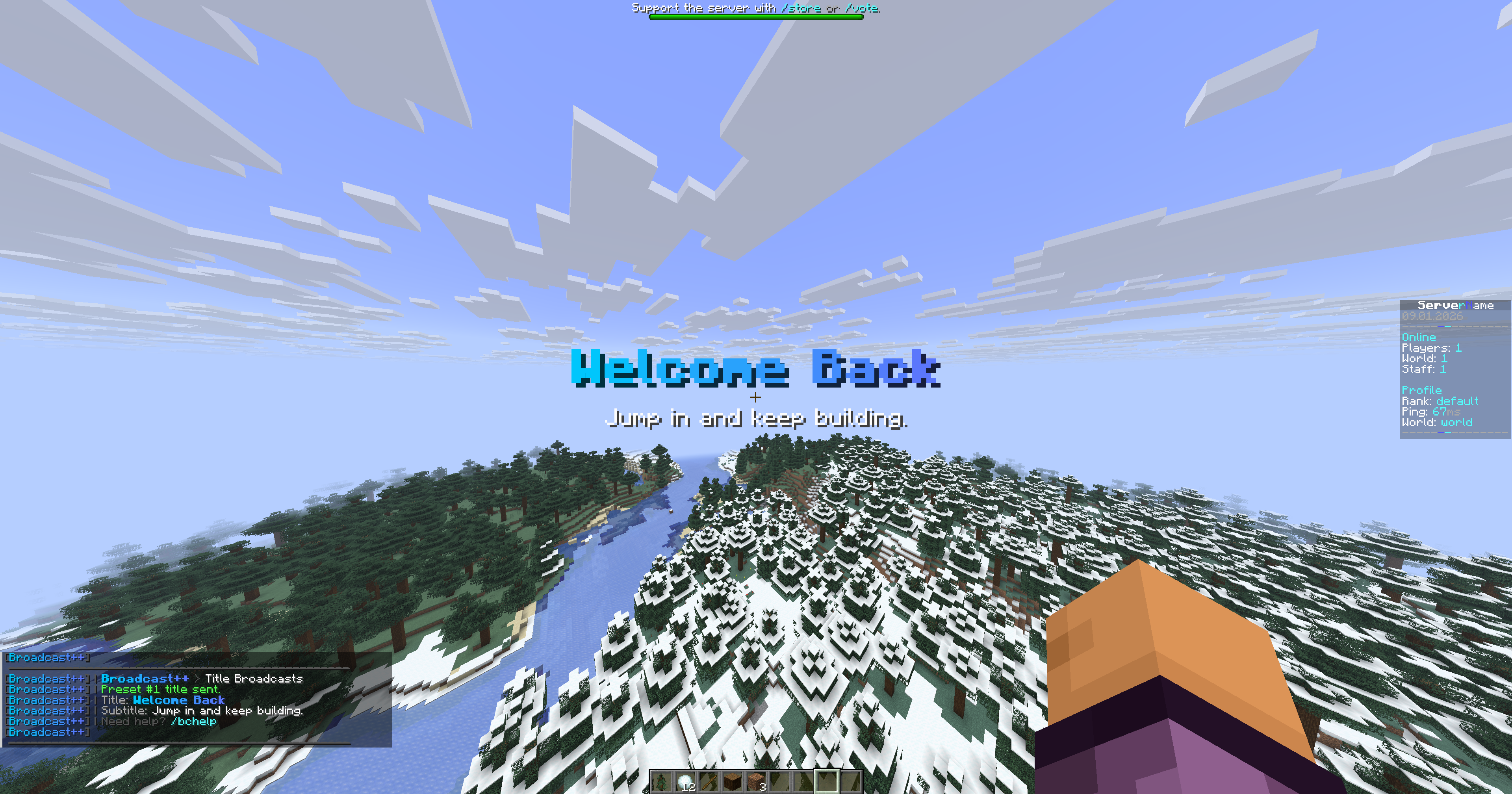
A single, unified primitive — scenes — runs every automated or triggered broadcast on your server. A scene has one trigger (join, interval, daily, or manual) and one or more steps. Each step can fire multiple channels at the same instant or chain them on a timeline. Drop the jar in, edit one line, /bc reload, done.
Why server owners pick it
- One primitive for everything. Stop juggling
welcome.yml,rotation.yml,schedule.yml. Every broadcast is a scene with the same shape. - Auto-brand your broadcasts. Set
server-name:once; every chat broadcast gets a gradient prefix. Changeserver-color:to restyle — no MiniMessage knowledge required. - Animated boss bars. Drain or fill the bar over a duration as a visual countdown. No custom scheduler code.
- Proxy-aware. On Velocity, filter scenes by backend with
servers: [lobby]to target broadcasts per-server. - Reload-safe.
/bc validatedry-runs your config before applying. If the new config has errors, the old one stays live. - Plug-and-play. Ships with five working presets and three working scenes. Useful on boot with zero edits.
Scenes — one primitive for everything
scenes:
  welcome-sequence:
    description: "On-join cinematic"
    on-join: true
    steps:
      - { at: 0s, chat: welcome }
      - { at: 1s, actionbar: tip-spawn }
      - { at: 3s, title: welcome-back }

  chat-rotation:
    every: 5m
    cycle: true
    steps:
      - { at: 0s, chat: tip-sethome }
      - { at: 0s, chat: rules }
      - { at: 0s, chat: discord }

  daily-reset:
    daily-at: "00:00"
    steps:
      - { at: 0s, chat: server-restart }
Triggers — pick one per scene
| Trigger | Fires |
|---|---|
on-join: true |
Once per player when they connect |
every: 5m |
Every 5 minutes server-wide |
daily-at: "09:00" |
Once a day at 09:00 UTC |
daily-at: "09:00 local" |
Once a day in the server's system timezone |
daily-at: "09:00 America/Los_Angeles" |
Once a day in any IANA timezone |
| (none) | Manual only — fires via /bc scene <name> |
Filters — gate delivery per-audience
vip-event:
  every: 10m
  min-players: 5
  max-players: 80
  worlds: [survival, minigames]   # Paper/Spigot only
  servers: [lobby]                 # Velocity only (backend filter)
  permission: broadcastplusplus.vip
  steps:
    - { at: 0s, chat: vip-tip }
All filters are optional. Set at scene level (applies to every step) or at preset level (applies just to that preset). When both are set, the stricter value wins.
Timeline vs. cycle
- Timeline (default) — every step fires at its
at:offset from scene start. cycle: true— one step fires per trigger tick, round-robin. Use withevery:for classic tip rotations.cycle: true+random: true— shuffled rotation instead of round-robin.
Branding in two lines
server-name: "YourServer"
server-color: ["#00C8FF", "#5C78FF"]   # gradient — two colors
# server-color: "#FFAA00"              # solid — one color
# server-color: "red"                  # named color — works too
That's it. The chat prefix is auto-synthesized from your server name and color. Every chat broadcast is stamped with it, and <server> resolves to the same value anywhere in presets.
Need a custom prefix layout? Set chat.prefix: explicitly and it overrides the auto-brand.
Animated boss bars
bossbars:
  presets:
    countdown:
      text: "<red><bold>Event starts in 10 seconds</bold></red>"
      color: RED
      overlay: PROGRESS
      progress: { from: 1.0, to: 0.0 }
      duration: 10s
Drain the bar to zero over 10 seconds. Or progress: { from: 0.0, to: 1.0 } for a fill. Static bars — just a number.
Commands
| Command | Permission | Purpose |
|---|---|---|
/bc chat <preset|"text"> |
send |
Broadcast a chat preset or ad-hoc MiniMessage |
/bc title <preset|"text"> |
send |
Show a title |
/bc actionbar <preset|"text"> (alias ab) |
send |
Show an action bar |
/bc bossbar <preset|"text"> (alias bb) |
send |
Show a boss bar |
/bc scene <preset> |
send |
Play a scene on demand |
/bc to <player> <channel> <preset|"text"> |
send |
Send to one player (staff DMs, moderation notices) |
/bc preview <type> <preset|"text"> |
send |
Send only to yourself — test before broadcasting |
/bc list [type] |
send |
List every preset, optionally filtered by channel |
/bc validate |
admin |
Dry-run the config without applying it |
/bc reload |
admin |
Reload config.yml (rejects on errors, keeps old live) |
/bc studio (alias gui) |
studio |
Open the in-game Studio GUI |
Ad-hoc broadcasts — a single unquoted word looks up a preset; multi-word or "quoted" arguments render as MiniMessage text. /bc chat "<red>Server restart in 5m</red>" works without touching the config.
Permissions
Three nodes. All default to op.
| Node | Grants |
|---|---|
broadcastplusplus.send |
All /bc broadcasts + preview |
broadcastplusplus.studio |
/bc studio GUI access |
broadcastplusplus.admin |
Everything above + /bc reload + /bc validate |
Placeholders
Usable in any preset text, per-recipient at render time:
| Tag | Value |
|---|---|
<player> |
Recipient's in-game name |
<online> |
Current online player count |
<server> |
Your server-name: value |
<time> |
Server time, HH:mm |
<date> |
Server date, yyyy-MM-dd |
Formatting uses MiniMessage. Gradients, hex colors, bold / italic, clickable URLs, hover tooltips — all supported. Preview live at webui.advntr.dev.
Studio GUI
/bc studio opens a 54-slot inventory UI on Paper and Spigot:
- Six tabs: Chat · Titles · Action bars · Boss bars · Scenes · Status
- Left-click a preset → preview it to yourself
- Shift-click → broadcast it to everyone
- Status tab shows the scene-trigger breakdown at a glance
- Admins get a reload button in the corner
Velocity doesn't support inventory GUIs — use commands there.
Platform support
| Platform | Support | Notes |
|---|---|---|
| Paper 1.20.1+ | ✅ Full | Native Adventure, smallest jar |
| Folia | ✅ Full | Region-aware schedulers, no runtime branching |
| Spigot 1.20.1 – 26.x | ✅ Full | Bundles Adventure, drop-in on legacy setups |
| Velocity 3.3+ | ✅ Full | Proxy-wide broadcasts + per-backend servers: filter |
Install
- Download the jar that matches your platform from the Versions page.
- Drop it into your server's
plugins/folder (or the proxy'splugins/for Velocity). - Start the server.
- Open
plugins/BroadcastPlusPlus/config.ymland changeserver-name:at the top. /bc reload.
The shipping config comes with five chat presets, one title, two action bars, one boss bar, and three scenes already wired up — join a fresh server and the welcome sequence fires on first connect so you can see the plugin working immediately.
Migrating from older configs
The deprecated rotation: and join: top-level sections still parse on load. The plugin detects them, synthesizes equivalent scenes in-memory, and logs one deprecation warning pointing at the new format. Nothing breaks — move your config to the scenes: shape at your own pace.
Links
- Discord — discord.gg/aJqqs2hYQJ
- MiniMessage docs — docs.advntr.dev/minimessage/format.html
- Hex color picker — htmlcolorcodes.com/color-picker
Screenshots
Gallery
Versions
Files
Relations
Project Relations
More like this
Similar Mods
Suggestions use data such as tags, dependencies, dependents, descriptions, titles, and more to rank how much they overlap with this mod.
On ModDex
Community snapshot
By the numbers
Statistics

Want to reach Minecraft players?
We're looking for a server hosting partner to feature here and other parts of the site. Interested? Send us a message!
Get in touchGet it on
Available Platforms
On ModDex
Community snapshot
By the numbers
Statistics
Resources