
Community listing page, reviews here may not be monitored by the author.
CC Synaxis Connector


No reviews yet
A mod for connecting CC: Tweaked computers with Synaxis Cimulink plant ports.
Community voices
Reviews
No reviews yet. Be the first to review this project!
Get it on
Available Platforms
Compatibility
Supported Environments
Must be installed on both the client and the server.
About
Project Details
For authors
Embed Badge
If you're the author of this project, you can embed a live badge anywhere that supports HTML or Markdown. It updates automatically whenever ratings change.
Use HTML for any page that supports it, or Markdown for README files and Markdown-based descriptions.
Identifiers
Platform IDs
Resources
External Links
About
Description
# CC Synaxis Connector
CC Synaxis Connector is a NeoForge compatibility mod for connecting
[CC: Tweaked](https://tweaked.cc/) computers with Synaxis Cimulink plant ports.
It adds bridge-style circuit boards that let Lua programs, Synaxis circuits, and
CSV logging workflows exchange values without requiring custom scripts on both
sides of every connection.
## Highlights
- Connect CC: Tweaked peripherals and Synaxis Cimulink ports.
- Expose named one-way real/boolean bridge signals.
- Use a Super Hub board to wrap adjacent CC peripherals and Synaxis plant values.
- Read selected Synaxis values from CC Lua through a single peripheral.
- Write CC getter/setter-style peripheral methods into Synaxis ports.
- Record Synaxis signals to CSV files with an in-game table editor.
- Supports both English and Simplified Chinese UI text.
## Requirements
This mod is not standalone. Install it together with CC: Tweaked, Synaxis, and
the dependencies required by Synaxis.
Tested target:
- Minecraft `1.21.1`
- NeoForge `21.1.226+`
- CC: Tweaked `1.118.0+`
- Synaxis `1.3.4+`
- Sable `1.1.3+`
- Sable Schematic API `0.2.6+`
- LDLib2 `2.2.17+`
- Create `6.0.10+`
- Flywheel `1.0.6+`
The generated jar does not include CC: Tweaked, Synaxis, Sable, Create, or their
assets. You must obtain those mods from their official distribution channels.
## Blocks
### CC: Synaxis Bridge
The Bridge is a small Cimulink-style board for manually created one-way signal
channels.
Each bridge channel has:
- a unique name, such as `bridge_1`
- a type: `real` or `boolean`
- a direction: `cc_to_synaxis` or `synaxis_to_cc`
- an optional "save last value" setting for missing Synaxis input
Use the block UI to create and remove bridge channels. Use Synaxis wiring tools
to connect the generated ports. CC computers can access the block as a peripheral
named `cc_synaxis_bridge`.
### CC: Synaxis Super Hub
The Super Hub is a board for wrapping nearby devices into ports for the other
side of the bridge.
It has two UI pages:
- **Providing to Synaxis**: select wrapped CC or Synaxis capabilities and expose
them as Synaxis Cimulink ports.
- **Providing to CC**: select wrapped CC or Synaxis capabilities and expose them
through the Super Hub CC peripheral.
For CC peripherals, getter-like methods such as `getSpeed()`, `isRunning()`, or
`hasFuel()` are treated as readable values. Setter-like methods such as
`setSpeed(value)` become writable inputs where possible.
For Synaxis, the hub reads available plant values through Synaxis bus/plant-port
style access and presents compatible values to CC or to Synaxis ports.
### Log Output Assistant
The Log Output Assistant is a Synaxis input board that writes signal values to
CSV.
It supports up to 10 columns. Each column creates one Synaxis input port and can
be configured as `real` or `boolean`. Empty, never-activated inputs are written
as `null` unless empty rows are skipped.
Main options:
- log name / output file
- row id: tick, row number, or none
- write mode: every tick, on value change, or every N ticks
- create mode: immediately, on any input, or on one selected input
- skip or write fully empty rows
- import existing CSV files from the safe output folder
CSV files are written inside the current save under:
```text
ccsconnector_outputs/
```
On servers, file selection is intentionally limited to this output folder. The
client import flow also only scans the client's own `ccsconnector_outputs`
folder and uploads the selected CSV content to the server.
## Basic Usage
1. Place one of the connector boards.
2. Empty-hand right-click the board to open its UI.
3. Configure the bridge, hub, or log columns you want.
4. Use Synaxis wiring tools to connect the visible ports.
5. Attach or place a CC computer next to the block when CC access is needed.
6. Use Lua peripheral calls to read or write the configured values.
## CC Lua API
### Bridge Peripheral
Peripheral type:
```lua
cc_synaxis_bridge
```
Methods:
```lua
list()
schema()
info(name)
addBridge([name], type, direction)
removeBridge(name)
get(name)
set(name, value)
lastWriteTick(name)
getSaveLastValue(name)
setSaveLastValue(name, enabled)
toggleSaveLastValue(name)
```
Example:
```lua
local bridge = peripheral.find("cc_synaxis_bridge")
assert(bridge, "Bridge not found")

bridge.addBridge("target_speed", "real", "cc_to_synaxis")

local value = 0
while true do
  bridge.set("target_speed", value)
  value = value + 1
  sleep(1)
end
```
### Super Hub Peripheral
Peripheral type:
```lua
cc_synaxis_super_hub
```
Methods:
```lua
list()
schema()
get(name)
getAll()
refresh()
lastUpdateTick(name)

listSynaxis()
getSynaxis(name)
getAllSynaxis()
synaxisLastUpdateTick(name)

listCcCandidates()
listExposedCc()
getCc(name)
getAllCc()

expose(...)
toggleExpose(...)
set(name, value)
write(name, value)
listProvidedToSynaxis()
```
Exposure is configured in the Super Hub UI. Lua can read configured values and
write to configured writable entries, but it does not create UI exposure rows.
The `expose` and `toggleExpose` entries are reserved compatibility methods and
will direct players to configure exposure in the UI.
Example:
```lua
local hub = peripheral.find("cc_synaxis_super_hub")
assert(hub, "Super Hub not found")

hub.refresh()

for name, value in pairs(hub.getAll()) do
  print(name, value)
end
```
## Notes And Limitations
- Synaxis-facing ports currently support `real` and `boolean` values.
- Text/string values are not exposed as Synaxis ports unless Synaxis provides a
compatible signal type.
- Not every CC peripheral method can be safely called without arguments. The
Super Hub focuses on simple getter/setter-style methods.
- CC and Synaxis may update at different rates. Connector blocks cache values so
either side can read at its own timing.
- Configure Synaxis wires with the normal Synaxis tools. Empty-hand right-click
opens connector UIs.
## Modpack Permission
You may include CC Synaxis Connector in modpacks, provided that all required
dependencies are obtained and distributed according to their own licenses and
permissions.
## License
This repository is licensed under the MIT License for this project's original
compatibility-layer code and assets only. See [LICENSE](LICENSE).
CC: Tweaked, Synaxis, Sable, LDLib, Create, Flywheel, NeoForge, Minecraft, and
related names, APIs, trademarks, source code, binaries, models, textures, and
documentation belong to their respective owners and remain under their upstream
terms.
CC Synaxis Connector is an independently created, AI-assisted compatibility mod.
It is not affiliated with, endorsed by, or sponsored by the authors of CC:
Tweaked, Synaxis, Sable, LDLib, Create, NeoForge, Minecraft, or Mojang/Microsoft.
See [THIRD_PARTY_NOTICES.md](THIRD_PARTY_NOTICES.md) for dependency and
rights-holder notes.
## Development Notes
Most dependencies are resolved from Maven by Gradle. The local `libs/` directory
is only for dependencies that are not currently resolved from a public Maven in
this project:
- `synaxis-1.3.4.jar`
- `sable-schematic-api-0.2.6.jar`
`libs/*.jar` is ignored by Git, so dependency jars should not be committed.
Compatibility fallback for CC:T generic peripherals is isolated in
`CcTweakedInternals` to keep non-public CC:T access easy to audit or remove if
upstream APIs change.
Synaxis plant access goes through registered `PlantEndpointProvider` ports and
`PlantPortProviders.tryCreate`.
CC Synaxis Connector
CC Synaxis Connector is a NeoForge compatibility mod for connecting CC: Tweaked computers with Synaxis Cimulink plant ports.
It adds bridge-style circuit boards that let Lua programs, Synaxis circuits, and CSV logging workflows exchange values without requiring custom scripts on both sides of every connection.
Highlights
- Connect CC: Tweaked peripherals and Synaxis Cimulink ports.
- Expose named one-way real/boolean bridge signals.
- Use a Super Hub board to wrap adjacent CC peripherals and Synaxis plant values.
- Read selected Synaxis values from CC Lua through a single peripheral.
- Write CC getter/setter-style peripheral methods into Synaxis ports.
- Record Synaxis signals to CSV files with an in-game table editor.
- Supports both English and Simplified Chinese UI text.
Requirements
This mod is not standalone. Install it together with CC: Tweaked, Synaxis, and the dependencies required by Synaxis.
Tested target:
- Minecraft
1.21.1 - NeoForge
21.1.226+ - CC: Tweaked
1.118.0+ - Synaxis
1.3.4+ - Sable
1.1.3+ - Sable Schematic API
0.2.6+ - LDLib2
2.2.17+ - Create
6.0.10+ - Flywheel
1.0.6+
The generated jar does not include CC: Tweaked, Synaxis, Sable, Create, or their assets. You must obtain those mods from their official distribution channels.
Blocks
CC: Synaxis Bridge
The Bridge is a small Cimulink-style board for manually created one-way signal channels.
Each bridge channel has:
- a unique name, such as
bridge_1 - a type:
realorboolean - a direction:
cc_to_synaxisorsynaxis_to_cc - an optional "save last value" setting for missing Synaxis input
Use the block UI to create and remove bridge channels. Use Synaxis wiring tools
to connect the generated ports. CC computers can access the block as a peripheral
named cc_synaxis_bridge.
CC: Synaxis Super Hub
The Super Hub is a board for wrapping nearby devices into ports for the other side of the bridge.
It has two UI pages:
- Providing to Synaxis: select wrapped CC or Synaxis capabilities and expose them as Synaxis Cimulink ports.
- Providing to CC: select wrapped CC or Synaxis capabilities and expose them through the Super Hub CC peripheral.
For CC peripherals, getter-like methods such as getSpeed(), isRunning(), or
hasFuel() are treated as readable values. Setter-like methods such as
setSpeed(value) become writable inputs where possible.
For Synaxis, the hub reads available plant values through Synaxis bus/plant-port style access and presents compatible values to CC or to Synaxis ports.
Log Output Assistant
The Log Output Assistant is a Synaxis input board that writes signal values to CSV.
It supports up to 10 columns. Each column creates one Synaxis input port and can
be configured as real or boolean. Empty, never-activated inputs are written
as null unless empty rows are skipped.
Main options:
- log name / output file
- row id: tick, row number, or none
- write mode: every tick, on value change, or every N ticks
- create mode: immediately, on any input, or on one selected input
- skip or write fully empty rows
- import existing CSV files from the safe output folder
CSV files are written inside the current save under:
ccsconnector_outputs/
On servers, file selection is intentionally limited to this output folder. The
client import flow also only scans the client's own ccsconnector_outputs
folder and uploads the selected CSV content to the server.
Basic Usage
- Place one of the connector boards.
- Empty-hand right-click the board to open its UI.
- Configure the bridge, hub, or log columns you want.
- Use Synaxis wiring tools to connect the visible ports.
- Attach or place a CC computer next to the block when CC access is needed.
- Use Lua peripheral calls to read or write the configured values.
CC Lua API
Bridge Peripheral
Peripheral type:
cc_synaxis_bridge
Methods:
list()
schema()
info(name)
addBridge([name], type, direction)
removeBridge(name)
get(name)
set(name, value)
lastWriteTick(name)
getSaveLastValue(name)
setSaveLastValue(name, enabled)
toggleSaveLastValue(name)
Example:
local bridge = peripheral.find("cc_synaxis_bridge")
assert(bridge, "Bridge not found")
bridge.addBridge("target_speed", "real", "cc_to_synaxis")
local value = 0
while true do
bridge.set("target_speed", value)
value = value + 1
sleep(1)
end
Super Hub Peripheral
Peripheral type:
cc_synaxis_super_hub
Methods:
list()
schema()
get(name)
getAll()
refresh()
lastUpdateTick(name)
listSynaxis()
getSynaxis(name)
getAllSynaxis()
synaxisLastUpdateTick(name)
listCcCandidates()
listExposedCc()
getCc(name)
getAllCc()
expose(...)
toggleExpose(...)
set(name, value)
write(name, value)
listProvidedToSynaxis()
Exposure is configured in the Super Hub UI. Lua can read configured values and
write to configured writable entries, but it does not create UI exposure rows.
The expose and toggleExpose entries are reserved compatibility methods and
will direct players to configure exposure in the UI.
Example:
local hub = peripheral.find("cc_synaxis_super_hub")
assert(hub, "Super Hub not found")
hub.refresh()
for name, value in pairs(hub.getAll()) do
print(name, value)
end
Notes And Limitations
- Synaxis-facing ports currently support
realandbooleanvalues. - Text/string values are not exposed as Synaxis ports unless Synaxis provides a compatible signal type.
- Not every CC peripheral method can be safely called without arguments. The Super Hub focuses on simple getter/setter-style methods.
- CC and Synaxis may update at different rates. Connector blocks cache values so either side can read at its own timing.
- Configure Synaxis wires with the normal Synaxis tools. Empty-hand right-click opens connector UIs.
Modpack Permission
You may include CC Synaxis Connector in modpacks, provided that all required dependencies are obtained and distributed according to their own licenses and permissions.
License
This repository is licensed under the MIT License for this project's original compatibility-layer code and assets only. See LICENSE.
CC: Tweaked, Synaxis, Sable, LDLib, Create, Flywheel, NeoForge, Minecraft, and related names, APIs, trademarks, source code, binaries, models, textures, and documentation belong to their respective owners and remain under their upstream terms.
CC Synaxis Connector is an independently created, AI-assisted compatibility mod. It is not affiliated with, endorsed by, or sponsored by the authors of CC: Tweaked, Synaxis, Sable, LDLib, Create, NeoForge, Minecraft, or Mojang/Microsoft.
See THIRD_PARTY_NOTICES.md for dependency and rights-holder notes.
Development Notes
Most dependencies are resolved from Maven by Gradle. The local libs/ directory
is only for dependencies that are not currently resolved from a public Maven in
this project:
synaxis-1.3.4.jarsable-schematic-api-0.2.6.jar
libs/*.jar is ignored by Git, so dependency jars should not be committed.
Compatibility fallback for CC:T generic peripherals is isolated in
CcTweakedInternals to keep non-public CC:T access easy to audit or remove if
upstream APIs change.
Synaxis plant access goes through registered PlantEndpointProvider ports and
PlantPortProviders.tryCreate.
Screenshots
Gallery
-
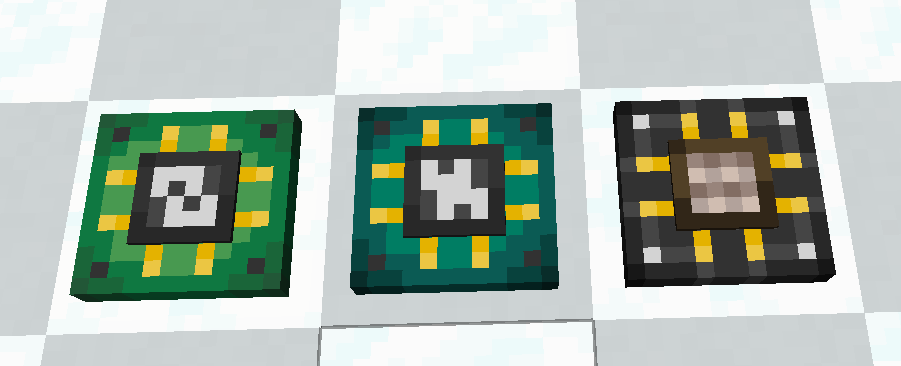 Blocks
 -
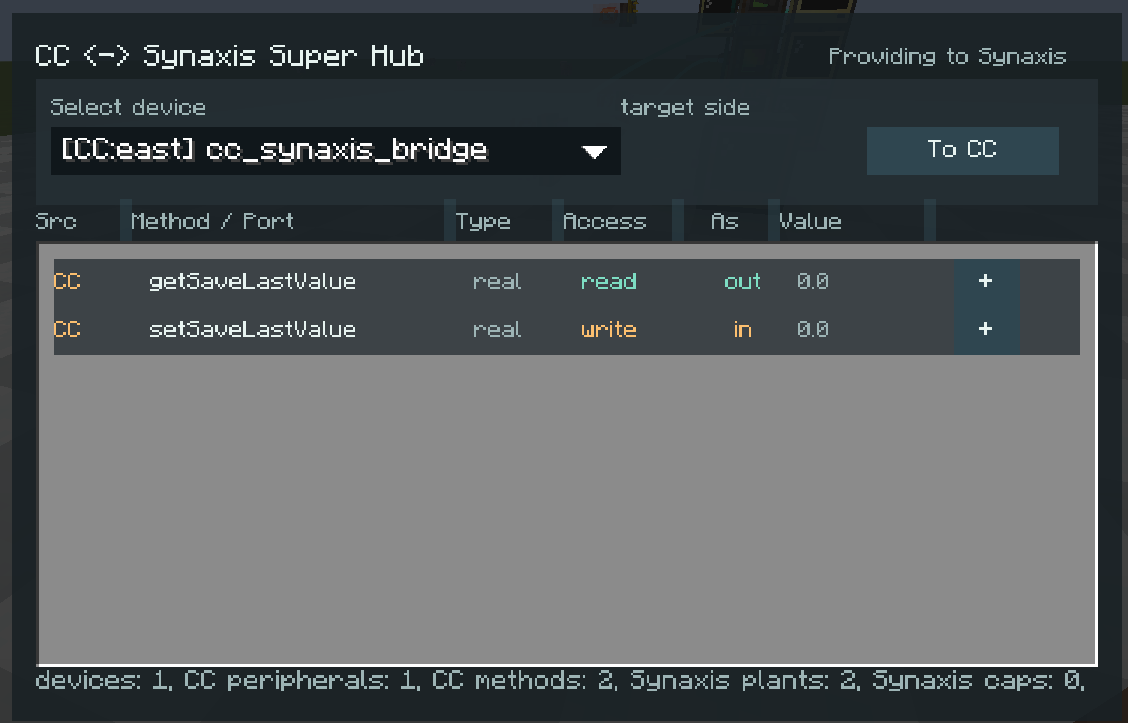 super hub
 -
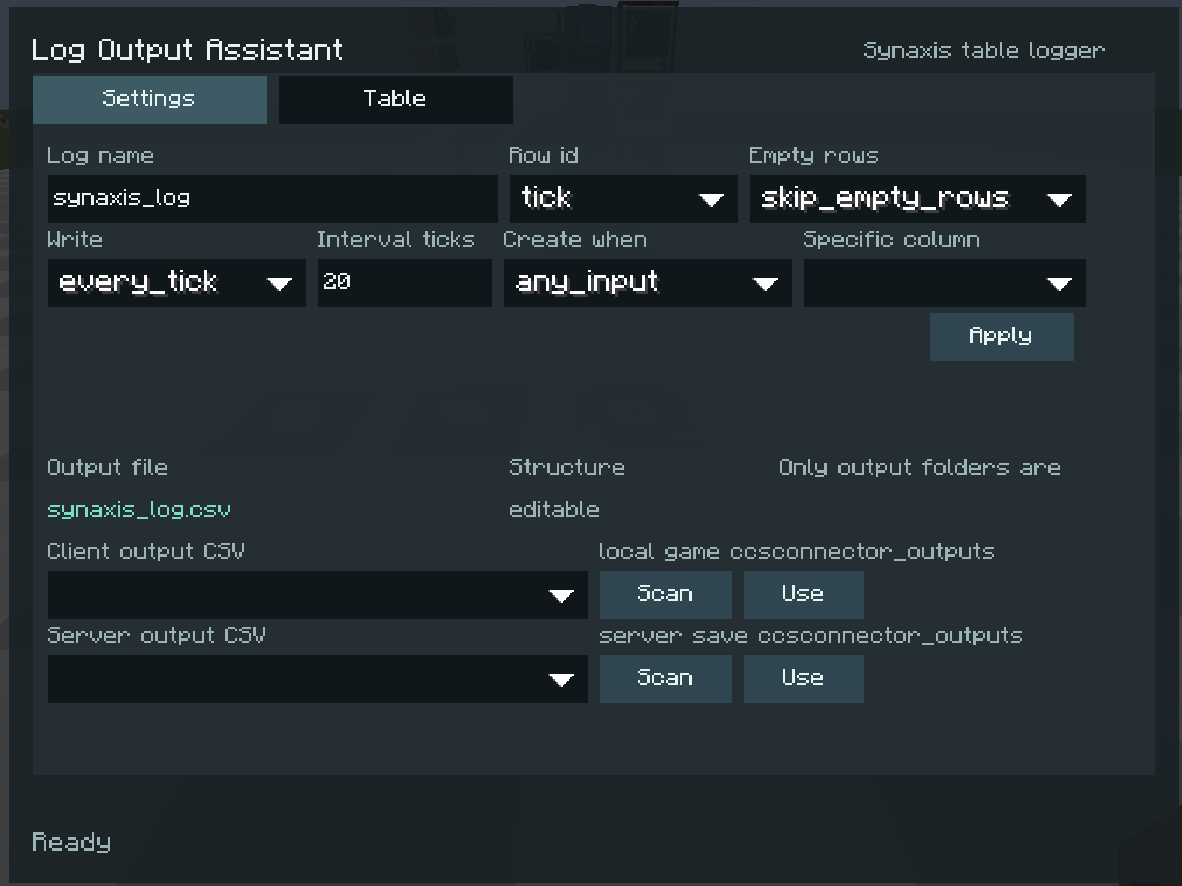 Logger
Versions
Files
Relations
Project Relations
More like this
Similar Mods
Suggestions use data such as tags, dependencies, dependents, descriptions, titles, and more to rank how much they overlap with this mod.
On ModDex
Community snapshot
By the numbers
Statistics
Want to reach Minecraft players?
We're looking for a server hosting partner to feature here and other parts of the site. Interested? Send us a message!
Get in touchGet it on
Available Platforms
On ModDex
Community snapshot
By the numbers
Statistics
Resources