
Community listing page, reviews here may not be monitored by the author.
Chat_AI_Assistant

No reviews yet
Chatbot Mod An AI chatbot mod designed for the Minecraft 1.21.1 NeoForge.
Community voices
Reviews
No reviews yet. Be the first to review this project!
Get it on
Available Platforms
About
Project Details
For authors
Embed Badge
If you're the author of this project, you can embed a live badge anywhere that supports HTML or Markdown. It updates automatically whenever ratings change.
Use HTML for any page that supports it, or Markdown for README files and Markdown-based descriptions.
Identifiers
Platform IDs
Resources
External Links
About
Description
# ChatBot Mod
An AI chatbot mod designed for Minecraft 1.21.1 NeoForge.
It transforms NPCs from simply reciting template lines into truly intelligent assistants capable of conversation and executing server commands.
## Features
- ✅ **Multiple AI Service Support**: Built-in support for 6 APIs including Zhipu GLM, Volcano Ark, OpenAI, DeepSeek, and MiniMax, with automatic recognition and adaptation.
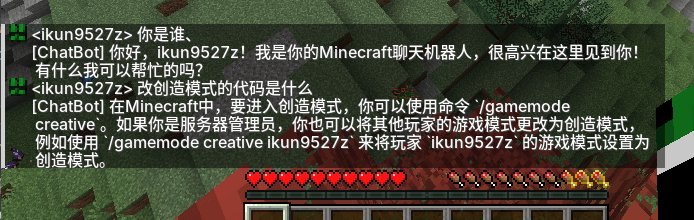
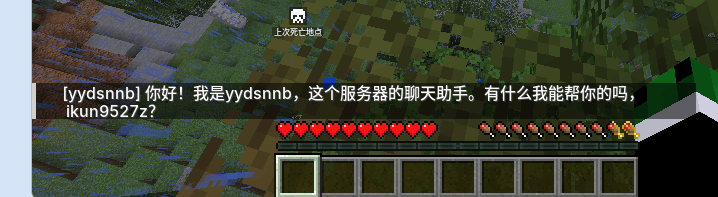
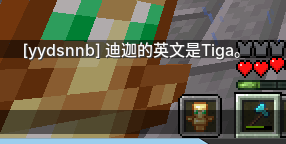
- ✅ **Real-time Dialogue**: Players can trigger dialogue by tagging the AI in the chat box; the AI processes asynchronously without blocking the main thread.
- ✅ **AI Command Execution**: Players can have the AI execute server commands (tp, weather, time, give, etc.). The AI outputs commands via the `<cmd>` tag protocol.
- ✅ **Hierarchical Permissions**: Separate permission models for OPs and regular players, with blacklist/whitelist dual protection to prevent prompt injection bypass.
- ✅ **Frequency Limits**: Configurable number of commands per player per minute to prevent AI abuse.
- ✅ **Two-Turn Dialogue**: AI first outputs intent and command → system executes the command → AI then summarizes the execution result for the player.
- ✅ **Flexible Configuration**: All functions are configured via `config/chatbot.toml`, allowing adjustments without restarting the code.
## Supported AI Services
| API Type | Service Name | Official Website |
|---------|----------|----------|
| `ZHIPU` | Zhipu GLM | https://open.bigmodel.cn/ |
| `VOLC` | Volcano Ark (Doubao) | https://console.volcengine.com/ark/ |
| `OPENAI` | OpenAI | https://platform.openai.com/ |
| `DEEPSEEK` | DeepSeek | https://platform.deepseek.com/ |
| `MINIMAX` | MiniMax | https://api.minimax.chat/ |
| `CUSTOM` | Custom API | Custom Endpoint (compatible with OpenAI protocol) |
## Installation Steps
1. Download the module file `chatbot-1.0.0.jar`
2. Place the file in the server's `mods/` folder
3. Start the server; the configuration file will be automatically generated. `config/chatbot.toml`
4. Stop the server, edit the configuration file and fill in the API Key & model.
5. Restart the server to use it.
## Configuration File Description
Configuration file path: `config/chatbot.toml`
```toml
# ===== AI Service Configuration =====
# API Key (Required)
api_key = "your-api-key-here"
# Model Name (Required, select according to API type)
model = "GLM-4-Flash-250414"
# API Type: ZHIPU, VOLC, OPENAI, DEEPSEEK, MINIMAX, CUSTOM
api_type = "ZHIPU"
# Custom API Address (Only required when api_type=CUSTOM)
custom_url = ""
# Enable AI Reply
ai_enabled = true
# Reply Delay (milliseconds)
reply_delay_ms = 0
# AI Display Name
ai_name = "ChatBot"
# Trigger Prefix (AI will only be triggered if player chat starts with this)
ai_trigger = "@AI"
# ===== AI Command Execution =====
# Enable AI command execution
cmd_enabled = true
# Global Blacklist (AI cannot execute commands from anyone, including OPs, comma-separated)
cmd_blacklist = "stop,setblock"
# Normal Player Whitelist (Only these commands can be executed by AI from non-OP players, comma-separated)
cmd_normal_whitelist = "list,seed,spawn,home,help,me,tell,msg,w"
# Maximum number of commands per player per minute (0 = Unlimited)
cmd_max_per_minute = 10
```
### Examples of AI Service Configurations
#### Zhipu GLM
```toml
api_key = "Your Zhipu API Key"
model = "GLM-4-Flash-250414"
api_type = "ZHIPU"
```
#### Volcano Ark (Doubao)
```toml
api_key = "Your Volcano Ark API Key"
model = "doubao-seed-2-0-lite"
api_type = "VOLC"
```
#### OpenAI
```toml
api_key = "sk-Your OpenAI Key"
model = "gpt-3.5-turbo"
api_type = "OPENAI"
```
#### DeepSeek
```toml
api_key = "Your DeepSeek Key"
model = "deepseek-chat"
api_type = "DEEPSEEK"
```
#### MiniMax
```toml
api_key = "Your MiniMax Key"
model = "abab5.5-chat"
api_type = "MINIMAX"
```
#### Custom API
```toml
api_key = "Your API key"
model = "Your model name"
api_type = "CUSTOM"
custom_url = "https://your-api-endpoint.com/v1/chat/completions"
```
## How to Use
### Basic Dialogue
1. Press `T` in the game to open the chat window.
2. Type `@AI Your question` and send.
3. The AI will reply to your message asynchronously.
### AI Command Execution
As long as `cmd_enabled = true`, players can have the AI execute server commands. The AI will embed `<cmd>command parameters</cmd>` tags in its reply, which the system will automatically parse and execute with the highest privileges (level 4).
#### Example Dialogue
```
<Player> @AI Hello
[ChatBot] Hello! Nice to meet you! How can I help you?
<Player> @AI How many people are online?
[ChatBot] Let me check the online players...
[ChatBot] There are currently 3 players online on the server: Steve, Alex, and PanKa.
<Player> @AI Teleport me to Steve.
[ChatBot] Okay, teleporting you to Steve.
[ChatBot] You have been teleported to Steve.
<Player> @AI Give me a diamond (regular player)
[ChatBot] Sorry, you do not have permission for me to execute the `give` command. Please contact the OP for assistance.
<Player> @AI Give me a diamond (OP player)
[ChatBot] has given you 1 diamond
```
## Frequently Asked Questions
### Q: AI is not responding
**A:** Check the server logs for information related to `[ChatBot]`:
- `AI service not enabled`: Check if the configuration file `ai_enabled` is `true`
- `API request failed`: Check if the API Key and model name are correct
- `Unable to connect`: Check if the server network is working properly
### Q: Where is the configuration file?
**A:** `config/chatbot.toml` in the server root directory
### Q: Do I need to restart the server after modifying the configuration?
**A:** Yes, you need to restart the server for the changes to take effect.
### Q: How do I view detailed logs?
**A:** Search for the keyword `[ChatBot]` in the server logs.
## Version Information
- **Mod Version**: 1.0.0
- **Minecraft Version**: 1.21.1
- **NeoForge Version**: 21.1.236
## License
MIT License
Screenshots
Gallery
-
 å±å¹æªå¾ 2026-07-19 130142.png å±å¹æªå¾ 2026-07-19 130142.png
 -
 å±å¹æªå¾ 2026-07-19 172657.png å±å¹æªå¾ 2026-07-19 172657.png
 -
 å±å¹æªå¾ 2026-07-19 173246.png å±å¹æªå¾ 2026-07-19 173246.png
Versions
Files
Relations
Project Relations
More like this
Similar Mods
Suggestions use data such as tags, dependencies, dependents, descriptions, titles, and more to rank how much they overlap with this mod.
On ModDex
Community snapshot
By the numbers
Statistics
Want to reach Minecraft players?
We're looking for a server hosting partner to feature here and other parts of the site. Interested? Send us a message!
Get in touchGet it on
Available Platforms
On ModDex
Community snapshot
By the numbers
Statistics
Resources