
Community listing page, reviews here may not be monitored by the author.
ChatImage


No reviews yet
show image in chat screen

Community voices
Reviews
No reviews yet. Be the first to review this project!
Get it on
Available Platforms
Compatibility
Supported Environments
Required on the client. Installing it on the server adds functionality.
About
Project Details
For authors
Embed Badge
If you're the author of this project, you can embed a live badge anywhere that supports HTML or Markdown. It updates automatically whenever ratings change.
Use HTML for any page that supports it, or Markdown for README files and Markdown-based descriptions.
Identifiers
Platform IDs
About
Description
Need Fabric API
Quick Start
Enter [[CICode,url=https://blog.kituin.fun/img/bg.png,name=Image]] in the chat field than it will transfer to image
ps: CICode used in version 1.0.2 and below has only 1 pair of [ ], 1.1.0 and above use 2 pairs of [ ]
local image,gif is also supported
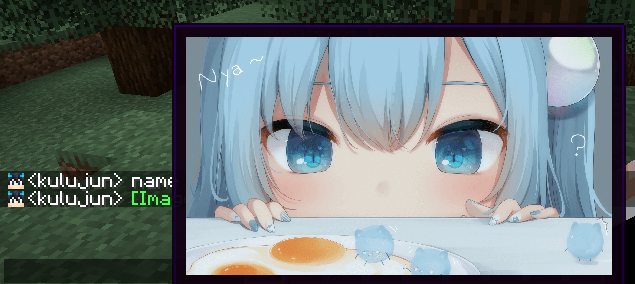
(image from 甘城なつき)
if you only put this mod in client,it can not show other player 's local image and they also cannot see your local image
Recommended to use both client side and server side
📖Detail in Github Readme
Example:
Web Image
[[CICode,url={Web Url},name=Image]]- example:
[[CICode,url=https://blog.kituin.fun/img/bg.png,name=Image]]
- example:
Local Image
[[CICode,url=file:///{absolute file path},name=Image]]- example:
[[CICode,url=file:///C:\blog\kituin\fun\img\bg.png,name=Image]]
- example:
Use Command to send [[CICode]]
/chatimage send {name} {url}
Send CICode with display name and url
/chatimage url {url}
Send CICode with url (use default display name)
Config Settings
- manual configure
- The configuration file is located at:
.minecraft/conifg/fabric/chatimageconfig.json - After modifying the configuration file, please use
/chatimage reloadto reload the configuration file
- The configuration file is located at:
- Use key binding (default
Endkey) - Use Mod Menu, click the configuration button to configure
Support input method
- ✅manual input
CICode - ✅send
CICodewith command - ✅Drag Image Into Chat Screen
Support Image Type
- ✅ png
- ✅ jpg/jpeg
- ✅ jfif
- ✅ gif
- ✅ ico
- ✅ bmp
ChatImage
✨ Show image in Minecraft chat ✨



📖Docs · 🐛Submit Suggestion/Bug . 📃Chinese . ⬇️CurseForge · ⬇️Modrinth
Quick Start
Enter [[CICode,url=https://blog.kituin.fun/img/bg.png,name=Image]] in the chat line
1.2.0 Could Transfer Http-Url To Image Directly
than it will transfer to image
Support display local image (need ServerSide Mod) and GIF
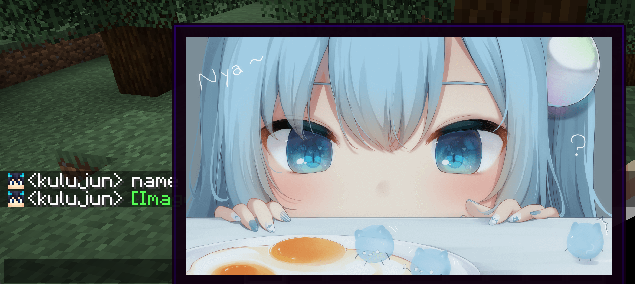
(image from 甘城なつき)
Compatibility
Support input method
- Manual Input
CICode - Send
CICodeWith Command - Drag Image Into Chat Screen
Specification
It use ChatImageCode ([[CICode,<arg>=<value>]])
| Arg | Require | Type | Remark |
|---|---|---|---|
| url | true | String | Image address (please use file:/// for local files) |
| nsfw | false | boolean | Is it an nsfw image |
| name | false | String | The name displayed in the chat |
| pre | false | String | prefix(default:[)(can't be,) |
| suf | false | String | suffix(default:])(can't be,) |
nsfw will determine whether to display the image directly
if it is set to true, you need to click to view it (or open the nsfw mode in the configuration file to view it directly)
Example:
-
Web Image
[[CICode,url=<Web Url>,name=Image]]- example:
[CICode,url=https://blog.kituin.fun/img/bg.png,name=Image]]
-
Local Image
[[CICode,url=file:///<absolute file path>,name=Image]]- example:
[[CICode,url=file:///C:\blog\kituin\fun\img\bg.png,name=Image]]
- example:
- example:
Use Command to send [[CICode]]
/chatimage send <display name> <url>
Send CICode with display name and url
/chatimage url <url>
Send CICode with url (use default display name)
Config Settings
- manual configure
- The configuration file is located at:
.minecraft/conifg/fabric/chatimageconfig.json - After modifying the configuration file, please use
/chatimage reloadto reload the configuration file
- Use key binding (default
Endkey) - Use Mod Menu, click the configuration button to configure
- The configuration file is located at:
Support Image Type
- png
- jpg/jpeg
- jfif
- gif
- ico
- bmp
Screenshots
Gallery
-
887ec7b4d1c7d04d11482f7e924a0eb5301cae45.png 887ec7b4d1c7d04d11482f7e924a0eb5301cae45.png
-
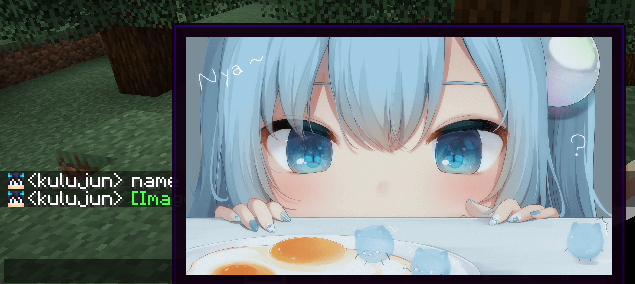 Sample
Versions
Files
Relations
Project Relations
More like this
Similar Mods
Suggestions use data such as tags, dependencies, dependents, descriptions, titles, and more to rank how much they overlap with this mod.
On ModDex
Community snapshot
By the numbers
Statistics
 (opens in a new tab)
Get it on
Available Platforms
On ModDex
Community snapshot
By the numbers