
Community listing page, reviews here may not be monitored by the author.
Cinematic Zoom (Fabric)


No reviews yet
Smooth zoom with cinematic black bars and per-frame easing.
Community voices
Reviews
No reviews yet. Be the first to review this project!
Get it on
Available Platforms
Compatibility
Supported Environments
Runs entirely on the client. Works on vanilla servers.
About
Project Details
For authors
Embed Badge
If you're the author of this project, you can embed a live badge anywhere that supports HTML or Markdown. It updates automatically whenever ratings change.
Use HTML for any page that supports it, or Markdown for README files and Markdown-based descriptions.
Identifiers
Platform IDs
About
Description
CinematicZoom (Fabric 1.20.1–26.3)
Smooth cinematic zoom for Minecraft Fabric 1.20.1–26.3 with animated black bars, per-frame easing and optional mouse-wheel control.
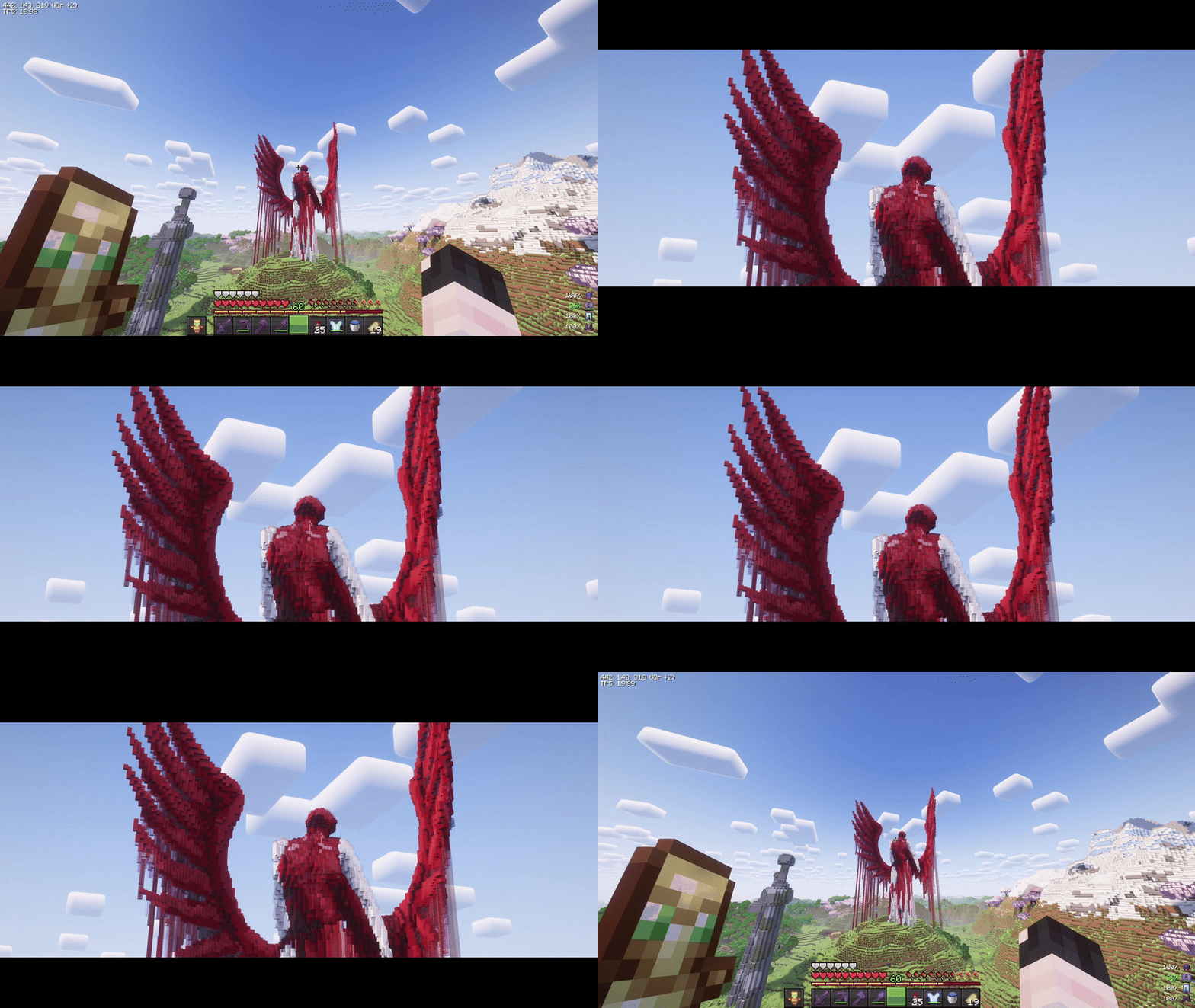
Features
- Hold-to-zoom (default key:
C, rebindable). - Per-frame smoothing.
- Configurable animated black bars.
- Optional mouse-wheel zoom adjustment.
- Optional HUD/crosshair hiding.
- Optional cinematic camera while zooming.
- Mod Menu and Cloth Config integration.
Installation
- Install Fabric Loader and Fabric API for your Minecraft version.
- Put the matching CinematicZoom JAR in the
modsfolder. - Optionally install Mod Menu and Cloth Config for the in-game configuration screen.
Credits
- Original author and idea: KubePixel, creator of the original Cinematic Zoom Forge mod.
- Fabric implementation: mel1x.
This project is an independent Fabric implementation inspired by the original concept and is not affiliated with or endorsed by KubePixel.
CinematicZoom (Fabric 1.20.1-26.3)
Smooth, cinematic zoom for Minecraft with animated black bars, per-frame easing, and optional mouse wheel control. Built for Fabric 1.20.1-26.3.
Features
- Hold-to-zoom (default key:
C, rebindable). - Per-frame smoothing (no “steppy” 20 TPS feel).
- Animated black bars (top & bottom, configurable height).
- Mouse wheel adjustment while zooming (optional).
- Hide HUD & crosshair while zooming (optional).
- Cinematic (smooth) camera toggle while zooming (optional).
- Multi-language: English & Russian.
Requirements
- (Optional) Mod Menu (for in-game settings entry)
- (Optional) Cloth Config (for a nice config screen)
Installation
- Install Fabric Loader & Fabric API for Minecraft 1.21.7-1.21.11.
- Put this mod’s JAR into your
mods/folder. - (Optional) Add Mod Menu and Cloth Config for an in-game settings UI.
Usage
- Hold the zoom key (default C) to zoom in.
- While holding zoom, scroll the mouse wheel to fine-tune zoom level (if enabled).
- Release the key to smoothly return to normal FOV and hide the bars.
Zoom, HUD hiding, and cinematic camera are automatically disabled in GUI screens.
Configuration
You can configure the mod in two ways:
In-game (recommended)
If Mod Menu + Cloth Config are installed:
- Open Mods → Cinematic Zoom → Configure.
Config file
Edit (or delete to regenerate defaults):
Credits & Attribution
-
Original author & idea credit: KubePixel
Their Forge mod for 1.20.1/1.21.1: Cinematic Zoom — https://www.curseforge.com/minecraft/mc-mods/cinematic-zoom -
Fabric implementation (this mod): mix
This project is an independent Fabric implementation inspired by the original concept. Not affiliated with or endorsed by KubePixel.
Original concept and name credit to KubePixel. If you’re on Forge 1.20.1/1.21.1, check out their original mod here: https://www.curseforge.com/minecraft/mc-mods/cinematic-zoom.
Screenshots
Gallery
Versions
Files
Relations
Project Relations
More like this
Similar Mods
Suggestions use data such as tags, dependencies, dependents, descriptions, titles, and more to rank how much they overlap with this mod.
On ModDex
Community snapshot
By the numbers
Statistics
Want to reach Minecraft players?
We're looking for a server hosting partner to feature here and other parts of the site. Interested? Send us a message!
Get in touchGet it on
Available Platforms
On ModDex
Community snapshot
By the numbers