Community listing page, reviews here may not be monitored by the author.
Clean View


No reviews yet
A clean view leads to clean plays
Community voices
Reviews
No reviews yet. Be the first to review this project!
Get it on
Available Platforms
Compatibility
Supported Environments
Runs entirely on the client. Works on vanilla servers.
About
Project Details
For authors
Embed Badge
If you're the author of this project, you can embed a live badge anywhere that supports HTML or Markdown. It updates automatically whenever ratings change.
Use HTML for any page that supports it, or Markdown for README files and Markdown-based descriptions.
Identifiers
Platform IDs
Resources
External Links
About
Description
CleanView - The Ultimate Visual Clarity Mod
🎯 Tired of Particles Blocking Your Vision?
CleanView gives you complete control over Minecraft's visual clutter. Whether you're in intense PvP combat, making PvP videos, or just want a cleaner gameplay experience, CleanView has you covered.
If you'd like to support me you can do so at Ko-Fi

✨ Features
⚔️ Held Item Scaling
- Mainhand Scale — Resize items in your main hand (0x - 2x)
- Change the position and rotation of the items
- Offhand Scale — Resize items in your off hand (0x - 2x)
- Change the position and rotation of the items
- Perfect for smaller weapon models during combat or larger tools for visibility
✨ Particle Control
- Particle Scale — Scale ALL particles in the game (0x - 2x)
- Status Effect Particles — Control potion swirl visibility (0% - 100%)
- Reduce visual noise while maintaining essential feedback
 Totem Effects
- Totem Pop Scale — Adjust totem of undying particle size (0x - 2x)
- Totem Particle Scale — Adjust the size of Totem Particles seperately (0x - 2x)
- Essential for PvP — clear vision immediately after popping
🍪 Eating Effects
- Eating Crumbs Scale — Control food crumb particle size (0x - 2x)
- Reduce clutter while eating without losing all feedback
🎨 Beautiful Configuration Screen

CleanView features a stunning custom configuration screen built with Yet Another Config Lib (YACL):
- 🎯 Intuitive sliders for precise control
- 🌙 Dark theme that matches Minecraft's aesthetic
- 📁 Organized categories: Held Items, Particles, Totem Effects, Eating
- 💾 Auto-save — your settings persist between sessions
📸 Screenshots
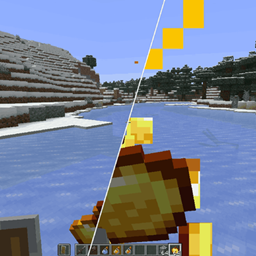
Before CleanView

After CleanView

📥 Installation
- Install Fabric Loader (0.15.11+) — Get Fabric
- Install Fabric API — Get Fabric API
- Install Mod Menu — Get Mod Menu
- Download CleanView — Get CleanView
- Drop into mods folder — Launch and enjoy! 🎉
A clean view leads to clean plays. 🎯
CleanView - The Ultimate Visual Clarity Mod
Tired of Particles Blocking Your Vision?
CleanView gives you complete control over Minecraft's visual clutter. Whether you're in intense PvP combat, making PvP videos, or just want a cleaner gameplay experience, CleanView has you covered.
If you'd like to support me you can do so at Ko-Fi

Features
⚔️ Held Item Scaling
- Mainhand Scale — Resize items in your main hand (0x - 2x)
- Change the position and rotation of the items
- Offhand Scale — Resize items in your off hand (0x - 2x)
- Change the position and rotation of the items
- Perfect for smaller weapon models during combat or larger tools for visibility
✨ Particle Control
- Particle Scale — Scale ALL particles in the game (0x - 2x)
- Status Effect Particles — Control potion swirl visibility (0% - 100%)
- Reduce visual noise while maintaining essential feedback
Totem Effects
- Totem Pop Scale — Adjust totem of undying particle size (0x - 2x)
- Totem Particle Scale — Adjust the size of Totem Particles seperately (0x - 2x)
- Essential for PvP — clear vision immediately after popping
🍪 Eating Effects
- Eating Crumbs Scale — Control food crumb particle size (0x - 2x)
- Reduce clutter while eating without losing all feedback
Beautiful Configuration Screen
CleanView features a stunning custom configuration screen built with Yet Another Config Lib (YACL):
- Intuitive sliders for precise control
- Dark theme that matches Minecraft's aesthetic
- Organized categories: Held Items, Particles, Totem Effects, Eating
- Auto-save — your settings persist between sessions
Screenshots
Before CleanView
After CleanView
Installation
- Install Fabric Loader (0.15.11+) — Get Fabric
- Install Fabric API — Get Fabric API
- Install Mod Menu — Get Mod Menu
- Download CleanView — Get CleanView
- Drop into mods folder — Launch and enjoy! 🎉
📜 License
Copyright (c) 2025 Nebula All rights reserved.
A clean view leads to clean plays. 🎯
Screenshots
Gallery
Versions
Files
Relations
Project Relations
More like this
Similar Mods
Suggestions use data such as tags, dependencies, dependents, descriptions, titles, and more to rank how much they overlap with this mod.
On ModDex
Community snapshot
By the numbers
Statistics
Want to reach Minecraft players?
We're looking for a server hosting partner to feature here and other parts of the site. Interested? Send us a message!
Get in touchGet it on
Available Platforms
On ModDex
Community snapshot
By the numbers
Statistics
Resources