
Community listing page, reviews may not be monitored by the author.
Client Chat Channels


No reviews yet
A client-side mod that adds chat channels to the game.

Community voices
Reviews
No reviews yet. Be the first to review this project!
Get it on
Available Platforms
Compatibility
Supported Environments
Runs entirely on the client. Works on vanilla servers.
About
Project Details
For authors
Embed Badge
If you're the author of this project, you can embed a live badge anywhere that supports HTML or Markdown. It updates automatically whenever ratings change.
Use HTML for any page that supports it, or Markdown for README files and Markdown-based descriptions.
Identifiers
Platform IDs
About
Description
Client Chat Channels
A client-side mod that adds chat channels to the game.
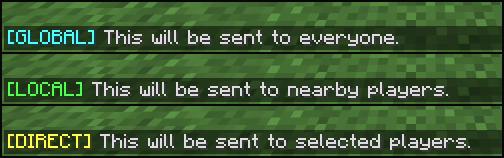
Channels
🌍 Global
Works like vanilla chat - all players on the server can see your messages (unless otherwise configured by the server).
🔊 Local
Messages are only sent to players within a specified distance from you.
✉️ Direct
Messages are sent exclusively to one or more specific players.
👥 Team
Messages are only sent to your teammates.
How It Works
When using a channel other than global, the mod automatically converts your chat messages into private messages using the /msg or /teammsg command and sends them only to the intended recipients.
Commands
You can use commands to switch between different channels:
- /channel global - Switches to the global channel.
- /channel local <radius> - Switches to the local channel. If the radius is omitted, the default radius will be used.
- /channel direct <recipients> - Switches to the direct channel. If recipients are omitted, the nearest player will be selected. Recipients should be space-separated.
- /channel team - Switches to the team channel.
- /channel status - Displays information about the currently selected channel.
Hotkeys
You can also use hotkeys to quickly switch between channels:
- Global: U
- Local: I
- Direct: O
- Team: K
- Show status: Not bound
Configuration
- Channel indicators and the default range of the local channel can be customized using Cloth Config.
- Hotkeys can be configured in Minecraft's key binding options.
Dependencies
NeoForge
Fabric
Client Chat Channels
A client-side mod that adds chat channels to the game.

Channels
🌍 Global
Works like vanilla chat - all players on the server can see your messages (unless otherwise configured by the server).
🔊 Local
Messages are only sent to players within a specified distance from you.
✉️ Direct
Messages are sent exclusively to one or more specific players.
👥 Team
Messages are only sent to your teammates.
How It Works
When using a channel other than global, the mod automatically converts your chat messages into private messages using the /msg or /teammsg command and sends them only to the intended recipients.
Commands
You can use commands to switch between different channels:
| Command | Usage |
|---|---|
/channel global |
Switches to the global channel. |
/channel local <radius> |
Switches to the local channel. If the radius is omitted, the default radius will be used. |
/channel direct <recipients> |
Switches to the direct channel. If recipients are omitted, the nearest player will be selected. Recipients should be space-separated. |
/channel team |
Switches to the team channel. |
/channel status |
Displays information about the currently selected channel. |
Hotkeys
You can also use hotkeys to quickly switch between channels:
| Channel / Action | Default Hotkey |
|---|---|
| Global | U |
| Local | I |
| Direct | O |
| Team | K |
| Show status | Not bound |
Configuration
- Channel indicators and the default range of the local channel can be customized using Cloth Config.
- Hotkeys can be configured in Minecraft's key binding options.
Dependencies
NeoForge
Fabric
Screenshots
Gallery
-
Channels
-
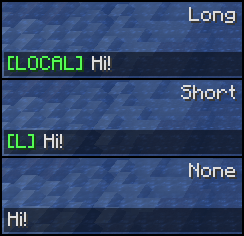 Channel Indicator Types
 -
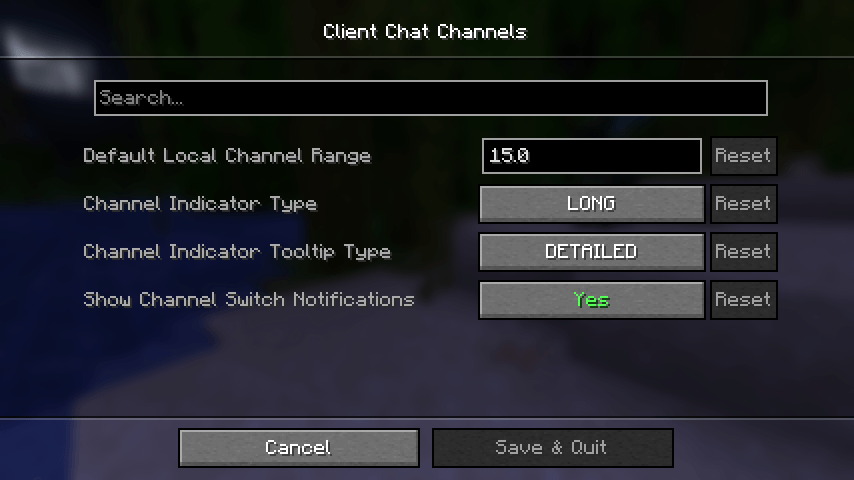 Mod Settings
-
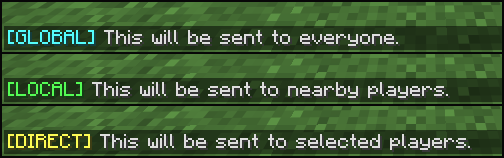 Channels
 -
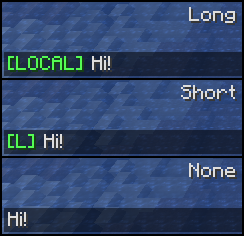 Channel Indicator Types
 -
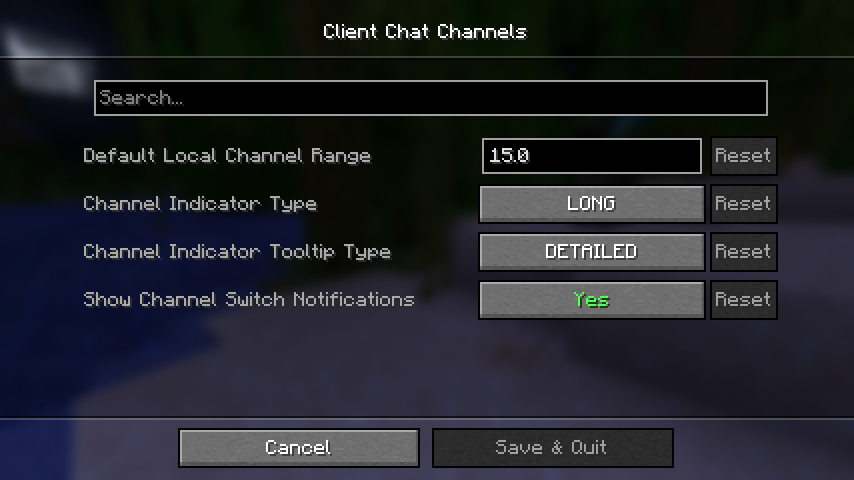 Mod Settings
Versions
Files
Relations
Project Relations
More like this
Similar Mods
Suggestions use data such as tags, dependencies, dependents, descriptions, titles, and more to rank how much they overlap with this mod.
On ModDex
Community snapshot
By the numbers
Statistics

Get it on
Available Platforms
On ModDex
Community snapshot
By the numbers