
Community listing page, reviews here may not be monitored by the author.
Cobblemon Challenge


No reviews yet
A simple way to challenge your friends and rivals to flat-level pokemon battles in Cobblemon.

Community voices
Reviews
No reviews yet. Be the first to review this project!
Get it on
Available Platforms
Compatibility
Supported Environments
Runs entirely on the server. Also works in singleplayer.
About
Project Details
For authors
Embed Badge
If you're the author of this project, you can embed a live badge anywhere that supports HTML or Markdown. It updates automatically whenever ratings change.
Use HTML for any page that supports it, or Markdown for README files and Markdown-based descriptions.
Identifiers
Platform IDs
Resources
External Links
About
Description
Cobblemon Challenge
Cobblemon Challenge is an extremely simple plugin for Cobblemon that makes challenging your friends and rivals to flat-level Pokemon battles
easier! Use the /challenge command to send a battle request to a nearby trainer, which they will be able to either accept or deny. This is a server-side plugin that only needs to be installed on the Server.
Easy Flat-Level PVP:
Tired of levelling all your pokemon to level 100 for competitive battling? Wait no longer. With one simple command, you can challenge others to a PVP match where all your pokemon are set to a specific level. This change is non-permanent is will not persist outside the battle. Any held items consumed in a challenge will also have no actual effect on a pokemon's held item:
/challenge <username> level <level>
Challenges specified player to a lvl X battle where X can be 1-100.
Example:
/challenge TurtleHoarder level 100 - challenges TurtleHoarder to a level 100 battle
Lead Pokemon & Team Preview GUI:
Select your lead pokemon to send out first and preview both your team and the enemy team [If enabled].
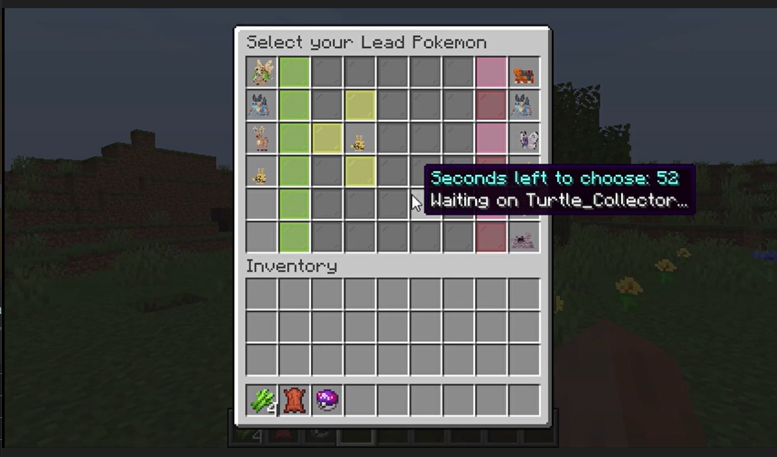
(As of 2.0) Challenge to 3v3, 1v1, etc.:
You can challenge other players to limited pokemon battles where you select the pokemon from your party to battle. You can use commands similar to below:
/challenge3v3 <username> level <level>
/challenge1v1 <username> level <level>
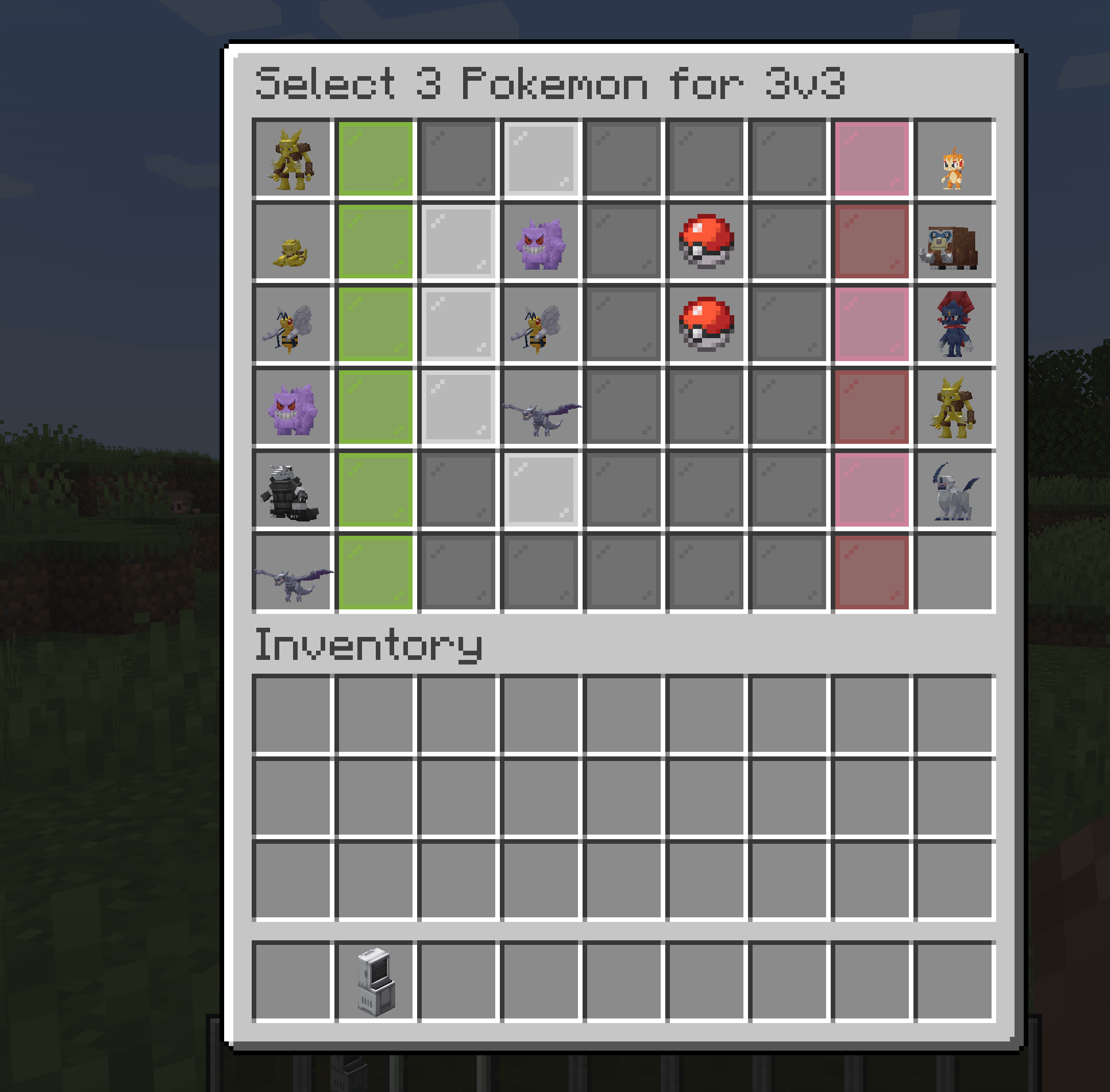
Double battles are also supported via the /challengedouble command:
/challengedouble <username> level <level>
Hide your Pokemon if you desire:
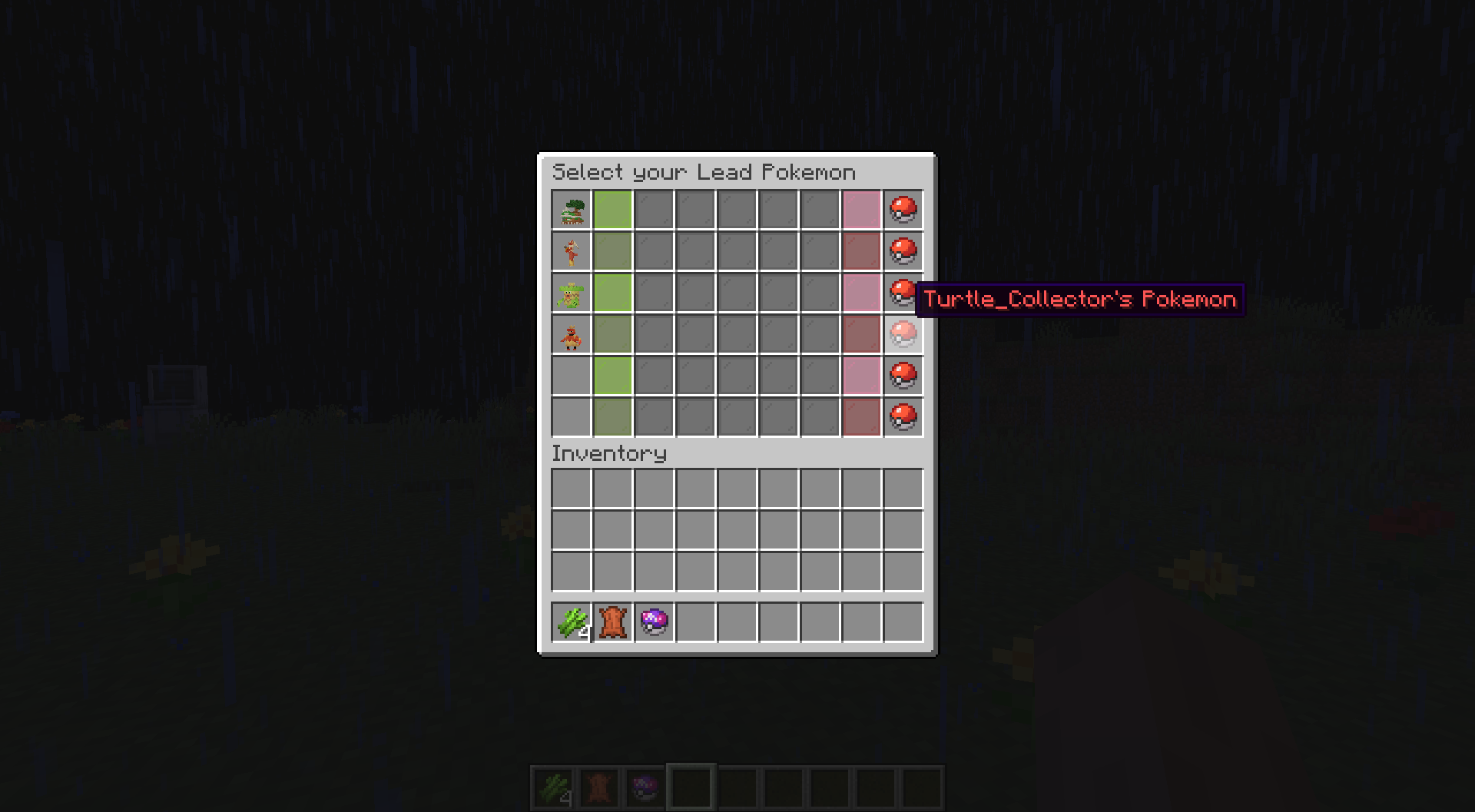
Don't want your rival to know your team? Just use the nopreview option to keep your team hidden!
Example: /challenge TurtleHoarder level 100 nopreview - Will hide your team from the other challenger until the battle begins.
Cobblemon Compatibility Versions:
Please use the following versions for your Cobblemon Server. Using incompatible versions will likely cause your game to crash during battles!
- Cobblemon 1.8.1 -> Challenge 2.5.0
- Cobblemon 1.6.0 -> Challenge 1.2.0 / Challenge 2.0.0+
- Cobblemon 1.5.0 -> Challenge 1.1.8
- Cobblemon 1.4.1 -> Challenge 1.1.7
Commands:
/challenge <username> - Challenges specified player to a lvl 50 pokemon battle. They may accept or deny this challenge.
/challenge <username> level <level> - Challenges specified player to a lvl X battle where X can be 1-100.
Example: /challenge TurtleHoarder level 100 - challenges TurtleHoarder to a level 100 battle
Configurations:
These server settings can be changed by altering the values in the config file located in the config folder of your server:
challengeDistanceRestriction - The value that determines if challenges are restricted by distance. Set to **false** if you would
want no restrictions on distance. This value is set to **true** by default.
maxChallengeDistance - If challengeDistanceRestriction is set to **true**, then this value defines the max distance
that a challenge can be sent. This is set to 50 blocks by default.
defaultChallengeLevel - The value that determines the level of a challenge if there is not level specified by the challenger.
This is set to 50 by default for lvl 50 battles.
challengeExpirationTime - The value that determines how long a challenge should be pending before it expires. This is
set to 60000 milliseconds / 1 minute by default.
challengeCooldownTime - The value that determines how long a player must wait before sending a consecutive request. This value is
set to 5000 milliseconds / 5 seconds by default, though players will need to wait until their existing challenge expires before sending another one.
Cobblemon Challenge
Cobblemon Challenge is an extremely simple plugin for Cobblemon that makes challenging your friends and rivals to flat-level Pokemon battles easier! Use the /challenge command to send a battle request to a nearby trainer, which they will be able to either accept or deny. This is a server-side plugin that only needs to be installed on the Server.
Easy Flat-Level PVP:
Tired of levelling all your pokemon to level 100 for competitive battling? Wait no longer. With one simple command, you can challenge others to a PVP match where all your pokemon are set to a specific level. This change is non-permanent is will not persist outside the battle. Any held items consumed in a challenge will also have no actual effect on a pokemon's held item:
/challenge <username> level <level> - Challenges specified player to a lvl X battle where X can be 1-100.
Example:
/challenge TurtleHoarder level 100
- challenges TurtleHoarder to a level 100 battle
Lead Pokemon & Team Preview GUI:
Select your lead pokemon to send out first and preview both your team and the enemy team [If enabled].

(As of 2.0) Challenge to 3v3, 1v1, etc.:
You can challenge other players to limited pokemon battles where you select the pokemon from your party to battle. You can use commands similar to below:
/challenge3v3 <username> level <level>
/challenge1v1 <username> level <level>

Double battles are also supported via the /challengedouble command:
/challengedouble <username> level <level>
/challengedouble4v4 <username> level <level> - For a 4v4 double battle:
Hide your Pokemon if you desire:
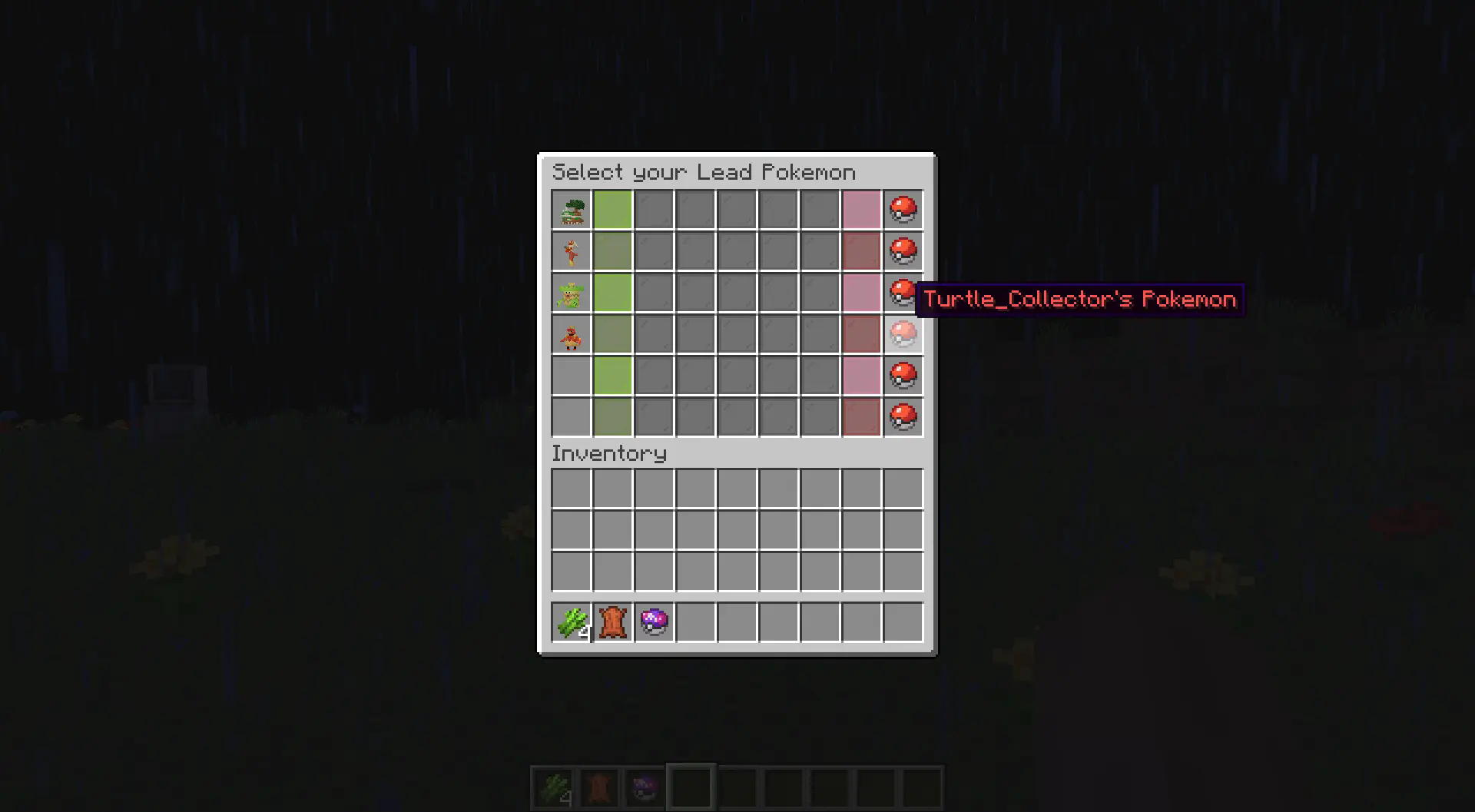
Don't want your rival to know your team? Just use the nopreview option to keep your team hidden!
Example:
/challenge TurtleHoarder level 100 nopreview - Will hide your team from the other challenger until the battle begins.
Cobblemon Compatibility Versions:
Please use the following versions for your Cobblemon Server. Using incompatible versions will likely cause your game to crash during battles! Older versions are available on Curseforge
Cobblemon 1.6.0 -> Challenge 1.2.0 / Challenge 2.0.0+
Cobblemon 1.5.0 -> Challenge 1.1.8
Cobblemon 1.4.1 -> Challenge 1.1.7
Commands:
/challenge <username> - Challenges specified player to a lvl 50 pokemon battle. They may accept or deny this challenge.
/challenge <username> level <level> - Challenges specified player to a lvl X battle where X can be 1-100.
Example: /challenge TurtleHoarder level 100 - challenges TurtleHoarder to a level 100 battle
Configurations:
These server settings can be changed by altering the values in the config file located in the config folder of your server:
challengeDistanceRestriction - The value that determines if challenges are restricted by distance. Set to false if you would want no restrictions on distance. This value is set to true by default.
maxChallengeDistance - If challengeDistanceRestriction is set to true, then this value defines the max distance that a challenge can be sent. This is set to 50 blocks by default.
defaultChallengeLevel - The value that determines the level of a challenge if there is not level specified by the challenger. This is set to 50 by default for lvl 50 battles.
challengeExpirationTime - The value that determines how long a challenge should be pending before it expires. This is set to 60000 milliseconds / 1 minute by default.
challengeCooldownTime - The value that determines how long a player must wait before sending a consecutive request. This value is set to 5000 milliseconds / 5 seconds by default, though players will need to wait until their existing challenge expires before sending another one.
Screenshots
Gallery
-
 Sample battle request Image of what a battle request looks like from the receiving end. The player can either accept the battle to initiate or reject the request.
 -
Lead Pokemon Selection / Team Preview
-
Lead selection with Nopreview option
-
3v3 Selection Example Example of 3v3 challenge where users select 3 pokemon to fight
-
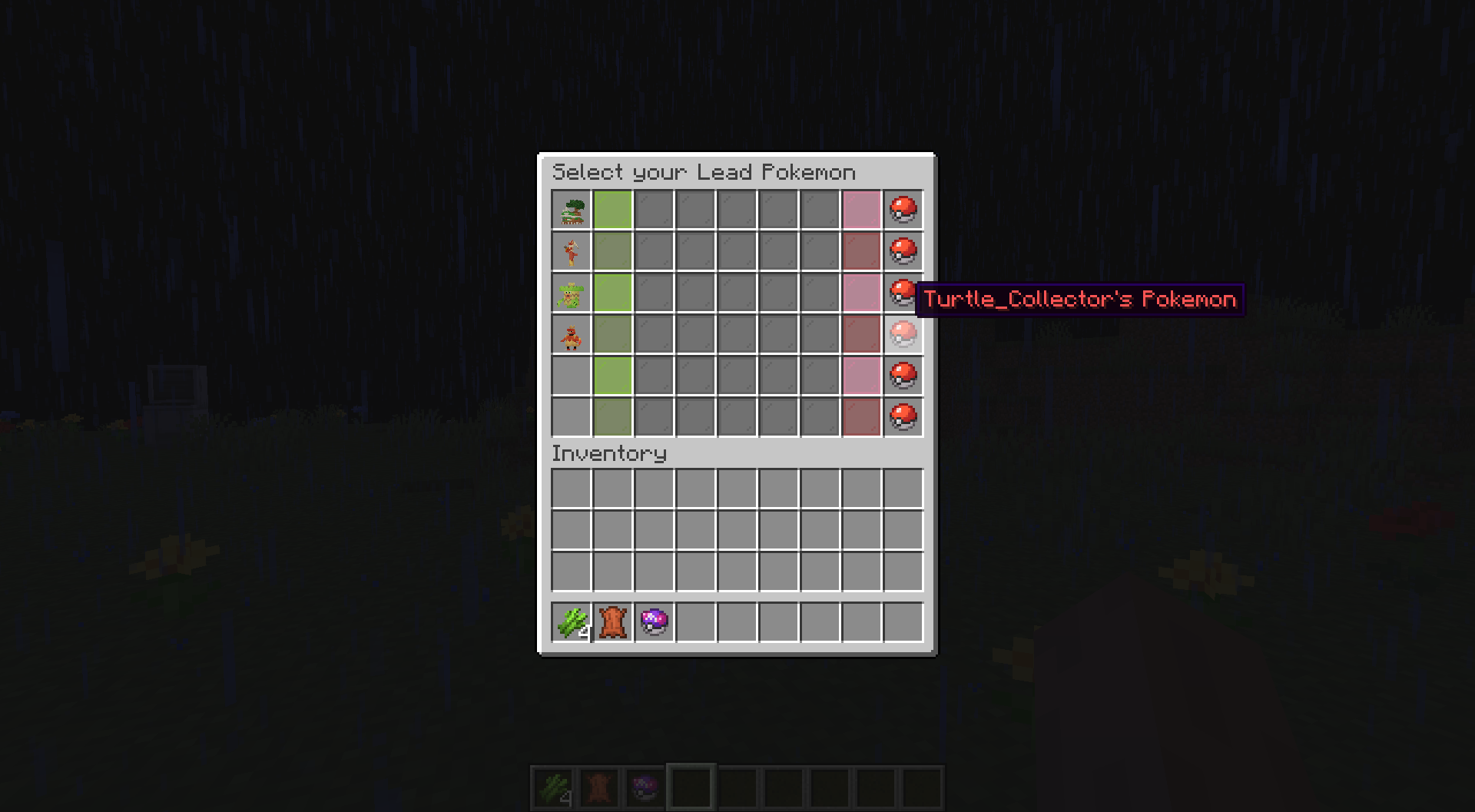 Lead Selection w/ Hidden pokemon With the nopreview option, you can hide your Pokemon from your opponent
 -
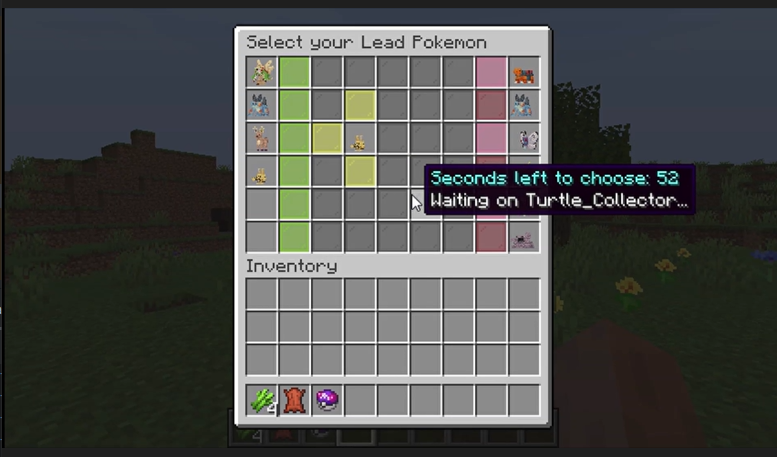 Lead Selection & Team Preview Built-in GUI that allows for team preview and lead selection before a battle begins.
 -
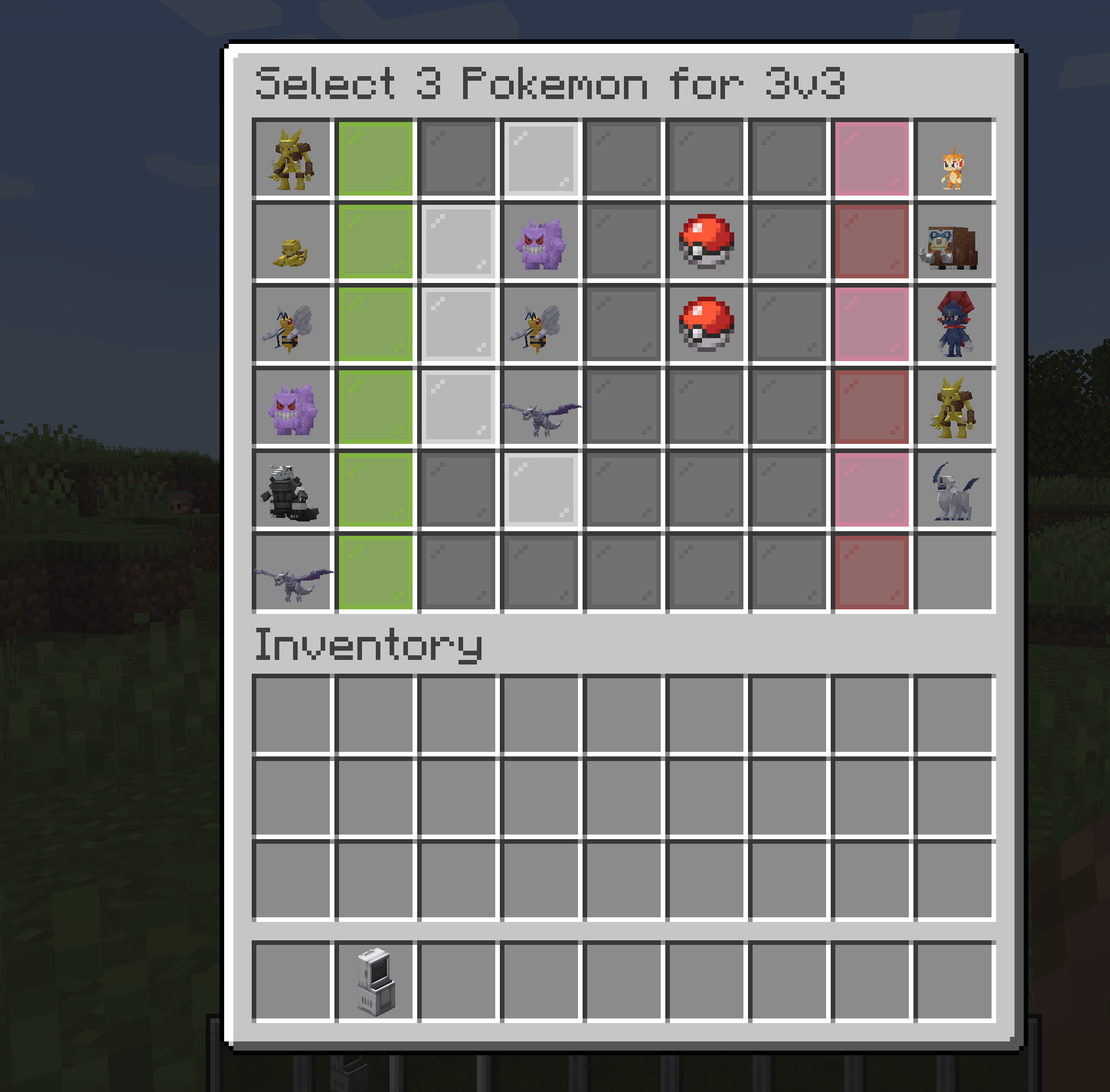 3v3 Pokemon Battle During alternative formats (3v3, 4v4, etc), you may choose the pokemon you want to battle with right in the GUI.
Versions
Files
Relations
Project Relations
More like this
Similar Mods
Suggestions use data such as tags, dependencies, dependents, descriptions, titles, and more to rank how much they overlap with this mod.
On ModDex
Community snapshot
By the numbers
Statistics
 (opens in a new tab)
Get it on
Available Platforms
On ModDex
Community snapshot
By the numbers
Statistics
Resources