Community listing page, reviews here may not be monitored by the author.
Cobblemon Home


No reviews yet
Server/World Cobblemon Home Storage System with Pokedex Tracking
Community voices
Reviews
No reviews yet. Be the first to review this project!
Get it on
Available Platforms
Compatibility
Supported Environments
Must be installed on both the client and the server.
About
Project Details
For authors
Embed Badge
If you're the author of this project, you can embed a live badge anywhere that supports HTML or Markdown. It updates automatically whenever ratings change.
Use HTML for any page that supports it, or Markdown for README files and Markdown-based descriptions.
Identifiers
Platform IDs
Resources
External Links
About
Description
I grant permission to anyone seeking to add my mod to a modpack
Cobblemon Home
A Server & World-Wide Pokémon Storage System
Cobblemon Home is a cloud-like storage system inspired by Pokémon Home, allowing you to store unlimited Pokémon across worlds and servers. Access your collection from anywhere with a fancy PC-style interface.

✨ Features:
Unlimited Cloud Storage
- Store as many Pokémon as you want — no box limits
- Pokémon data persists across world reloads and server restarts
- Held items are saved and restored when withdrawing
PC-Style Interface
- Clean grid layout with Pokémon sprites (6x5 slots per page)
- Multiple sprite pack options (Default, Xaeros 3D, E19 Pixel)
- Search box to quickly find any Pokémon by name
- Sort by Name, Level, Recent, or Pokédex Number
- Filter by Shiny (★) or Favorites (♥)
Rich Tooltips
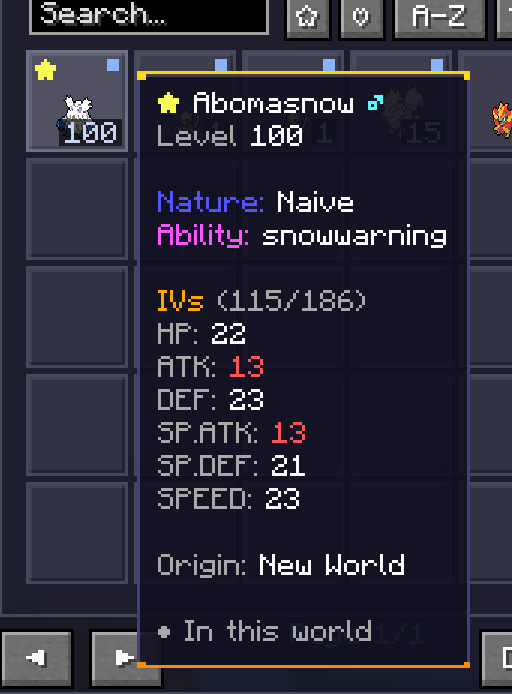
- View Nature, Ability, Gender, Level, and Origin World
- Full IV and EV stat breakdowns
- Held item display
- Shiny Pokémon get special gold-bordered tooltips
Living Dex Tracker
- Tracks every unique species you've deposited
- Shows Pokédex completion percentage in the header
- "?" button reveals which Pokémon you're missing
- Missing Pokémon tooltips show spawn locations, biomes, and rarity
- Sort missing Pokémon by rarity (Common → Ultra Rare) or Dex number
- Original Color Magearna reward for completing your Living Dex!
Party Integration
Your current party is displayed alongside Home storage Deposit Pokémon directly from your party with one click "Deposit All" button to quickly store your entire party "PC → HOME" button to bulk deposit all PC Pokémon
Favorites System
- Right-click any Pokémon to mark as favorite
- Favorites always appear first when sorting
- Favorites persist across sessions
🌐 Cross-World Transfers
When enabled by the server and client config, Cobblemon Home supports transferring Pokémon between different worlds and servers:
How It Works:
- Your Pokémon are stored locally in your .minecraft/cobblemon_home/ folder
- When joining a new server with transfers enabled, your local Pokémon appear in the Home interface
- To bring them from a server to your local client click "Select" and then left-click all the pokemon to checkmark them and then click "Transfer" you should see the Origin world get (local) on it afterwards which means as long as you don't withdraw it again it will be accessible on singleplayer
Important Notes:
- Cross-world transfers are disabled by default for security
- Server operators control this setting via config/cobblemon_home.json
- Disabled in singleplayer (your Pokémon are already local)
- Each Pokémon remembers its Origin World — you can always see where it came from
⚠️ Server Owners: Only enable this on trusted/private servers. This feature allows players to bring in Pokémon from any source, including from creative in singleplayer.
📦 The Home Storage Terminal:
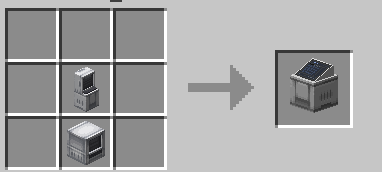
Craft the Home Storage Terminal block to access your storage. Right-click to open the interface.
💻 Commands:
/home list - View all stored Pokémon with UUIDs
/home info - Show current world info and storage tips
/home retrieve <uuid> - Withdraw a Pokémon by UUID (partial match supported)
/home dex status - Check your Living Dex completion progress
/home dex complete - (Admin) Register all species for testing
/home dex reset - (Admin) Reset Living Dex progress
🌍 Localization:
Fully translated in 14 languages: English, German, Spanish (ES/MX), French, Italian, Japanese, Korean, Polish, Portuguese (BR), Russian, Tagalog, Chinese (Simplified/Traditional)
📁 Data Storage
Your Pokémon data is stored in the cobblemon_home/ folder:
Server: <world>/cobblemon_home/data/<player_uuid>/
Client (for transfers): .minecraft/cobblemon_home/data/<player_uuid>/
Each Pokémon is saved as a JSON file containing full Cobblemon data, ensuring nothing is lost.
Please consider supporting me on ko-fi if you like the mod and can afford it, I appreciate even 1 dollar. 
I grant permission to anyone seeking to add my mod to a modpack
Cobblemon Home
A Server & World-Wide Pokémon Storage System
Cobblemon Home is a cloud-like storage system inspired by Pokémon Home, allowing you to store unlimited Pokémon across worlds and servers. Access your collection from anywhere with a fancy PC-style interface.
✨ Features:
Unlimited Cloud Storage
- Store as many Pokémon as you want — no box limits
- Pokémon data persists across world reloads and server restarts
- Held items are saved and restored when withdrawing
PC-Style Interface
- Clean grid layout with Pokémon sprites (6x5 slots per page)
- Multiple sprite pack options (Default, Xaeros 3D, E19 Pixel)
- Search box to quickly find any Pokémon by name
- Sort by Name, Level, Recent, or Pokédex Number
- Filter by Shiny (★) or Favorites (♥)
Rich Tooltips
- View Nature, Ability, Gender, Level, and Origin World
- Full IV and EV stat breakdowns
- Held item display
- Shiny Pokémon get special gold-bordered tooltips
Living Dex Tracker
- Tracks every unique species you've deposited
- Shows Pokédex completion percentage in the header
- "?" button reveals which Pokémon you're missing
- Missing Pokémon tooltips show spawn locations, biomes, and rarity
- Sort missing Pokémon by rarity (Common → Ultra Rare) or Dex number
- Original Color Magearna reward for completing your Living Dex!
Party Integration
Your current party is displayed alongside Home storage Deposit Pokémon directly from your party with one click "Deposit All" button to quickly store your entire party "PC → HOME" button to bulk deposit all PC Pokémon
Favorites System
- Right-click any Pokémon to mark as favorite
- Favorites always appear first when sorting
- Favorites persist across sessions
🌐 Cross-World Transfers
When enabled by the server and client config, Cobblemon Home supports transferring Pokémon between different worlds and servers:
How It Works:
- Your Pokémon are stored locally in your .minecraft/cobblemon_home/ folder
- When joining a new server with transfers enabled, your local Pokémon appear in the Home interface
- To bring them from a server to your local client click "Select" and then left-click all the pokemon to checkmark them and then click "Transfer" you should see the Origin world get (local) on it afterwards which means as long as you don't withdraw it again it will be accessible on singleplayer
Important Notes:
- Cross-world transfers are disabled by default for security
- Server operators control this setting via config/cobblemon_home.json
- Disabled in singleplayer (your Pokémon are already local)
- Each Pokémon remembers its Origin World — you can always see where it came from
⚠️ Server Owners: Only enable this on trusted/private servers. This feature allows players to bring in Pokémon from any source, including from creative in singleplayer.
📦 The Home Storage Terminal
Craft the Home Storage Terminal block to access your storage. Right-click to open the interface.
💻 Commands:
/home list - View all stored Pokémon with UUIDs
/home info - Show current world info and storage tips
/home retrieve - Withdraw a Pokémon by UUID (partial match supported)
/home dex status - Check your Living Dex completion progress
/home dex complete - (Admin) Register all species for testing
/home dex reset - (Admin) Reset Living Dex progress
🌍 Localization
Fully translated in 14 languages: English, German, Spanish (ES/MX), French, Italian, Japanese, Korean, Polish, Portuguese (BR), Russian, Tagalog, Chinese (Simplified/Traditional)
📁 Data Storage
Your Pokémon data is stored in the cobblemon_home/ folder:
Server: /cobblemon_home/data/<player_uuid>/
Client (for transfers): .minecraft/cobblemon_home/data/<player_uuid>/
Each Pokémon is saved as a JSON file containing full Cobblemon data, ensuring nothing is lost.
Screenshots
Gallery
-
 hometooltip.png hometooltip.png
 -
 homerecipe.png homerecipe.png
-
 home screen
Versions
Files
Relations
Project Relations
More like this
Similar Mods
Suggestions use data such as tags, dependencies, dependents, descriptions, titles, and more to rank how much they overlap with this mod.
On ModDex
Community snapshot
By the numbers
Statistics
Want to reach Minecraft players?
We're looking for a server hosting partner to feature here and other parts of the site. Interested? Send us a message!
Get in touchGet it on
Available Platforms
On ModDex
Community snapshot
By the numbers
Statistics
Resources