
Community listing page, reviews here may not be monitored by the author.
Cobblemon Fence


No reviews yet
Invisible Pokémon Fences that stop only Pokémon from passing through.

Community voices
Reviews
No reviews yet. Be the first to review this project!
Get it on
Available Platforms
Compatibility
Supported Environments
Must be installed on both the client and the server.
About
Project Details
For authors
Embed Badge
If you're the author of this project, you can embed a live badge anywhere that supports HTML or Markdown. It updates automatically whenever ratings change.
Use HTML for any page that supports it, or Markdown for README files and Markdown-based descriptions.
Identifiers
Platform IDs
Resources
External Links
About
Description

This mod adds Pokémon Fence blocks that stop only Pokémon from passing through. This means you can choose where your Pokémon can and can't go. The Pokémon Fence is invisible, has no bounding box, and can't be broken unless holding the Pokémon Fence or the Pokémon Fence Detector. They also can be disabled and reenabled again with the Pokémon Fence Detector. This allows for open pastures and cool builds without any hassle.
Pokémon Fence Detector Uses
The Pokémon Fence Detector can be used to do everything stated above but it also has other features.
How to Enable or Disable Fences
The Pokémon Fence Detector allows you to right click the fence blocks to enable or disable the block. By default all Pokémon Fence Blocks are enabled. This means Pokémon can't pass through them. If you right click while holding the Pokémon Fence Detector to disable the fences Pokémon will now be able to pass through them. You will also get feedback on screen stating whether you are disabling or enabling a Pokémon Fence.
How to Tell if a Fences is Enabled or Disabled
You can tell if a Pokémon Fence is disabled by either looking at the color of the fence (red means disabled) or by hovering over a Pokémon Fence with the Pokémon Fence Detector. If the Pokémon Fence Detector says "Pokémon Fence is disabled" then that fence is disabled. There is no text overlay for enabled fences when hovering over them. The only text for enabled fences is when enabling them after they have been disabled.
Crafting Recipes
Pokémon Fence:
This recipe gives 16 fences
- Iron Nugget, Iron Nugget, Iron Nugget
- Amethyst Shard, Amethyst Shard, Amethyst Shard
- Iron Nugget, Iron Nugget, Iron Nugget
Pokémon Fence Detector:
- Iron Nugget, Lightning Rod, Iron Nugget
- Amethyst Shard, Glass, Amethyst Shard
- Iron Nugget, Redstone Dust, Iron Nugget
Almost all pressure plates are made with the pressure plate you want and a Cobblemon Fence placed side by side.
The Distorted Player Pressure Plate has two crafting recipes. The first is the normal way if you have the Cobblemon Distortion World mod installed. The second is made with a Cobblemon Fence and a blue carpet.
The Cobblemon Pressure Plate is made by placing a Cobblemon Fence in the crafting grid.
For Cobblemon 1.7.0 and above.
This mod adds Pokémon Fence blocks that stop only Pokémon from passing through. This means you can choose where your Pokémon can and can't go. The Pokémon Fence is invisible, has no bounding box, and can't be broken unless holding the Pokémon Fence or the Pokémon Fence Detector. They also can be disabled and reenabled again with the Pokémon Fence Detector. This allows for open pastures and cool builds without any hassle.
Pokémon Fence Detector Uses
The Pokémon Fence Detector can be used to do everything stated above but it also has other features.
How to Enable or Disable Fences
The Pokémon Fence Detector allows you to right click the fence blocks to enable or disable the block. By default all Pokémon Fence Blocks are enabled. This means Pokémon can't pass through them. If you right click while holding the Pokémon Fence Detector to disable the fences Pokémon will now be able to pass through them. You will also get feedback on screen stating whether you are disabling or enabling a Pokémon Fence.
How to Tell if a Fences is Enabled or Disabled
You can tell if a Pokémon Fence is disabled by either looking at the color of the fence (red means disabled) or by hovering over a Pokémon Fence with the Pokémon Fence Detector. If the Pokémon Fence Detector says "Pokémon Fence is disabled" then that fence is disabled. There is no text overlay for enabled fences when hovering over them. The only text for enabled fences is when enabling them after they have been disabled.
Crafting Recipes
Pokémon Fence:
This recipe gives 16 fences
- Iron Nugget, Iron Nugget, Iron Nugget
- Amethyst Shard, Amethyst Shard, Amethyst Shard
- Iron Nugget, Iron Nugget, Iron Nugget
Pokémon Fence Detector:
- Iron Nugget, Lightning Rod, Iron Nugget
- Amethyst Shard, Glass, Amethyst Shard
- Iron Nugget, Redstone Dust, Iron Nugget
Almost all pressure plates are made with the pressure plate you want and a Pokémon Fence placed side by side.
The Distorted Player Pressure Plate has two crafting recipes. The first is the normal way if you have the Cobblemon Distortion World mod installed. The second is made with a Pokémon Fence and a blue carpet.
The Apricorn Player Pressure Plate has two crafting recipes. The first is the normal way if you have the Cobblemon mod installed. The second is made with a Pokémon Fence and a brown carpet.
The Saccharine Player Pressure Plate has two crafting recipes. The first is the normal way if you have the Cobblemon mod installed. The second is made with a Pokémon Fence and a light blue carpet.
The Pokémon Pressure Plate is made by placing a Pokémon Fence in the crafting grid.
Tested on Cobblemon 1.7.0 and above. For any questions or issues not answered on this page join the Discord for support.



Screenshots
Gallery
-
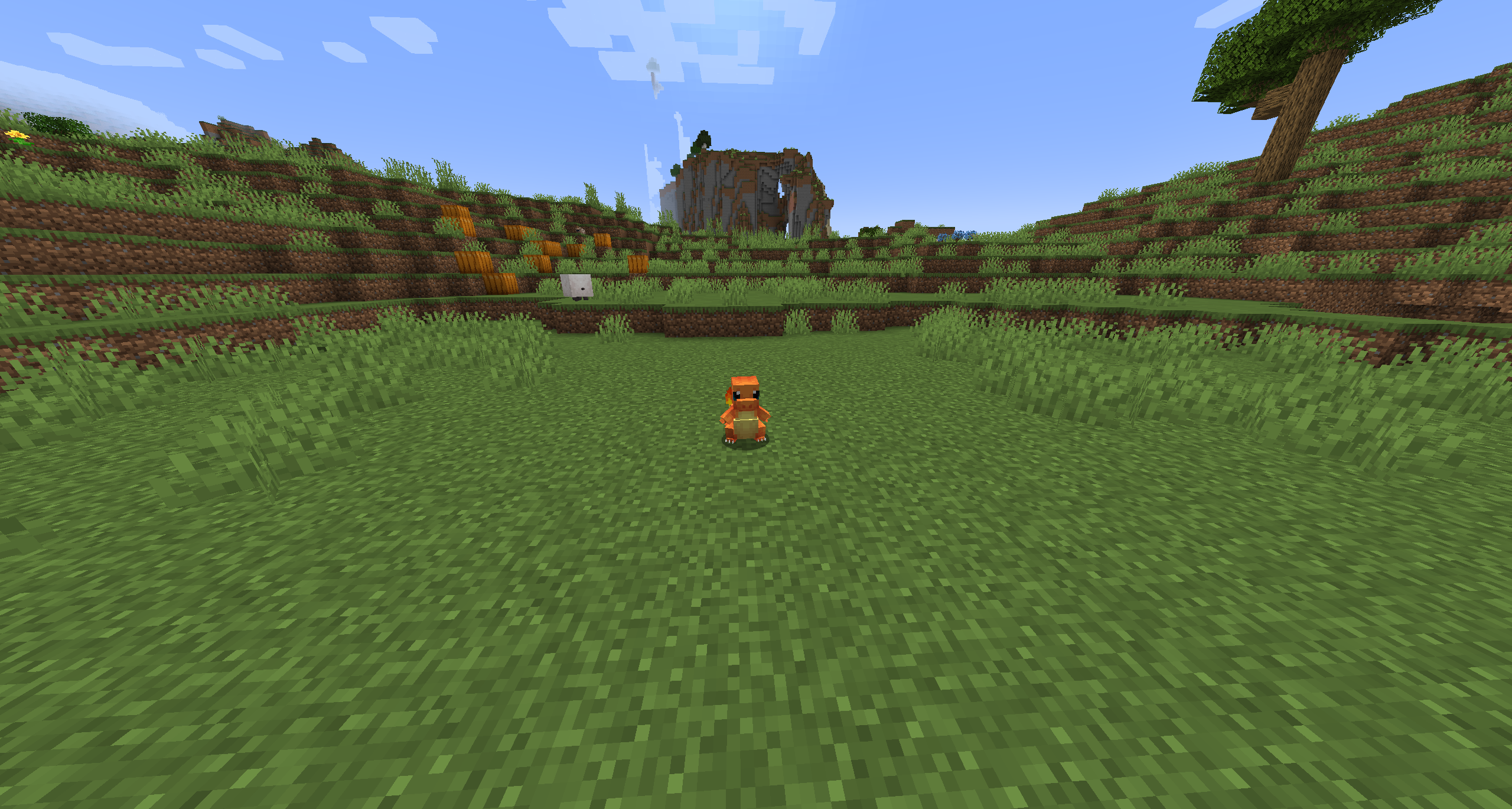 Not Holding the Pokémon Fence Detector This is what is seen without the Pokémon Fence Detector or Pokémon Fence items held in hand. There is no bounding box and no texture for the Pokémon Fence block. Charmander is still held back by the fence.
 -
 Disabling Pokémon Fences The Pokémon Fence Detector can disable and enable Pokémon Fences by right clicking a fence. In the disabled state Pokémon can pass through the fence blocks. Once the blocks are enabled again the blocks will stop Pokémon from passing through.
 -
 Holding the Pokémon Fence Detector The Pokémon Fence Detector allows you to see the Pokémon Fences. The fences are also stopping Charmander from escaping.
 -
 Pokémon Fence Works Anywhere Pokémon will always be stopped from leaving a fenced area no matter where you put them. The Pokémon Fence can be passed through by anything but Pokémon while enabled.
Versions
Files
Relations
Project Relations
More like this
Similar Mods
Suggestions use data such as tags, dependencies, dependents, descriptions, titles, and more to rank how much they overlap with this mod.
On ModDex
Community snapshot
By the numbers
Statistics
 (opens in a new tab)
Get it on
Available Platforms
On ModDex
Community snapshot
By the numbers
Statistics
Resources