
Community listing page, reviews here may not be monitored by the author.
CobbleStops

No reviews yet
A PokeStop DataPack and Resource Pack for Cobblemon 1.7
Community voices
Reviews
No reviews yet. Be the first to review this project!
Get it on
Available Platforms
About
Project Details
For authors
Embed Badge
If you're the author of this project, you can embed a live badge anywhere that supports HTML or Markdown. It updates automatically whenever ratings change.
Use HTML for any page that supports it, or Markdown for README files and Markdown-based descriptions.
Identifiers
Platform IDs
About
Description
CobbleStops Datapack (for Cobblemon 1.7.1) Instantly add functional, rewarding PokeStops to your Cobblemon test server! This datapack adds a new, custom PokéStop NPC that players can interact with to claim items.
It's designed to be incredibly easy for server owners to configure, allowing you to change all loot pools and cooldowns to fit your needs.

Features
-
Adds a New NPC: Spawns a dedicated "PokeStop" NPC.
-
Fully Customizable Loot: Easily configure every possible reward by editing the loot_pool.json file. No scripting knowledge required!
-
4 Rarity Tiers: Rewards are split into Common, Uncommon, Rare, and Ultra Rare pools. You decide what items go where.
Weighted Rarity: The script uses a 1-100 roll to determine which pool a player gets a reward from. The defaults are:

- Common: 60%

- Uncommon: 25%

- Rare: 10%

- Ultra Rare: 5%
-
Configurable Cooldown: Set how long (in hours) a player must wait before using the PokeStop again.
-
User-Friendly Feedback: Players receive a clean, colorful chat message telling them exactly what they found.
Installation This datapack has two parts that MUST be installed correctly:
Server-Side (Host): Place the datapack .zip file into your server's world folder, inside the datapacks folder.
Client-Side (All Players): All players (including the host) MUST install the same .zip file in their resourcepacks folder and enable it in their settings. This is required for everyone to see the PokeStop model.
How to Use & Configure
- Spawning the CobbleStop Once the datapack and resource pack are installed, you can spawn the NPC in-game (you must have OP permissions).
Simply run the command: /spawnnpc pokestop
- Configuring the Loot You can change every item reward without touching the main script.
By using /npcedit you can edit all values including loot for each loot pool in the npc.
- Configuring the Cooldown You can set the wait time for the PokéStop directly in-game.
Make sure you are in Creative Mode or have admin permissions.
Use /npcedit on the PokeStop NPC to open the NPC Editor.
Find the "Cooldown" setting in the top the editor.
Change the value to your desired wait time (in hours).
Save and exit the editor. The new cooldown will apply from the next time a player uses the PokeStop. Each PokeStop will have its own independent cooldown.
Screenshots
Gallery
-
 NPC Editor Gui Edit Click times (Health) and Cooldown (Hours)
 -
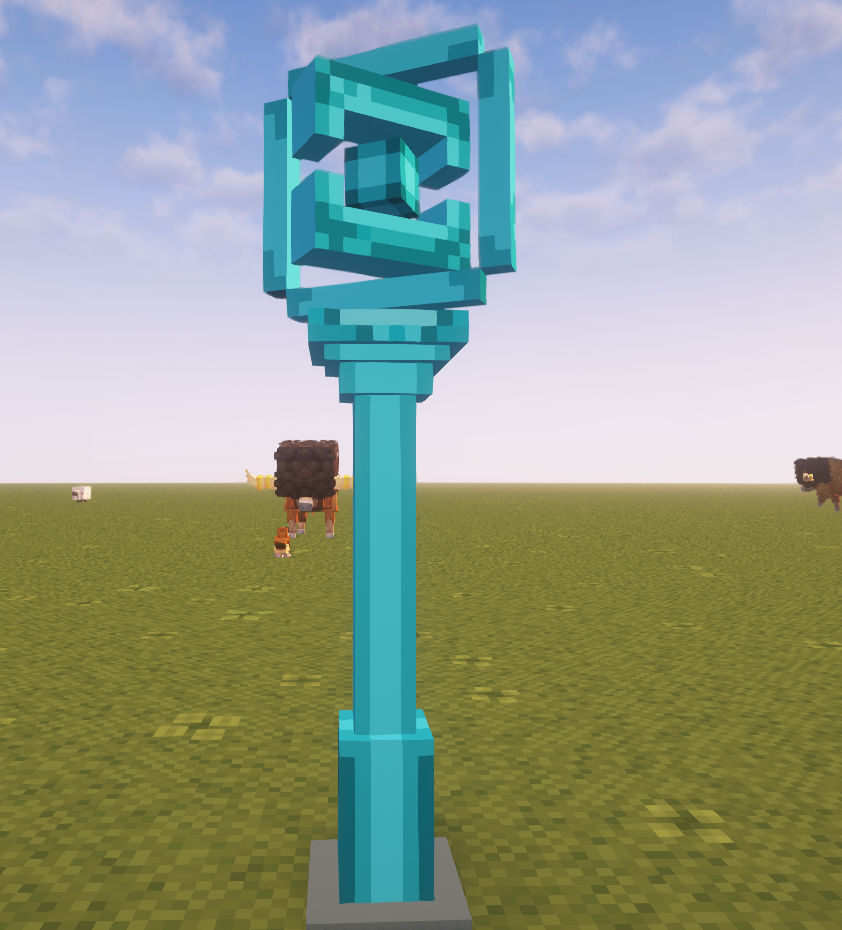 PokeStop NPC
 -
 Loot Pool Editor Edit Loot Pools using the Editor Gui
Versions
Files
Relations
Project Relations
More like this
Similar Mods
Suggestions use data such as tags, dependencies, dependents, descriptions, titles, and more to rank how much they overlap with this mod.
On ModDex
Community snapshot
By the numbers
Statistics

Want to reach Minecraft players?
We're looking for a server hosting partner to feature here and other parts of the site. Interested? Send us a message!
Get in touchGet it on
Available Platforms
On ModDex
Community snapshot
By the numbers