
Community listing page, reviews may not be monitored by the author.
Command Block UI Overhaul


No reviews yet
A lightweight command block UI overhaul with multiline editing, hierarchy highlighting, customizable formatting, and a floating color palette for easier command editing.

Community voices
Reviews
No reviews yet. Be the first to review this project!
Get it on
Available Platforms
Compatibility
Supported Environments
Runs entirely on the client. Works on vanilla servers.
About
Project Details
For authors
Embed Badge
If you're the author of this project, you can embed a live badge anywhere that supports HTML or Markdown. It updates automatically whenever ratings change.
Use HTML for any page that supports it, or Markdown for README files and Markdown-based descriptions.
Identifiers
Platform IDs
About
Description
CommandBlockUIOverhaul
Make command block editing clearer and easier.
CommandBlockUIOverhaul is a lightweight client-side mod that improves the editing interface for command blocks and command block minecarts, making long commands and nested structures easier to read and edit.
Features
- Multiline editing — Automatic wrapping, indentation, mouse drag selection, and scrolling.
- Hierarchy highlighting — Distinguish command and bracket nesting levels with IDEA Dark or vanilla color schemes.
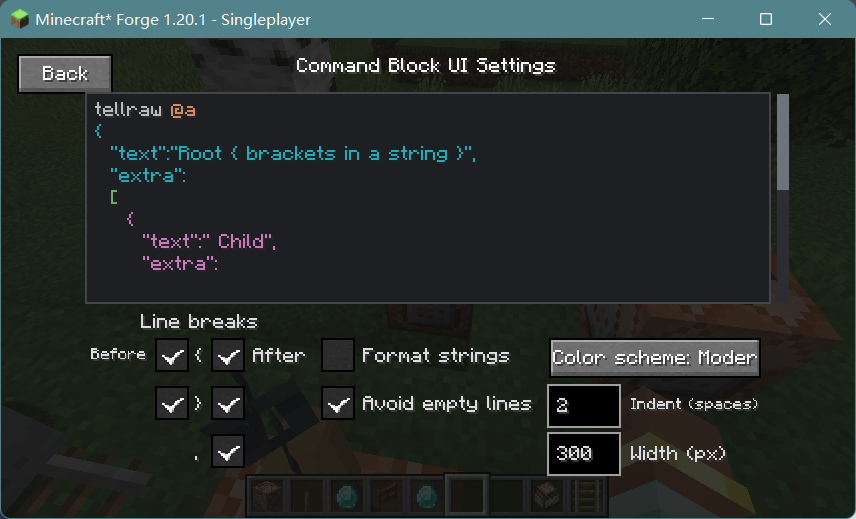
- Configurable formatting — Customize bracket and comma line breaks, string formatting, empty lines, indentation, and line width.
- Live preview — Preview formatting and colors directly in the settings screen.
- Undo and redo — Keep up to 100 editing snapshots.
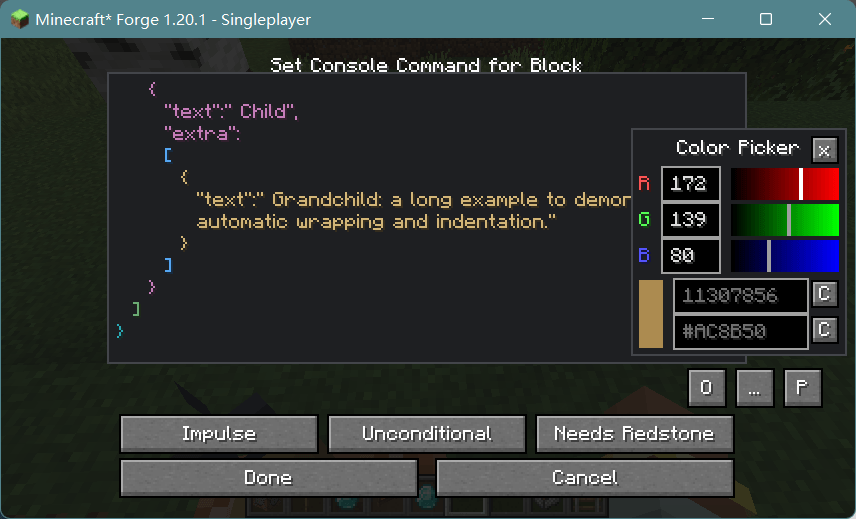
- Floating RGB palette — Adjust colors and copy decimal or hexadecimal values while continuing to edit commands.
- Improved command suggestions — Better popup visibility, positioning, and focus handling.
Formatting only changes how commands are displayed; it does not insert extra line breaks or indentation into the original command.
Supported Versions
- Minecraft 1.20.1 · Forge
- Minecraft 1.21.1 · NeoForge
Inspired by BetterCommandBlockUI, with a focus on a lightweight and practical editing experience.
CommandBlockUIOverhaul
Make command block editing clearer and easier.
CommandBlockUIOverhaul is a lightweight client-side mod that improves the editing interface for command blocks and command block minecarts, making long commands and nested structures easier to read and edit.
Features
- Multiline editing — Automatic wrapping, indentation, mouse drag selection, and scrolling.
- Hierarchy highlighting — Distinguish command and bracket nesting levels with IDEA Dark or vanilla color schemes.
- Configurable formatting — Customize bracket and comma line breaks, string formatting, empty lines, indentation, and line width.
- Live preview — Preview formatting and colors directly in the settings screen.
- Undo and redo — Keep up to 100 editing snapshots.
- Floating RGB palette — Adjust colors and copy decimal or hexadecimal values while continuing to edit commands.
- Improved command suggestions — Better popup visibility, positioning, and focus handling.
Formatting only changes how commands are displayed; it does not insert extra line breaks or indentation into the original command.
Supported Versions
- Minecraft 1.20.1 · Forge
- Minecraft 1.21.1 · NeoForge
Inspired by BetterCommandBlockUI, with a focus on a lightweight and practical editing experience.
CommandBlockUIOverhaul
让命令方块编辑更清晰、更顺手。
CommandBlockUIOverhaul 是一个轻量级客户端模组,改进原版命令方块与命令方块矿车的编辑界面,让长命令和复杂的嵌套结构更易阅读、编辑。
主要功能
- 多行编辑:支持自动换行、缩进、鼠标拖选和滚动。
- 层级着色:区分命令及括号嵌套层级,可切换 IDEA Dark 与原版配色。
- 自定义排版:调整括号与逗号的断行位置、字符串格式化、空行、缩进和行宽。
- 实时预览:在配置界面直接查看排版与配色效果。
- 撤销与重做:最多保留 100 次编辑记录。
- 悬浮调色板:调整 RGB 颜色,复制十进制或十六进制颜色值,同时继续编辑命令。
- 命令建议优化:改善补全窗口的显示、定位和焦点交互。
排版仅改变显示方式,不会向原始命令插入额外换行或缩进。
支持版本
- Minecraft 1.20.1 · Forge
- Minecraft 1.21.1 · NeoForge
本模组参考了 BetterCommandBlockUI 的设计,着重提供轻量、实用的命令编辑体验。
Screenshots
Gallery
-
 PixPin_2026-01-13_21-36-02.png PixPin_2026-01-13_21-36-02.png
-
 PixPin_2026-01-13_21-44-27.png PixPin_2026-01-13_21-44-27.png
-
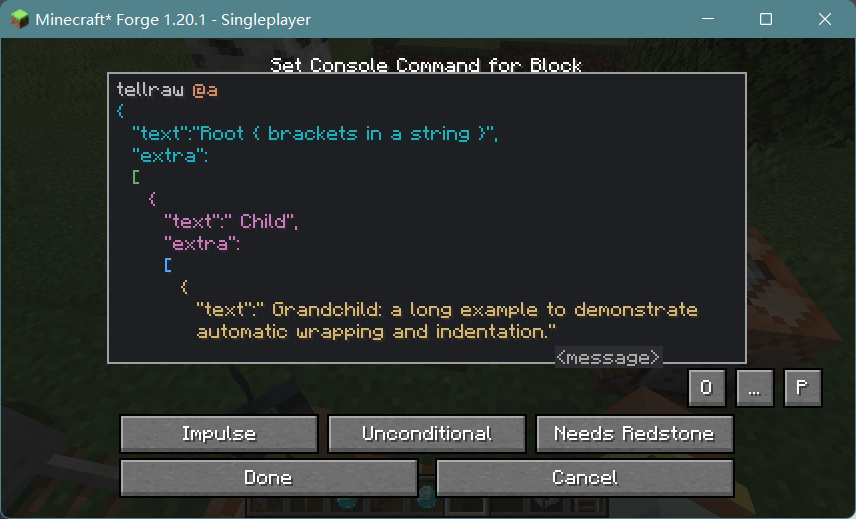 image-attachment_10dfdfc4-6ae9-441e-9003-47f04fb8a4b4.png
-
 PixPin_2026-10-07_02-50-32.png PixPin_2026-10-07_02-50-32.png
-
 PixPin_2026-10-07_02-51-05.png PixPin_2026-10-07_02-51-05.png


Versions
Files
Relations
Project Relations
More like this
Similar Mods
Suggestions use data such as tags, dependencies, dependents, descriptions, titles, and more to rank how much they overlap with this mod.
On ModDex
Community snapshot
By the numbers
Statistics

Get it on
Available Platforms
On ModDex
Community snapshot
By the numbers