Community listing page, reviews here may not be monitored by the author.
Command Hotkeys

No reviews yet
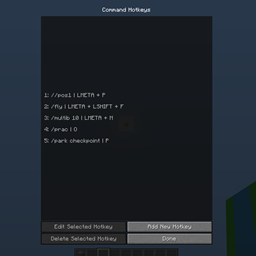
A 1.8.9 mod that adds command hotkey functionality!
Community voices
Reviews
No reviews yet. Be the first to review this project!
Get it on
Available Platforms
About
Project Details
For authors
Embed Badge
If you're the author of this project, you can embed a live badge anywhere that supports HTML or Markdown. It updates automatically whenever ratings change.
Use HTML for any page that supports it, or Markdown for README files and Markdown-based descriptions.
Identifiers
Platform IDs
Resources
External Links
About
Description
Features and Usage
Custom Hotkey Menu

Access the custom hotkey menu with the command: /commandhotkeys. In this menu you can add a new hotkey, edit an existing hotkey, or delete an existing hotkey.
Create Hotkey

- Default new command hotkey screen

- Fully optioned command hotkey
When creating a new hotkey, set the command in the command text box and set the keyboard shortcut using the set shortcut button. Once the hotkey is created, you can trigger the command by pressing all the hotkey buttons on your keyboard while in game. There are also several customisation options you can set which are explained in detail below.
Server Whitelist
If you have 'Command Type' set to server, the text box at the very bottom of the screen will be visible. In this text box you can enter a whitelist of servers where the hotkey will work. If left blank, the hotkey will work while you are connected to any server. To enter multiple server ip's, separate them with a comma.
Client Side Command Compatible
If you have 'Command Type' set to client, the server whitelist text box will not be visible. Client commands are not addressed by most command hotkey mods, but are useful if you have another mod which creates client-side commands, as these commands need to be input differently than server commands. Using this setting executes the command as a client-side command.
Toggle Command Hotkeys
If you set 'Is Toggle' to on, then a second command text box will become visible beside the primary command text box. When a hotkey is a toggle, it means you can execute two commands with the same hotkey. It does this by alternating between each command every use. In my fully filled example above, this means I can use the hotkey once to set the start point in my world edit selection, then when I press the same hotkey again it will set the end point in my world edit selection. This is also extremely useful for on/off type commands, where the on command and off command are different.
Screenshots
Gallery
Versions
Files
Relations
Project Relations
More like this
Similar Mods
Suggestions use data such as tags, dependencies, dependents, descriptions, titles, and more to rank how much they overlap with this mod.
On ModDex
Community snapshot
By the numbers
Statistics
Want to reach Minecraft players?
We're looking for a server hosting partner to feature here and other parts of the site. Interested? Send us a message!
Get in touchGet it on
Available Platforms
On ModDex
Community snapshot
By the numbers
Statistics
Resources