Community listing page, reviews may not be monitored by the author.
Compact F3 Plus


No reviews yet
a mod that replaces the vanilla F3 with a clean, minimal hud overlay.

Community voices
Reviews
No reviews yet. Be the first to review this project!
Get it on
Available Platforms
Compatibility
Supported Environments
Runs entirely on the client. Works on vanilla servers.
About
Project Details
For authors
Embed Badge
If you're the author of this project, you can embed a live badge anywhere that supports HTML or Markdown. It updates automatically whenever ratings change.
Use HTML for any page that supports it, or Markdown for README files and Markdown-based descriptions.
Identifiers
Platform IDs
Resources
External Links
About
Description
Compact F3 Plus
A minimal, fully customizable HUD overlay for NeoForge, Forge and Fabric that replaces the vanilla F3 debug screen with a clean, readable interface.
Modes
- Replace F3 (default):
F3opens the compact HUD instead of the vanilla debug screen. - Standalone: Keep vanilla F3 intact and toggle the HUD separately via
F8(rebindable in Controls).
HUD Elements
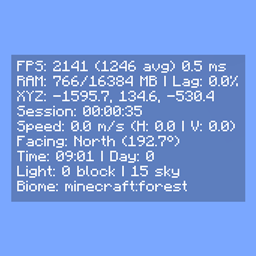
- FPS - current, average and 1% low, with dynamic color indicators based on thresholds
- RAM usage
- Lag meter - stutter rate monitor for diagnosing frame drops
- Server TPS
- GPU and CPU in use
- XYZ coordinates
- Matching Nether / Overworld coordinates
- Network ping
- Facing direction: cardinal + axis + pitch
- Biome and dimension
- Block and sky light levels
- Local difficulty
- Session timer
- In-game time and day counter
- Slime chunk indicator
- Horizontal and vertical movement speed
- Item durability
- Currently playing music track
- Rendered entity count
- Dropped items in sight
- Crop growth progress
- Targeted block, fluid, and entity
- Blockstate properties of the targeted block
Configuration
Every element can be individually toggled. The HUD can be anchored to any screen corner with adjustable X and Y offsets.
Settings are saved to
config/compactf3plus-client.toml (NeoForge, Forge)
config/compactf3plus.json (Fabric)
and accessible via Mod Menu (Fabric) or the NeoForge / Forge mod list.
Credits
- username65735 - original Compact F3 and open-source release
Compact F3 Plus
A minimal, fully customizable HUD overlay for NeoForge, Forge and Fabric that replaces the vanilla F3 debug screen with a clean, readable interface.
Modes
- Replace F3 (default):
F3opens the compact HUD instead of the vanilla debug screen. - Standalone: Keep vanilla F3 intact and toggle the HUD separately via
F8(rebindable in Controls).
HUD Elements
- FPS - current, average and 1% low, with dynamic color indicators based on thresholds
- RAM usage
- Lag meter - stutter rate monitor for diagnosing frame drops
- Server TPS
- GPU and CPU in use
- XYZ coordinates
- Matching Nether / Overworld coordinates
- Network ping
- Facing direction: cardinal + axis + pitch
- Biome and dimension
- Block and sky light levels
- Local difficulty
- Session timer
- In-game time and day counter
- Slime chunk indicator
- Horizontal and vertical movement speed
- Item durability
- Currently playing music track
- Rendered entity count
- Dropped items in sight
- Crop growth progress
- Targeted block, fluid, and entity
- Blockstate properties of the targeted block
Configuration
Every element can be individually toggled. The HUD can be anchored to any screen corner with adjustable X and Y offsets.
Settings are saved to
config/compactf3plus-client.toml (NeoForge, Forge)
config/compactf3plus.json (Fabric)
and accessible via Mod Menu (Fabric) or the NeoForge / Forge mod list.
Credits
- username65735 - original Compact F3 and open-source release
Screenshots
Gallery
-
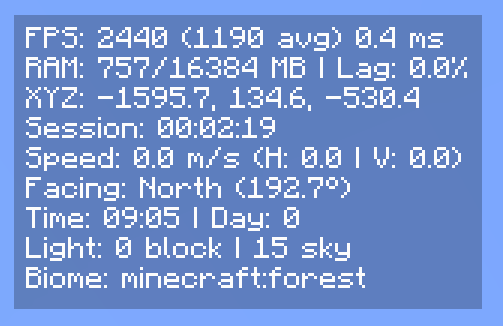 Default Default
 -
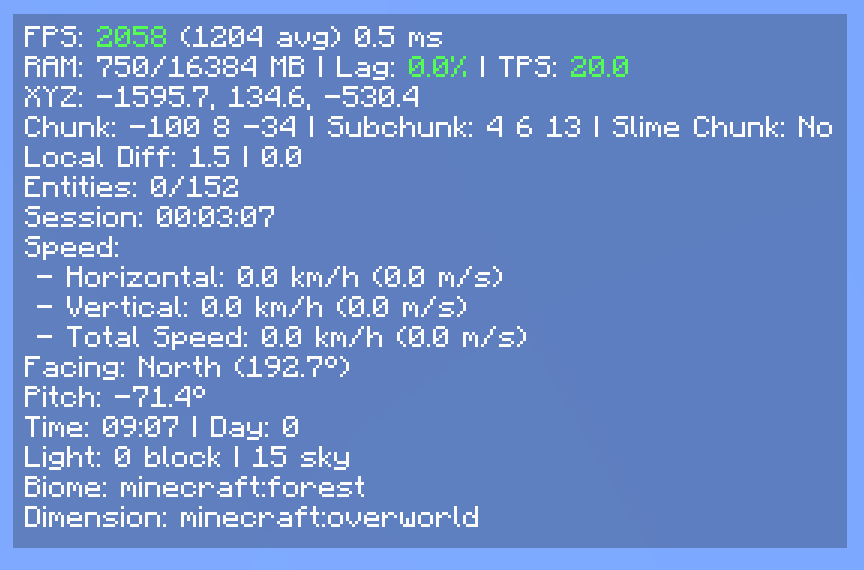 Maxed Out Maxed Out
 -
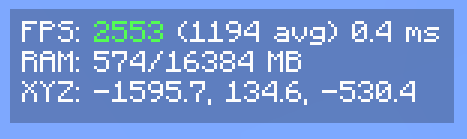 Customized + Color Indicators Customized + Color Indicators
-
 Default
 -
 Maxed Out
 -
 Customized + Color Indicators
Versions
Files
Relations
Project Relations
More like this
Similar Mods
Suggestions use data such as tags, dependencies, dependents, descriptions, titles, and more to rank how much they overlap with this mod.
On ModDex
Community snapshot
By the numbers
Statistics

Get it on
Available Platforms
On ModDex
Community snapshot
By the numbers
Statistics
Resources