Community listing page, reviews may not be monitored by the author.
Craftomatic


No reviews yet
Automatic crafting using template items

Community voices
Reviews
No reviews yet. Be the first to review this project!
Get it on
Available Platforms
Compatibility
Supported Environments
Must be installed on both the client and the server.
About
Project Details
For authors
Embed Badge
If you're the author of this project, you can embed a live badge anywhere that supports HTML or Markdown. It updates automatically whenever ratings change.
Use HTML for any page that supports it, or Markdown for README files and Markdown-based descriptions.
Identifiers
Platform IDs
About
Description
Craftomatic
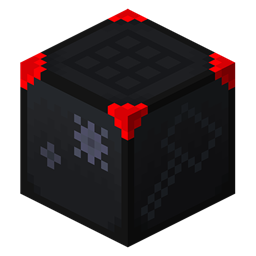
Automatically crafts new items based on a template.
NOTE: This is beta and we are experimenting with two types of crafters: a passive one which you can simply put a hopper under to collect items, and an active one which behaves like a dropper, like the upcoming vanilla Crafter block. It's unclear whether we'll keep both.
This block allows you to automatically craft items. You place an item into the left slot, and the grid will update to show you the items it needs to craft it. If multiple items could be used (as in the case of dyes), arrows will appear above and below the template item to allow you to choose the specific recipe you want. You can also use the scroll wheel while hovering over the template item to switch between recipes.
How is this different than the upcoming Vanilla Crafter?
This block uses a template to tell the crafter what you want to make. With that knowledge, it can pull in the appropriate items from hoppers place around it. This means you can make each hopper only hold one item type and the crafter knows what to do.
Drop an item in the left well and it will show the ghost items for what it expects.

If Instead you have an item that can be crafted in several ways, it will provide arrows to select the input ingredients you want to provide.

Hopper (Passive) Variant
In this setup, you only need to place a hopper underneath the crafter to receive the results. In this variant, you can up up to 5 input hoppers around the crafter, so it can pull in up to 5 items in once cycle.
For items that leave items behind, e.g. honey bottles -> honey blocks will leave empty honey bottles, those items will also flow out the bottom. No item will craft until remaining items are all gone.
Dropper Variant
This one behaves more like the upcoming Vanilla crafter in that it works like a dropper and requires a Redstone signal to make it work in the same way. It even has a mouth! Due to the fact that it requires power, you can only put up to 4 hoppers around it, so it can't input quite as fast. However, when crafting items that leave items behind, the dropper variant will attempt to spit all of them out with the result item at the same time, while the hopper variant has to wait for enough cycles for the grid to clear before it starts crafting new items.
Pros and Cons
There are pros and cons to both variants. Personally, while originally gravitating towards the dropper variant, I have found myself using the passive variant because it's just simpler (no Redstone clock involved). The passive variant also is easily tileable for use in a sorter, etc. while the dropper variant requires power which might affect a nearby component. It might be workable, but it's harder. The dropper variant can be faster, as it can run on a redstone clock whereas the passive variant can operate only at hopper speed. The hopper variant can only output from the bottom, whereas the dropper variant is directional.
Stateful Crafting
If you don't put a template item in, the table behaves as a stateful crafter. What that means is if you start to craft something and forgot something, when you close the UI, the items are still in the table. It should otherwise behave like a normal crafting table.
Crafting Recipes
There are two recipes for the two variants. The key difference is the item at the bottom. For the passive variant, a Redstone block is used (to represent that it is self-powered). For the dropper variant, a dropper is used instead.

Craftomatic
Automatically crafts new items based on a template.
NOTE: This is beta and we are experimenting with two types of crafters: a passive one which you can simply put a hopper under to collect items, and an active one which behaves like a dropper, like the vanilla Crafter in Minecraft 1.21. It's unclear whether we'll keep both.
This block allows you to automatically craft items. You place an item into the left slot, and the grid will update to show you the items it needs to craft it. If multiple items could be used (as in the case of dyes), arrows will appear above and below the template item to allow you to choose the specific recipe you want. You can also use the scroll wheel while hovering over the template item to switch between recipes.
How is this different than the Vanilla Crafter in 1.21?
This block uses a template to tell the crafter what you want to make. With that knowledge, it can pull in the appropriate items from hoppers place around it. This means you can make each hopper only hold one item type and the crafter knows what to do.
Drop an item in the left well and it will show the ghost items for what it expects.
If Instead you have an item that can be crafted in several ways, it will provide arrows to select the input ingredients you want to provide.
Hopper (Passive) Variant
In this setup, you only need to place a hopper underneath the crafter to receive the results. In this variant, you can up up to 5 input hoppers around the crafter, so it can pull in up to 5 items in once cycle.
For items that leave items behind, e.g. honey bottles -> honey blocks will leave empty honey bottles, those items will also flow out the bottom. No item will craft until remaining items are all gone.
Dropper Variant
This one behaves more like the upcoming Vanilla crafter in that it works like a dropper and requires a Redstone signal to make it work in the same way. It even has a mouth! Due to the fact that it requires power, you can only put up to 4 hoppers around it, so it can't input quite as fast. However, when crafting items that leave items behind, the dropper variant will attempt to spit all of them out with the result item at the same time, while the hopper variant has to wait for enough cycles for the grid to clear before it starts crafting new items.
Pros and Cons
There are pros and cons to both variants. Personally, while originally gravitating towards the dropper variant, I have found myself using the passive variant because it's just simpler (no Redstone clock involved). The passive variant also is easily tileable for use in a sorter, etc. while the dropper variant requires power which might affect a nearby component. It might be workable, but it's harder. The dropper variant can be faster, as it can run on a redstone clock whereas the passive variant can operate only at hopper speed. The hopper variant can only output from the bottom, whereas the dropper variant is directional.
Stateful Crafting
If you don't put a template item in, the table behaves as a stateful crafter. What that means is if you start to craft something and forgot something, when you close the UI, the items are still in the table. It should otherwise behave like a normal crafting table.
Crafting Recipes
There are two recipes for the two variants. The key difference is the item at the bottom. For the passive variant, a Redstone block is used (to represent that it is self-powered). For the dropper variant, a dropper is used instead.
Screenshots
Gallery
Versions
Files
Relations
Project Relations
More like this
Similar Mods
Suggestions use data such as tags, dependencies, dependents, descriptions, titles, and more to rank how much they overlap with this mod.
On ModDex
Community snapshot
By the numbers
Statistics

Get it on
Available Platforms
On ModDex
Community snapshot
By the numbers