
Community listing page, reviews here may not be monitored by the author.
Create: Lights & Controls


No reviews yet
More lights and wireless redstone switches that plug straight into Create's Redstone Link network
Community voices
Reviews
No reviews yet. Be the first to review this project!
Get it on
Available Platforms
Compatibility
Supported Environments
Must be installed on both the client and the server.
About
Project Details
For authors
Embed Badge
If you're the author of this project, you can embed a live badge anywhere that supports HTML or Markdown. It updates automatically whenever ratings change.
Use HTML for any page that supports it, or Markdown for README files and Markdown-based descriptions.
Identifiers
Platform IDs
Resources
External Links
About
Description



⚙️ Create: Lights & Controls :
A Create add-on that brings a full set of lighting, redstone control, access and sound blocks ; all built to plug straight into Create's Redstone Link network for clean, wireless automation.
💡 Lighting :

- Crystal Lamps - sleek colored lamps in 14 dye colors.
- Caged Signal Lights - rugged industrial cage lights in 14 colors.
- Inlaid Flat Lights - slim panels that sit flush against any surface, in 14 colors.
- Large Tint Lights - standalone surface-mounted lights in Andesite, Industrial, Copper and Brass casings. The bulb is dyeable to any color, invertible, and links to a frequency.
Every light emits full brightness when active and can be inverted ; so it glows while unpowered and turns off when it receives a signal.
🧩 Modules :

The Module Panel (Module Anchor) is a wall-mounted chassis that holds several small modules at once — shift+right-click a module item onto any surface and it snaps onto a panel automatically (creating one if needed).
🔢 326.9 billion possible module combinations per panel
Mix module types, casings, colors and layouts — no two panels have to look alike.
- Modular Button - dyeable button, wireless frequency, clipboard copy/paste.
- Modular Lever - wireless frequency, clipboard copy/paste.
- Modular Item Frame (Classic & Dark) - displays item without consuming it.
- Modular Tint Light (Andesite / Copper / Brass / Industrial) - compact dyeable module version of the Large Tint Light, invertible, frequency-linked.
🕹️ Controls :

- Industrial Gear Switch - a hand-built gear lever that mounts on floor, wall or ceiling. Right-click to throw it; it emits a redstone signal and broadcasts its on/off state over a frequency.
- Quad Lever Panel - four independent levers on one block, each transmitting on its own frequency. The bulbs are dyeable per lever, and the panel emits stronger world light as more levers switch on.
- Inverted Redstone Link - a Redstone Link with flipped logic: it transmits while unpowered, and its receiver fires only when the frequency goes silent.
- Emergency Button - works exactly like a vanilla button, and can also carry a wireless frequency, invert and toggle mode.
- Elevator Push Button - same as the Emergency Button, plus it can link directly to an Elevator Contact for one-button remote calling, any distance.
- Broadcast Node - rebroadcasts a Redstone Link signal wirelessly into up to 3 target blocks, simulating a real redstone source on each one. Wrench it to enter link mode, then aim and wrench each target to connect it.
🪧 Signage :
- Board - a wall-mounted text sign with an in-game GUI editor (up to 3 lines). Dye the text and the background panel separately with a Dye, and make the text glow with a Glow Ink Sac, just like vanilla signs.
- Lit Board - everything Board does, plus a dyeable bulb and a Redstone Link frequency, so it lights up on signal. Invertible, same as the mod's other lamps.
🔑 Access :
- Access Card / Blank Card - craftable keycard, blank until encoded.
- Card Inscriber - encodes a blank card with a 4-digit PIN and a dye color; ejects the finished card with a spray animation.
- Card Reader - sticks to any surface; first swipe registers a card's PIN as its accepted key, later swipes compare the code and pulse a redstone signal on match (green/red bulb), and can also broadcast over a Redstone Link frequency.
- Keycard Door - Opens with a Linked Access Card
🔊 Sound
- Smart Speaker - plays any sound in the game (vanilla or modded). Trigger it with a redstone signal or a Redstone Link frequency, and dial in the broadcast range (1–32 blocks) with a natural distance falloff. Its custom menu lets you search every loaded sound, preview them, set the range and assign a frequency.
📡 How it works / Redstone Link integration
Controls (Gear Switch, Quad Lever Panel, Emergency/Elevator Push Button, Modules, Broadcast Node) act as transmitters; lamps, lights, the Lit Board, the Card Reader and the Smart Speaker act as receivers. Give a transmitter and a receiver the same frequency and the receiver responds wirelessly — no dust, no repeaters.
Set a frequency by Sneak + Right-Click on any of the mod's linkable blocks to open the frequency menu, then drop two items into the frequency slots (exactly like a vanilla Create Redstone Link). You can also toggle Inverted Mode right there.
📋 Tip / use the Clipboard!
Create's Clipboard can save your frequencies so you can copy & paste them across all of the mod's Redstone-Link blocks - lamps, lights, levers, modules and speakers alike. Write down a frequency combo once, then reuse it everywhere to keep large builds perfectly in sync.
🛠️ Crafting
Most blocks are crafted at a Crafting Table. Colored lights use a new Luminous Component (Raw Luminous Component mixed from glowstone dust + polished rose quartz, then pressed) instead of raw glowstone ; all recipes are viewable in JEI / EMI / REI.
📦 Requirements
- Minecraft 1.21.1
- NeoForge
- Create (required) - plus its own dependencies (Flywheel, Ponder, Registrate), which ship bundled with Create.
❤️ Credits
Huge thanks to the Create team - this add-on stands on their incredible work and Redstone Link API. Go support the original mod!
If you enjoy this mod, you can buy me a coffee ☕ thank you!
Created by Moubarack · Released under the ALL RIGHTS RESERVED.
You are allowed to include this mod in Modrinth or CurseForge modpacks without asking for permission.
Redistribution of the jar files is not allowed (do not share the jar files anywhere else).
⚙️ Create: Lights & Controls :
A Create add-on that brings a full set of lighting, redstone control, access and sound blocks ; all built to plug straight into Create's Redstone Link network for clean, wireless automation.
💡 Lighting :
- Crystal Lamps - sleek colored lamps in 14 dye colors.
- Caged Signal Lights - rugged industrial cage lights in 14 colors.
- Inlaid Flat Lights - slim panels that sit flush against any surface, in 14 colors.
- Large Tint Lights - standalone surface-mounted lights in Andesite, Industrial, Copper and Brass casings. The bulb is dyeable to any color, invertible, and links to a frequency.
Every light emits full brightness when active and can be inverted ; so it glows while unpowered and turns off when it receives a signal.
🧩 Modules :
The Module Panel (Module Anchor) is a wall-mounted chassis that holds several small modules at once — shift+right-click a module item onto any surface and it snaps onto a panel automatically (creating one if needed).
🔢 326.9 billion possible module combinations per panel
Mix module types, casings, colors and layouts — no two panels have to look alike.
- Modular Button - dyeable button, wireless frequency, clipboard copy/paste.
- Modular Lever - wireless frequency, clipboard copy/paste.
- Modular Item Frame (Classic & Dark) - displays item without consuming it.
- Modular Tint Light (Andesite / Copper / Brass / Industrial) - compact dyeable module version of the Large Tint Light, invertible, frequency-linked.
🕹️ Controls :
- Industrial Gear Switch - a hand-built gear lever that mounts on floor, wall or ceiling. Right-click to throw it (with a satisfying animation, spark particles and custom sounds); it emits a redstone signal and broadcasts its on/off state over a frequency.
- Quad Lever Panel - four independent levers on one block, each transmitting on its own frequency. The bulbs are dyeable per lever, and the panel emits stronger world light as more levers switch on.
- Inverted Redstone Link - a Redstone Link with flipped logic: it transmits while unpowered, and its receiver fires only when the frequency goes silent.
- Emergency Button - works exactly like a vanilla button, and can also carry a wireless frequency, invert and toggle mode.
- Elevator Push Button - same as the Emergency Button, plus it can link directly to an Elevator Contact for one-button remote calling, any distance.
- Broadcast Node - rebroadcasts a Redstone Link signal wirelessly into up to 3 target blocks, simulating a real redstone source on each one. Wrench it to enter link mode, then aim and wrench each target to connect it.
🪧 Signage :
- Board - a wall-mounted text sign with an in-game GUI editor (up to 3 lines). Dye the text and the background panel separately with a Dye, and make the text glow with a Glow Ink Sac, just like vanilla signs.
- Lit Board - everything Board does, plus a dyeable bulb and a Redstone Link frequency, so it lights up on signal. Invertible, same as the mod's other lamps.
🔑 Access :
- Access Card / Blank Card - craftable keycard, blank until encoded.
- Card Inscriber - encodes a blank card with a 4-digit PIN and a dye color; ejects the finished card with a spray animation.
- Card Reader - sticks to any surface; first swipe registers a card's PIN as its accepted key, later swipes compare the code and pulse a redstone signal on match (green/red bulb), and can also broadcast over a Redstone Link frequency.
- Keycard Door - Opens with a Linked Access Card
🔊 Sound
- Smart Speaker - plays any sound in the game (vanilla or modded). Trigger it with a redstone signal or a Redstone Link frequency, and dial in the broadcast range (1–32 blocks) with a natural distance falloff. Its custom menu lets you search every loaded sound, preview them, set the range and assign a frequency.
📡 How it works / Redstone Link integration
Controls (Gear Switch, Quad Lever Panel, Emergency/Elevator Push Button, Modules, Broadcast Node) act as transmitters; lamps, lights, the Lit Board, the Card Reader and the Smart Speaker act as receivers. Give a transmitter and a receiver the same frequency and the receiver responds wirelessly — no dust, no repeaters.
Set a frequency by Sneak + Right-Click on any of the mod's linkable blocks to open the frequency menu, then drop two items into the frequency slots (exactly like a vanilla Create Redstone Link). You can also toggle Inverted Mode right there.
📋 Tip / use the Clipboard!
Create's Clipboard can save your frequencies so you can copy & paste them across all of the mod's Redstone-Link blocks - lamps, lights, levers, modules and speakers alike. Write down a frequency combo once, then reuse it everywhere to keep large builds perfectly in sync.
🛠️ Crafting
Most blocks are crafted at a Crafting Table. Colored lights use a new Luminous Component (Raw Luminous Component mixed from glowstone dust + polished rose quartz, then pressed) instead of raw glowstone ; all recipes are viewable in JEI / EMI / REI.
📦 Requirements
- Minecraft 1.21.1
- NeoForge
- Create (required) - plus its own dependencies (Flywheel, Ponder, Registrate), which ship bundled with Create.
❤️ Credits
Huge thanks to the Create team - this add-on stands on their incredible work and Redstone Link API. Go support the original mod!
If you enjoy this mod, you can buy me a coffee ☕ thank you!
Created by Moubarack · Released under the ALL RIGHTS RESERVED.
You are allowed to include this mod in Modrinth or CurseForge modpacks without asking for permission. Redistribution of the jar files is not allowed (do not share the jar files anywhere else).Screenshots
Gallery
-
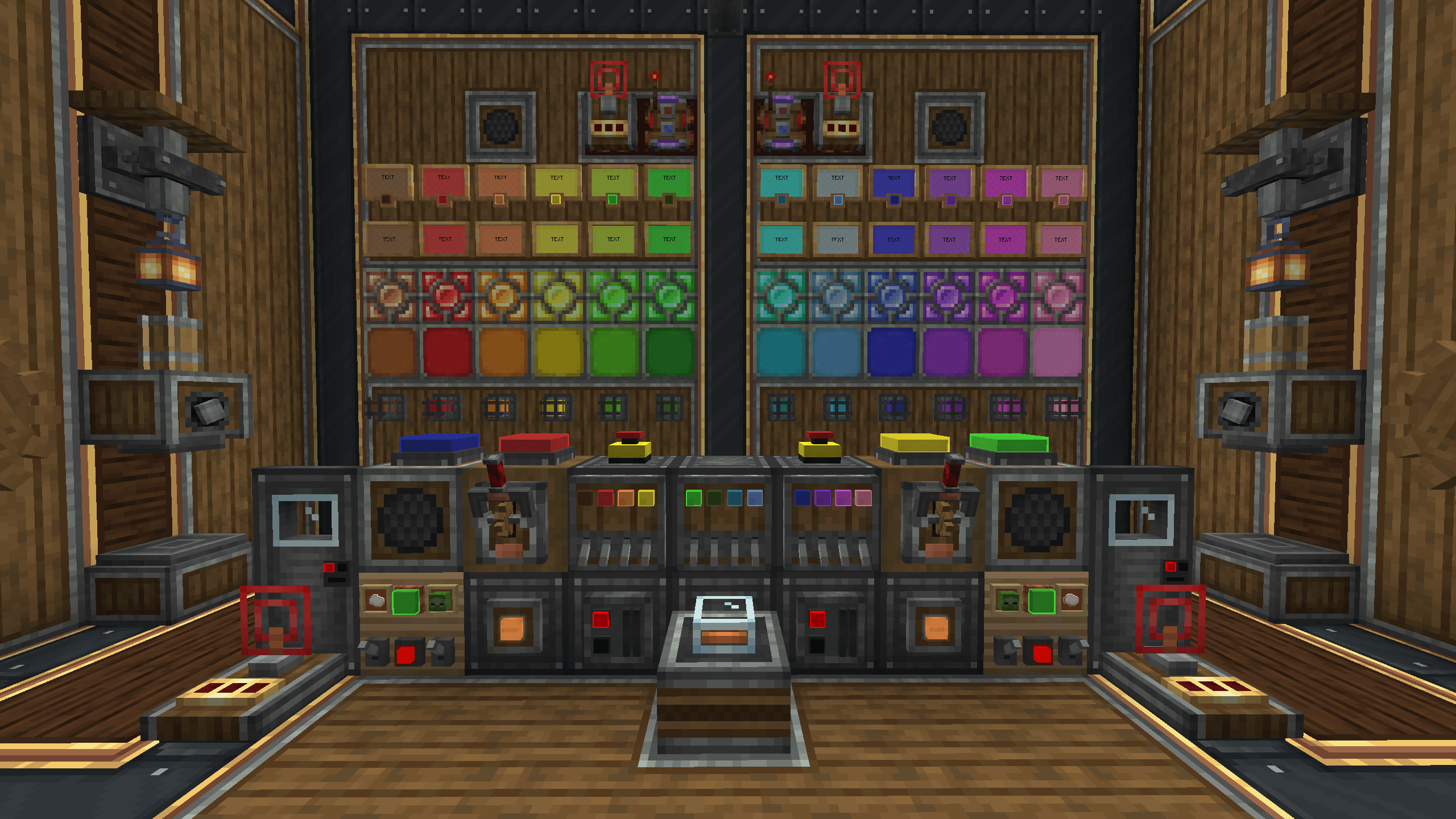 Block Preview Block preview from Create: Lights & Controls
-
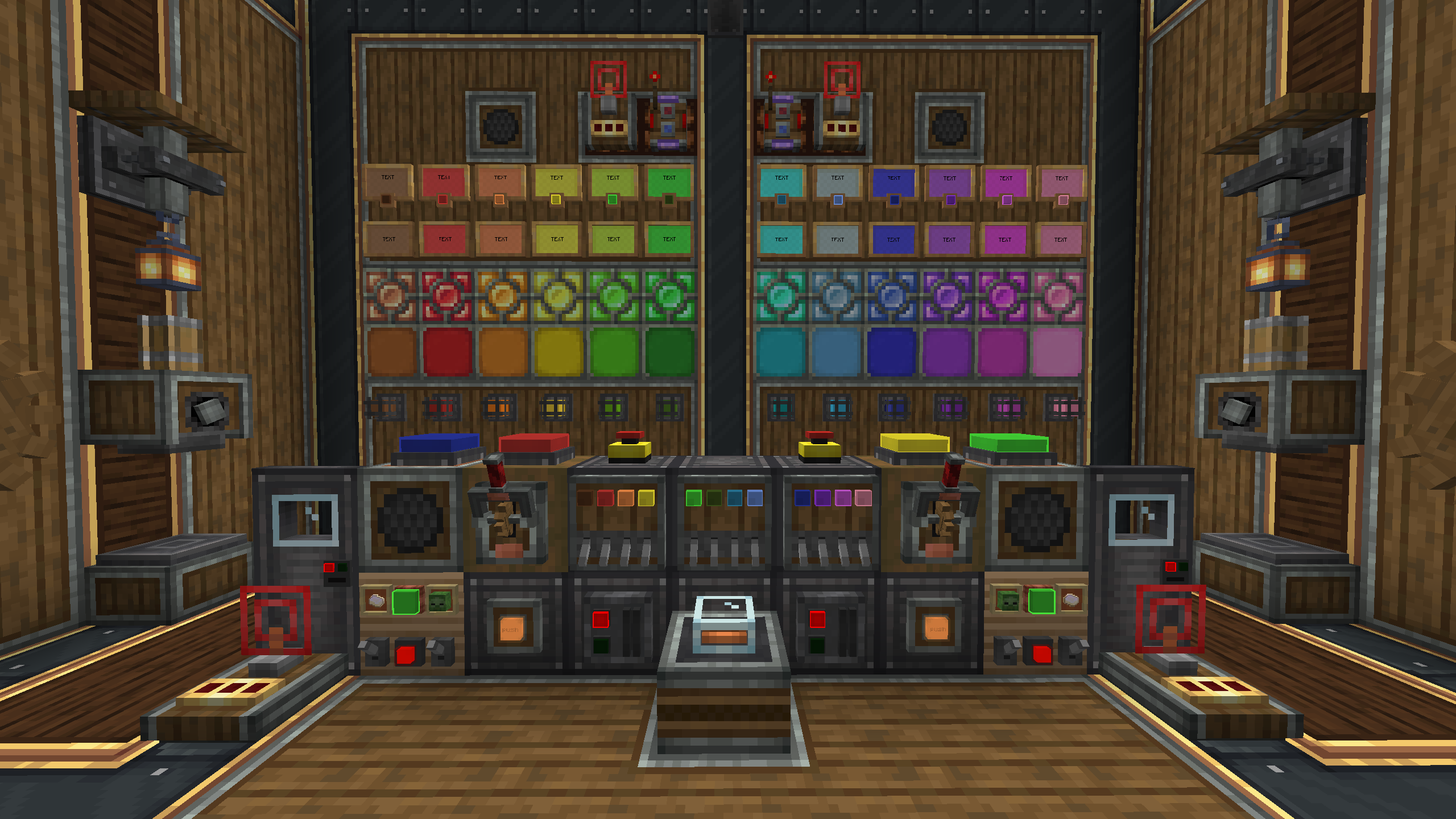 Block Preview Block Preview from Create: Lights & Control
Versions
Files
Relations
Project Relations
More like this
Similar Mods
Suggestions use data such as tags, dependencies, dependents, descriptions, titles, and more to rank how much they overlap with this mod.
On ModDex
Community snapshot
By the numbers
Statistics
Want to reach Minecraft players?
We're looking for a server hosting partner to feature here and other parts of the site. Interested? Send us a message!
Get in touchGet it on
Available Platforms
On ModDex
Community snapshot
By the numbers
Statistics
Resources