Community listing page, reviews here may not be monitored by the author.
Creative Tabs Tweaker


No reviews yet
CreativeTabsTweaker (Forge 1.12.2) lets you remove modded creative tabs, add custom ones, and move items between tabs for better organization.
Community voices
Reviews
No reviews yet. Be the first to review this project!
Get it on
Available Platforms
Compatibility
Supported Environments
Runs entirely on the client. Works on vanilla servers.
About
Project Details
For authors
Embed Badge
If you're the author of this project, you can embed a live badge anywhere that supports HTML or Markdown. It updates automatically whenever ratings change.
Use HTML for any page that supports it, or Markdown for README files and Markdown-based descriptions.
Identifiers
Platform IDs
Resources
External Links
About
Description
CreativeTabsTweaker - Minecraft Forge 1.12.2
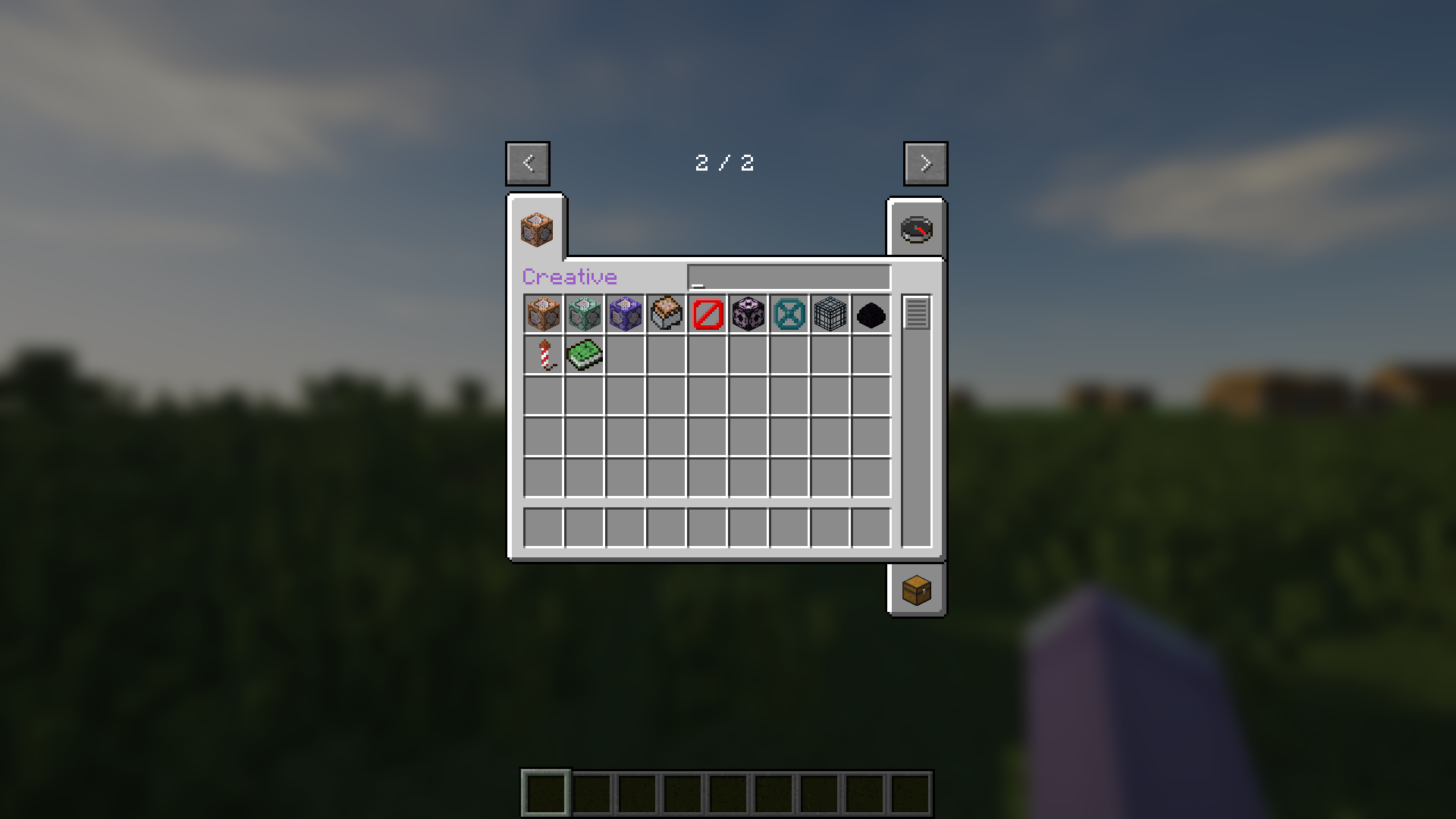
CreativeTabsTweaker (Forge 1.12.2) lets you remove modded creative tabs, add custom ones, and move items between tabs for better organization.
🎉 Features 🎉
- Remove any Creative Tabs from Mod.
- Add custom new Creative Tabs.
- Change Items' Tab.
🚀 Usage 🚀
- Run Minecraft 1 time when installed mod to create config file.
- Edit configured example or just follow below rules.
- Add .lang and .png file of custom tabs to resourcepacks folder.
⚙️ CreativeTabsTweaker.json ⚙️
  "removeTabs": [
    // "tabLabel" What tab you want to remove. You can look for tabs' label in game logs. //
  ],
  "addTabs": {
    "creative": { // What is your custom tab name. //
      "tabBackgroundImage": "tab_creative.png", // Tab's background image from Resource Pack, always start with "tab_" and end with ".png" //
      "tabIconItem": "minecraft:command_block", // Tab's icon item registry name. You can look for the registry name of items in tooltips. //
      "drawTitle": true, // Your tab have title or not. //
      "hasSearchBar": true, // Your tab have search bar or not. //
      "hexLabelColor": "#9A5CC6" // If have title, what is it color in hex. //
      "searchBarWidth": 89, // If have search bar, what is it width. //
    }
  },
  "items": {
    "minecraft:command_block": { // Registry name of item that you want to edit tab //
        "tabs": ["creative"], // List of tabs label to add or change to. //
        "nbt": {} // JSON format of any NBT for item. //
    },
    "minecraft:dirt": {} // If want to remove item from any tabs just leave empty //
  }
🖼️ CreativeTabsTweaker.zip 🖼️
CreativeTabsTweaker.zip
├── assets
│   └── ctt
│       ├── lang
│       │   └── .lang
│       └── texture
│           └── gui
│               └── container
│                   └── creative_inventory
│                       └── .png
└── pack.mcmeta
📄 pack.mcmeta 📄
{
  "pack": {
    "description": "ctt mod resources",
    "pack_format": 3
  }
}
🎌 locale_code.lang 🎌
itemGroup.creative=Creative // itemGroup dot then tab label and visual title //📜 License 📜
- © 2025 by MeowSkyKung is licensed under CC BY-SA 4.0. 🔖
- Credits to MCreator, Blur, Optifine, SEUS
💖 Supporting by 💖
- Star Me on GitHub 🌟
- Donate on Ko-Fi ☕
CreativeTabsTweaker - Minecraft Forge 1.12.2
CreativeTabsTweaker (Forge 1.12.2) lets you remove modded creative tabs, add custom ones, and move items between tabs for better organization.
🎉 Features 🎉
- Remove any Creative Tabs from Mod.
- Add custom new Creative Tabs.
- Change Items' Tab.
🚀 Usage 🚀
- Run Minecraft 1 time when installed mod to create config file.
- Edit configured example or just follow below rules.
- Add .lang and .png file of custom tabs to resourcepacks folder.
⚙️ CreativeTabsTweaker.json ⚙️
  "removeTabs": [
    // "tabLabel" What tab you want to remove. You can look for tabs' label in game logs. //
  ],
  "addTabs": {
    "creative": { // What is your custom tab name. //
      "tabBackgroundImage": "tab_creative.png", // Tab's background image from Resource Pack, always start with "tab_" and end with ".png" //
      "tabIconItem": "minecraft:command_block", // Tab's icon item registry name. You can look for the registry name of items in tooltips. //
      "drawTitle": true, // Your tab have title or not. //
      "hasSearchBar": true, // Your tab have search bar or not. //
      "hexLabelColor": "#9A5CC6" // If have title, what is it color in hex. //
      "searchBarWidth": 89, // If have search bar, what is it width. //
    }
  },
  "items": {
    "minecraft:command_block": "creative", // Registry name of item that you want to change tab and tab label of tab to change to. //
    "minecraft:dirt": "" // If want to remove item from any tabs just leave empty//
  }
🖼️ CreativeTabsTweaker.zip 🖼️
CreativeTabsTweaker.zip
├── assets
│   └── ctt
│       ├── lang
│       │   └── .lang
│       └── texture
│           └── gui
│               └── container
│                   └── creative_inventory
│                       └── .png
└── pack.mcmeta
📄 pack.mcmeta 📄
{
  "pack": {
    "description": "ctt mod resources",
    "pack_format": 3
  }
}
🎌 locale_code.lang 🎌
itemGroup.creative=Creative // itemGroup dot then tab label and visual title //
📜 License 📜
- © 2025 by MeowSkyKung is licensed under CC BY-SA 4.0. 🔖
- Credits to MCreator, Blur, Optifine, SEUS
💖 Supporting by 💖
- Star Me on GitHub 🌟
- Donate on Ko-Fi ☕
Screenshots
Gallery
Versions
Files
Relations
Project Relations
More like this
Similar Mods
Suggestions use data such as tags, dependencies, dependents, descriptions, titles, and more to rank how much they overlap with this mod.
On ModDex
Community snapshot
By the numbers
Statistics
Want to reach Minecraft players?
We're looking for a server hosting partner to feature here and other parts of the site. Interested? Send us a message!
Get in touchGet it on
Available Platforms
On ModDex
Community snapshot
By the numbers
Statistics
Resources