Community listing page, reviews may not be monitored by the author.
CrimsonCube Admin Panel

No reviews yet
Official client-side Admin Control Panel and moderation GUI utility with Persian RTL font support for the CrimsonCube server

Community voices
Reviews
No reviews yet. Be the first to review this project!
Get it on
Available Platforms
About
Project Details
For authors
Embed Badge
If you're the author of this project, you can embed a live badge anywhere that supports HTML or Markdown. It updates automatically whenever ratings change.
Use HTML for any page that supports it, or Markdown for README files and Markdown-based descriptions.
Identifiers
Platform IDs
Resources
External Links
About
Description
CrimsonCube Admin Panel
An exclusive, high-performance client-side admin and moderation utility designed specifically for staff members on the CrimsonCube Minecraft server (Play.CrimsonCube.ir).

  
  

Features & Highlights
- Interactive Punishment Dashboard: Easily search online/offline players, view custom rank badges, and execute quick staff actions (
TP,Here,History,Alts) with zero lag. - WorldEdit & Server Management: Quick navigation shortcuts for moderation tools, server stats, and staff utilities.
- Live Chat & Alert Monitor: Real-time logging and alert notifications directly inside the panel UI.
- Custom Persian RTL Font Support: Smart font rendering that applies clean custom Persian shaping only to Persian/Arabic text, while keeping all English text, commands, and numbers in the default Minecraft font.
- Exclusive Server Lock: Automatically activates only when connected to
Play.CrimsonCube.ir. - Default Open Key: Press
Oanytime in-game to toggle the panel (customizable in Options → Controls → Key Binds). - 3 Dedicated Universal JARs: Multi-project architecture targeting 1.18.2 (Java 17), 1.20 - 1.21.11 (Intermediary), and 26.1 - 26.3 (Native Mojmap) with zero class-loading crashes.
🌟 Key Features & Capabilities
1. Multi-Step Smart Punishment Wizard (PunishmentTab)
- Step 1 (Target Selection): Live searchable online player tab list, smooth scrolling, instant
[TP](teleport staff to player),[Here](teleport player to staff), and[Hist](punishment history lookup) buttons, plus an offline player input field for offline moderation. - Step 2 (Punishment Category): Choose punishment types (
BAN,MUTE,KICK,WARN) with player summary banner and player-to-player teleport controls (/teleport <user1> <user2>). - Step 3 (CrimsonCube Rules & Durations): Over 40 standard infraction presets based directly on CrimsonCube server guidelines. Smart duration buttons (green
§afor permitted durations per infractions, bold yellow§e§lfor selected, and disabled grey for restricted options) with an[Unlock: ON/OFF]override switch for senior staff. - Live Command Preview: Real-time preview of the exact Minecraft command before dispatching to prevent syntax or rule mistakes.
2. Live Chat Surveillance & Anticheat Monitor (ChatAlertsTab)
- 100-Message Memory Buffer: Temporary archive of critical chat events and alerts without cluttering the in-game chat HUD.
- 4 Specialized Feed Filters:
All Feed: Complete chronological feed of server messages, staff communications, and system events.StaffChat (/sc): Built-in staff communication channel with direct input field and Send / Enter key support.Anticheat & Warns: Instant feed capturing anticheat detections from Grim, Thermis, and server spam/flood filters.Spy & History: Dedicated monitor for SocialSpy, SpyMsg, and multi-line responses from/history <player>.
- Quick-Action Buttons: Automated detection of player names inside alerts, spawning immediate
[TP]and[Punish]buttons directly on the alert row for split-second moderation responses.
3. Visual WorldEdit Toolbar (WorldEditTab)
- Selection Tools: Wand tool (
//wand), deselect (//desel), set position 1 (//pos1), set position 2 (//pos2), and vertical expansion (//expand vert). - Clipboard & History: Undo (
//undo), redo (//redo), copy (//copy), paste (//paste), and cut (//cut). - Geometric Generation: One-click execution for
//set,//walls,//replace,//cyl, and//spherewith block type and radius input fields.
4. Staff Utilities & Server Management (StaffServerTab)
- Live State Toggles: Synchronized toggles for
Grim Alerts,SocialSpy,SpyMsg, and/vanishwith automatic chat feedback syncing. - Quick Server Commands: One-click shortcuts for server health check (
/tps), plugin listing (/plugins), world saving (/save-all), whitelist toggle (/whitelist on/off), reload confirmation (/reload confirm), and instant gamemode switching (/gm creative//gm spectator). - Universal Command Console: Direct command dispatch bar supporting any custom administrator command with Enter key execution.
5. Custom Persian RTL Font Engine & Text Separation
- Native RTL & Persian Shaping: Embedded high-legibility Vazirmatn font tailored specifically for Persian and Arabic text with correct cursive letter shaping, diacritics, and right-to-left layout.
- Zero English Distortion: Strict character-range filtering routes all ASCII, English letters (
a-z,A-Z), numerals (0-9), punctuation, and Minecraft commands (//set,/ban) through Minecraft's default vanilla font renderer, preserving crisp pixel alignment.
📥 Installation & Version Compatibility
Download the JAR corresponding to your Minecraft client version:
| Release File | Supported Minecraft Versions | Java Runtime | Mappings Architecture |
|---|---|---|---|
adminpanel-crimsoncube-1.18.2.jar |
1.18 — 1.19.4 | Java 17 | Yarn / PoseStack |
adminpanel-crimsoncube-1.21.x.jar |
1.20 — 1.21.11 | Java 21 | Fabric Intermediary (class_310, class_2561) |
adminpanel-crimsoncube-26.x.jar |
26.1 — 26.3 | Java 21 / 25 | Native Mojmap (Unobfuscated) |
Installation Steps:
- Install Fabric Loader matching your Minecraft version.
- Place the matching Fabric API JAR inside your
.minecraft/modsdirectory. - Download the appropriate CrimsonCube Admin Panel JAR and place it inside
.minecraft/mods. - Launch Minecraft, join
Play.CrimsonCube.ir, and pressOto open the panel!
📄 License & Credits
Distributed under the MIT License.
Developed with ❤️ for the CrimsonCube Staff Team.
Author: aidin_021 (ZeLoExE)
Screenshots
Gallery
-
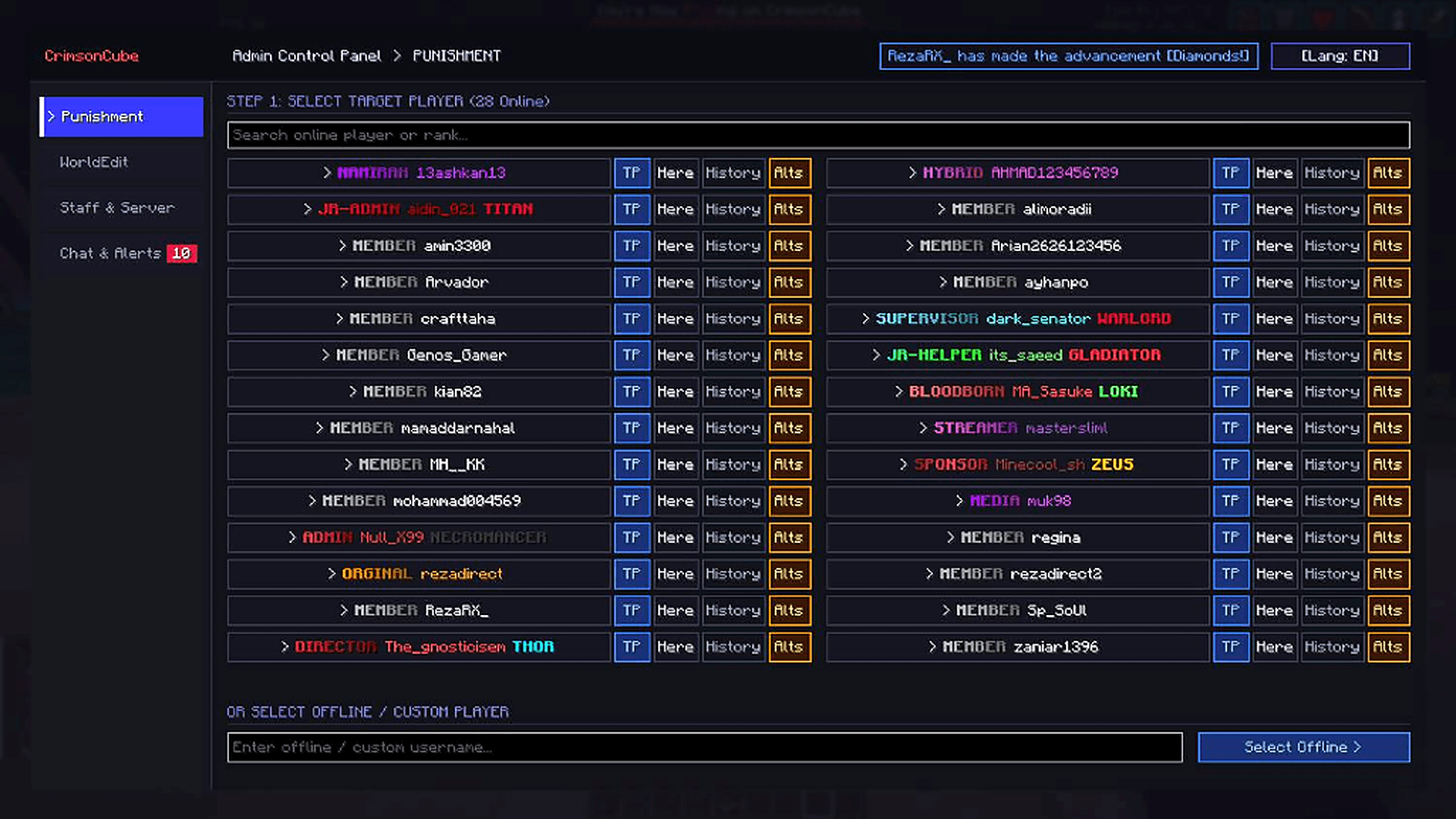 Punishment Wizard & Live Player Roster Live in-game punishment wizard, online staff/player roster with CrimsonCube ranks, and quick action buttons (TP, Here, History, Alts).
Versions
Files
Relations
Project Relations
More like this
Similar Mods
Suggestions use data such as tags, dependencies, dependents, descriptions, titles, and more to rank how much they overlap with this mod.
On ModDex
Community snapshot
By the numbers
Statistics

Get it on
Available Platforms
On ModDex
Community snapshot
By the numbers
Statistics
Resources