
Community listing page, reviews here may not be monitored by the author.
Critical Flight Details

No reviews yet
A Minecraft Mod that enhances the Game's HUD with details for Elytra Flying:
Community voices
Reviews
No reviews yet. Be the first to review this project!
Get it on
Available Platforms
About
Project Details
For authors
Embed Badge
If you're the author of this project, you can embed a live badge anywhere that supports HTML or Markdown. It updates automatically whenever ratings change.
Use HTML for any page that supports it, or Markdown for README files and Markdown-based descriptions.
Identifiers
Platform IDs
Resources
External Links
About
Description
Critical Flight Display Mod (Minecraft 1.16.x)
Available to download from Curseforge.
Built using Fabric Example Mod Template and made with the Fabric modding toolchain for Minecraft.
A Minecraft Mod that enhances the Game's HUD with details for Elytra Flying:
-
HUD Features:
- pitch display
- horizon graphic -speed
Images

Installation
-
Install Fabric Loader on your Minecraft client
- Recommended to install with the MultiMC Minecraft client, which allows you to install Fabric in one click in the Minecraft instance settings
- Download latest Mod
.jarfrom Github or from Curseforge -
Put the downloaded Mod
.jarin the.minecraft/modsfolder- Or if you're using MultiMC, open the Minecraft instance settings you're using, and look for the option to add a Mod, then select the
.jarfile you downloaded
- Or if you're using MultiMC, open the Minecraft instance settings you're using, and look for the option to add a Mod, then select the
- Done!
Building from source
- Clone the project with
git clone https://github.com/bshuler/critical-flight-details.git - Cd into the project's directory
cd simple-utilities-mod - Run
./gradlew buildto build the.jar -
Built Mod
.jarfiles will be located atbuild/libs- Example:
build/libs/simple-utilities-mod-1.0.0.jar - This will be the Mod
.jarfile you can put in your.minecraft/modsfolder
- Example:
Planned features
- Allow the User to toggle the HUD utilities, both individually and as a whole, could be done either with Hotkeys or with a Settings interface, possibly both
- Add Altitude indicators
- Add compass
FAQ
-
Does this Mod work on versions below 1.15?
- No, it might work on 1.14 with some changes, but not anything below 1.14, since this Mod is made with Fabric, which only supports Minecraft 1.14 and above.
-
Will this Mod get me banned from X multiplayer server?
- Maybe, maybe not, the Mod is entirely Client-sided and does not require it to be installed on the Server, and mostly shows things already available to you at all times like coordinates and Cardinal directions, like an extended but simplified F3 Menu, but it has some exceptions, like very specific Game time, so some servers may not allow it, do look into the Server's rules carefully before using it, do not create issues here asking about that, since I won't know.
-
Will you add 'X feature not present in the Planned Features section'**?
- Maybe, and only if it fits with the other features of the mod, create an issue about it, I only on this project on my spare time, but I'd be happy to add wanted features in my spare time.
Screenshots
Gallery
-
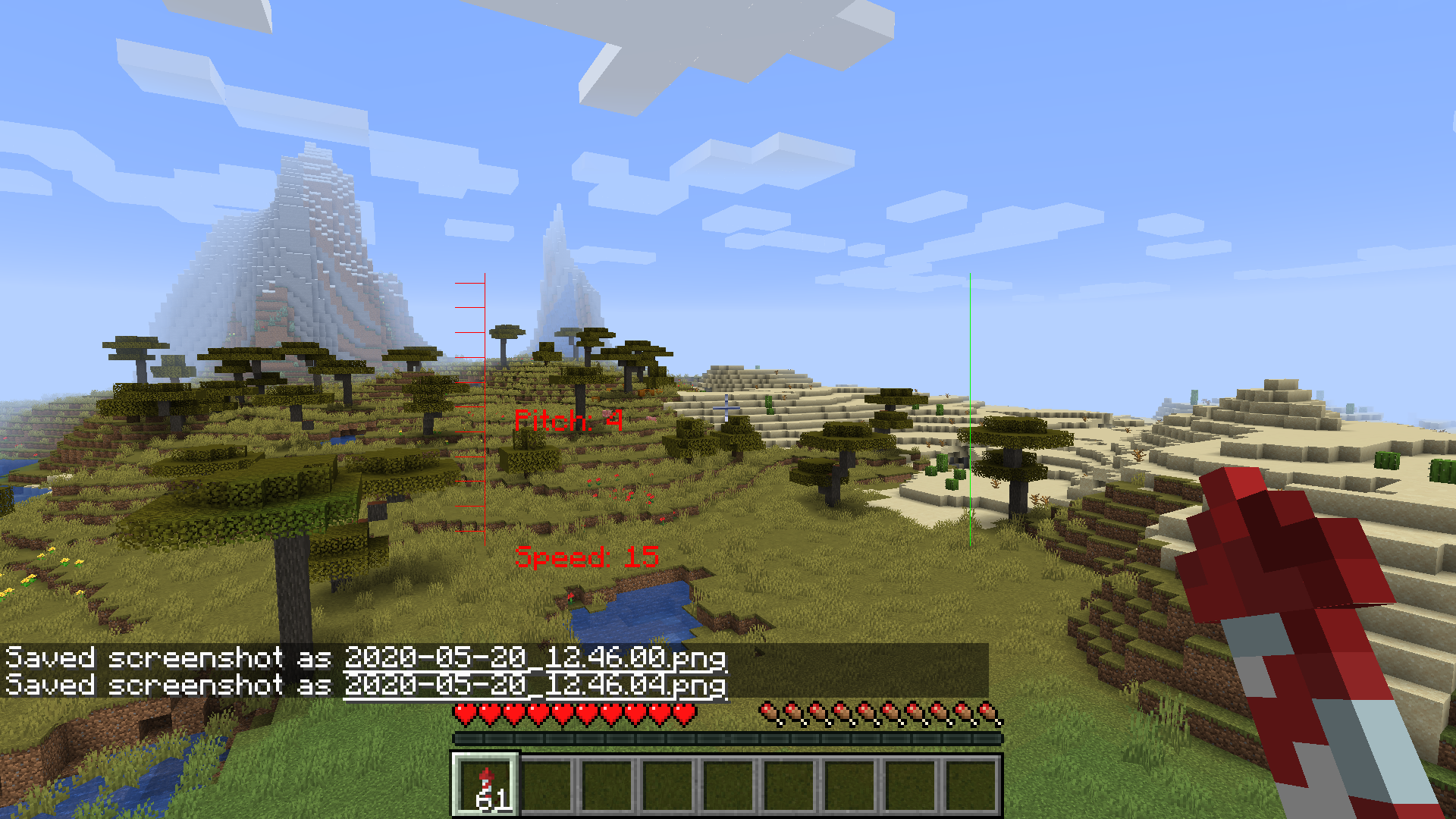 ingame_hud.png
 -
 Critical Flight Details
Versions
Files
Relations
Project Relations
More like this
Similar Mods
Suggestions use data such as tags, dependencies, dependents, descriptions, titles, and more to rank how much they overlap with this mod.
On ModDex
Community snapshot
By the numbers
Statistics
Want to reach Minecraft players?
We're looking for a server hosting partner to feature here and other parts of the site. Interested? Send us a message!
Get in touchGet it on
Available Platforms
On ModDex
Community snapshot
By the numbers
Statistics
Resources