
Community listing page, reviews here may not be monitored by the author.
Custom Item Model


No reviews yet
Now support custom models & animations for items
Community voices
Reviews
No reviews yet. Be the first to review this project!
Get it on
Available Platforms
Compatibility
Supported Environments
Runs entirely on the client. Works on vanilla servers.
About
Project Details
For authors
Embed Badge
If you're the author of this project, you can embed a live badge anywhere that supports HTML or Markdown. It updates automatically whenever ratings change.
Use HTML for any page that supports it, or Markdown for README files and Markdown-based descriptions.
Identifiers
Platform IDs
Resources
External Links
About
Description
CIM | Custom Item Model
English
Adds support for fully-custom animated item models using simple vanilla-style 'JSON'
Requires mods
How it works #1 Model registration
Create the file cim_models.json in your resource pack namespace at assets/<namespace>/cim_models.json (Do not use the cim namespace!)
Then write the following content:
{
    "entries": [
        // List of entries
    ]
}
Add a new element to entries with the following structure:
{
    "items": [ /* List of `item_id`'s */ ],
    "components": { /* Components filter */ },
    "mode": /* Component filter mode: any | all | only */,
    "model": /* Model ID */
}
Where:
items— A list of item IDs used to filter items.
- To apply the model to all items, use "all".
components— A J`SON object used to filter items by components.
- To apply the model regardless of components, omit this field.
mode— Controls how the components filter is applied.
any— The item must contain at least one of the listed components.all— The item must contain all listed components. Other components are ignored.only— The item must contain only the listed components and no others.model— The model location.
- Format: namespace:folder_name, where folder_name is a directory inside cim_models. #2 Model properties setup
If you only need to replace the model and/or animations, the following files must be present in the folder_name directory:
/cim_models/<model_id>/
|- model.geo.json  | Item model file
|- texture.png     | Texture for model
|- animations.json | Animations for model (optional)
\- display.json    | Display transform for model (optional)
You must use these exact file names.
Otherwise, if you need more detailed model configuration, you must create a properties.json file at /cim_models/<model_id>/properties.json with the following content:
{
    "name": /* Model name (currently unused) */,
    "authors": /* List of authors (currently unused) */,

    "disable_ground_bobbing": true,   // Disables item floating (up-down movement)
    "disable_ground_spinning": true,  // Disables item spinning on the ground

    "display_context": {
        /* Mapping between item_display_context and cim_profile */
    }
}
The display_context field defines the default profile for the item_display_context equal to none:
"none": { // You can overwrite it
    "model": "./model.geo.json",
    "texture": "./texture.png",
    "animations": "./animations.json",
    "display": "./display.json"
}
Where:
- model — Path to the model resource. Use the ./ prefix for local resources.
- texture — Path to the model texture. Use the ./ prefix for local resources.
- animations — Path to the animations file. Optional. Use the ./ prefix for local resources.
- display — Path to the display transform file. Optional. Use the ./ prefix for local resources.
For other contexts, it is not necessary to rewrite the profile exactly, it is enough to specify only the necessary parameters in the profile. The rest will be taken from the none context.
Русский
Добавляет поддержку полноценных кастомных и анимируемых моделей предметов через обычный 'JSON'
Зависимости мода
Как это работает #1 Регистрация моделей
Создайте файл cim_models.json в вашем ресурспаке по пути assets/<mod_id>/cim_models.json (Не используйте cim в качестве mod_id)
Затем впишите следующее:
{
    "entries": [
        // Список элементов
    ]
}
Добавьте новый элемент в список entries со следующей структурой:
{
    "items": [ /* Список `item_id` */ ],
    "components": { /* Фильтр компонентов */ },
    "mode": /* Режим фильтрации компонентов: any | all | only */,
    "model": /* `model_id` */
}
Где:
items— Список предметов (item_id), используемых для фильтрации.
- Укажите "all" для замены модели всех предметов.
components— JSON-объект, используемый для фильтрации предметов по компонентам.
- Не указывайте этот параметр, если требуется заменить модель вне зависимости от наличия компонентов.
mode— Режим фильтрации компонентов.any— Предмет должен содержать любой из указанных компонентов.all— Предмет должен содержать все указанные компоненты. Остальные компоненты игнорируются.only— Предмет должен содержать только указанные компоненты. При отсутствии хотя бы одного или наличии лишних — предмет игнорируется.model— Идентификатор модели.
- Формат: :, где
folder_name— имя директории внутри cim_models/. #2 Model properties setup
Если требуется заменить только модель и/или анимации, в директории folder_name должны присутствовать следующие файлы:
/cim_models/<model_id>/
|- model.geo.json   | Файл модели предмета
|- texture.png      | Текстура модели
|- animations.json  | Анимации модели (необязательно)
\- display.json     | Трансформации отображения (необязательно)
Необходимо использовать именно эти имена файлов.
В противном случае, если требуется более детальная настройка модели, необходимо создать файл properties.json по пути /cim_models/<model_id>/properties.json со следующим содержимым:
{
    "name": /* Название модели (в данный момент не используется) */,
    "authors": /* Список авторов (в данный момент не используется) */,

    "disable_ground_bobbing": true,   // Отключает «парение» предмета (движение вверх-вниз)
    "disable_ground_spinning": true,  // Отключает вращение предмета на земле

    "display_context": {
        /* Связь между item_display_context и cim_profile */
    }
}
Поле display_context задаёт профиль по умолчанию для item_display_context, равного none:
"none": { // Вы можете его перезаписать
    "model": "./model.geo.json",
    "texture": "./texture.png",
    "animations": "./animations.json",
    "display": "./display.json"
}
Где:
model— Путь к ресурсу модели. Для локальных ресурсов используйте префикс./.texture— Путь к текстуре модели. Для локальных ресурсов используйте префикс./.animations— Путь к файлу анимаций. Необязательный параметр. Используйте./для локальных ресурсов.display— Путь к файлу трансформаций отображения. Необязательный параметр. Используйте./для локальных ресурсов.
Для других контектов не обязательно переписывать профиль в точь-точь, достаточно указать только нужные параметры в профиле. Остальные же будут взяты из none контекста.
CIM | Custom Item Model
English
Adds support for fully-custom animated item models using simple vanilla-style 'JSON'
How it works
#1 Model registration
Create the file cim_models.json in your resource pack namespace at
assets/<namespace>/cim_models.json (Do not use the cim namespace!)
Then write the following content:
{
    "entries": [
        // List of entries
    ]
}
Add a new element to entries with the following structure:
{
    "items": [ /* List of `item_id`'s */ ],
    "components": { /* Components filter */ },
    "mode": /* Component filter mode: any | all | only */,
    "model": /* Model ID */
}
Where:
items— A list of item IDs used to filter items.
- To apply the model to all items, use "all".
components— A J`SON object used to filter items by components.
- To apply the model regardless of components, omit this field.
mode— Controls how the components filter is applied.
any— The item must contain at least one of the listed components.all— The item must contain all listed components. Other components are ignored.only— The item must contain only the listed components and no others.model— The model location.
- Format: namespace:folder_name, where folder_name is a directory inside cim_models.
#2 Model properties setup
If you only need to replace the model and/or animations, the following files must be present in the folder_name
directory:
/cim_models/<model_id>/
|- model.geo.json  | Item model file
|- texture.png     | Texture for model
|- animations.json | Animations for model (optional)
\- display.json    | Display transform for model (optional)
You must use these exact file names.
Otherwise, if you need more detailed model configuration, you must create a properties.json file at
/cim_models/<model_id>/properties.json with the following content:
{
    "name": /* Model name (currently unused) */,
    "authors": /* List of authors (currently unused) */,

    "disable_ground_bobbing": true,   // Disables item floating (up-down movement)
    "disable_ground_spinning": true,  // Disables item spinning on the ground

    "display_context": {
        /* Mapping between item_display_context and cim_profile */
    }
}
The display_context field defines the default profile for the item_display_context equal to none:
"none": { // You can overwrite it
    "model": "./model.geo.json",
    "texture": "./texture.png",
    "animations": "./animations.json",
    "display": "./display.json"
}
Where:
- model — Path to the model resource. Use the ./ prefix for local resources.
- texture — Path to the model texture. Use the ./ prefix for local resources.
- animations — Path to the animations file. Optional. Use the ./ prefix for local resources.
- display — Path to the display transform file. Optional. Use the ./ prefix for local resources.
For other contexts, it is not necessary to rewrite the profile exactly, it is enough to specify only the necessary parameters in
the profile. The rest will be taken from the none context.
Русский
Добавляет поддержку полноценных кастомных и анимируемых моделей предметов через обычный 'JSON'
Как это работает
#1 Регистрация моделей
Создайте файл cim_models.json в вашем ресурспаке по пути assets/<mod_id>/cim_models.json (Не используйте cim в
качестве mod_id)
Затем впишите следующее:
{
    "entries": [
        // Список элементов
    ]
}
Добавьте новый элемент в список entries со следующей структурой:
{
    "items": [ /* Список `item_id` */ ],
    "components": { /* Фильтр компонентов */ },
    "mode": /* Режим фильтрации компонентов: any | all | only */,
    "model": /* `model_id` */
}
Где:
items— Список предметов (item_id), используемых для фильтрации.
- Укажите "all" для замены модели всех предметов.
components— JSON-объект, используемый для фильтрации предметов по компонентам.
- Не указывайте этот параметр, если требуется заменить модель вне зависимости от наличия компонентов.
mode— Режим фильтрации компонентов.any— Предмет должен содержать любой из указанных компонентов.all— Предмет должен содержать все указанные компоненты. Остальные компоненты игнорируются.only— Предмет должен содержать только указанные компоненты. При отсутствии хотя бы одного или наличии лишних — предмет игнорируется.model— Идентификатор модели.
- Формат: <namespace/mod_id>:<folder_name>, где
folder_name— имя директории внутри cim_models/.
#2 Model properties setup
Если требуется заменить только модель и/или анимации, в директории folder_name должны присутствовать следующие файлы:
/cim_models/<model_id>/
|- model.geo.json   | Файл модели предмета
|- texture.png      | Текстура модели
|- animations.json  | Анимации модели (необязательно)
\- display.json     | Трансформации отображения (необязательно)
Необходимо использовать именно эти имена файлов.
В противном случае, если требуется более детальная настройка модели, необходимо создать файл properties.json по пути
/cim_models/<model_id>/properties.json со следующим содержимым:
{
    "name": /* Название модели (в данный момент не используется) */,
    "authors": /* Список авторов (в данный момент не используется) */,

    "disable_ground_bobbing": true,   // Отключает «парение» предмета (движение вверх-вниз)
    "disable_ground_spinning": true,  // Отключает вращение предмета на земле

    "display_context": {
        /* Связь между item_display_context и cim_profile */
    }
}
Поле display_context задаёт профиль по умолчанию для item_display_context, равного none:
"none": { // Вы можете его перезаписать
    "model": "./model.geo.json",
    "texture": "./texture.png",
    "animations": "./animations.json",
    "display": "./display.json"
}
Где:
model— Путь к ресурсу модели. Для локальных ресурсов используйте префикс./.texture— Путь к текстуре модели. Для локальных ресурсов используйте префикс./.animations— Путь к файлу анимаций. Необязательный параметр. Используйте./для локальных ресурсов.display— Путь к файлу трансформаций отображения. Необязательный параметр. Используйте./для локальных ресурсов.
Для других контектов не обязательно переписывать профиль в точь-точь, достаточно указать только нужные параметры в
профиле. Остальные же будут взяты из none контекста.
Screenshots
Gallery
-
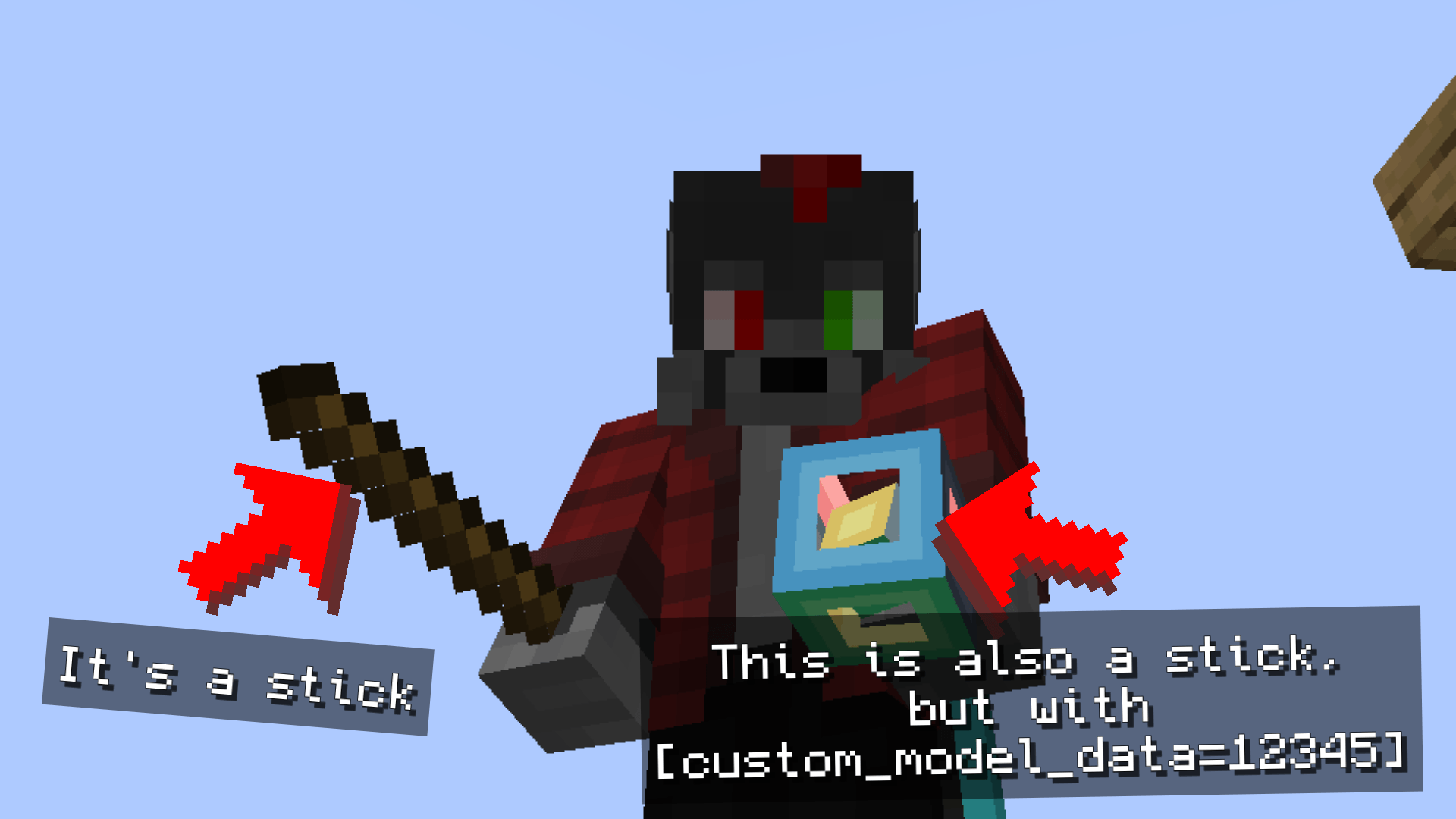 Preview #1 The stick changes its model when 'custom_model_data' is set to '12345'
-
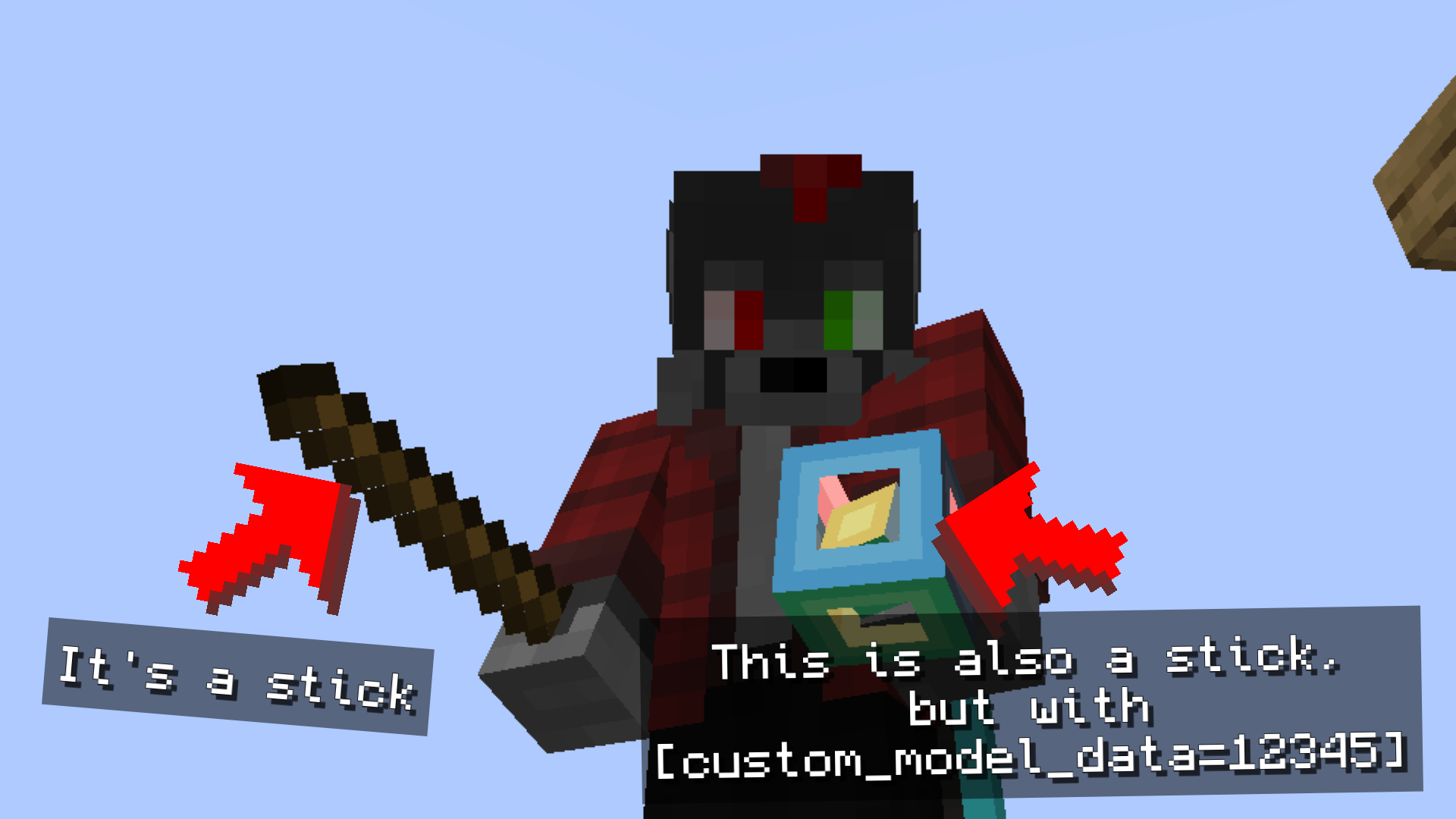 Preview #1 - The stick morph to matrix cube The stick changes its model when 'custom_model_data' is set to '12345'
 -
 Preview #2 - More items are custom models & animations The item frame 1 (left) contains a 'stick' with 'custom_model_data=12345'. The item frame 2 (center) contains a 'golden_sword' with 'custom_model_data=12345'. The item frame 3 (right) contains a 'potion' with 'potion_contents={"potion":"water"}'.
 -
 Preview #3 - Custom model based on the name of the item The model is registered for the "stick" item on the "custom_name" component. To replace the model, simply rename the item on the anvil
Versions
Files
Relations
Project Relations
More like this
Similar Mods
Suggestions use data such as tags, dependencies, dependents, descriptions, titles, and more to rank how much they overlap with this mod.
On ModDex
Community snapshot
By the numbers
Statistics
Want to reach Minecraft players?
We're looking for a server hosting partner to feature here and other parts of the site. Interested? Send us a message!
Get in touchGet it on
Available Platforms
On ModDex
Community snapshot
By the numbers
Statistics
Resources