
Community listing page, reviews may not be monitored by the author.
Custom Recipe

No reviews yet
Create custom crafting recipes and custom crafts in-game with a Fabric recipe editor. Manage vanilla/modded recipes, worlds, recipe books, and servers. Now supports custom items (NBTs).

Community voices
Reviews
No reviews yet. Be the first to review this project!
Get it on
Available Platforms
Compatibility
Supported Environments
Must be installed on both the client and the server.
About
Project Details
For authors
Embed Badge
If you're the author of this project, you can embed a live badge anywhere that supports HTML or Markdown. It updates automatically whenever ratings change.
Use HTML for any page that supports it, or Markdown for README files and Markdown-based descriptions.
Identifiers
Platform IDs
About
Description
Custom Recipe
Create, edit, organize, and manage Minecraft crafting recipes directly in-game — without writing datapacks or JSON files.
Custom Recipe is a visual recipe editor for singleplayer worlds, modpacks, and dedicated servers. Build shaped or shapeless recipes, use exact vanilla or modded items, manage existing Minecraft recipes, and reuse your creations across worlds.
Download the latest version · Report an issue · Source code
✨ Features
- Create shaped and shapeless crafting recipes
- Use items from Minecraft and installed mods
- Require multiple items inside a single ingredient slot
- Configure ingredient and output quantities
- Save exact custom items, including their durability and custom data
- Maintain independent recipes for each world
- Reuse recipes and custom items through the Global Library
- Browse and control vanilla or modded crafting recipes
- Disable complete recipes or individual material variants
- Integrate custom recipes with Minecraft’s recipe book
- Support normal crafting and Shift-crafting
- Manage recipes securely on dedicated servers
- Preserve recipes affected by missing mods
- Import and export recipe configurations
🛠️ Visual recipe editor
Creating a recipe works similarly to using a normal crafting table.
The editor lets you:
- Arrange ingredients inside a visual crafting grid
- Create shaped recipes that can be positioned anywhere in the crafting table
- Create shapeless recipes where ingredient position does not matter
- Search items by displayed name, identifier, ingredient, recipe ID, or mod namespace
- Browse every item accepted by an ingredient tag
- Set the required quantity for each ingredient
- Respect the real stack limit of every item
- Choose the recipe output and its quantity
- Enable, disable, duplicate, edit, or remove recipes
- Mark recipes as Known by default
The editor can automatically use a recommended GUI scale while open and restore your exact previous setting when you leave.
💎 Custom Items
Custom Recipe can save the exact item held by a player to the Custom Items Library.
This preserves supported item properties such as:
- Custom names
- Enchantments
- Durability
- Mod-added data
- Other custom item properties
Use /customrecipe_item save [name] while holding an item to save it.
Saved custom items can be used as recipe ingredients or outputs. They can also be renamed directly from the library, including their identifier. Recipes referencing a renamed item are updated automatically.
Custom item commands also support listing, giving, and removing saved entries.
📚 Recipe collections
| Target | Purpose |
|---|---|
| Global Library | Reusable recipes and custom items shared between your local worlds |
| World configuration | Recipes that belong only to one specific singleplayer world |
| Dedicated server | Shared server recipes managed by authorized operators |
Recipes copied from the Global Library become independent copies. Editing a recipe inside one world does not unexpectedly change another world or the original library entry.
🔍 Default Recipes and Quick Add
The Default Recipes browser lets you inspect crafting recipes provided by Minecraft and installed mods.
You can:
- Search recipes by output, ingredient, identifier, or namespace
- Preview their real crafting-grid layout
- Browse vanilla and modded recipes
- Inspect ingredient tags and accepted material variants
- Disable an entire recipe
- Disable only one material variant
- Replace existing recipes while keeping unrelated crafting behaviour intact
Quick Add provides optional ready-made templates and user-created shortcuts. Adding one creates an independent recipe that can be freely edited or removed.
🎁 Included optional templates
Available templates depend on the Minecraft version and may include:
- Elytra
- Totem of Undying
- Enchanted Golden Apple
- Bottle o’ Enchanting
- Heavy Core
These templates are never activated automatically. Add only the ones you want through Quick Add.
📖 Recipe book and crafting
Custom recipes can appear in Minecraft’s normal recipe book.
Recipes marked Known by default are automatically available without requiring manual discovery. The recipe book can place complete ingredient stacks when a recipe requires several items in one slot.
Custom Recipe also handles:
- Ingredient quantities larger than one
- Items with different maximum stack sizes
- Non-stackable ingredients
- Exact custom items with matching durability and custom data
- Shift-clicking and repeated crafting
- Multiple recipes using similar crafting layouts
- Compact shaped recipes placed anywhere in the crafting grid
🖥️ Singleplayer and server access
| Context | How to open the editor |
|---|---|
| Singleplayer | Use the Custom Recipe pause-menu button or /customrecipe_solo |
| Dedicated server | Use /customrecipe_server as an authorized operator |
On dedicated servers:
- Recipe management is restricted to authorized operators
- Changes remain drafts until Save is pressed
- The server validates changes before applying them
- Failed saves keep the editor open and preserve unsaved work
- Client and server recipe catalogs remain separate
- A compatible Custom Recipe installation is required on the server and the operator’s client
💾 Configuration safety
Custom Recipe is designed for worlds and modpacks that evolve over time.
If a recipe references an item from a missing mod:
- The unavailable item is detected
- The recipe is preserved instead of silently deleted
- The affected recipe can be marked as unavailable
- It can recover when the missing mod is installed again
Configurations support:
- Full configuration export
- Global Library export
- Global Library import
- Migration from older Custom Recipe formats
- Protection against unsupported newer formats
- Conflict handling during library imports
Backing up a world before making major recipe or modpack changes is still recommended.
📦 Supported versions
| Minecraft | Fabric | NeoForge | Forge |
|---|---|---|---|
| 1.20.1 | ✅ | — | ✅ |
| 1.21.1 | ✅ | ✅ | — |
| 1.21.8 | ✅ | — | — |
| 1.21.10 | ✅ | — | — |
| 1.21.11 | ✅ | ✅ | — |
| 26.1.x | ✅ | — | — |
| 26.2 | ✅ | — | — |
| 26.3 | ✅ | — | — |
Always download the file matching both your exact Minecraft version and mod loader. Required dependencies are listed on each Modrinth version page.
💚 Made for players, modpacks, and servers
Custom Recipe can be used for anything from adding one missing crafting recipe to building a completely customized progression system.
It is suitable for:
- Singleplayer worlds
- Modded survival
- Custom modpacks
- Multiplayer servers
- Server administrators
- Players who want an easier alternative to datapacks
Found a bug or compatibility problem? Report it on GitHub.
Screenshots
Gallery
-
-
 Mod Menu page
 -
 Main Menu
 -
 Select your worlds
 -
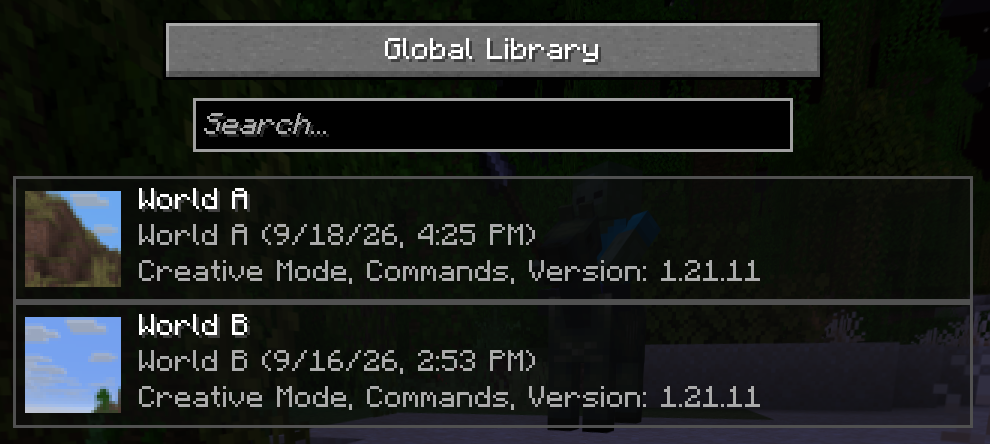 World Selector
 -
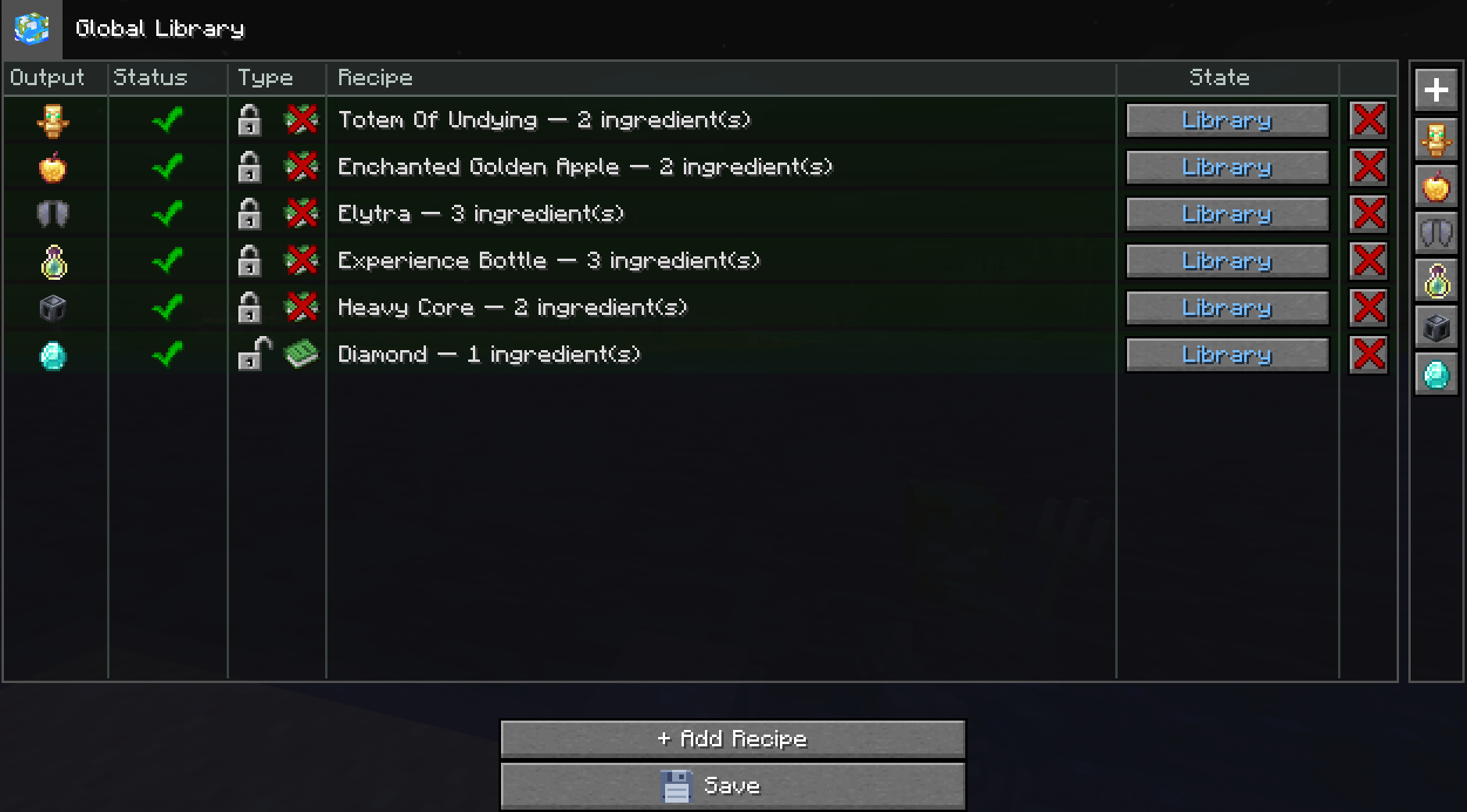 New library
 -
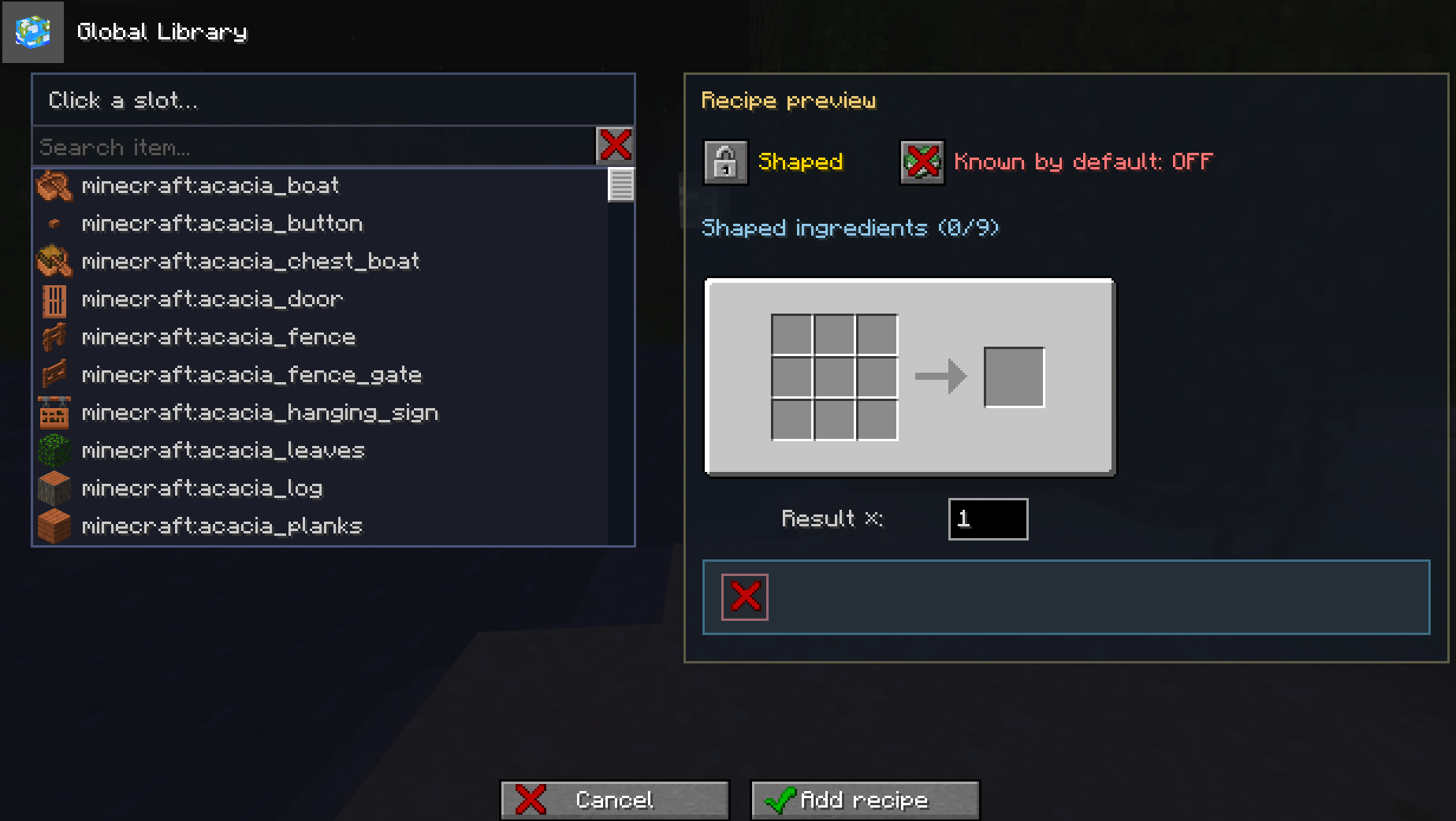 Recipe Creator Menu
 -
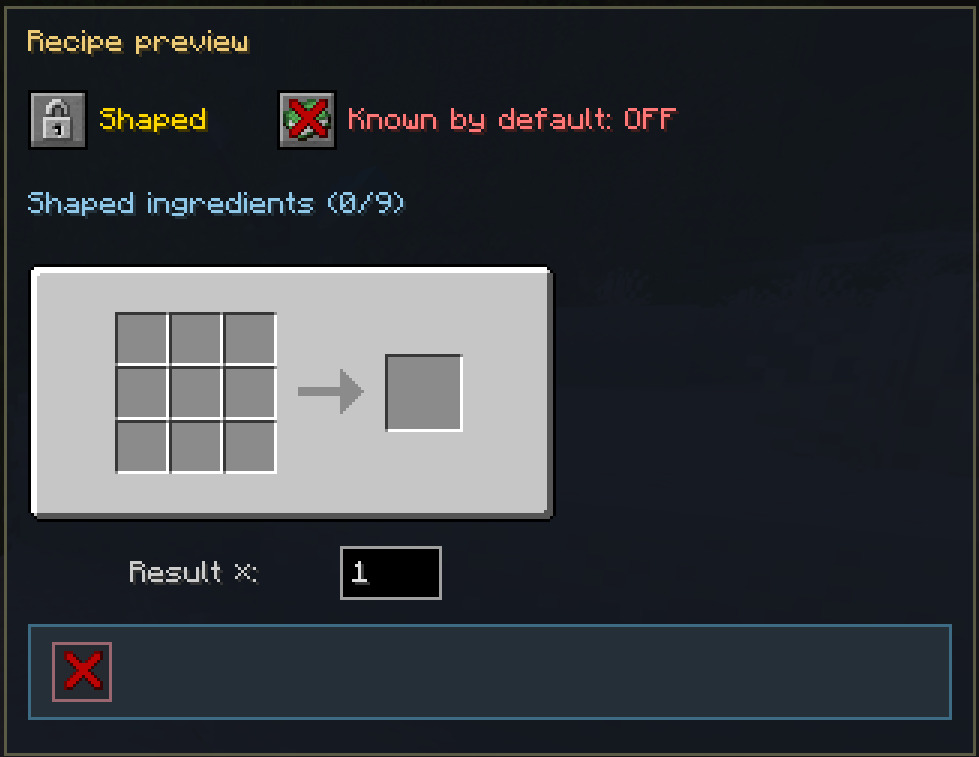 Shaped
 -
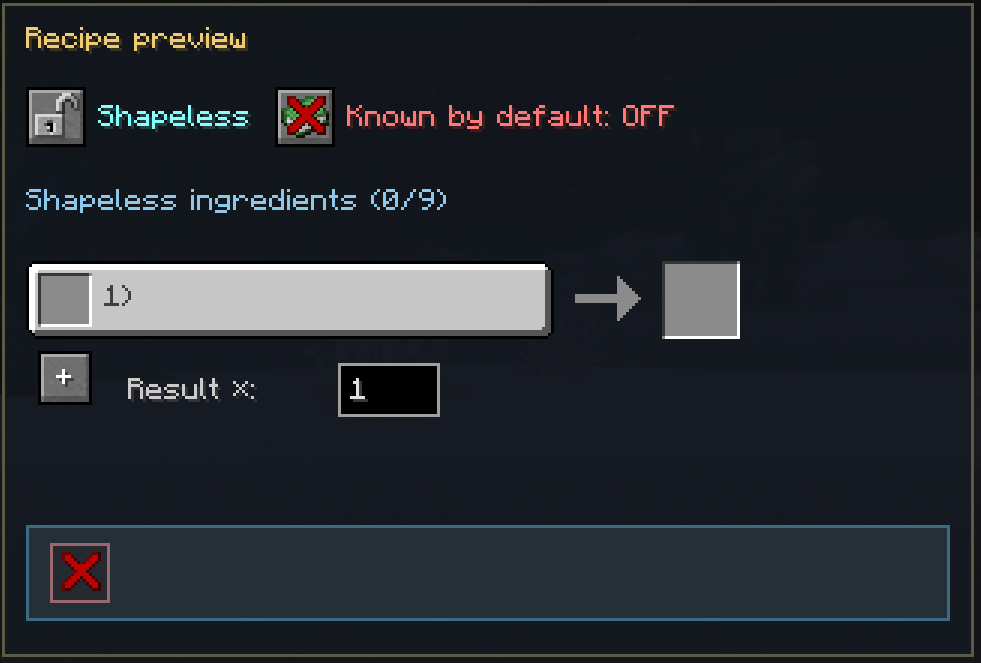 And Shapeless
 -
 Default Recipes
Versions
Files
Relations
Project Relations
More like this
Similar Mods
Suggestions use data such as tags, dependencies, dependents, descriptions, titles, and more to rank how much they overlap with this mod.
On ModDex
Community snapshot
By the numbers
Statistics


Get it on
Available Platforms
On ModDex
Community snapshot
By the numbers