Community listing page, reviews here may not be monitored by the author.
Custom Window Title


No reviews yet
Client-side mod to change window title (including special tokens) and window icon. Supports Forge & Fabric.
Community voices
Reviews
No reviews yet. Be the first to review this project!
Get it on
Available Platforms
Compatibility
Supported Environments
Runs entirely on the client. Works on vanilla servers.
About
Project Details
For authors
Embed Badge
If you're the author of this project, you can embed a live badge anywhere that supports HTML or Markdown. It updates automatically whenever ratings change.
Use HTML for any page that supports it, or Markdown for README files and Markdown-based descriptions.
Identifiers
Platform IDs
About
Description
Installation
The mod supports NeoForge and Fabric (*) mod loaders. Follow either mod loader's installation guide, then download the mod file for your Minecraft version, and install it into the .minecraft/mods folder.
(*) Fabric API is not required.
Configuration
Run the game once to create the configuration file. By default, the window title will be set to Minecraft <version>. Unlike in vanilla 1.15.2 onwards, the title will not change when you enter a world/server.
To change the title or icon, navigate to the .minecraft/config folder, and open customwindowtitle-client.toml in a text editor. You will see the following entries:
title = 'Minecraft {mcversion}'
icon16 = ''
icon32 = ''
Only edit text inside quotes or apostrophes.
Changing the Title
You can use the following special tokens in the title configuration entry:
{mcversion}- current Minecraft version{modversion:mod_id}- version of installed mod with the identifiermod_id{username}- current username
If any of the tokens aren't working, search the game log for CustomWindowTitle and you should see the reason, otherwise please file an issue on the issue tracker with as many details as possible.
Changing the Icon
Minecraft 1.21+
This feature is only available in Custom Window Title 1.4.0 and newer.
Create a square PNG image whose dimensions are a power of two, such as 32x32 or 48x48. Put the PNG file into the .minecraft/config folder, either directly or into a subfolder.
The icon must be saved with transparency even if it doesn't use it, otherwise the icon may be corrupted or not appear at all. In Krita, for example, you must check Store alpha channel (transparency) when saving.
The icon configuration entry points to the PNG file relative to .minecraft/config.
For example, if you placed the icon into .minecraft/config/customwindowtitle/icon.png, then the configuration entry should look like this:
icon = 'customwindowtitle/icon.png'
Minecraft 1.20
This feature is not available in Minecraft 1.20.
Minecraft 1.19 and older
Instead of one icon configuration entry, there are two configuration entries icon16 and icon32 for icons with dimensions 16x16 and 32x32.
Screenshots
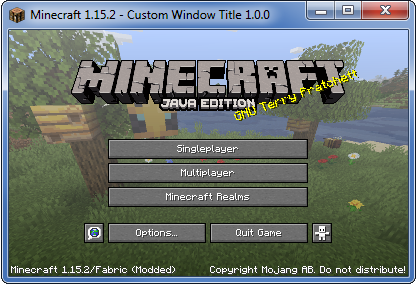
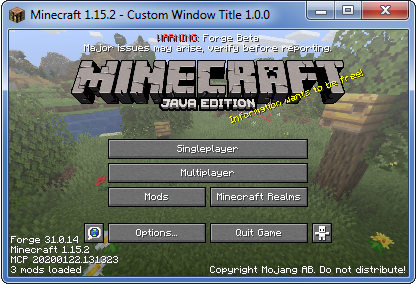
These screenshots were taken using the following example configuration:
title = "Minecraft {mcversion} - Custom Window Title {modversion:customwindowtitle}"
Installation
The mod supports NeoForge and Fabric (*) mod loaders. Follow either mod loader's installation guide, then download the mod file for your Minecraft version, and install it into the .minecraft/mods folder.
(*) Fabric API is not required.
Configuration
Run the game once to create the configuration file. By default, the window title will be set to Minecraft . Unlike in vanilla 1.15.2 onwards, the title will not change when you enter a world/server.
To change the title or icon, navigate to the .minecraft/config folder, and open customwindowtitle-client.toml in a text editor. You will see the following entries:
title = 'Minecraft {mcversion}'
icon16 = ''
icon32 = ''
Only edit text inside quotes or apostrophes.
Changing the Title
You can use the following special tokens in the title configuration entry:
{mcversion}- current Minecraft version{modversion:<mod_id>}- version of installed mod with the identifier<mod_id>{username}- current username
If any of the tokens aren't working, search the game log for CustomWindowTitle and you should see the reason, otherwise please file an issue on the issue tracker with as many details as possible.
Changing the Icon
Minecraft 1.21+
This feature is only available in Custom Window Title 1.4.0 and newer.
Create a square PNG image whose dimensions are a power of two, such as 32x32 or 48x48. Put the PNG file into the .minecraft/config folder, either directly or into a subfolder.
The icon must be saved with transparency even if it doesn't use it, otherwise the icon may be corrupted or not appear at all. In Krita, for example, you must check Store alpha channel (transparency) when saving.
The icon configuration entry points to the PNG file relative to .minecraft/config.
For example, if you placed the icon into .minecraft/config/customwindowtitle/icon.png, then the configuration entry should look like this:
icon = 'customwindowtitle/icon.png'
Minecraft 1.20
This feature is not available in Minecraft 1.20.
Minecraft 1.19 and older
Instead of one icon configuration entry, there are two configuration entries icon16 and icon32 for icons with dimensions 16x16 and 32x32.
Screenshots
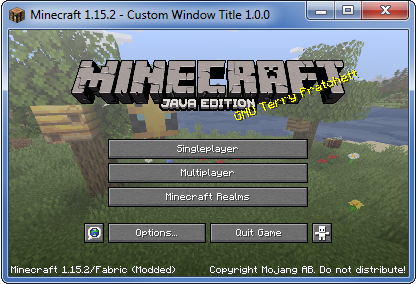
These screenshots were taken using the following example configuration:
title = "Minecraft {mcversion} - Custom Window Title {modversion:customwindowtitle}"
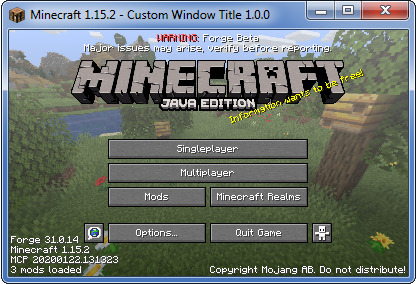
Screenshots
Gallery
-
Example (Forge)
-
Example (Fabric)
-
Example (Fabric)
-
Example (Forge)
Versions
Files
Relations
Project Relations
More like this
Similar Mods
Suggestions use data such as tags, dependencies, dependents, descriptions, titles, and more to rank how much they overlap with this mod.
On ModDex
Community snapshot
By the numbers
Statistics
Want to reach Minecraft players?
We're looking for a server hosting partner to feature here and other parts of the site. Interested? Send us a message!
Get in touchGet it on
Available Platforms
On ModDex
Community snapshot
By the numbers