
Community listing page, reviews here may not be monitored by the author.
Cycle Switcher

No reviews yet
A Minecraft Fabric mod that adds an F3 + F4-like menu for things such as weather, time and difficulty (F5, F6 and F7, respectfully)
Community voices
Reviews
No reviews yet. Be the first to review this project!
Get it on
Available Platforms
About
Project Details
For authors
Embed Badge
If you're the author of this project, you can embed a live badge anywhere that supports HTML or Markdown. It updates automatically whenever ratings change.
Use HTML for any page that supports it, or Markdown for README files and Markdown-based descriptions.
Identifiers
Platform IDs
About
Description
Requires the Fabric API for localisation.
Cycle Switcher - Example
We've all been in that situation: happily building a new project, and then it starts to rain. Now, at this point there are a few options, and quite a large number of people would just type out a command to clear up the weather and be done with it. Others, knowing the effort of typing out the command is not worth it, will simply use Cycle Switcher to clear the weather, by pressing F3 + F5 - getting back to building far quicker than using a command.
So what does it do?
Quite simply put, it adds an F3 + F4-like menu for things such as weather, time and difficulty (F5, F6 and F7, respectfully). This means that, instead of pressing F3 + F4, to get the gamemode switcher you may be familiar with, you can press a combination of F3 + F5, to get a switcher very similar, but for weather instead. Weather modes you can switch between: Clear, rain and thunder. A combination of F3 + F6 will allow you to change between 4 different times of day (day, noon, night and midnight. The times are equivalent to doing "/time set %s", where %s is the mode being selected). Finally, for F3 + F7, you will receive a menu for switching difficulty, just in case you need to change that on the fly.
Images


Footnotes
Credit to Jason for the idea of extending the vanilla menu.
Credit to NotSoAI for the logo.
Screenshots
Gallery
-
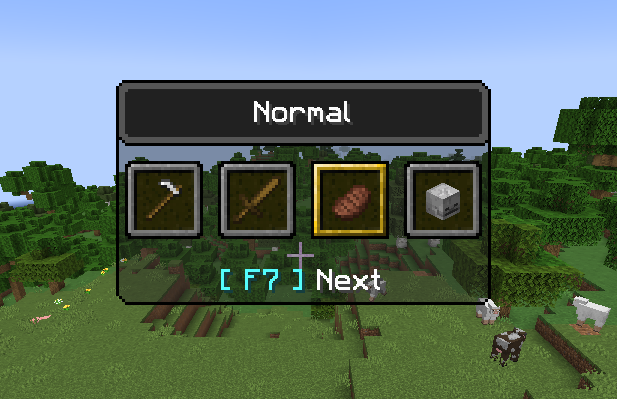 F3 + F7 Menu A simple demonstration of the F3 + F7 menu.
 -
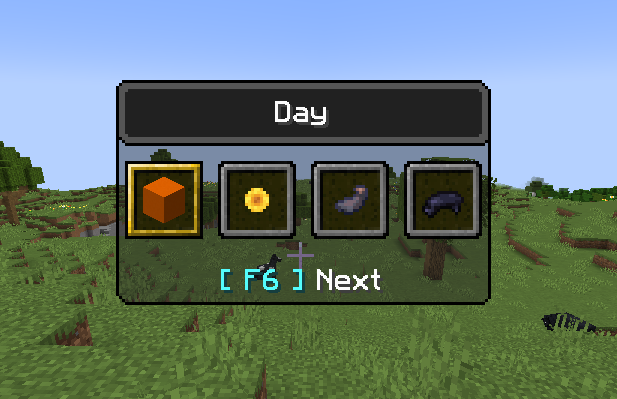 F3 + F6 Menu A simple demonstration of the F3 + F6 menu.
 -
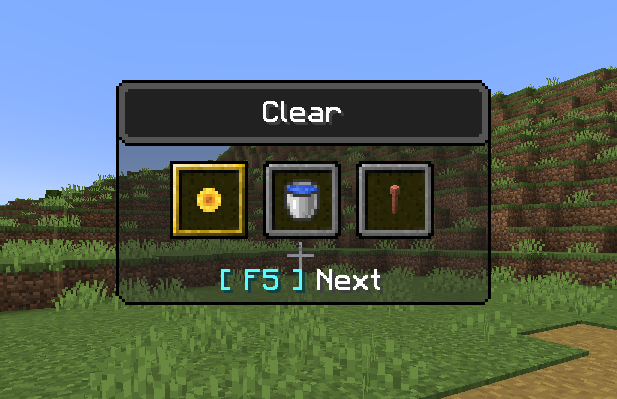 F3 + F5 Menu A simple demonstration of the F3 + F5 menu.
Versions
Files
Relations
Project Relations
More like this
Similar Mods
Suggestions use data such as tags, dependencies, dependents, descriptions, titles, and more to rank how much they overlap with this mod.
On ModDex
Community snapshot
By the numbers
Statistics
Want to reach Minecraft players?
We're looking for a server hosting partner to feature here and other parts of the site. Interested? Send us a message!
Get in touchGet it on
Available Platforms
On ModDex
Community snapshot
By the numbers