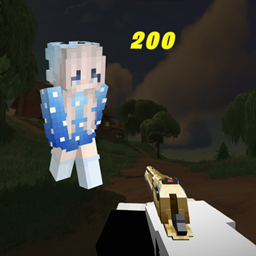
Community listing page, reviews here may not be monitored by the author.
Damage Indicator Plus

No reviews yet
Damage Indicator Plus aims to display animated floating damage numbers above entities as you fight, featuring stack, combine, and hybrid modes with per-hit color scaling and deep customization.

Community voices
Reviews
No reviews yet. Be the first to review this project!
Get it on
Available Platforms
About
Project Details
For authors
Embed Badge
If you're the author of this project, you can embed a live badge anywhere that supports HTML or Markdown. It updates automatically whenever ratings change.
Use HTML for any page that supports it, or Markdown for README files and Markdown-based descriptions.
Identifiers
Platform IDs
Resources
External Links
About
Description
Damage Indicator Plus
Floating damage numbers for Minecraft — like Fortnite's damage tickers, but fully customizable.
Every time you land a hit, the damage pops up above the mob's head in hearts, floats upward, and fades out. Critical hits get a yellow ★ star. You choose how the numbers behave.
How It Looks
When you attack any entity, a damage number (e.g. 3.5 ❤) appears above their head with a punchy pop-in animation, drifts upward, and smoothly fades out. Numbers are rendered in world space — they face your camera, scale with distance, and feel like a natural part of the game. Only you see them. No one else on the server is affected.
Three Display Modes
Stack
Every hit shows its own number. Swing at a zombie five times and you'll see five separate values stacked vertically above it, each floating up independently. Great for confirming every hit with fast weapons.
- Max 8 numbers visible per entity
- Slight horizontal jitter so the stack looks natural
- Oldest numbers fade out at the top while new ones appear at the bottom
Combine
Rapid hits on the same mob merge into a single number that keeps growing — just like Fortnite. Hit for 3, then 4, then 6, and you see one number tick up from 3 → 7 → 13. The number changes color as the total climbs:
- White — low damage
- Yellow — moderate
- Orange — heavy
- Red — massive burst
Each new hit resets the timer and triggers a pop animation so you feel the total climbing. Once you stop attacking, the number floats away and fades.
Both
Runs Stack and Combine simultaneously. Individual hits stack as small numbers, while a larger Σ total sits near the mob's head showing the running combined damage. Maximum information at a glance.
Configuration
Press H in-game to open the settings screen. Everything saves to damage_indicator_plus.json automatically.
General
| Setting | Default | Description |
|---|---|---|
| Display Mode | Stack | Stack, Combine, or Both |
| Text Scale | 1.0× | Size of damage numbers |
| Visibility Duration | 1.5s | How long numbers stay on screen |
| Rise Speed | 1.0× | How fast numbers float upward |
| Show Own Damage | Off | Display numbers for damage you take |
Animations
| Setting | Default | Description |
|---|---|---|
| Pop-In Curve | Bounce | Animation when a number appears (7 presets: Bounce, Elastic, Snap, etc.) |
| Fade-Out Curve | Smooth | Animation when a number disappears |
Combine Mode
| Setting | Default | Description |
|---|---|---|
| Merge Window | 1.0s | Time window for combining rapid hits |
| Pop Effect | On | Scale-bounce when the total updates |
| Color Thresholds | 5 / 15 / 30 | Damage values where color shifts from white → yellow → orange → red |
Font
A dedicated Font Settings sub-screen lets you customize the typeface used for damage numbers.
Features at a Glance
- Floating damage numbers in hearts above any entity you hit
- Three display modes: Stack, Combine, Both
- Critical hit indicator (★ star, rendered in yellow)
- Color-coded damage scaling in Combine mode
- 7 animation curve presets for pop-in and fade-out
- Fully configurable text size, speed, duration, and merge timing
- Custom font support
- Client-side only — no server installation needed
- Persistent config file
Requirements
- Minecraft 1.20.1 or 1.21.1
- Fabric Loader (latest recommended)
- Fabric API (required dependency)
- No server-side installation needed
FAQ
Does the server need this mod installed? No. Damage Indicator Plus is 100% client-side. It reads damage from packets your client already receives. Install it on your client and join any server.
Will other players see my damage numbers? No. The numbers render locally on your screen only.
Does this affect performance? Negligibly. Numbers use lightweight world-space rendering with automatic cleanup. You won't notice a difference even in mob farms.
Does it work with other HUD mods? Yes. Damage Indicator Plus doesn't touch the vanilla HUD — it renders in 3D world space above entities, so it won't conflict with minimap mods, HUD replacers, or overlay mods.
Can I use this with OptiFine / Sodium / Iris? It's built for Fabric, so Sodium and Iris are the natural pairing and work fine. OptiFine is not supported (it's a Forge/standalone thing).
How do I change the keybind for the config screen? The default is H. You can rebind it in Minecraft's Controls menu under the Damage Indicator Plus category.
Planned Features
- Healing numbers (green +N when entities heal)
- Per-entity-type color customization
- Sound effects on hit feedback
- More animation presets
License
All Rights Reserved. Do not redistribute without permission.
Screenshots
Gallery
Versions
Files
Relations
Project Relations
More like this
Similar Mods
Suggestions use data such as tags, dependencies, dependents, descriptions, titles, and more to rank how much they overlap with this mod.
On ModDex
Community snapshot
By the numbers
Statistics
 (opens in a new tab)
Get it on
Available Platforms
On ModDex
Community snapshot
By the numbers
Statistics
Resources