
Community listing page, reviews may not be monitored by the author.
Dark Mode

No reviews yet
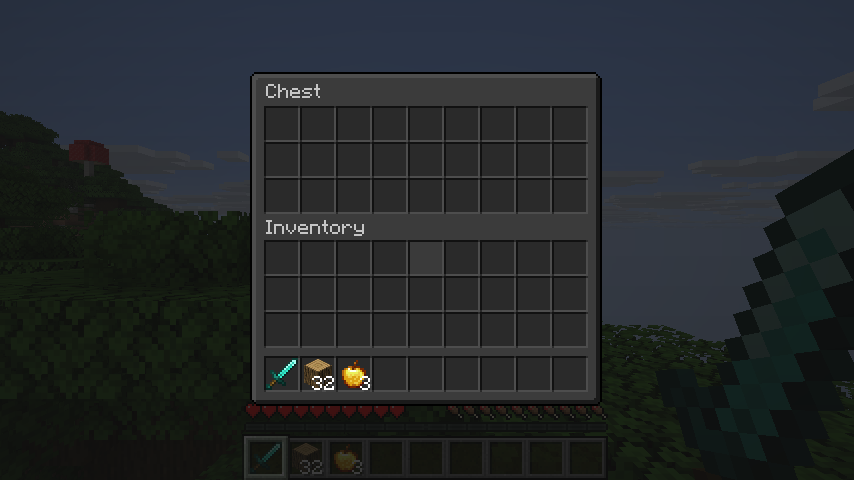
Dark mode for all of Minecraft: dark menus, inventories and the Mojang loading screen, including screens from other mods.

Community voices
Reviews
No reviews yet. Be the first to review this project!
Get it on
Available Platforms
About
Project Details
For authors
Embed Badge
If you're the author of this project, you can embed a live badge anywhere that supports HTML or Markdown. It updates automatically whenever ratings change.
Use HTML for any page that supports it, or Markdown for README files and Markdown-based descriptions.
Identifiers
Platform IDs
Resources
External Links
About
Description
Dark Mode
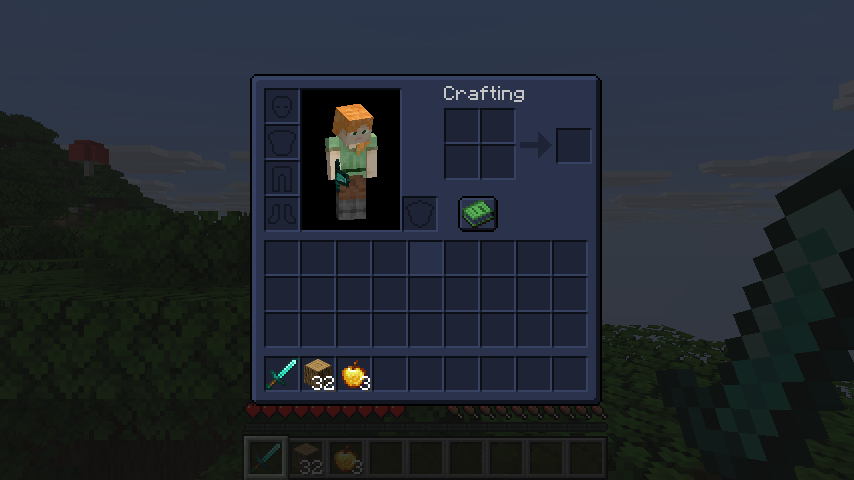
Turn the whole game dark, in one install. Menus, inventories, books, the creative menu and the red Mojang loading screen all go dark.
Screens from other mods go dark too, so you don't need a separate resource pack for each mod.
What you get
- Dark menus, inventories, chests, furnaces, anvils and books
- Dark screens from other mods, with no per-mod setup
- A black Mojang loading screen, or charcoal, midnight or plum
- Items, hearts and logos keep their colors
- Dark text gets brighter so you can still read it
Make it yours
Find the Dark Mode button in the top left of the Options menu.
- Themes: Neutral, Midnight, Forest, Plum and Ember
- Brightness: from nearly black to soft grey
- HUD: darken the hotbar too, if you like
- Mods to leave alone: keep any mod's screens as they are
Good to know
- Client-side: servers don't need it
- Requires Mycel
- Fabric, Forge and NeoForge, Minecraft 26.1 to 26.3
- On Forge and NeoForge, the first loading window is still red the very first time you start. It's black from the next start on.
- If a screen from another mod looks wrong, add that mod under Mods to leave alone
Screenshots
Gallery
Versions
Files
Relations
Project Relations
More like this
Similar Mods
Suggestions use data such as tags, dependencies, dependents, descriptions, titles, and more to rank how much they overlap with this mod.
On ModDex
Community snapshot
By the numbers
Statistics

Get it on
Available Platforms
On ModDex
Community snapshot
By the numbers
Statistics
Resources