
Community listing page, reviews here may not be monitored by the author.
Dark Mode Everywhere


No reviews yet
Have dark GUIs everywhere with the power of shaders
Community voices
Reviews
No reviews yet. Be the first to review this project!
Get it on
Available Platforms
Compatibility
Supported Environments
Runs entirely on the client. Works on vanilla servers.
About
Project Details
For authors
Embed Badge
If you're the author of this project, you can embed a live badge anywhere that supports HTML or Markdown. It updates automatically whenever ratings change.
Use HTML for any page that supports it, or Markdown for README files and Markdown-based descriptions.
Identifiers
Platform IDs
About
Description

 Join my Discord
  Support me on Patreon
  Follow me on twitter
Dark Mode Everywhere uses the built in 1.18 Minecraft shaders to transform any GUI texture into a Dark Mode. Thanks to the shaders it will work in any GUI in the game, it will also try to modify the text color so its not hard to read in dark mode. Please report any visual issues so I can fix it.
The mod currently provides with 3 dark modes to suit your needs that can be easily changed by clicking on the button on the bottom left:

You can have the possibilty if adding new GUI shaders by modifying the "darkmodeeverywhereshaders.json" and using a Resource Loader mod or a Resource Pack.
Shader Blacklist
#A list of strings that will prevent the dark shader to be used.
#Each string consists of the class and the method or any part of it to prevent the use of the dark shader.
#The dump will consist of a bunch of string with this style 'net.minecraftforge.client.gui.overlay.ForgeGui:renderHunger' (class:method), any part of that dump (like just using renderHunger) will prevent the hunger bar from using the dark shader.
METHOD_SHADER_BLACKLIST = ["mezz.jei.common.render.FluidTankRenderer:drawTextureWithMasking", "renderCrosshair", "net.minecraft.client.gui.screens.TitleScreen", "renderSky", "renderHotbar", "setupOverlayRenderState", "net.minecraftforge.client.gui.overlay.ForgeGui", "renderFood", "renderExperienceBar"]
#Enabling this config will dump every 5 seconds which classes & methods were used to render something in the screen and the dark shader was trying to be used
METHOD_SHADER_DUMP = false
undefined
Join my Discord Support me on Patreon Follow me on twitter
Dark Mode Everywhere uses the built in 1.18 Minecraft shaders to transform any GUI texture into a Dark Mode. Thanks to the shaders it will work in any GUI in the game, it will also try to modify the text color is its not hard to read in dark mode. Please report any visual issues so I can fix it.
The mod currently provides with 3 dark modes to suit your needs that can be easily changed by clicking on the button on the bottom left:
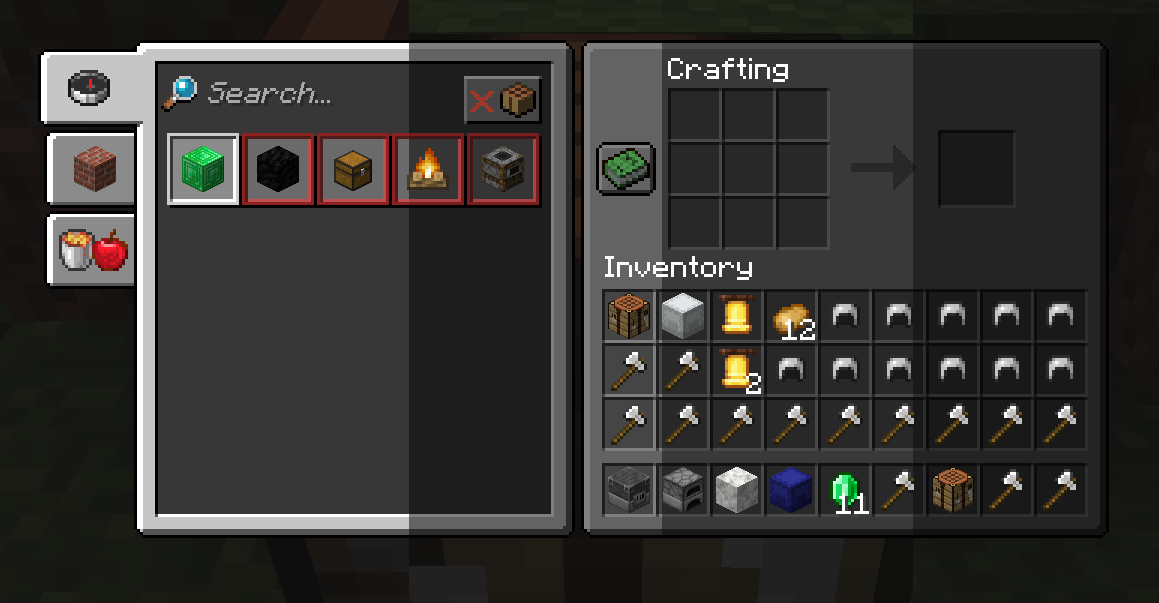
You can have the possibilty if adding new GUI shaders by modifying the "darkmodeeverywhereshaders.json" and using a Resource Loader mod or a Resource Pack.<
Shader Blacklist
# A list of strings that will prevent the dark shader to be used.
# Each string consists of the class and the method or any part of it to prevent the use of the dark shader.
# The dump will consist of a bunch of string with this style:
# 'net.minecraftforge.client.gui.overlay.ForgeGui:renderHunger' (class:method)
# Any part of that dump (like just using renderHunger) will prevent the hunger bar from using the dark shader.
METHOD_SHADER_BLACKLIST = [
    "mezz.jei.common.render.FluidTankRenderer:drawTextureWithMasking",
    "renderCrosshair",
    "net.minecraft.client.gui.screens.TitleScreen",
    "renderSky",
    "renderHotbar",
    "setupOverlayRenderState",
    "net.minecraftforge.client.gui.overlay.ForgeGui",
    "renderFood",
    "renderExperienceBar"
]
# Enabling this config will dump every 5 seconds which classes and methods were used to render something
# in the screen and the dark shader was trying to be used
METHOD_SHADER_DUMP = false
Screenshots
Gallery
-
3 different dark modes
Versions
Files
Relations
Project Relations
More like this
Similar Mods
Suggestions use data such as tags, dependencies, dependents, descriptions, titles, and more to rank how much they overlap with this mod.
On ModDex
Community snapshot
By the numbers
Statistics
Want to reach Minecraft players?
We're looking for a server hosting partner to feature here and other parts of the site. Interested? Send us a message!
Get in touchGet it on
Available Platforms
On ModDex
Community snapshot
By the numbers