Community listing page, reviews here may not be monitored by the author.
Diet (Fabric/Forge/Quilt)


No reviews yet
A customizable food group-based nutrition and diet system.

Community voices
Reviews
No reviews yet. Be the first to review this project!
Get it on
Available Platforms
Compatibility
Supported Environments
Must be installed on both the client and the server.
About
Project Details
For authors
Embed Badge
If you're the author of this project, you can embed a live badge anywhere that supports HTML or Markdown. It updates automatically whenever ratings change.
Use HTML for any page that supports it, or Markdown for README files and Markdown-based descriptions.
Identifiers
Platform IDs
About
Description
Diet is a mod that facilitates the creation and management of dietary food groups in Minecraft. Diet comes with a default configuration that creates five classical food groups (fruits, grains, vegetables, proteins, and sugars). The mod is highly configurable; users and modpack developers can define their own food groups, classifications, and diet effects.
Downloads
Features
Food Groups

Food groups are custom dietary groups that represent the types of food that you have eaten. Each group has a value ranging between 0% and 100% depending on how much of that particular category that a player has eaten. These values increase depending on what types of food a player eats and every group gradually decays when the player uses up their hunger bar.
By default, Diet comes with five classical food groups: Fruits, Grains, Proteins, Vegetables, and Sugars.
Configurable options include:
- Name
- Item Icon
- Hexcode Color
- Ordering
- Default Value
- Gain Multiplier
- Decay Multiplier
Please refer to the wiki linked in the sidebar for more detailed information.
Dietary Effects

Dietary effects are custom rewards or penalties applied to players based on certain, configurable food group values.
Possible effects can include any registered potion effect, vanilla and modded, as well as modifying attributes directly (i.e. increasing maximum health by an arbitrary value). The conditions for these effects are highly configurable, including checking specific values, checking only subsets of groups, applying effects cumulatively for each matching test, and much more.
Please refer to the wiki linked in the sidebar for more detailed information.
Support
Please report all bugs, issues, and feature requests to the issue tracker.
For non-technical support and questions, join the developer's Discord.
License
All source code and assets are licensed under LGPL 3.0.
Donations
Donations to the developer can be sent through Ko-fi.
Affiliates

Five Food Groups - Supported Mods
- Abnormals Delight
- Abundance
- Advent of Ascension (Nevermine)
- akkamaddi's Ashenwheat
- Alex's Mobs
- Animalium
- Aquaculture 2
- Ars Nouveau
- Artifacts
- Atmospheric
- Atum 2: Return to the Sands
- Autumnity
- Bayou Blues
- BetterDefaultBiomes
- Berry Good
- Bettas
- Better Animals Plus
- Better End (Forge)
- Bloom and Gloom
- Blue Skies
- Blueberry
- Buzzier Bees
- Caves and Cliffs Backport
- Caves and Cliffs Mod
- Charcoal Pit
- Combustive Fishing
- Comfortable Nether
- Conjurer's Cookbook
- Cookielicious
- Create
- Create Confectionary
- Create Crafts & Additions
- Creatures and Beasts
- Crock Pot
- Croptopia
- Cyclic
- Delicate and Dainty
- Drop the Meat
- Druidcraft
- Edible Bugs
- Eidolon
- Endergetic Expansion
- Endless Oceans: Adventures
- Enhanced Mushrooms
- Environmental
- EvilCraft
- Exotic Birds
- Extended Caves
- Extra Food Recipes
- Extra Foods
- Fantasy Mounts
- Farmer's Delight
- Fins and Tails
- Fluffy's Farming
- Food Expansion: Reimagined
- ForageCraft
- Forbidden and Arcanus
- Frozen Up
- Fruit Trees
- Fruitful
- Gaia Dimension
- Gilded Ingot
- Ginger's Drinks+
- Glow Bats
- Golden Beetroot Mod
- Good Night's Sleep
- Greek Fantasy
- Ice and Fire: Dragons
- Immersive Cooking
- Improved Berries
- Infernal Expansion
- Inspirations
- Integrated Dynamics
- Kray's Magic Candles
- Meet Your Fight
- Mowzie's Mobs
- Mystical World
- Neapolitan
- Nef's Medieval decoration
- Nether Soups Mod
- Nether's Delight
- Nourished End
- Nourished Nether
- Odd Water Mobs
- Oh The Biomes You'll Go
- Omni
- Pam's HarvestCraft 2: Crops
- Pam's HarvestCraft 2: Food Core
- Pam's HarvestCraft 2: Food Extended
- Pam's HarvestCraft 2: Trees
- Pandoras Creatures
- Peculiars
- Pickle Tweaks
- PneumaticCraft: Repressurized
- Project: Vibrant Journeys
- Pumpkin Spice Everything
- Quark
- Rats
- Resourceful Bees
- Roots Classic
- Seasonals
- Shulkered
- Silent Gear
- Silent's Gems (Experimental)
- Silent's Mechanisms
- Simple Corn
- Simple Delights
- Simple Farming
- Simply Tea
- Supplementaries
- SurvivalPlus
- Tea Kettle
- Terra Incognita
- The Bumblezone
- The Outer End
- The Undergarden
- Tinkers' Construct
- Trick'O Creeps
- Turkish Meals
- Turtlemancy
- Trail Mix
- Twilight Forest
- Unique Crops
- Untitled Duck Mod
- Upgrade Aquatic
- VanillaFoodPantry Mod
- VanillaTweaks
- Vanilla Cookbook
- Water Source
- Wyrmroost
- XercaMod
- …and more!
Please request support by opening an issue on the issue tracker or opening a pull request to contribute directly.
Diet is a mod that facilitates the creation and management of dietary food groups in Minecraft. Diet comes with a default configuration that creates five classical food groups (fruits, grains, vegetables, proteins, and sugars). The mod is highly configurable; users and modpack developers can define their own food groups, classifications, and diet effects.
Features
Food Groups

Food groups are custom dietary groups that represent the types of food that you have eaten. Each group has a value ranging between 0% and 100% depending on how much of that particular category that a player has eaten. These values increase depending on what types of food a player eats and every group gradually decays when the player uses up their hunger bar.
By default, Diet comes with five classical food groups: Fruits, Grains, Proteins, Vegetables, and Sugars.
By editing the diet-groups.toml configuration file in the world save's serverconfig folder, users and modpack developers can create their own custom food groups. Configurable options include:
- Name
- Item Icon
- Hexcode Color
- Ordering
- Default Value
- Gain Multiplier
- Decay Multiplier
Please refer to the wiki for more detailed information.
Dietary Effects

Dietary effects are custom rewards or penalties applied to players based on certain, configurable food group values. These effects can be configured through the diet-effects.toml file in the world save's serverconfig folder.
Possible effects can include any registered potion effect, vanilla and modded, as well as modifying attributes directly (i.e. increasing maximum health by an arbitrary value). The conditions for these effects are highly configurable, including checking specific values, checking only subsets of groups, applying effects cumulatively for each matching test, and much more.
Please refer to the wiki for more detailed information.
Affiliates

Five Food Groups - Supported Mods
- Abnormals Delight
- Abundance
- Advent of Ascension (Nevermine)
- akkamaddi's Ashenwheat
- Alex's Mobs
- Animalium
- Aquaculture 2
- Ars Nouveau
- Artifacts
- Atmospheric
- Atum 2: Return to the Sands
- Autumnity
- Bayou Blues
- BetterDefaultBiomes
- Berry Good
- Bettas
- Better Animals Plus
- Better End (Forge)
- Bloom and Gloom
- Blue Skies
- Blueberry
- Buzzier Bees
- Caves and Cliffs Backport
- Caves and Cliffs Mod
- Charcoal Pit
- Combustive Fishing
- Comfortable Nether
- Conjurer's Cookbook
- Cookielicious
- Create
- Create Confectionary
- Create Crafts & Additions
- Creatures and Beasts
- Crock Pot
- Croptopia
- Cyclic
- Delicate and Dainty
- Drop the Meat
- Druidcraft
- Edible Bugs
- Eidolon
- Endergetic Expansion
- Endless Oceans: Adventures
- Enhanced Mushrooms
- Environmental
- EvilCraft
- Exotic Birds
- Extended Caves
- Extra Food Recipes
- Extra Foods
- Fantasy Mounts
- Farmer's Delight
- Fins and Tails
- Fluffy's Farming
- Food Expansion: Reimagined
- ForageCraft
- Forbidden and Arcanus
- Frozen Up
- Fruit Trees
- Fruitful
- Gaia Dimension
- Gilded Ingot
- Ginger's Drinks+
- Glow Bats
- Golden Beetroot Mod
- Good Night's Sleep
- Greek Fantasy
- Ice and Fire: Dragons
- Immersive Cooking
- Improved Berries
- Infernal Expansion
- Inspirations
- Integrated Dynamics
- Kray's Magic Candles
- Meet Your Fight
- Mowzie's Mobs
- Mystical World
- Neapolitan
- Nef's Medieval decoration
- Nether Soups Mod
- Nether's Delight
- Nourished End
- Nourished Nether
- Odd Water Mobs
- Oh The Biomes You'll Go
- Omni
- Pam's HarvestCraft 2: Crops
- Pam's HarvestCraft 2: Food Core
- Pam's HarvestCraft 2: Food Extended
- Pam's HarvestCraft 2: Trees
- Pandoras Creatures
- Peculiars
- Pickle Tweaks
- PneumaticCraft: Repressurized
- Project: Vibrant Journeys
- Pumpkin Spice Everything
- Quark
- Rats
- Resourceful Bees
- Roots Classic
- Seasonals
- Shulkered
- Silent Gear
- Silent's Gems (Experimental)
- Silent's Mechanisms
- Simple Corn
- Simple Delights
- Simple Farming
- Simply Tea
- Supplementaries
- SurvivalPlus
- Tea Kettle
- Terra Incognita
- The Bumblezone
- The Outer End
- The Undergarden
- Tinkers' Construct
- Trick'O Creeps
- Turkish Meals
- Turtlemancy
- Trail Mix
- Twilight Forest
- Unique Crops
- Untitled Duck Mod
- Upgrade Aquatic
- VanillaFoodPantry Mod
- VanillaTweaks
- Vanilla Cookbook
- Water Source
- Wyrmroost
- XercaMod
- ...and more!
Please request support by opening an issue on the issue tracker or opening a pull request to contribute directly.
Screenshots
Gallery
-
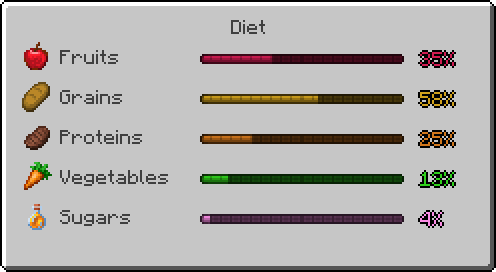 Diet GUI
Versions
Files
Relations
Project Relations
More like this
Similar Mods
Suggestions use data such as tags, dependencies, dependents, descriptions, titles, and more to rank how much they overlap with this mod.
- Ars Nouveau's Flavors & Delight
- The Irregular Chef! (A Farmer's Delight Add-on)
- Fruits Delight
- Copper Pot! (A Farmer's Delight Add-on)
- Gensokyo Delight ~ Youkai's Homecoming
- Hostile Mobs and Girls (HMaG)
- Gensokyo Delight ~ Youkais' Feasts
- Gensokyo Delight ~ Youkais' Feasts
- Mindful Eating
- Mindful Eating Unofficial Port
- Mindful Eating - Fabric
- Bulking
On ModDex
Community snapshot
By the numbers
Statistics
 (opens in a new tab)
Get it on
Available Platforms
On ModDex
Community snapshot
By the numbers