
Community listing page, reviews here may not be monitored by the author.
Dimension Access Manager


No reviews yet
Manager for the access to dimensions.
Community voices
Reviews
No reviews yet. Be the first to review this project!
Get it on
Available Platforms
Compatibility
Supported Environments
Must be installed on both the client and the server.
About
Project Details
For authors
Embed Badge
If you're the author of this project, you can embed a live badge anywhere that supports HTML or Markdown. It updates automatically whenever ratings change.
Use HTML for any page that supports it, or Markdown for README files and Markdown-based descriptions.
Identifiers
Platform IDs
About
Description
Version 4.X.X
For older versions of the mod, check the wiki.
This Mod adds, that access to dimensions can be granted or locked.
If a dimension is locked, you can stand in the portal to this dimension, but don't change to this dimension.
If a dimension is granted, you can stand in the portal to this dimension and change to this dimension.
Since Minecraft 1.19.1 the Mod is needed on the server and client side.
For 1.19 and before, the Mod is only needed on the server side, but can also be used on the client side.
You need a server to play with friends? You don't know how to set up one? Just rent an already configured server!

Click on the picture above, select a plan (with recommended at least 6 GB),
use my code agent to get 25% off your first month and enjoy playing with your friends!
Support
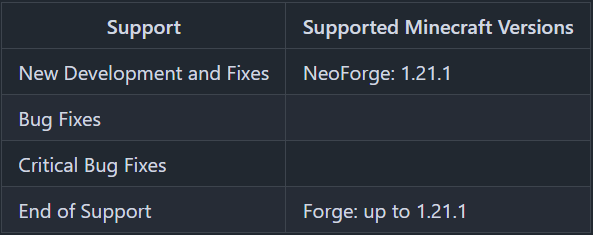
Minecraft versions, for which the mod is not released, are not supported.
You can find a text version here.
Granting / Locking
There is a general flag, a whitelist and a blacklist, to manage which players have access to a dimension.
Flag
For every dimension can be set, if the dimension access is granted or locked.
If a player is not on the white- or blacklist for the dimension, this flag is used to define, if the player can teleport to the dimension or not.
For non player entities, this flag is used to define, if they can teleport to the dimension or not.
Whitelist
The whitelist is only active, if the dimension access is locked.
Players on the whitelist, can teleport to the dimension, even if the dimension access is locked.
If the dimension access is locked and the whitelist is active, only players and no other entities can teleport to the dimension.
Blacklist
The blacklist is only active, if the dimension access is granted.
Players on the blacklist, cannot teleport to the dimension, even if the dimension access is granted.
Server Config
The config file can be found in the "serverconfig" folder in the "world" folder and is named "dimension_access_manager-server.toml". The name of the world folder is set for servers in the "server.properties" file and for clients it is the name of the world/save game in the world list, and it can be found in the "saves" folder in the ".minecraft" folder.
- default_dimension_access_type
Defines if new dimensions are GRANTED or LOCKED by default
Default = "GRANTED"
The access type for a dimension is set, if the dimension is generated for the first time.
I.E: This value should set before pre-generating the dimensions. - dimension_command_permission_level
Defines which permission level is required to run the /dimension command
Default = 3
Available values = 0, 1, 2, 3, 4
By default, only operators, that can change the whitelist, can change the dimension permissions.
If the commands shall be executed by a command block of i.e. HQM the permission level has to be 2 or less.
More details about minecraft permission levels, you can find here: https://minecraft.fandom.com/wiki/Permission_level
Commands
- /dimensions status
Shows the status of all dimension, if they are granted or locked. - /dimensions default defaultDimensionAccessType
Shows the value of the config option "default_dimension_access_type". - /dimensions default defaultDimensionAccessType <dimensionAccessType\>
Sets the value of the config option "default_dimension_access_type".
dimensionAccessType values: GRANTED or LOCKED - /dimension <dimension\> access status
Shows the status of the selected dimension, if it is granted or locked. - /dimension <dimension\> access grant
Grants the selected Dimension. - /dimension <dimension\> access lock
Locks the selected dimension. - /dimension <dimension\> players list
Shows players on the whitelist and the blacklist of the selected dimension. - /dimension <dimension\> players whitelist list
Shows players on the whitelist of the selected dimension. - /dimension <dimension\> players whitelist add <targets\>
Adds players (<targets\>) to the whitelist of the selected dimension. - /dimension <dimension\> players whitelist remove <targets\>
Removes players (<targets\>) from the whitelist of the selected dimension. - /dimension <dimension\> players blacklist list
Shows players on the blacklist of the selected dimension. - /dimension <dimension\> players blacklist add <targets\>
Adds players (<targets\>) to the blacklist of the selected dimension. - /dimension <dimension\> players blacklist remove <targets\>
Removes players (<targets\>) from the blacklist of the selected dimension.
Thanks for the logo to Muse31.
You can use this mod in non-commercial modpacks without asking.
You can find more mods from me on CurseForge and Modrinth.

Version 4.X.X
For older versions of the mod, check the wiki.
This Mod adds, that access to dimensions can be granted or locked.
If a dimension is locked, you can stand in the portal to this dimension, but don't change to this dimension.
If a dimension is granted, you can stand in the portal to this dimension and change to this dimension.
Since Minecraft 1.19.1 the Mod is needed on the server and client side.
For 1.19 and before, the Mod is only needed on the server side, but can also be used on the client side.
You need a server to play with friends? You don't know how to set up one? Just rent an already configured server!
Click on the picture above, select a plan (with recommended at least 6 GB),
use my code agent to get 25% off your first month and enjoy playing with your friends!
Support
Minecraft versions, for which the mod is not released, are not supported.
You can find a text version here.
Granting / Locking
There is a general flag, a whitelist and a blacklist, to manage which players have access to a dimension.
Flag
For every dimension can be set, if the dimension access is granted or locked.
If a player is not on the white- or blacklist for the dimension, this flag is used to define, if the player can teleport to the dimension or not.
For non player entities, this flag is used to define, if they can teleport to the dimension or not.
Whitelist
The whitelist is only active, if the dimension access is locked.
Players on the whitelist, can teleport to the dimension, even if the dimension access is locked.
If the dimension access is locked and the whitelist is active, only players and no other entities can teleport to the dimension.
Blacklist
The blacklist is only active, if the dimension access is granted.
Players on the blacklist, cannot teleport to the dimension, even if the dimension access is granted.
Server Config
The config file can be found in the "serverconfig" folder in the "world" folder and is named "dimension_access_manager-server.toml". The name of the world folder is set for servers in the "server.properties" file and for clients it is the name of the world/save game in the world list, and it can be found in the "saves" folder in the ".minecraft" folder.
- default_dimension_access_type
Defines if new dimensions are GRANTED or LOCKED by default
Default = "GRANTED"
The access type for a dimension is set, if the dimension is generated for the first time.
I.E: This value should set before pre-generating the dimensions. - dimension_command_permission_level
Defines which permission level is required to run the /dimension command
Default = 3
Available values = 0, 1, 2, 3, 4
By default, only operators, that can change the whitelist, can change the dimension permissions.
If the commands shall be executed by a command block of i.e. HQM the permission level has to be 2 or less.
More details about minecraft permission levels, you can find here: https://minecraft.fandom.com/wiki/Permission_level
Commands
- /dimensions status
Shows the status of all dimension, if they are granted or locked. - /dimensions default defaultDimensionAccessType
Shows the value of the config option "default_dimension_access_type". - /dimensions default defaultDimensionAccessType <dimensionAccessType>
Sets the value of the config option "default_dimension_access_type".
dimensionAccessType values: GRANTED or LOCKED - /dimension <dimension> access status
Shows the status of the selected dimension, if it is granted or locked. - /dimension <dimension> access grant
Grants the selected Dimension. - /dimension <dimension> access lock
Locks the selected dimension. - /dimension <dimension> players list
Shows players on the whitelist and the blacklist of the selected dimension. - /dimension <dimension> players whitelist list
Shows players on the whitelist of the selected dimension. - /dimension <dimension> players whitelist add <targets>
Adds players (<targets>) to the whitelist of the selected dimension. - /dimension <dimension> players whitelist remove <targets>
Removes players (<targets>) from the whitelist of the selected dimension. - /dimension <dimension> players blacklist list
Shows players on the blacklist of the selected dimension. - /dimension <dimension> players blacklist add <targets>
Adds players (<targets>) to the blacklist of the selected dimension. - /dimension <dimension> players blacklist remove <targets>
Removes players (<targets>) from the blacklist of the selected dimension.
Thanks for the logo to Muse31.
You can use this mod in non-commercial modpacks without asking.
You can find more mods from me on CurseForge and Modrinth.
Screenshots
Gallery
Versions
Files
Relations
Project Relations
More like this
Similar Mods
Suggestions use data such as tags, dependencies, dependents, descriptions, titles, and more to rank how much they overlap with this mod.
On ModDex
Community snapshot
By the numbers
Statistics
Want to reach Minecraft players?
We're looking for a server hosting partner to feature here and other parts of the site. Interested? Send us a message!
Get in touchGet it on
Available Platforms
On ModDex
Community snapshot
By the numbers