
Community listing page, reviews here may not be monitored by the author.
Dimension Notifier

No reviews yet
Server-side dimension change notifications with action bar coordinates, chat broadcasts, and live Tab list labels.
Community voices
Reviews
No reviews yet. Be the first to review this project!
Get it on
Available Platforms
Compatibility
Supported Environments
Required on the server. Installing it on the client adds functionality.
About
Project Details
For authors
Embed Badge
If you're the author of this project, you can embed a live badge anywhere that supports HTML or Markdown. It updates automatically whenever ratings change.
Use HTML for any page that supports it, or Markdown for README files and Markdown-based descriptions.
Identifiers
Platform IDs
Resources
External Links
About
Description
Dimension Notifier





Dimension Notifier adds server-side dimension change notifications, coordinates, chat broadcasts, and live Tab list labels without requiring client installs.
- See every dimension change — a short action bar cue the moment a player enters the Nether, the End, or the Overworld.
- Broadcast travel to the server — an optional chat message when anyone changes dimension.
- Read the room from the Tab list — live dimension labels next to player names.
- Server-first — the core features run on the server; players do not need to install anything.
- Yours to tune — optional client settings and live Mod Menu controls.
Features
See where you arrive, instantly
A short action bar message confirms where you arrived without filling chat. Hide coordinates for a cleaner line, or show them when your group wants exact arrival points. Compact labels such as OVR, NET, and END keep alerts tight.



Tell the server who is on the move
Broadcast a compact chat message when a player enters another dimension — useful for survival groups, events, and operator visibility when players spread across worlds. Switch to short labels for less noise, and choose whether the traveling player sees it too.



A Tab list that shows where everyone is
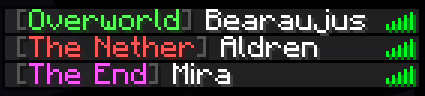
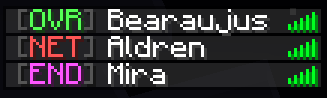
Dimension labels make the vanilla Tab list easy to scan. Use full labels when clarity matters most, compact badges for a tighter column, and aligned names for a tidy layout.
Settings when you want them
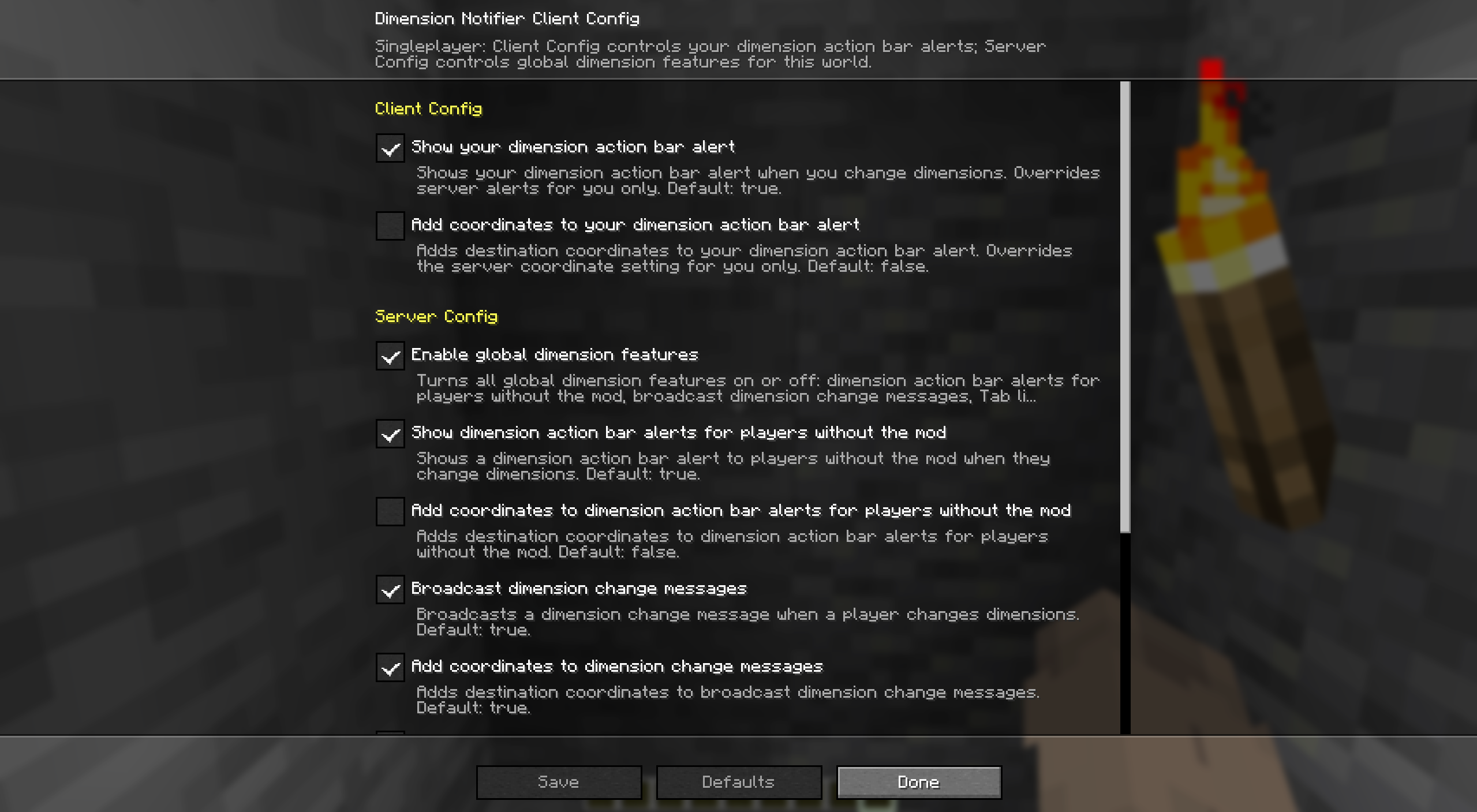
With Mod Menu, leave your action bar inheriting Server Config by default, or turn inheritance off while keeping your local values saved for later. In singleplayer, or on a server where you have operator permission, Server Config also exposes the global dimension features.
Quickstart
- Install Fabric Loader and Fabric API on your server.
- Drop Dimension Notifier into the server's
mods/folder and start it. Every player now sees dimension cues, broadcasts, and Tab list labels — no client install required. - Want personal action bar control or live settings? Add the mod (and Mod Menu) on your client.
- Change anything later in Mod Menu — Server Config needs operator permission — or in the config file below.
Compatibility
Dimension Notifier is server-first. Here is where each piece runs and what it needs.
- Dedicated server (required): broadcast dimension-change messages, action bar alerts for players without the mod, and Tab list labels.
- Client (optional): personal action bar alerts, Client Config, Mod Menu settings, and singleplayer.
- Required dependency: Fabric API, wherever the mod is installed.
- Optional dependency: Mod Menu on clients for Client Config and permission-gated Server Config.
| Feature | Singleplayer | Multiplayer with server mod | Client-only install |
|---|---|---|---|
| Dimension change messages | This world | Everyone sees the broadcast | Not available |
| Dimension action bar alerts | Client and Server Config | Your client, or server settings for players without the mod | Client Config only |
| Tab list dimension labels | This world | Server-controlled labels for everyone | Not available |
| Mod Menu settings | Client and Server Config | Client on this computer; Server Config with operator permission | Client Config only |
Make it yours
Dimension Notifier keeps client settings separate from server settings.
- Client settings control your dimension-change action bar on this computer after you turn inheritance off.
- Client Config can inherit overlapping Server Config values without overwriting your saved local values.
- Server settings control the action bar for players without the mod, broadcast messages, and Tab list labels.
- Each scope has its own master toggle, so either side can stay on or off.
- In singleplayer, Server Config edits the server settings in the local file. On remote servers, Server Config is editable only with operator permission.
Config file
After first launch, edit config/dimension-notifier.json. File edits need a game or server restart; Mod Menu changes apply immediately where editable.
Show the default dimension-notifier.json
{
  "schema_version": 1,
  "server": {
    "enabled": true,
    "action_bar": {
      "on_dimension_change": {
        "enabled": true,
        "include_dimension": true,
        "include_coordinates": false,
        "use_short_labels": false
      }
    },
    "broadcasts": {
      "on_dimension_change": {
        "enabled": true,
        "include_coordinates": false,
        "use_short_labels": false,
        "send_to_triggering_player": false
      }
    },
    "tab_list": {
      "dimension_labels": {
        "enabled": true,
        "use_short_labels": false,
        "add_space_before": false,
        "add_space_after": true
      }
    }
  },
  "client": {
    "enabled": true,
    "inherit_server_settings": true,
    "action_bar": {
      "on_dimension_change": {
        "enabled": true,
        "include_dimension": true,
        "include_coordinates": false,
        "use_short_labels": false
      }
    }
  }
}
More from bearaujus
Browse every Bearaujus mod, current version, and install link at modrinth.bearaujus.com.
More server-first Fabric mods in the same family:
- Death Respawn Notifier — Server-side death coordinates, respawn notifications, personal death-screen details, and live Tab list dead markers.
- Improved Sleep — Multiplayer sleep percentage or fixed-player thresholds, daytime and storm rules, wake times, and sleeper rewards.
- Sleep Wake-Up Notifier — Live multiplayer sleep progress, wake-up notifications, custom bed messages, and morning broadcasts with Improved Sleep integration.
Support & license
Report issues at issues.
Dimension Notifier is distributed under the Bearaujus Proprietary License v1.0. Full terms ship inside the downloaded jar as LICENSE.txt.
Dimension Notifier is not official Minecraft content and is not endorsed by or associated with Mojang or Microsoft.
Screenshots
Gallery
-
Dimension Notifier overview
-
Action bar alert in the Overworld
-
Action bar alert in The End
-
Action bar alert in The Nether
-
Dimension change message for the Overworld
-
Dimension change message for The End
-
Dimension change message for The Nether
-
Tab list with full dimension labels
-
Tab list with compact dimension labels
-
Dimension Notifier Mod Menu settings
Versions
Files
Relations
Project Relations
More like this
Similar Mods
Suggestions use data such as tags, dependencies, dependents, descriptions, titles, and more to rank how much they overlap with this mod.
On ModDex
Community snapshot
By the numbers
Statistics

Want to reach Minecraft players?
We're looking for a server hosting partner to feature here and other parts of the site. Interested? Send us a message!
Get in touchGet it on
Available Platforms
On ModDex
Community snapshot
By the numbers
Statistics
Resources