
Community listing page, reviews here may not be monitored by the author.
Durability HUD | Tools & Armor

No reviews yet
See the remaining durability of your held item, armor, and off-hand gear in a compact on-screen panel.

Community voices
Reviews
No reviews yet. Be the first to review this project!
Get it on
Available Platforms
About
Project Details
For authors
Embed Badge
If you're the author of this project, you can embed a live badge anywhere that supports HTML or Markdown. It updates automatically whenever ratings change.
Use HTML for any page that supports it, or Markdown for README files and Markdown-based descriptions.
Identifiers
Platform IDs
Resources
External Links
About
Description
Durability HUD | Tools & Armor
Durability HUD keeps the condition of your equipped gear visible without opening the inventory.
Features
- Shows remaining durability as a percentage in a compact two-column layout
- Keeps every equipment slot in a stable position as items are changed
- Tracks the main-hand item, helmet, chestplate, leggings, boots, and off-hand item
- Uses each item's real icon and vanilla durability bar
- Displays healthy durability in green, worn durability in yellow, and critical durability in red
- Updates immediately as equipment changes or takes damage
- Hides slots that do not contain a damageable item
- Supports compatible modded items that use standard durability
- Can be toggled with H by default and remembers the setting
- Dedicated Fabric and NeoForge builds
How to use
Equip a damageable item in your main hand or off hand, or wear damageable armor. The panel appears automatically and shows the remaining durability of each item as a percentage. Empty and non-damageable slots stay blank. Press H to hide or show the panel; you can change this key in Minecraft's Controls menu. Your choice is saved between sessions.
Installation
Install matching Durability HUD and Zero Lib builds on the client. Installing both on a server is safe but not required for the HUD. Architectury API is also required; Fabric installations additionally require Fabric API.
Requirements
- Minecraft Java Edition 26.2
- Java 25 or newer
- Zero Lib 1.0.3 or newer
- Architectury API
- Fabric API on Fabric
Screenshots
Gallery
-
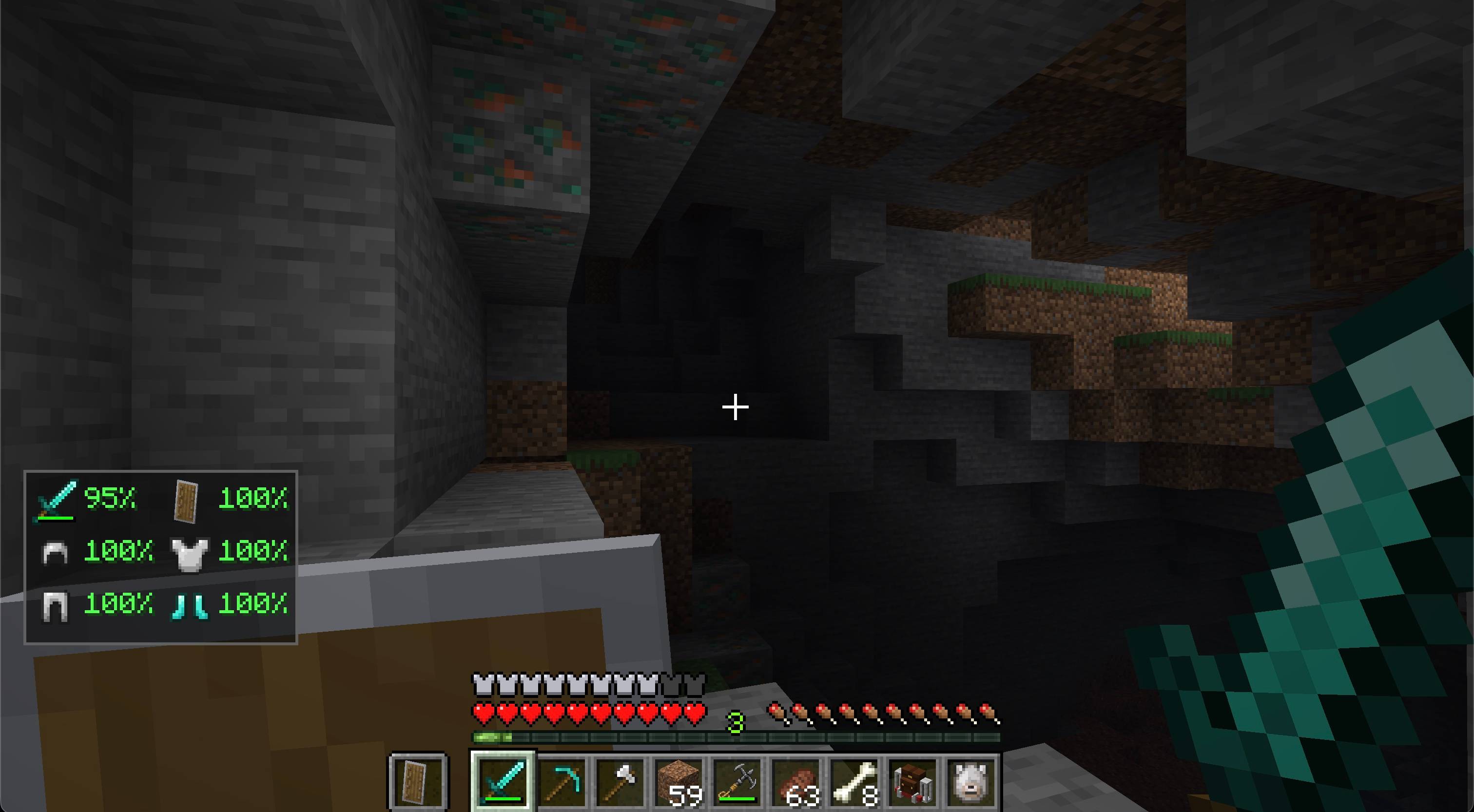 Screen 1
Versions
Files
Relations
Project Relations
More like this
Similar Mods
Suggestions use data such as tags, dependencies, dependents, descriptions, titles, and more to rank how much they overlap with this mod.
- Dynamite | ZT
- Gravestone | Death Grave & Loot Protection
- Zero Accessories
- Grappling Hook | Movement & Exploration
- Combat Indicators | Health Bars & Damage Numbers
- Pet Status | Remote Pet Tracker
- Auto Hotbar Refill | Inventory Quality of Life
- Compact Villagers
- Durability Hud
- Durability HUD
- Durability HUD
- Armor Durability HUD
On ModDex
Community snapshot
By the numbers
Statistics
 (opens in a new tab)
Get it on
Available Platforms
On ModDex
Community snapshot
By the numbers
Statistics
Resources